AI Photo Calendar: 12 Pages with the Right Dates, in One Batch
Make an AI photo calendar for 2027: one prompt per month, correct dates drawn into every grid, and a blank template page that keeps all 12 pages matching.
On this page
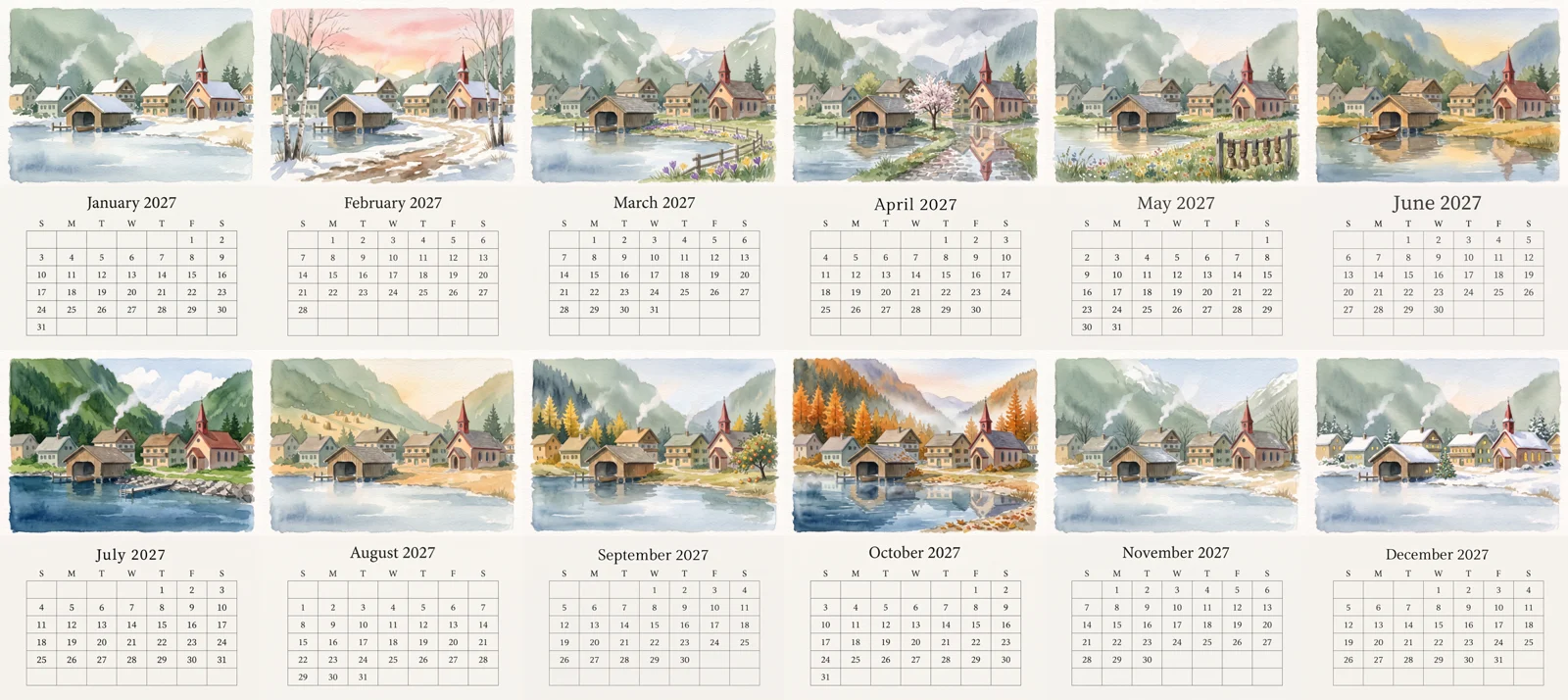
An AI photo calendar usually ends up as twelve nice pictures and an evening spent dragging them into a calendar template. We wanted to know whether the AI could draw the whole page instead: the picture, the month title and the date grid, with every date on the right weekday. So we made a 2027 wall calendar — a watercolor alpine village through the seasons — and checked all 365 dates by hand.
Short answer: yes, if you write the dates into the prompt and use the right kind of reference image. Written into the prompt, the dates came out right on every page we generated without a reference. The trouble started when we used a finished January page as the template: six of eleven months came back with repeated or missing dates. This guide shows the setup that fixed it, the full prompt list for 2027, and what to check before you print.
Generate in bulk
One prompt per line, hundreds of images, one ZIP to download.
Step 1: Write the dates into the prompt, row by row#
If you ask for "a calendar grid for April 2027", the model has to know which weekday April starts on, and it guesses. So don't make it count. Spell out the grid the way you would read it off a printed calendar: how many rows, and which number goes in each cell, with "blank" for the empty ones.
The grid has exactly 5 rows, filled left to right: row 1: blank blank blank blank 1 2 3; row 2: 4 5 6 7 8 9 10; row 3: 11 12 13 14 15 16 17; row 4: 18 19 20 21 22 23 24; row 5: 25 26 27 28 29 30 blank. Every date appears exactly once, no other numbers or text.That one sentence is the whole trick. In our first test we asked for four months this way, January to April, with no reference image. All four grids were right: January started on Friday with the 31st alone in a sixth row, February ran from Monday the 1st to Sunday the 28th, April ended on Friday the 30th. No skipped numbers, no doubles, and the month names were spelled correctly.
Tip
You don't have to work out the rows yourself. The prompt list in Step 4 already has every month of 2027, with weeks starting on Sunday. For a Monday start, ask ChatGPT or Claude to rewrite the rows and change the header to M T W T F S S.
Step 2: Make January the page everything else copies#
Generate one page first and get it right before you make eleven more. Here is the January prompt we used. It sets the style (watercolor, a fixed palette, one invented village), the layout (picture on top, grid below) and the dates:
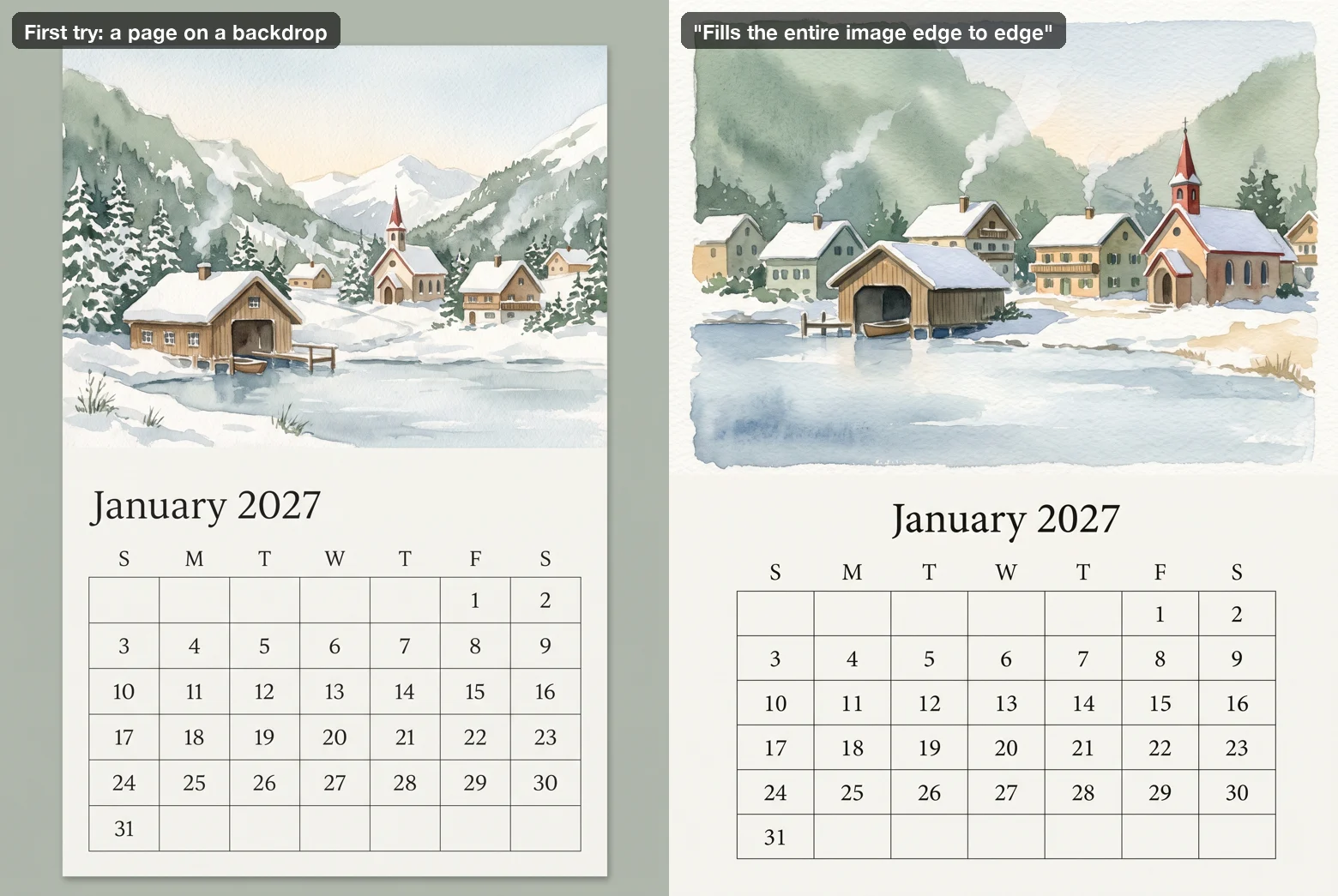
Vertical wall calendar page for January 2027. The calendar page fills the entire image edge to edge: no table, wall or background around it, no border, no drop shadow, not a mockup, not a photograph. Top 60%: Watercolor illustration on textured cold-press paper, soft muted palette of sage green, dusty blue and warm ochre, loose brushwork with visible paper grain, gentle natural light, a small imaginary alpine lake village with a wooden boathouse and a red-roofed chapel, no people in the foreground. Scene: deep winter: snow on the roofs, frozen lake edge, smoke from chimneys, pale morning sky. The painting has a soft deckled watercolor edge. Bottom 40%: plain off-white paper with the title "January 2027" centered in a simple elegant serif, and below it a centered date grid with thin dark grey lines, fully closed on all four sides, 7 columns headed S M T W T F S (Sunday first). The grid has exactly 6 rows, filled left to right: row 1: blank blank blank blank blank 1 2; row 2: 3 4 5 6 7 8 9; row 3: 10 11 12 13 14 15 16; row 4: 17 18 19 20 21 22 23; row 5: 24 25 26 27 28 29 30; row 6: 31 blank blank blank blank blank blank. Every date appears exactly once, no other numbers or text.We ran it on Nano Banana Pro at 2K, aspect ratio 3:4, which gives a 1792 × 2400 pixel page.
Notice the second sentence. Our first attempt didn't have it, and all eight test pages came back as a sheet of paper lying on a grey-green backdrop with a drop shadow — a picture of a calendar, not a calendar. "Not a photograph" in the prompt didn't stop it. Saying where the page ends did: "fills the entire image edge to edge: no table, wall or background around it, no border, no drop shadow." The next January filled the frame.
Step 3: Turn January into a blank template#
This is the step we learned the hard way.
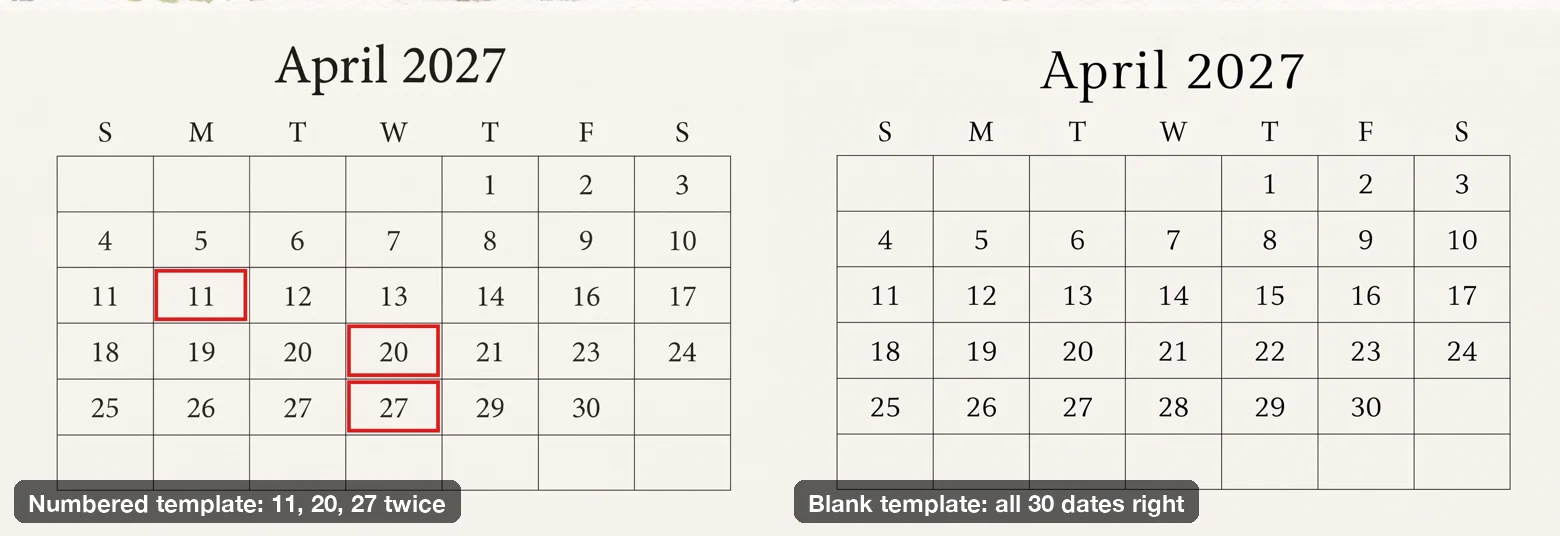
To keep all twelve pages matching, we used the finished January page as a reference image for the other eleven months, and told the model to keep the layout and change only the scene, the title and the dates. The layout matched perfectly. The dates didn't. Six of the eleven pages came back wrong:
| Month | What went wrong |
|---|---|
| April | 11, 20 and 27 appear twice; 15, 22 and 28 are missing |
| May | 7 and 14 twice; 5 and 13 missing |
| June | An extra 27 in a sixth row |
| July | 12 twice; 15 missing |
| September | 20 twice; 21 missing |
| December | 20 twice; 22 missing |
The prompts listed the right rows. What changed was the reference image: it already had a full set of January numbers in the same cells, and the model mixed the two up.
So we took the numbers out of the template. One edit, with January as the reference image:
Edit this calendar page: remove every number from the date grid and remove the month title, leaving those areas as plain empty paper. Keep the weekday letters S M T W T F S, keep the grid lines exactly as they are with 6 rows, and keep the watercolor painting, paper color and layout exactly the same. The page still fills the entire image edge to edge.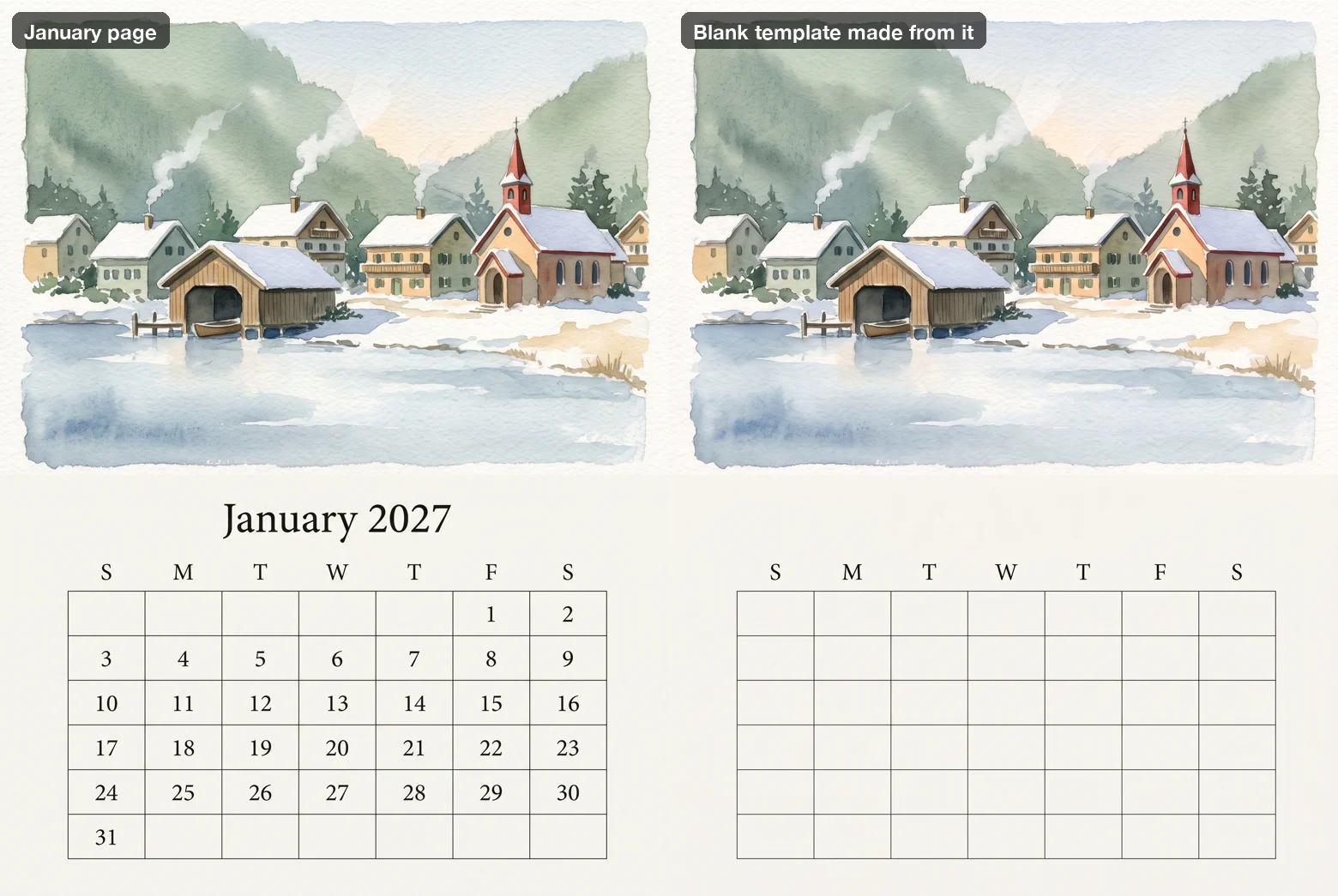
Then we ran the six broken months again with the blank template as the reference. All six came back with every date right.
There was one side effect. With no title in the template, the title style drifted: May came back in spaced capitals, June in a pale brown. Describing the title in the prompt — Title Case, the same dark ink as the dates, a large heading centered above the grid — fixed both on the next run. That sentence is already in the list below.
Step 4: Generate February to December in one batch#
Here is the full list, one month per line. Every line begins with the template instruction and ends with that month's rows, Sunday first:
The reference image is a blank page template with an empty date grid. Keep exactly the same page layout, grid size and line weight, the same watercolor style and the same village. Repaint the scene as described, add the month title in the empty space above the grid, and write the dates into the empty grid cells exactly as listed below; leave unused cells empty. Vertical wall calendar page for February 2027. The calendar page fills the entire image edge to edge: no table, wall or background around it, no border, no drop shadow, not a mockup, not a photograph. Top 60%: Watercolor illustration on textured cold-press paper, soft muted palette of sage green, dusty blue and warm ochre, loose brushwork with visible paper grain, gentle natural light, a small imaginary alpine lake village with a wooden boathouse and a red-roofed chapel, no people in the foreground. Scene: late winter: snow melting into slush on the path, bare birch trees, a low pink sunset. The painting has a soft deckled watercolor edge. Bottom 40%: plain off-white paper with the title "February 2027" centered in a simple elegant serif, and below it a centered date grid with thin dark grey lines, fully closed on all four sides, 7 columns headed S M T W T F S (Sunday first). The grid has exactly 5 rows, filled left to right: row 1: blank 1 2 3 4 5 6; row 2: 7 8 9 10 11 12 13; row 3: 14 15 16 17 18 19 20; row 4: 21 22 23 24 25 26 27; row 5: 28 blank blank blank blank blank blank. The month title is written in Title Case (only the first letter capitalized, e.g. "February 2027"), in a simple elegant serif, in the same dark charcoal ink as the dates, at the size of a large heading centered above the grid. Every date appears exactly once, no other numbers or text.
The reference image is a blank page template with an empty date grid. Keep exactly the same page layout, grid size and line weight, the same watercolor style and the same village. Repaint the scene as described, add the month title in the empty space above the grid, and write the dates into the empty grid cells exactly as listed below; leave unused cells empty. Vertical wall calendar page for March 2027. The calendar page fills the entire image edge to edge: no table, wall or background around it, no border, no drop shadow, not a mockup, not a photograph. Top 60%: Watercolor illustration on textured cold-press paper, soft muted palette of sage green, dusty blue and warm ochre, loose brushwork with visible paper grain, gentle natural light, a small imaginary alpine lake village with a wooden boathouse and a red-roofed chapel, no people in the foreground. Scene: early spring: first green on the meadow, patches of snow on the far peaks, crocuses by the fence. The painting has a soft deckled watercolor edge. Bottom 40%: plain off-white paper with the title "March 2027" centered in a simple elegant serif, and below it a centered date grid with thin dark grey lines, fully closed on all four sides, 7 columns headed S M T W T F S (Sunday first). The grid has exactly 5 rows, filled left to right: row 1: blank 1 2 3 4 5 6; row 2: 7 8 9 10 11 12 13; row 3: 14 15 16 17 18 19 20; row 4: 21 22 23 24 25 26 27; row 5: 28 29 30 31 blank blank blank. The month title is written in Title Case (only the first letter capitalized, e.g. "March 2027"), in a simple elegant serif, in the same dark charcoal ink as the dates, at the size of a large heading centered above the grid. Every date appears exactly once, no other numbers or text.
The reference image is a blank page template with an empty date grid. Keep exactly the same page layout, grid size and line weight, the same watercolor style and the same village. Repaint the scene as described, add the month title in the empty space above the grid, and write the dates into the empty grid cells exactly as listed below; leave unused cells empty. Vertical wall calendar page for April 2027. The calendar page fills the entire image edge to edge: no table, wall or background around it, no border, no drop shadow, not a mockup, not a photograph. Top 60%: Watercolor illustration on textured cold-press paper, soft muted palette of sage green, dusty blue and warm ochre, loose brushwork with visible paper grain, gentle natural light, a small imaginary alpine lake village with a wooden boathouse and a red-roofed chapel, no people in the foreground. Scene: spring rain: wet cobblestones reflecting the chapel, blossoming cherry tree, soft grey clouds. The painting has a soft deckled watercolor edge. Bottom 40%: plain off-white paper with the title "April 2027" centered in a simple elegant serif, and below it a centered date grid with thin dark grey lines, fully closed on all four sides, 7 columns headed S M T W T F S (Sunday first). The grid has exactly 5 rows, filled left to right: row 1: blank blank blank blank 1 2 3; row 2: 4 5 6 7 8 9 10; row 3: 11 12 13 14 15 16 17; row 4: 18 19 20 21 22 23 24; row 5: 25 26 27 28 29 30 blank. The month title is written in Title Case (only the first letter capitalized, e.g. "April 2027"), in a simple elegant serif, in the same dark charcoal ink as the dates, at the size of a large heading centered above the grid. Every date appears exactly once, no other numbers or text.
The reference image is a blank page template with an empty date grid. Keep exactly the same page layout, grid size and line weight, the same watercolor style and the same village. Repaint the scene as described, add the month title in the empty space above the grid, and write the dates into the empty grid cells exactly as listed below; leave unused cells empty. Vertical wall calendar page for May 2027. The calendar page fills the entire image edge to edge: no table, wall or background around it, no border, no drop shadow, not a mockup, not a photograph. Top 60%: Watercolor illustration on textured cold-press paper, soft muted palette of sage green, dusty blue and warm ochre, loose brushwork with visible paper grain, gentle natural light, a small imaginary alpine lake village with a wooden boathouse and a red-roofed chapel, no people in the foreground. Scene: late spring: wildflower meadow in full bloom, cows' bells on a fence post, bright clear morning. The painting has a soft deckled watercolor edge. Bottom 40%: plain off-white paper with the title "May 2027" centered in a simple elegant serif, and below it a centered date grid with thin dark grey lines, fully closed on all four sides, 7 columns headed S M T W T F S (Sunday first). The grid has exactly 6 rows, filled left to right: row 1: blank blank blank blank blank blank 1; row 2: 2 3 4 5 6 7 8; row 3: 9 10 11 12 13 14 15; row 4: 16 17 18 19 20 21 22; row 5: 23 24 25 26 27 28 29; row 6: 30 31 blank blank blank blank blank. The month title is written in Title Case (only the first letter capitalized, e.g. "May 2027"), in a simple elegant serif, in the same dark charcoal ink as the dates, at the size of a large heading centered above the grid. Every date appears exactly once, no other numbers or text.
The reference image is a blank page template with an empty date grid. Keep exactly the same page layout, grid size and line weight, the same watercolor style and the same village. Repaint the scene as described, add the month title in the empty space above the grid, and write the dates into the empty grid cells exactly as listed below; leave unused cells empty. Vertical wall calendar page for June 2027. The calendar page fills the entire image edge to edge: no table, wall or background around it, no border, no drop shadow, not a mockup, not a photograph. Top 60%: Watercolor illustration on textured cold-press paper, soft muted palette of sage green, dusty blue and warm ochre, loose brushwork with visible paper grain, gentle natural light, a small imaginary alpine lake village with a wooden boathouse and a red-roofed chapel, no people in the foreground. Scene: early summer: a rowing boat tied at the boathouse, long golden evening light on the water. The painting has a soft deckled watercolor edge. Bottom 40%: plain off-white paper with the title "June 2027" centered in a simple elegant serif, and below it a centered date grid with thin dark grey lines, fully closed on all four sides, 7 columns headed S M T W T F S (Sunday first). The grid has exactly 5 rows, filled left to right: row 1: blank blank 1 2 3 4 5; row 2: 6 7 8 9 10 11 12; row 3: 13 14 15 16 17 18 19; row 4: 20 21 22 23 24 25 26; row 5: 27 28 29 30 blank blank blank. The month title is written in Title Case (only the first letter capitalized, e.g. "June 2027"), in a simple elegant serif, in the same dark charcoal ink as the dates, at the size of a large heading centered above the grid. Every date appears exactly once, no other numbers or text.
The reference image is a blank page template with an empty date grid. Keep exactly the same page layout, grid size and line weight, the same watercolor style and the same village. Repaint the scene as described, add the month title in the empty space above the grid, and write the dates into the empty grid cells exactly as listed below; leave unused cells empty. Vertical wall calendar page for July 2027. The calendar page fills the entire image edge to edge: no table, wall or background around it, no border, no drop shadow, not a mockup, not a photograph. Top 60%: Watercolor illustration on textured cold-press paper, soft muted palette of sage green, dusty blue and warm ochre, loose brushwork with visible paper grain, gentle natural light, a small imaginary alpine lake village with a wooden boathouse and a red-roofed chapel, no people in the foreground. Scene: midsummer: a small swimming jetty, deep blue lake, puffy white clouds over green peaks. The painting has a soft deckled watercolor edge. Bottom 40%: plain off-white paper with the title "July 2027" centered in a simple elegant serif, and below it a centered date grid with thin dark grey lines, fully closed on all four sides, 7 columns headed S M T W T F S (Sunday first). The grid has exactly 5 rows, filled left to right: row 1: blank blank blank blank 1 2 3; row 2: 4 5 6 7 8 9 10; row 3: 11 12 13 14 15 16 17; row 4: 18 19 20 21 22 23 24; row 5: 25 26 27 28 29 30 31. The month title is written in Title Case (only the first letter capitalized, e.g. "July 2027"), in a simple elegant serif, in the same dark charcoal ink as the dates, at the size of a large heading centered above the grid. Every date appears exactly once, no other numbers or text.
The reference image is a blank page template with an empty date grid. Keep exactly the same page layout, grid size and line weight, the same watercolor style and the same village. Repaint the scene as described, add the month title in the empty space above the grid, and write the dates into the empty grid cells exactly as listed below; leave unused cells empty. Vertical wall calendar page for August 2027. The calendar page fills the entire image edge to edge: no table, wall or background around it, no border, no drop shadow, not a mockup, not a photograph. Top 60%: Watercolor illustration on textured cold-press paper, soft muted palette of sage green, dusty blue and warm ochre, loose brushwork with visible paper grain, gentle natural light, a small imaginary alpine lake village with a wooden boathouse and a red-roofed chapel, no people in the foreground. Scene: late summer: hay bales in the field above the village, warm hazy afternoon. The painting has a soft deckled watercolor edge. Bottom 40%: plain off-white paper with the title "August 2027" centered in a simple elegant serif, and below it a centered date grid with thin dark grey lines, fully closed on all four sides, 7 columns headed S M T W T F S (Sunday first). The grid has exactly 5 rows, filled left to right: row 1: 1 2 3 4 5 6 7; row 2: 8 9 10 11 12 13 14; row 3: 15 16 17 18 19 20 21; row 4: 22 23 24 25 26 27 28; row 5: 29 30 31 blank blank blank blank. The month title is written in Title Case (only the first letter capitalized, e.g. "August 2027"), in a simple elegant serif, in the same dark charcoal ink as the dates, at the size of a large heading centered above the grid. Every date appears exactly once, no other numbers or text.
The reference image is a blank page template with an empty date grid. Keep exactly the same page layout, grid size and line weight, the same watercolor style and the same village. Repaint the scene as described, add the month title in the empty space above the grid, and write the dates into the empty grid cells exactly as listed below; leave unused cells empty. Vertical wall calendar page for September 2027. The calendar page fills the entire image edge to edge: no table, wall or background around it, no border, no drop shadow, not a mockup, not a photograph. Top 60%: Watercolor illustration on textured cold-press paper, soft muted palette of sage green, dusty blue and warm ochre, loose brushwork with visible paper grain, gentle natural light, a small imaginary alpine lake village with a wooden boathouse and a red-roofed chapel, no people in the foreground. Scene: early autumn: the first yellow larches on the slopes, apples on a tree by the chapel wall. The painting has a soft deckled watercolor edge. Bottom 40%: plain off-white paper with the title "September 2027" centered in a simple elegant serif, and below it a centered date grid with thin dark grey lines, fully closed on all four sides, 7 columns headed S M T W T F S (Sunday first). The grid has exactly 5 rows, filled left to right: row 1: blank blank blank 1 2 3 4; row 2: 5 6 7 8 9 10 11; row 3: 12 13 14 15 16 17 18; row 4: 19 20 21 22 23 24 25; row 5: 26 27 28 29 30 blank blank. The month title is written in Title Case (only the first letter capitalized, e.g. "September 2027"), in a simple elegant serif, in the same dark charcoal ink as the dates, at the size of a large heading centered above the grid. Every date appears exactly once, no other numbers or text.
The reference image is a blank page template with an empty date grid. Keep exactly the same page layout, grid size and line weight, the same watercolor style and the same village. Repaint the scene as described, add the month title in the empty space above the grid, and write the dates into the empty grid cells exactly as listed below; leave unused cells empty. Vertical wall calendar page for October 2027. The calendar page fills the entire image edge to edge: no table, wall or background around it, no border, no drop shadow, not a mockup, not a photograph. Top 60%: Watercolor illustration on textured cold-press paper, soft muted palette of sage green, dusty blue and warm ochre, loose brushwork with visible paper grain, gentle natural light, a small imaginary alpine lake village with a wooden boathouse and a red-roofed chapel, no people in the foreground. Scene: full autumn: orange and gold larch forest, morning mist lifting off the lake. The painting has a soft deckled watercolor edge. Bottom 40%: plain off-white paper with the title "October 2027" centered in a simple elegant serif, and below it a centered date grid with thin dark grey lines, fully closed on all four sides, 7 columns headed S M T W T F S (Sunday first). The grid has exactly 6 rows, filled left to right: row 1: blank blank blank blank blank 1 2; row 2: 3 4 5 6 7 8 9; row 3: 10 11 12 13 14 15 16; row 4: 17 18 19 20 21 22 23; row 5: 24 25 26 27 28 29 30; row 6: 31 blank blank blank blank blank blank. The month title is written in Title Case (only the first letter capitalized, e.g. "October 2027"), in a simple elegant serif, in the same dark charcoal ink as the dates, at the size of a large heading centered above the grid. Every date appears exactly once, no other numbers or text.
The reference image is a blank page template with an empty date grid. Keep exactly the same page layout, grid size and line weight, the same watercolor style and the same village. Repaint the scene as described, add the month title in the empty space above the grid, and write the dates into the empty grid cells exactly as listed below; leave unused cells empty. Vertical wall calendar page for November 2027. The calendar page fills the entire image edge to edge: no table, wall or background around it, no border, no drop shadow, not a mockup, not a photograph. Top 60%: Watercolor illustration on textured cold-press paper, soft muted palette of sage green, dusty blue and warm ochre, loose brushwork with visible paper grain, gentle natural light, a small imaginary alpine lake village with a wooden boathouse and a red-roofed chapel, no people in the foreground. Scene: late autumn: bare trees, the first dusting of snow on the peaks, low silver light, woodsmoke. The painting has a soft deckled watercolor edge. Bottom 40%: plain off-white paper with the title "November 2027" centered in a simple elegant serif, and below it a centered date grid with thin dark grey lines, fully closed on all four sides, 7 columns headed S M T W T F S (Sunday first). The grid has exactly 5 rows, filled left to right: row 1: blank 1 2 3 4 5 6; row 2: 7 8 9 10 11 12 13; row 3: 14 15 16 17 18 19 20; row 4: 21 22 23 24 25 26 27; row 5: 28 29 30 blank blank blank blank. The month title is written in Title Case (only the first letter capitalized, e.g. "November 2027"), in a simple elegant serif, in the same dark charcoal ink as the dates, at the size of a large heading centered above the grid. Every date appears exactly once, no other numbers or text.
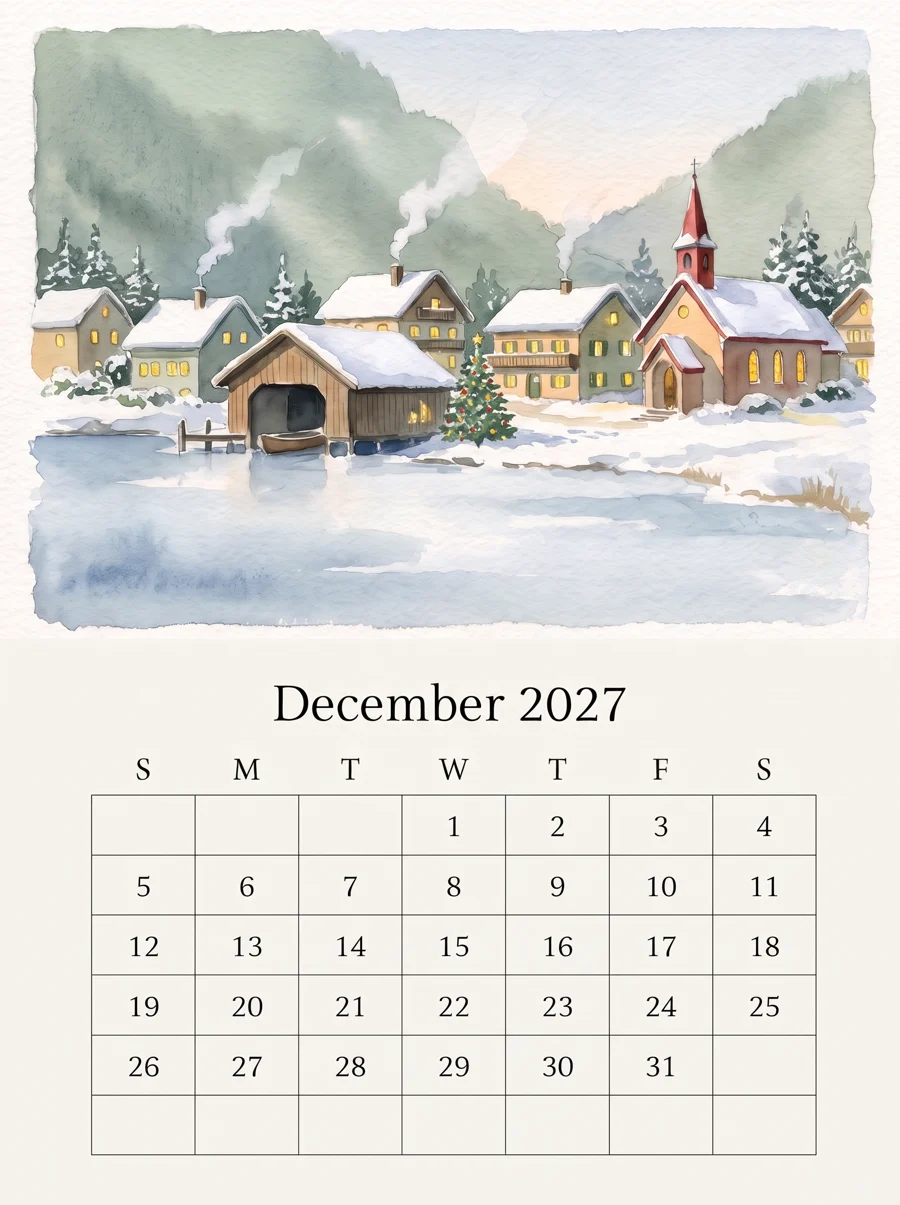
The reference image is a blank page template with an empty date grid. Keep exactly the same page layout, grid size and line weight, the same watercolor style and the same village. Repaint the scene as described, add the month title in the empty space above the grid, and write the dates into the empty grid cells exactly as listed below; leave unused cells empty. Vertical wall calendar page for December 2027. The calendar page fills the entire image edge to edge: no table, wall or background around it, no border, no drop shadow, not a mockup, not a photograph. Top 60%: Watercolor illustration on textured cold-press paper, soft muted palette of sage green, dusty blue and warm ochre, loose brushwork with visible paper grain, gentle natural light, a small imaginary alpine lake village with a wooden boathouse and a red-roofed chapel, no people in the foreground. Scene: Christmas: deep snow, warm lit windows at dusk, a small decorated fir tree by the boathouse. The painting has a soft deckled watercolor edge. Bottom 40%: plain off-white paper with the title "December 2027" centered in a simple elegant serif, and below it a centered date grid with thin dark grey lines, fully closed on all four sides, 7 columns headed S M T W T F S (Sunday first). The grid has exactly 5 rows, filled left to right: row 1: blank blank blank 1 2 3 4; row 2: 5 6 7 8 9 10 11; row 3: 12 13 14 15 16 17 18; row 4: 19 20 21 22 23 24 25; row 5: 26 27 28 29 30 31 blank. The month title is written in Title Case (only the first letter capitalized, e.g. "December 2027"), in a simple elegant serif, in the same dark charcoal ink as the dates, at the size of a large heading centered above the grid. Every date appears exactly once, no other numbers or text.
To run it in BulkImagen:
- Paste the list into the prompt box — one line is one page.
- Upload your blank template under reference images and pick Per image, so every line gets the template.
- Set the model to Nano Banana Pro, ratio 3:4, resolution 2K, and Images per combo to 1.
- Check the count (11 images) and the credits the form shows, then press Start batch.
At 2K Nano Banana Pro costs 6 credits a page, so the whole year is 72 credits plus 6 for the blank template. Current prices for every model are on the models page, and failed images are refunded automatically. When the batch finishes, Download all gives you one ZIP with the pages numbered in list order.
What the template does that a good prompt can't#
Is the template worth it? We ran three months — May, August and November — from the same prompts with no reference image at all. The dates were right on all three. But look at the pages side by side:
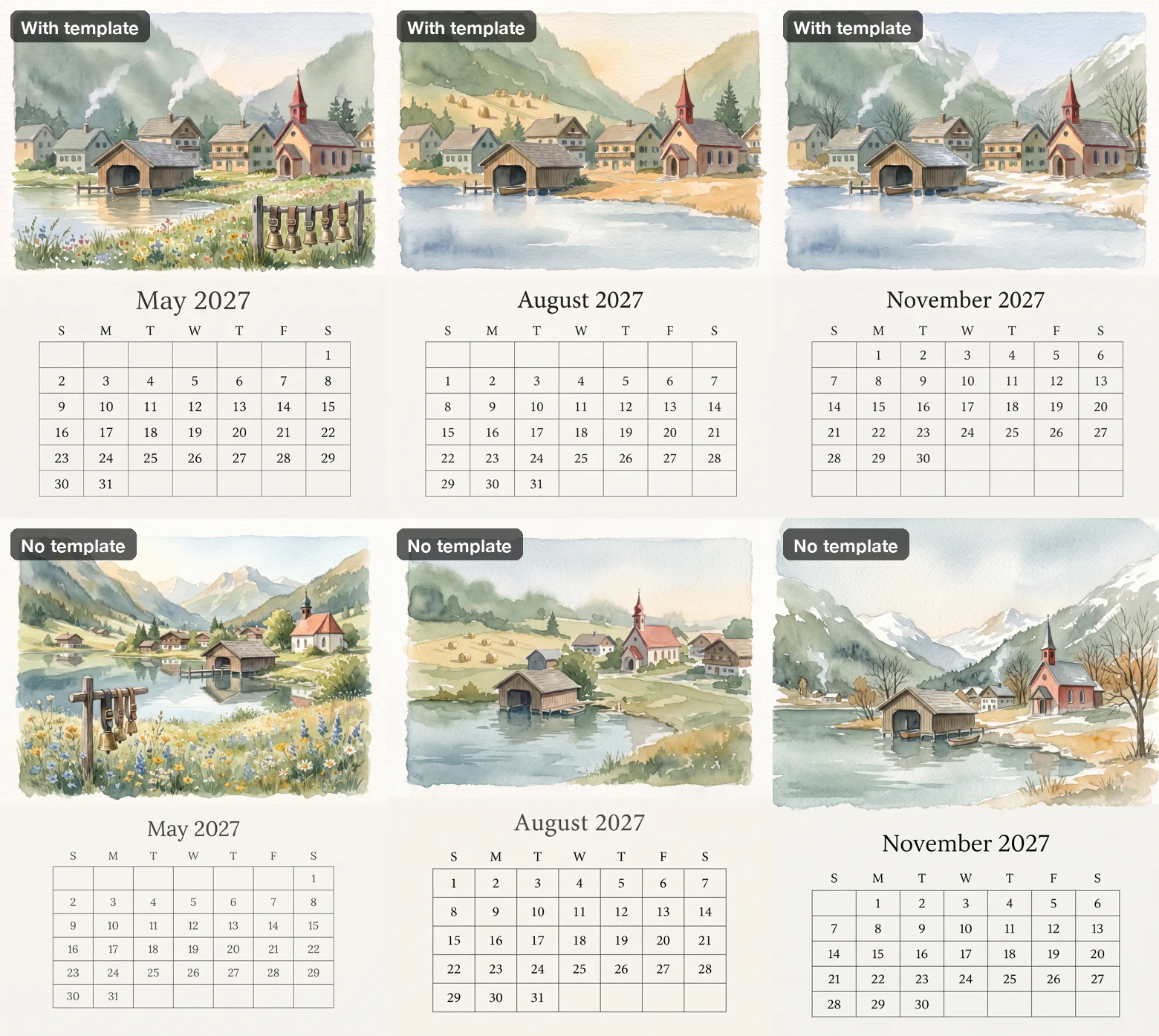
Without the template, every page is drawn from scratch. The title size changes, the grid grows and shrinks, the painting moves from a wide valley to a close-up, and the boathouse and chapel swap places. Each page looks fine alone; hung on a wall, flipped month by month, it reads as twelve different calendars.
With the template, the village stays put and only the season changes. Snow, blossom, hay bales, larches and Christmas lights come and go around the same boathouse. That is what makes a set feel like a set.
Check every page before you print#
Even with the blank template, read every grid before you send it anywhere. It takes a minute a page and it is the only thing that catches a wrong date. What we found in our run:
- Count the cells, not just the numbers. Our August is correct but starts with an empty row: the 1st sits on the second line because the template had six rows and August only needs five. It isn't wrong, but you'll notice it.
- Check the last row. The June we had to throw away had a 27 repeated on its own in a sixth row. Repeated numbers hide at the end of the month.
- Read the title. Spelling was right on every page, but style can drift (see Step 3).
- Look at the edges. If a page comes back as a sheet on a background, rerun it with the edge-to-edge sentence.
A 2K page is 1792 × 2400 pixels, which is about 6 × 8 inches at 300 pixels per inch. For a larger wall calendar, run the batch at 4K (10 credits a page on Nano Banana Pro).
Use a different style#
The structure — style sentence, scene, layout, dates — works for any picture. To change the look, swap the style sentence in the January prompt and keep everything else. We only tested the watercolor village; treat these as starting points and run one page before the batch:
Soft natural-light photograph of a small family vegetable garden, the same garden every month, shot from the same corner, true-to-life colors, gentle film grain.Flat vector illustration of a cozy reading nook by a window, the same room every month, muted terracotta and teal palette, simple shapes, no outlines.Pick a subject that can change with the seasons but stay recognizable — one garden, one room, one street. A different subject every month is fine too, but then the template matters even more, because the layout is the only thing tying the pages together.
FAQ#
Can AI draw the dates of a calendar correctly? In our test, yes when the dates were written into the prompt row by row and the reference image had no numbers in it: every page we kept has all its dates on the right weekdays. Asking for "a calendar for April 2027" without listing the rows leaves the model to work out the weekdays, which is where things go wrong. Always check each grid before you print.
Why use a reference image at all? To keep the layout and the scene the same across twelve pages. Without one, each page is drawn from scratch and the title, grid size and composition change month to month.
How much does a 12-month AI photo calendar cost? On Nano Banana Pro at 2K, 6 credits a page: 72 credits for twelve pages, plus 6 for the blank template. At 4K it is 10 credits a page. See pricing for credit packs.
Can I make the whole calendar in one go? Almost. January comes first because it sets the style, and the blank template comes from January. After that, the other eleven months are one batch in our bulk image generator.
Can I use it for other years? Yes. Only the rows change. Swap in the rows for your year, keep everything else.
For more on keeping a character or a scene the same across a set, see consistent characters across AI images. For printed pages without color, see making a coloring book with AI.