Etsy Listing Photos with AI: What the October 2026 Rules Allow, Tested on a Real Listing Set
Etsy listing photos after the October 2026 image rules: one real photo, AI lifestyle scenes that keep the item exact, print mockups, and how to disclose it.
On this page
- What Etsy's new image rules say (November 2026)
- The technical specs
- Do you have to disclose AI on Etsy?
- Step 1: Take the one photo you are required to take
- Step 2: Turn it into a full listing set in one batch
- What to check before you upload
- Resolution
- Print-on-demand and art prints: where AI mockups fall short
- A starting prompt list for any handmade item
- Checklist before you publish an Etsy listing with AI photos
- FAQ
Etsy listing photos got new rules on October 22, 2026. Etsy rewrote its Listing Image Requirements policy, and the short version is good news for small sellers: you may now use AI tools on your listing images, as long as the result still shows the real item. There is one catch, and it is not optional. Every listing needs at least one plain, unedited photo of the item you actually ship.
That gives you a simple model: one honest photo you take yourself, plus a set of AI scenes built from it. This guide covers what the new rules say, a full listing set we generated from one phone photo of a walnut cutting board, a print mockup test that did not go as well, and what to write in your description. All the images below are ours, generated for this guide: 13 images for 78 credits, cover included.
Generate in bulk
One prompt per line, hundreds of images, one ZIP to download.
What Etsy's new image rules say (November 2026)#
We read Etsy's Listing Image Requirements policy (last updated October 22, 2026), the Creativity Standards, the Seller Handbook article on AI, and the Help Center article on listing photos on November 1, 2026. The rules that matter for AI:
- "All images must accurately reflect the item's true appearance, including color, condition, scale, and materials."
- "For most products, you must include at least one unedited photo of the actual item against a real background."
- "You may use photo editing software or AI-powered tools on your other listing images, provided the final result remains an accurate representation of the physical product."
- Allowed: "Cleaning up or replacing the background." Not allowed: "Using AI to change the core design or features of a physical item," or hiding flaws and damage.
- Items you make or handpick must use "original photo or video content of the final product". For personalized items, the first image must show a finished, customized item, not a blank or placeholder text.
The Seller Handbook article on AI (also dated October 22) adds two things worth knowing. Etsy names the exact use case in this guide: using AI to "place your items in specific contexts to show their relative size or how they could be used." And it bans the opposite end: "Mass-automated generation of listings or products through scripts… without individualized human oversight is prohibited."
Warning
The penalty for misleading images is real money. Under the new policy, "Etsy may issue the buyer a refund, and you may be responsible for the refund amount," with further steps "up to and including shop removal."
The technical specs#
From Etsy's Help Center, as of November 2026:
| Spec | What Etsy says |
|---|---|
| Photos per listing | Up to 20 photos and 2 videos |
| Recommended size | At least 2,000 pixels wide and tall |
| First photo minimum | At least 635 pixels wide and tall, "to avoid showing up lower in searches" |
| File types | JPG, GIF, PNG, SVG, HEIC. Transparent PNG areas show up black |
| File size | Over 1 MB "may not finish uploading" on slow connections (no hard limit published) |
| Shape | First photo landscape or square; thumbnails are cropped several ways, so keep the item away from the edges |
Etsy does not publish a required aspect ratio. We used 4:3 landscape for everything below.
Do you have to disclose AI on Etsy?#
It depends on what the AI made.
- The item itself is AI-generated (an AI art print, an AI clipart pack): yes, always. The Creativity Standards say "Sellers must disclose within their listing description if an item is created with the use of AI." These items go under "Designed by a seller".
- Only the photos are AI-edited (a real board placed in AI kitchens): Etsy's Help Center asks you to "note whether images were edited in your listing description." It is worded as advice, not a hard rule, but it costs one sentence and protects you if a buyer complains.
A line like this is enough:
Photos: the first photo is an unedited photo of this board. The other photos place the same board in different settings using AI image tools, to show size and use.Etsy does not have an "AI images" checkbox in the listing form, as far as we could find. The description is the place.
Step 1: Take the one photo you are required to take#
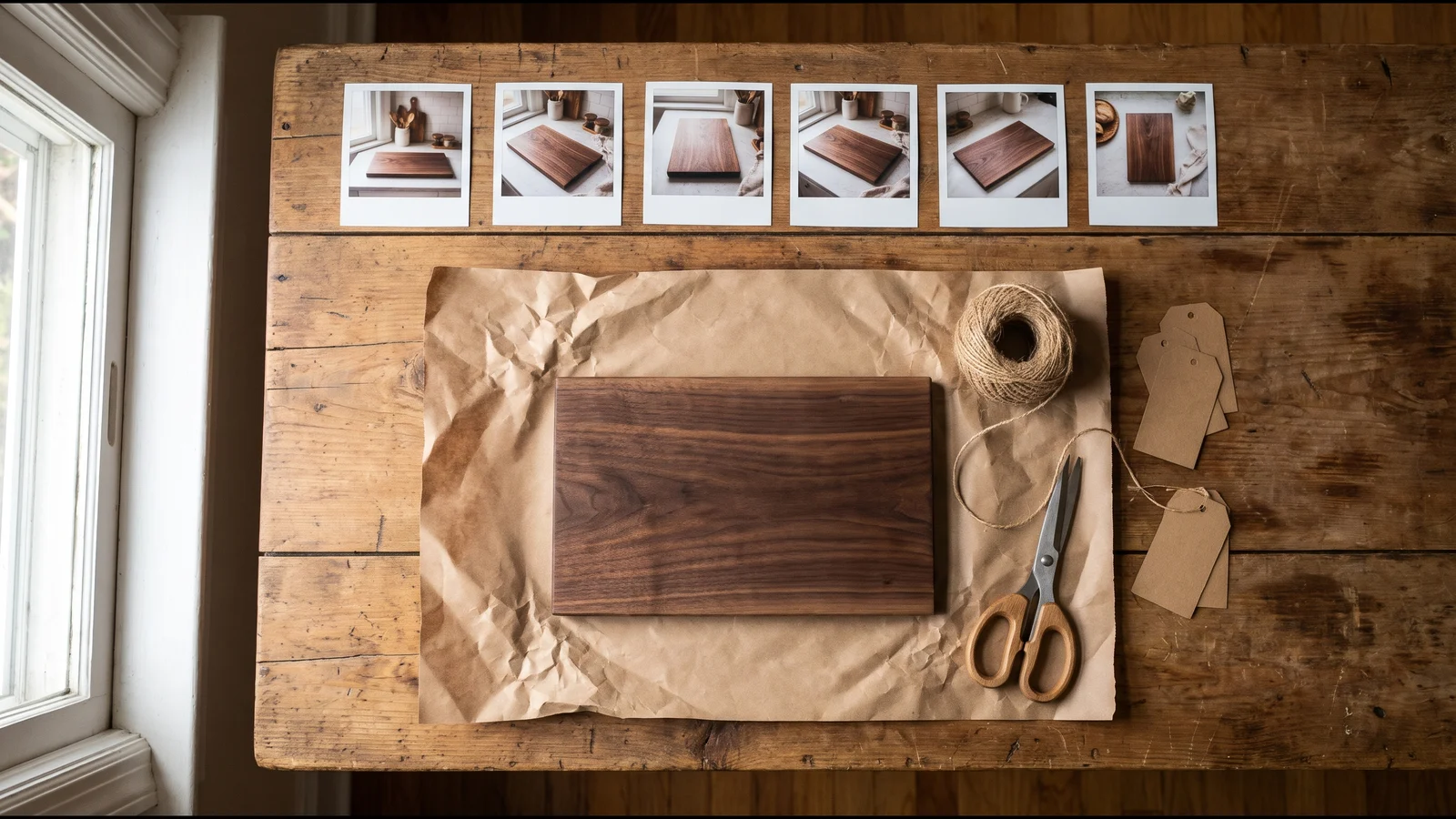
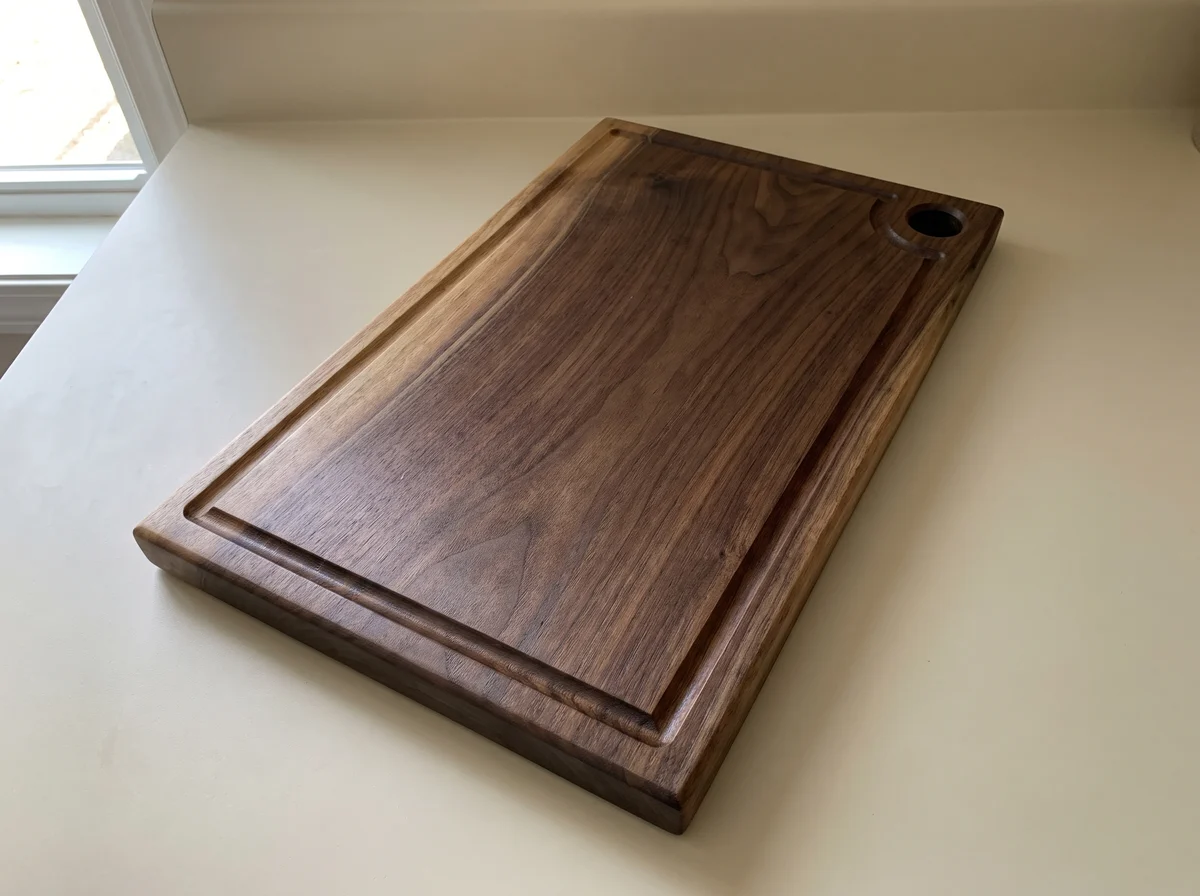
This is the photo Etsy requires, and it is also the reference image for every AI scene. It does not need a studio. A clean counter, daylight from a window, and the whole item in frame. Make it your first photo: Etsy says the first one should be "the clearest, most realistic representation of the item buyers will receive."
Note
For this guide we generated the "phone photo" above with AI, because the board is invented. In your shop, this photo must be a real, unedited photo of your item. That is the whole point of the rule.
Step 2: Turn it into a full listing set in one batch#
Etsy's own Seller Handbook lists the photo types that sell: lifestyle, scale, detail, packaging and more. That maps neatly onto a prompt list. In a bulk image generator you upload the photo once, set the reference mode to Per image, and paste one scene per line. Each line becomes its own image, and every image gets the same reference.
What makes it work is the sentence at the end of every line. It names the details a buyer will check first and tells the model not to touch them:
keep the cutting board from the reference image exactly as it is: same rectangular shape with rounded corners, same dark walnut grain, same juice groove around the edge, same round hanging hole in one corner, same thickness and proportions; do not redesign it, do not add logos, engraving or any text to the board.The six scenes we ran, each followed by that sentence (Nano Banana Pro, 2K, 4:3, 6 credits each):
The board on a rustic wooden kitchen table with a loaf of sourdough partly sliced on it and a bread knife beside it, warm morning window light, shallow depth of field.
A person's hands holding the board upright at chest height in a bright kitchen, only hands and forearms and a plain linen apron visible, so the size of the board is clear.
Close-up of one corner of the board showing the end grain, the juice groove and the oiled finish, raking side light that brings out the wood texture.
The board wrapped halfway in brown kraft paper with twine and a sprig of dried eucalyptus, on a light linen tablecloth, soft daylight, a simple gift feel with no Christmas decorations.
Overhead flat lay of the board on a pale stone surface, with a small bowl of olive oil, a few cherry tomatoes, a sprig of rosemary and a wedge of cheese arranged around it, even soft light.
The board hanging by its hole on a hook on a white tiled kitchen wall above a counter with a few wooden utensils in a ceramic crock, natural light.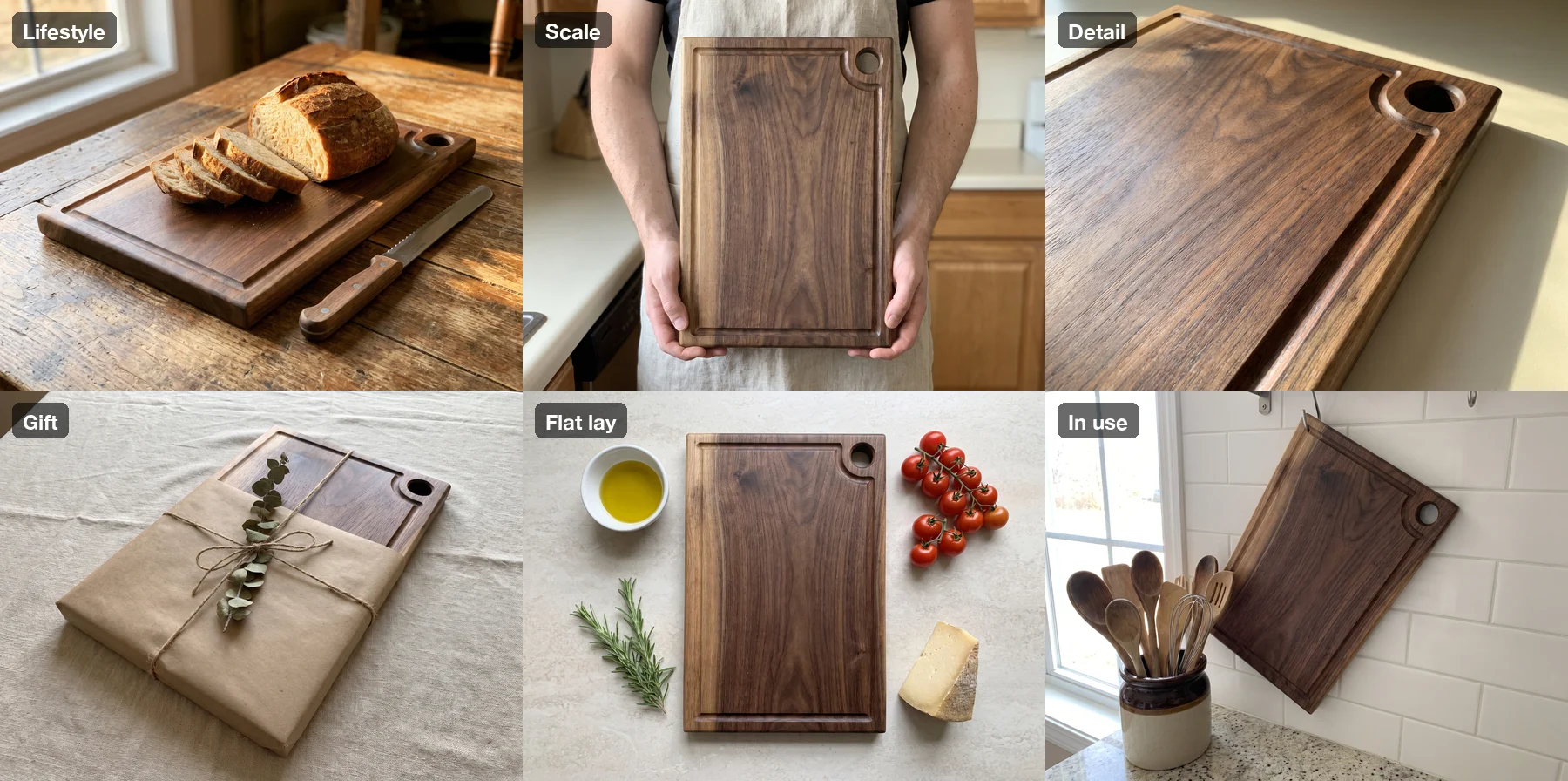
All six came back on the first try, and the board survived in every one: the rounded corners, the groove that curves around the hole, the hole in the same corner, the thickness. The hands shot is the most useful one for an Etsy buyer. It answers "how big is it?" faster than a measurement in the description.
What to check before you upload#
Two things in this set would not pass a careful look, and neither is visible in a thumbnail.
The wood grain is new in every image. The shape is the same board, but the figure in the grain is redrawn each time. For a product line made to a pattern, that is fine. For a one-of-a-kind board where the buyer is choosing that piece of walnut, it is not, and that is exactly why Etsy wants the unedited photo first. If your items are unique, say in the description that the photos show the style and the first photo shows the actual piece.
The "hanging" photo does not hang by the hole. We asked for the board to hang by its hole. The model hung it from a hook at the top corner, with the hole sitting unused at the other end. A buyer would not notice; a buyer who tries it at home would.
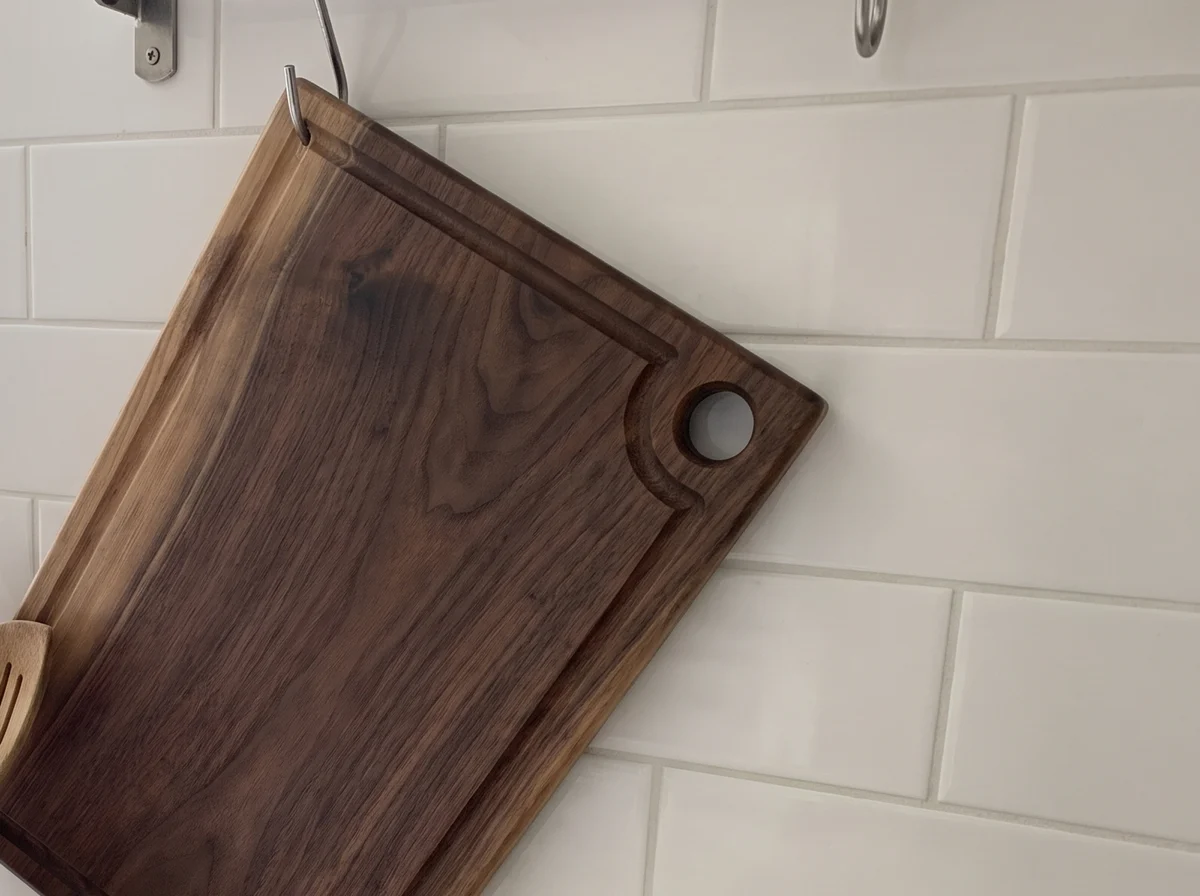
Our rule: open every image at full size before it goes into a listing. Etsy's ban on "mass-automated generation… without individualized human oversight" is about listings, not drafts, but the habit it asks for is the right one. Generate in bulk, approve one by one.
Resolution#
Our 2K images came back at 2400 × 1792. That clears Etsy's 635-pixel minimum easily but is a little under the recommended 2,000 on the short side. If you want both sides over 2,000, use the 4K tier (10 credits per image on Nano Banana Pro instead of 6). Etsy also warns that files over 1 MB may not finish uploading on slow connections, so compress them first. Our free bulk image compressor shrinks a whole set in the browser without uploading anything.
Print-on-demand and art prints: where AI mockups fall short#
Art prints are one of the biggest Etsy categories, and room mockups are their standard photos. So we tried the same method: one watercolor fern illustration as the reference, four scenes (living room, sideboard, bedroom, held in hands), with a protection sentence asking the model to keep the artwork exactly as it is.
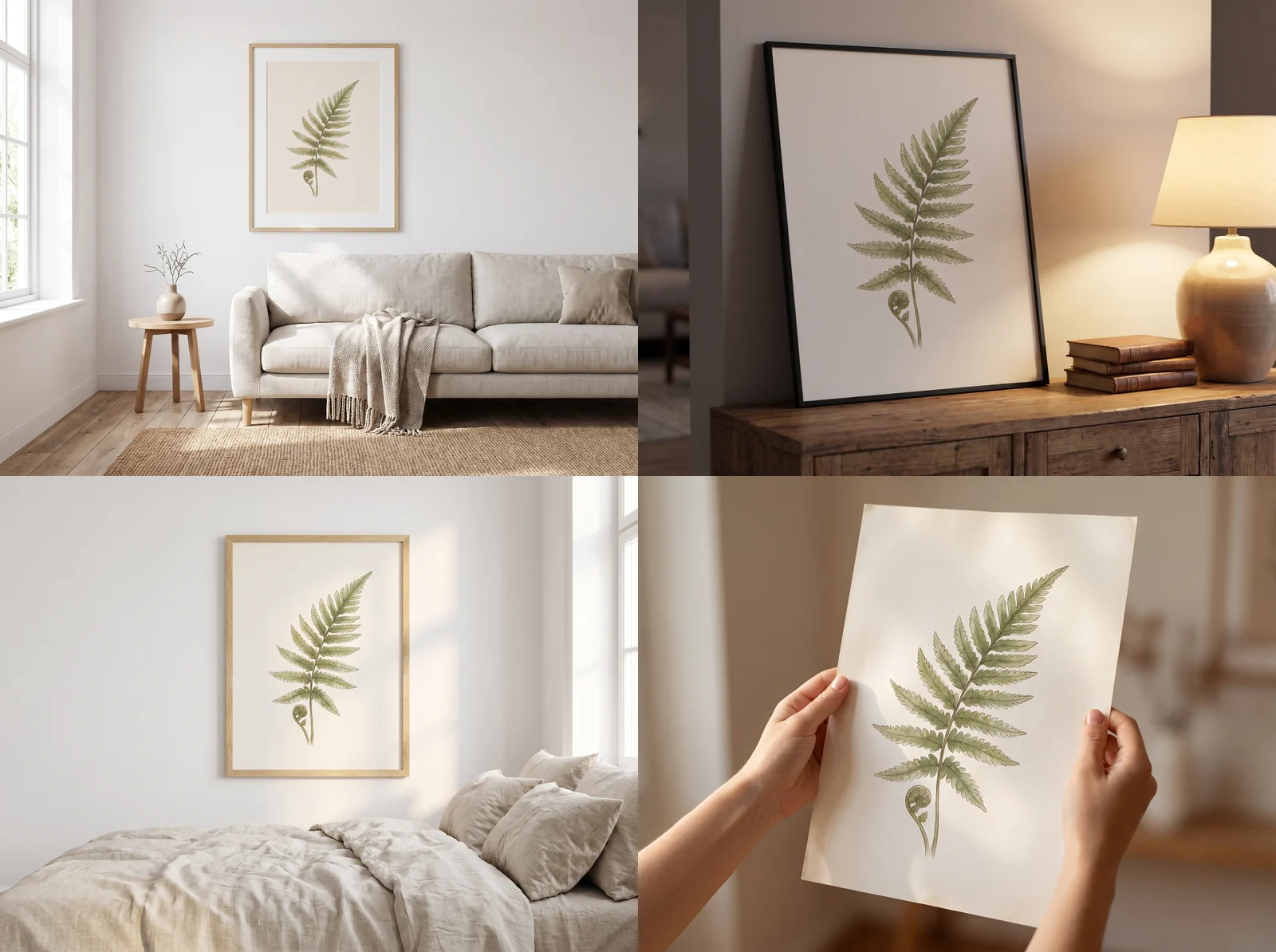
At thumbnail size these look like a mockup set. Up close they are not the same artwork:
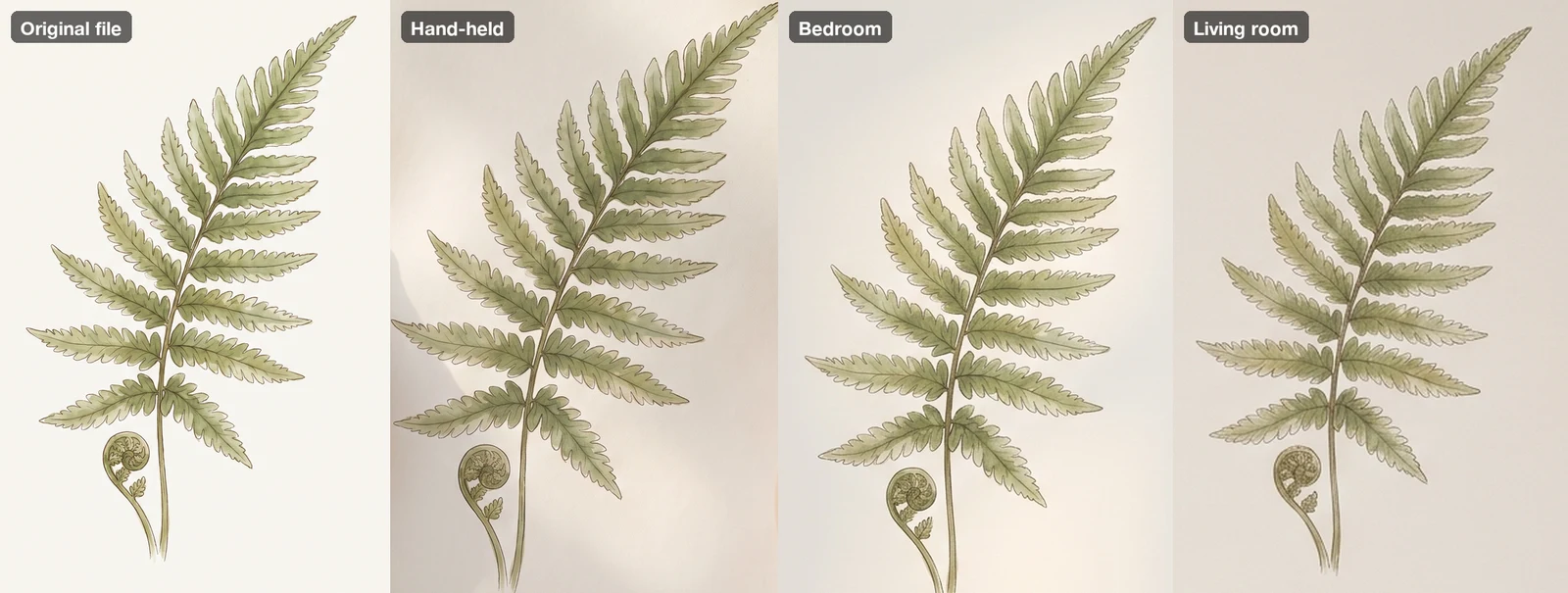
The model redrew the fern every time. The leaflets have different shapes and spacing, and the living room version came out grayer and on a beige mat instead of a white one. For the cutting board, small changes in grain were a judgment call. For an art print, the artwork is the product, and Etsy's policy names "using AI to change the core design" as not allowed.
So for prints, split the job:
- Room scenes from AI, artwork placed by hand. Generate empty frames in rooms, then drop your exact file into the frame with a mockup template or any editor that does a perspective paste. The art stays pixel-exact, and you still get many rooms quickly.
- A real photo of a real print as the required unedited image, if you sell physical prints.
- Stock mockups, which Etsy explicitly allows for print-on-demand items "if the stock photo's owner has authorized its use."
If a production partner (Printful, Printify and similar) prints your design, Etsy also requires you to say so on the listing. That is a separate rule from AI disclosure, and you need both.
A starting prompt list for any handmade item#
This is a general version of the board list. It is a starting point we have not run as written: try it on one image before you run a whole set, and add your own protection sentence naming your item's key details.
The item from the reference image in a natural home setting where it would be used, warm window light, shallow depth of field. Keep the item exactly as it is in the reference image; do not redesign it and do not add logos or text.
A person's hands holding the item from the reference image so its real size is clear, only hands visible, bright neutral room. Keep the item exactly as it is in the reference image; do not redesign it and do not add logos or text.
Close-up detail of the item from the reference image showing its material and finish, soft side light. Keep the item exactly as it is in the reference image; do not redesign it and do not add logos or text.
The item from the reference image partly wrapped in brown kraft paper with twine on a linen cloth, simple gift styling, soft daylight. Keep the item exactly as it is in the reference image; do not redesign it and do not add logos or text.
Overhead flat lay of the item from the reference image on a pale stone surface with a few simple related props around it, even soft light. Keep the item exactly as it is in the reference image; do not redesign it and do not add logos or text.
For more on how the reference image keeps an object stable across scenes, see our bulk image-to-image test. If you also sell on Amazon, its rules are stricter about the main image; we covered them in Amazon AI product images.
Checklist before you publish an Etsy listing with AI photos#
- The first photo is a real, unedited photo of the item you ship, on a real background.
- Every AI image matches the item in color, size, materials and condition. Open each at full size.
- No AI image hides a flaw or adds a feature the item does not have.
- For one-of-a-kind items, the description says the photos show the style and the first photo is the actual piece.
- Art prints: the artwork in mockups is your exact file, not a redrawn version.
- The description says which photos were made or edited with AI. If the item itself was made with AI, that disclosure is required.
- Production partner named on the listing, if you use one.
- Files at least 635 px (2,000 px recommended), under about 1 MB, no transparent PNGs.
FAQ#
Can I use only AI images on an Etsy listing? For most physical products, no. Since October 22, 2026, Etsy requires at least one unedited photo of the actual item against a real background. The other photos can be AI-edited if they stay accurate.
Are mockups still allowed on Etsy? Yes, for print-on-demand items Etsy allows stock photo mockups when the stock photo's owner has authorized them. AI room scenes are allowed as long as the item, including the artwork, is shown accurately. Our test showed AI tends to redraw artwork, so place the art yourself.
Does Etsy penalize AI images in search? Etsy does not say it ranks AI images lower. It does say main images that are too dark, blurry, or part of a collage may rank lower, and that the first photo should be at least 635 pixels.
How much did this test cost? 78 credits for 13 images: two reference images, six board scenes, four print mockups and the cover, all on Nano Banana Pro at 2K. Prices per model are on the pricing page.