Amazon AI Product Images in 2026: What's Allowed and What Gets Your Listing Suppressed
Amazon AI product images, tested: a main image and six secondary shots from Nano Banana 2 and GPT Image 2, measured for pure white, plus a compliance checklist.
On this page
- What Amazon's image rules say (October 2026)
- Does Amazon allow AI-generated product images?
- Why an "AI modified" badge on the main image is a mistake
- The test: one phone photo in, seven listing images out
- Main image: neither model gave a pure white background
- Fix it: fill the background with true white
- The six secondary images
- Run the whole set as one batch
- Amazon AI product images: compliance checklist
- FAQ
Amazon AI product images are not banned. What Amazon suppresses is images that break its image rules, and AI makes some of those rules surprisingly easy to break. A background that looks white but measures 253. A faint ghost of the kitchen counter you photographed the product on. A logo mark on the product that came back slightly redrawn. And sometimes a little "AI modified" badge in the corner of the main image, added by sellers who think they are being honest.
With Black Friday on November 27, 2026, many sellers are putting up new listings this month. This guide covers what Amazon's rules actually say about images, what happened when we generated a full Amazon image set with two models, and the checks to run before you upload. Every image below came from one reference photo of an invented, unbranded water bottle. The whole test cost 130 credits, including one re-run and the cover.
Generate in bulk
One prompt per line, hundreds of images, one ZIP to download.
What Amazon's image rules say (October 2026)#
We read Amazon's Seller Central help pages on October 22, 2026: the Product image guide, the Image suppression page and the Technical image file requirements. The rules that matter most for AI images:
Main image
- "Have a pure white background (RGB color values: 255, 255, 255)."
- "Show the product as 85% of the image" and "Show the entire product within the frame of the image."
- "Accurately represent the product as a realistic, professional-quality image. The image should accurately represent the real scale, quantity, and color of the product."
- "Only show the product once in the image" and only one unit, plus accessories that come with it.
- No props that are not included with the product, and no packaging unless it is an important feature.
- The Image suppression page lists "Main image has text, logo, graphic, or watermark" as a reason to suppress a listing.
All images
- No customer review images, five-star graphics, or claims like free shipping.
- No Amazon badges ("Amazon's Choice", "Best seller") and no Amazon logos.
- The image must match the product you are selling and the title.
Technical
- JPEG (recommended), TIFF, PNG or non-animated GIF.
- At least 500 px and at most 10,000 px on the longest side. At 1,000 px or more on the longest side, shoppers can zoom.
- RGB is preferred. Amazon says not to artificially enlarge small images.
Amazon recommends "at least six additional images and one video" on top of the main image. That is where the 1 main + 6 secondary set in this guide comes from.
Warning
If no main image meets the requirements, Amazon "may temporarily remove the product listing from search until a compliant main image is provided." Amazon checks images when you upload them. Listings removed for image issues show up under the Fix tab in Manage Products.
Does Amazon allow AI-generated product images?#
Amazon has no general rule for or against AI images. The test is the same as for a photo: the image has to be realistic and accurate. If the AI version shows a different color, a missing detail or a wrong size, it fails, no matter how it was made.
There is one AI-specific rule, and it is about people, not products. If an image shows photorealistic AI-generated people, Amazon requires you to tag the file before upload: add the keyword contains-synthetic-performer to the image's XMP dc:subject field. Amazon then adds the disclosure itself where needed. Real people edited with AI tools, cartoon people and images with no people do not get the tag. With the free tool exiftool, one line does it:
exiftool -XMP-dc:Subject+=contains-synthetic-performer scale-in-hand.jpgAmazon's text does not say whether a single AI hand holding the product counts as a "person". Tagging such an image costs nothing and shows no badge on the image itself, so we would tag it.
Why an "AI modified" badge on the main image is a mistake#
Amazon has no rule that mentions this badge by name. But a badge is text and a graphic on the main image, and "Main image has text, logo, graphic, or watermark" is one of the listed reasons to suppress a listing. Amazon's own disclosure method is metadata, not a visible mark, and only for AI people. So the badge does not do the disclosure job, and it is exactly the kind of graphic the main image rules forbid. If you want to say how the photos were made, the description is the place for it. Never put it on the main image.
The test: one phone photo in, seven listing images out#
Most sellers do not start with a studio shot. They start with a phone photo on a kitchen counter. So that is what we gave the models: a warm, slightly off-center snapshot of a sage-green insulated bottle with a bamboo lid, a silicone carry loop and a small debossed leaf near the bottom. A mug, a towel, keys and a fruit bowl are in the background.
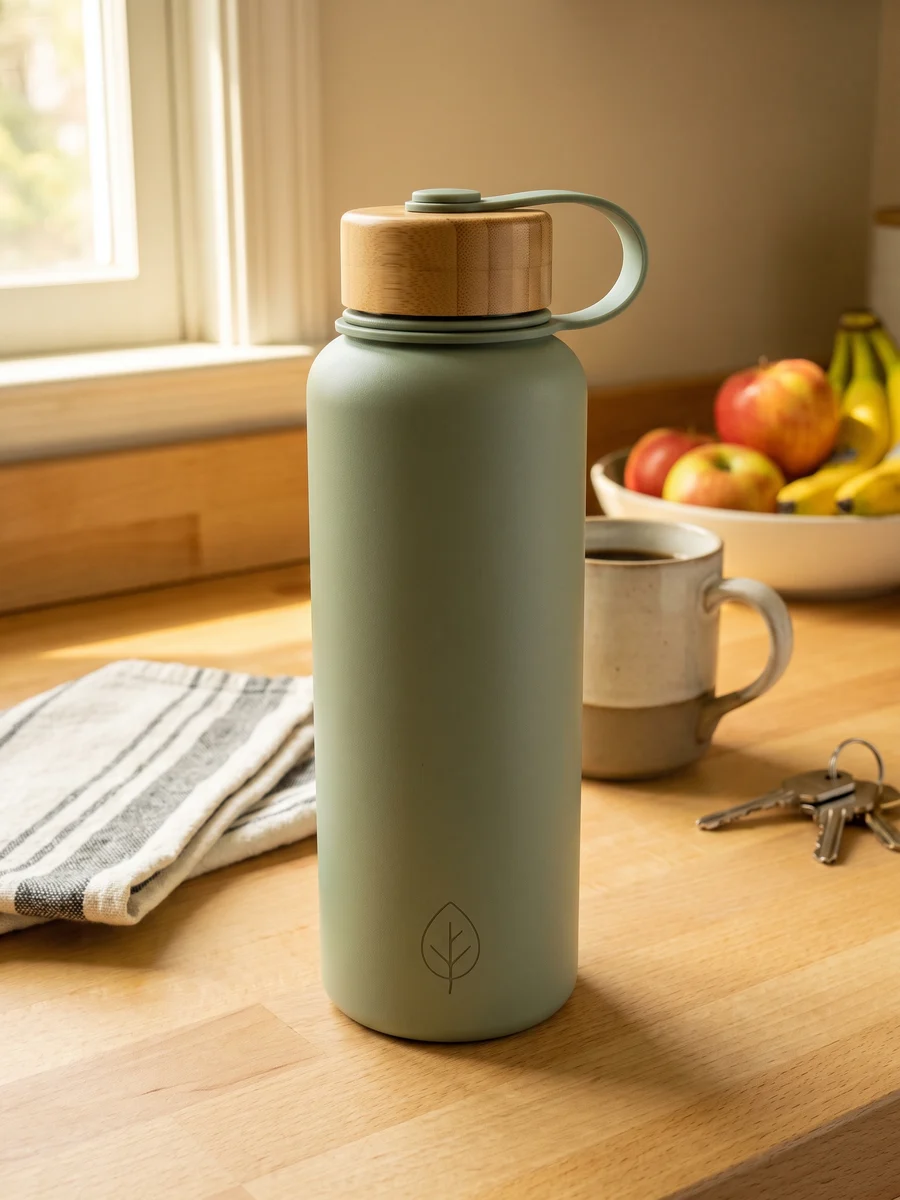
We uploaded it as a reference image, set the reference mode to Per image, and wrote seven lines, one per image: a main image, a back angle, a lid close-up, a hand for scale, two lifestyle scenes and an infographic. Each line ended with the same product protection sentence. We ran the same seven lines on Nano Banana 2 and GPT Image 2, both at 2K and 1:1 (2048 × 2048 px, comfortably above Amazon's 1,000 px zoom threshold). Each model ran once, and we kept every result.
This is the main image line we used. Upload a photo of your own product and it runs as is:
Amazon main product image of the product from the reference image, front view, alone on a pure white background (RGB 255,255,255) with no floor, no horizon and no gradient, only a very faint natural contact shadow under the base. The product fills about 85% of the frame and is fully in frame. Remove everything else from the reference photo: no other objects, no props. Neutral, color-accurate studio lighting with no warm cast. No text, no badges, no watermarks, no borders. Keep the product from the reference image exactly as it is: same shape, proportions, colors, materials and markings; do not redesign it and do not add logos or text to it.Main image: neither model gave a pure white background#
On screen, all three main images below look white. They are not. In the middle row, every pixel that is not exactly RGB 255, 255, 255 is painted magenta (the product is faded out so you can see the background):
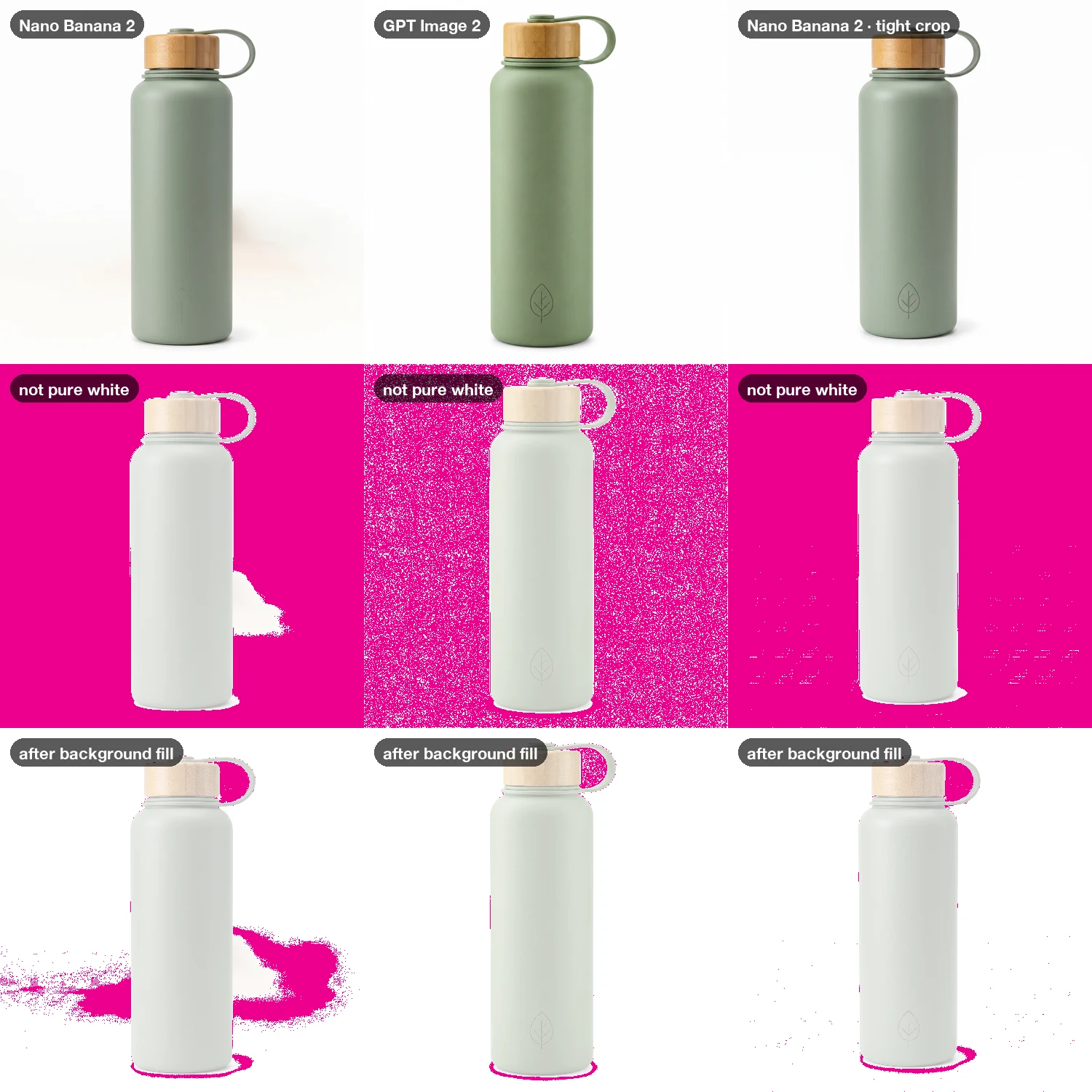
- Nano Banana 2 gave an off-white background, around 243 to 255. It also left a blurred, warm ghost of the kitchen counter to the right of the bottle, which you can just see in the top-left tile. And the debossed leaf on the bottle came back as a faint arrow-like mark instead of a leaf.
- GPT Image 2 gave a clean, even background at 253 to 255. Only 22.9% of the outer border was exactly 255, so the rest is a fine noise of 254s. The leaf, lid and loop all matched the input.
- Nano Banana 2 with a tight crop. We then cropped the input photo close to the bottle, so less of the kitchen was in it, and ran the same line again. This time the ghost was gone and the leaf was correct. The background was still off-white, though: only 3.2% of the border was exactly 255. We ran this once, so treat it as a strong hint, not a rule.
Both models filled the frame correctly: the bottle was 88% of the image height on Nano Banana 2 and 92% on GPT Image 2.
We do not know how strictly Amazon's upload check measures "pure white". But the rule is written as 255, 255, 255, and a best-selling listing is not the place to find out. So fix the background after generating.
Fix it: fill the background with true white#
The bottom row above shows the fix. Use a contiguous fill from the corners, not a global "make light pixels white" filter, which would also bleach highlights on the product. In Photoshop, or in the free browser editor Photopea:
- Choose the Paint Bucket tool. Set the color to
#FFFFFF, Tolerance to about 12, and turn Contiguous on. - Click each corner of the background.
- Check enclosed gaps separately. In our test, the space inside the carry loop is not connected to the rest of the background, so it stayed off-white until we clicked it too.
- Use the eyedropper or the Info panel to check a few background points. They should read 255, 255, 255.
After the fill, GPT Image 2's border and the tight-crop Nano Banana 2 border were 100% pure white. The first Nano Banana 2 image was 99.7%, but the kitchen ghost was still there, because it is too dark to count as background. An image with leftovers like that needs a new generation, not a fill. Saving the filled image as JPEG kept the white at 255 at both quality 85 and 95.
The six secondary images#
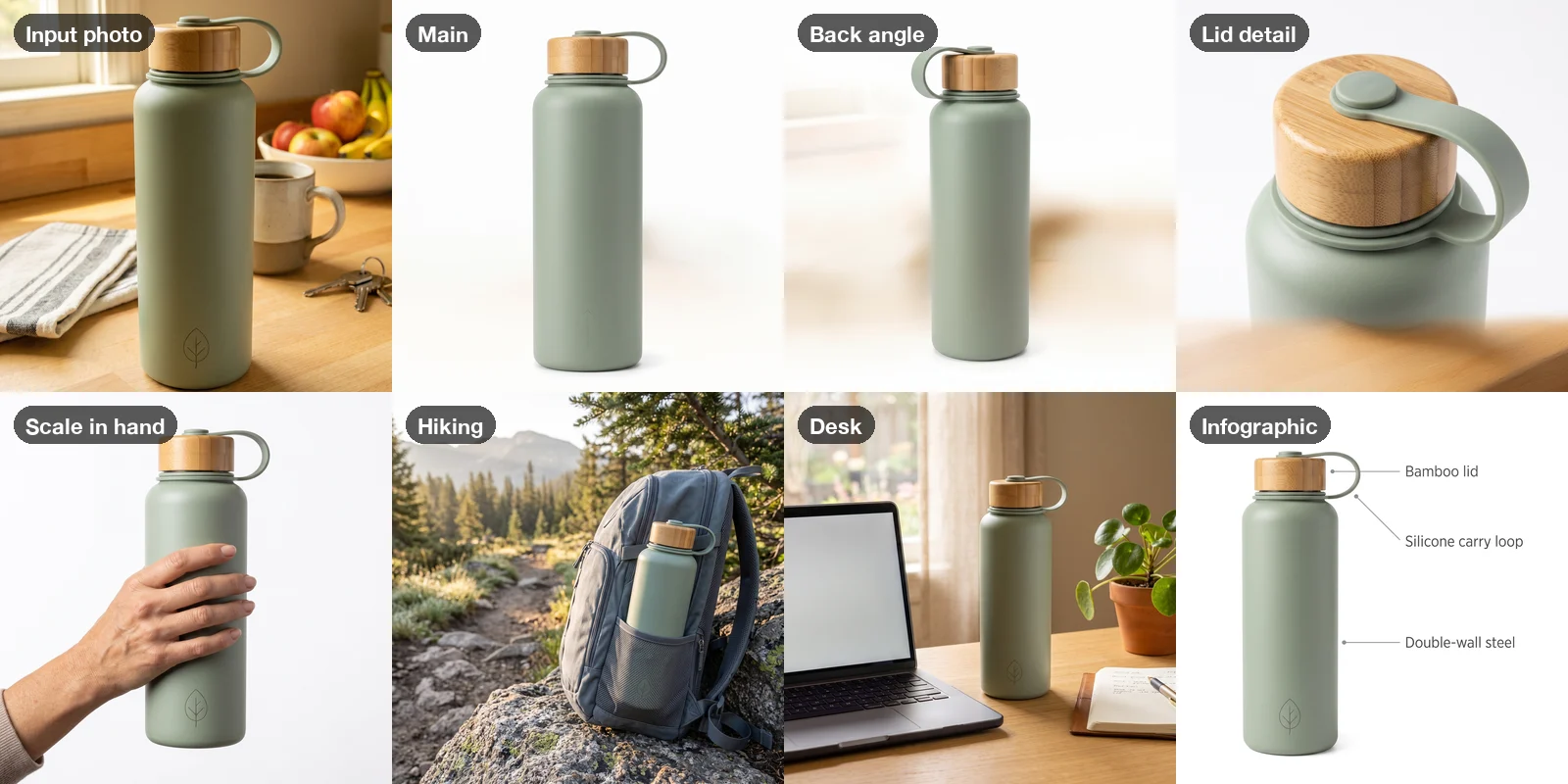
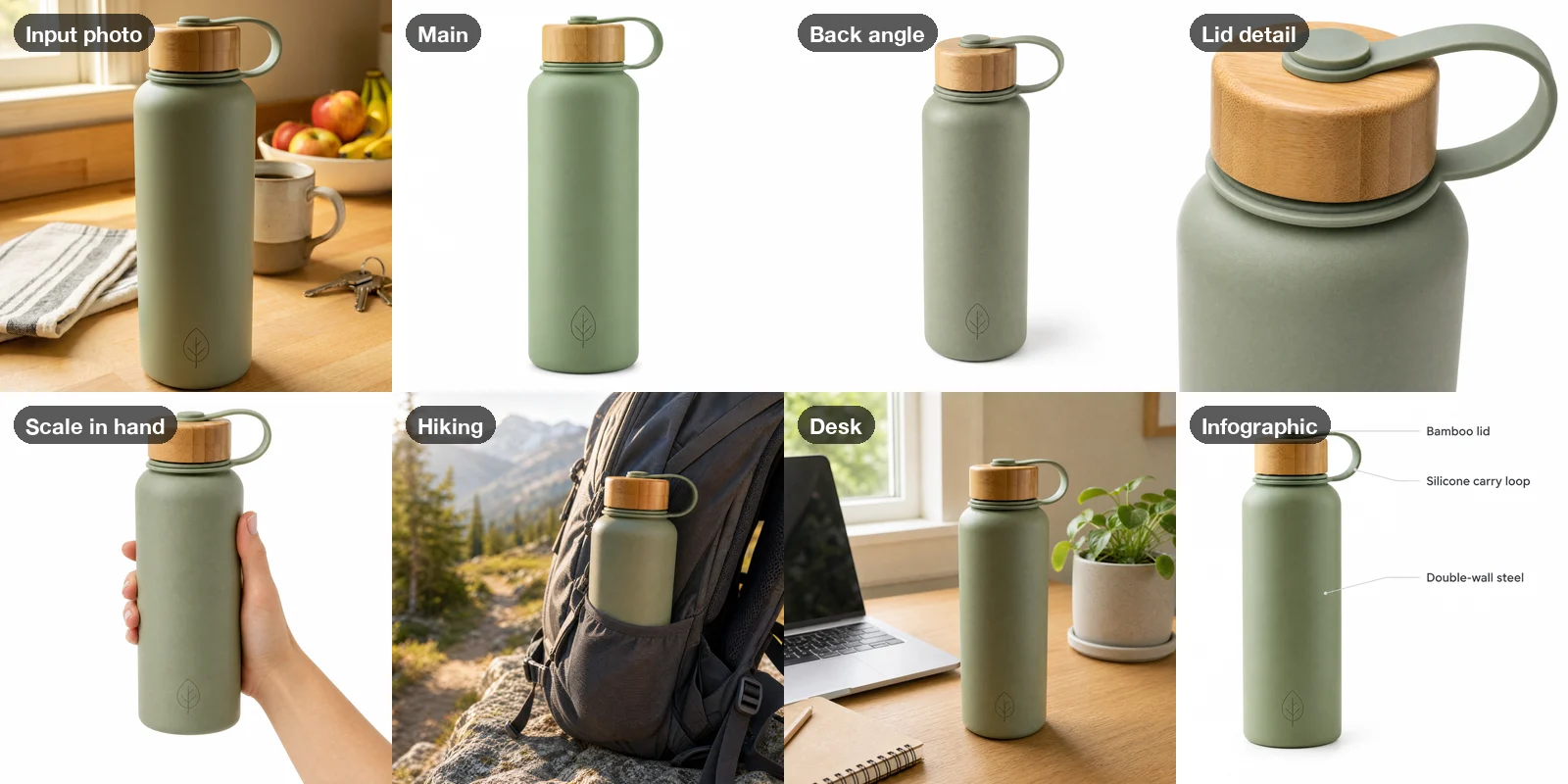
Secondary images can have lifestyle scenes, hands and text. Here is what each model produced, starting with the input photo:
| Nano Banana 2 · 2K | GPT Image 2 · 2K | |
|---|---|---|
| Leftover background from the input photo | 3 of 7 (main, back angle, lid detail) | 0 of 7 |
| Main image: border pixels exactly 255 | 0.2% | 22.9% |
| Main image: border pixels 250 or above | 82.6% | 100% |
| Leaf mark on the main image | Redrawn as a faint arrow | Correct |
| Followed "three-quarter rear view" | Yes | No, showed the front |
| Infographic labels spelled right | 3 of 3 | 3 of 3 |
| Infographic leader lines | "Bamboo lid" line ends on the loop | "Bamboo lid" line ends on the loop |
| Credits per image | 6 | 10 |
| Credits for the 7-image set | 42 | 70 |
A few more things only showed up when we zoomed in:
- Color drifted on both models, and we cannot say which is right. The input photo had a warm cast, and we asked for neutral light. Nano Banana 2 came back grayer, and GPT Image 2 a more olive green. Amazon wants the real color, and an AI model can only guess it from a color-cast photo. Shoot your reference in daylight or under neutral light, and compare the result with the physical product before you upload.
- The lifestyle shots were the strongest images from both models. The backpack and desk scenes look like a photographer took them, and the bottle kept its lid, loop and leaf in both.
- The infographic text was correct, but the lines were not. Both models spelled all three labels right. On both, though, the "Bamboo lid" line points at the carry loop. Check every callout line, or add the labels yourself in an editor and generate the infographic without text.
Our pick: GPT Image 2 for the main image and close-ups, where background purity and exact detail matter most. Nano Banana 2 costs less and was just as good for lifestyle scenes, as long as you give it a tightly cropped reference.
Run the whole set as one batch#
To do this for your own product, upload a tightly cropped, color-accurate photo, choose Per image, and paste the list below. Every line becomes one image of the uploaded product. Add more product photos and each one gets the full set, so a whole catalog is one run in our bulk image generator.
Amazon main product image of the product from the reference image, front view, alone on a pure white background (RGB 255,255,255) with no floor, no horizon and no gradient, only a very faint natural contact shadow under the base, the product fills about 85% of the frame and is fully in frame, no other objects, no props, neutral color-accurate studio lighting, no text, no badges, no watermarks, no borders. Keep the product exactly as it is: same shape, proportions, colors, materials and markings; do not redesign it and do not add logos or text to it.
The same product on a pure white background, turned to a three-quarter rear view, fully in frame, soft even studio light, faint contact shadow, no text, no props. Keep the product exactly as it is: same shape, proportions, colors, materials and markings; do not redesign it and do not add logos or text to it.
Close-up macro product photo of the most important detail of the same product, on a pure white background, sharp focus, soft studio light, no text, no props. Keep the product exactly as it is: same shape, proportions, colors, materials and markings; do not redesign it and do not add logos or text to it.
A hand holding the same product against a pure white background to show its real size, natural skin tones, soft studio light, only the hand and forearm visible, no face, no text. Keep the product exactly as it is: same shape, proportions, colors, materials and markings; do not redesign it and do not add logos or text to it.
Lifestyle photo of the same product in use in a bright, tidy home setting where it would naturally be used, soft daylight, shallow depth of field, the product in sharp focus, no people, no text, no logos on other objects. Keep the product exactly as it is: same shape, proportions, colors, materials and markings; do not redesign it and do not add logos or text to it.
Lifestyle photo of the same product outdoors in a natural setting where it would be used, morning light, shallow depth of field, the product in sharp focus, no people, no text, no logos on other objects. Keep the product exactly as it is: same shape, proportions, colors, materials and markings; do not redesign it and do not add logos or text to it.
The infographic needs your own labels, so it is a template. Keep the labels short (two or three words), because every extra word is another chance for a spelling mistake:
Clean product infographic on a pure white background: the product from the reference image standing on the left half of the image, and on the right three short callout labels connected to the product by thin gray lines, each label exactly as written: '[Feature one]', '[Feature two]', '[Feature three]'. Those three labels are the only text in the image: no other words, letters, numbers, icons or logos. Simple dark gray sans-serif text, generous white space. Keep the product exactly as it is; do not redesign it.Tip
If one image in the set comes out wrong, run just that line again on its own instead of the whole set. Images that fail to generate are refunded automatically. For more on keeping one product consistent across many scenes, see bulk product photos with AI and product photos with consistent backgrounds.
GPT Image 2 delivers PNG and Nano Banana 2 delivers JPEG. Amazon accepts both, but recommends JPEG. If you want all your files as JPEG, our free PNG to JPG converter converts a whole folder in the browser, without uploading anything.
Amazon AI product images: compliance checklist#
Run this on every image before you upload. Main image first:
- Background is RGB 255, 255, 255. Check with an eyedropper at the corners and inside any enclosed gaps, not by eye.
- No leftover shapes or color from the original photo: zoom in to 100% along every edge.
- Product fills about 85% of the frame and nothing is cut off.
- One product, shown once. Only accessories that are actually in the box.
- No text, badges, watermarks, borders or "AI" marks of any kind.
- Logos, markings and labels on the product match the real product. AI often redraws small marks.
- Color matches the physical product under neutral light.
- Longest side is at least 1,000 px, so shoppers can zoom (2K output is 2048 px).
- JPEG or PNG, RGB.
Every image:
- Scale is real. A hand or a scene must not make the product look bigger or smaller than it is.
- Infographic text is spelled right, and every callout line points at the right part.
- No review stars, "Best seller" or "Amazon's Choice" badges, no Amazon logos, no shipping claims.
- Photorealistic AI people, including hands if you are unsure, are tagged
contains-synthetic-performerin XMPdc:subject.
FAQ#
Can I use AI images on Amazon? Yes. No Amazon rule bans them. The images must follow the same rules as photos: realistic, accurate in color, scale and quantity, and, for the main image, a pure white background with nothing else on it.
Will Amazon suppress my listing for an AI image? Not for being AI. It may suppress it for what the image contains: a non-white background, text or a badge on the main image, props, a cropped product or a product that is too small.
Should I label my main image as "AI modified"? No. A visible badge is text and a graphic on the main image, which is a listed suppression reason. Amazon's only AI disclosure is the metadata tag for photorealistic AI people.
Which model is better for Amazon main images? In our test, GPT Image 2: a cleaner background and exact product details. Both models still needed a white fill to reach a true 255. This was one product with one run per image, so test your own product with one image before running your whole catalog. Prices and limits for every model are on the models page.