Gemini Bulk Image Generator: How to Run a Whole Prompt List on Nano Banana (No Code)
Need a Gemini bulk image generator? The Gemini app makes one image per prompt. Here is how to run a whole prompt list on Nano Banana with no code, and the cost.
On this page
- Can Gemini generate multiple images at once?
- Which Nano Banana does Gemini actually use?
- Route 1: Google Flow (variations, not a list)
- Route 2: the Gemini API and Batch mode
- Route 3: paste the list, get a ZIP
- From a Gemini chat to a hundred images, step by step
- Side by side
- What Gemini still does better
- FAQ
If you are searching for a Gemini bulk image generator, the short answer is that there is no bulk mode inside the Gemini app. Gemini makes images one prompt at a time. There is no list input, no spreadsheet upload, no "download all" and, as of October 2026, Google does not even publish how many images a request or a day gives you. That is by design: Gemini is a conversation, and a conversation moves one message at a time.
The good news is that the models behind Gemini's images, Google's Nano Banana family, are available outside the chat window. There are three realistic ways to run a hundred prompts through them: Google Flow, the Gemini API with its Batch mode, or a bulk image generator that takes a pasted list and hands back a ZIP. This guide covers what Gemini itself can do, checked against Google's own help pages and developer documentation in October 2026, then walks through each route with real numbers, including a twelve-poster batch we ran on Nano Banana 2.1 while writing it.
Generate in bulk
One prompt per line, hundreds of images, one ZIP to download.
Can Gemini generate multiple images at once?#
Not from a list, and not in any number you can count on. Google's own developer documentation for the Nano Banana models says, under limitations, that "the model won't always follow the exact number of image outputs that the user explicitly asks for." Ask the Gemini app for "ten different travel posters" and what you get is whatever the model decides a single reply should contain, usually one image, sometimes a few that share one idea. You cannot hand it ten different prompts and get ten images back.
Here is what the Gemini help center and plans page say about volume, as of October 2026:
- Limits are compute-based, not image counts. Since May 2026 Gemini has "compute-based usage limits that will refresh every 5 hours until you reach your weekly limit." Images, video and music use more of that budget than text. Google publishes no number of images per day for any plan.
- Paid plans multiply the budget. Google AI Plus is "2x higher than standard limits," AI Pro is "4x," and AI Ultra is "5x or 20x higher than AI Pro depending on your subscription." You can also "extend your limits by purchasing AI credits."
- There is a daily quota, and it gates Pro. The image generation help page says that "if you reach your daily quota of Nano Banana 2 images, you can't redo any additional images with Nano Banana Pro." Again, the quota itself is not published.
- Downloads are one at a time, with "Download full size" on each image: "2K resolution with a Google AI plan or at 1K without an AI plan."
- Every image is watermarked. Images carry "an invisible SynthID watermark, as well as a visible watermark to show they are AI-generated."
- No list, no spreadsheet. The help page describes uploading multiple images as references; there is nothing about running multiple prompts.
| Plan | Price (per Google's plans page) | Usage limits |
|---|---|---|
| Free | $0 | "Standard limits" |
| Google AI Plus | $4.99/month | "2x higher than standard limits" |
| Google AI Pro | $19.99/month | "4x higher than standard limits" |
| Google AI Ultra | $99.99 or $199.99/month | "5x or 20x higher than AI Pro" |
So the arithmetic for a hundred images inside Gemini is a hundred messages, each typed by hand, each downloaded by hand, inside a weekly budget whose size you only discover when you hit it.
Note
ChatGPT has the same shape for bulk purposes: one image per message, or a connected set of up to eight on paid plans with thinking on. We cover it in the ChatGPT bulk image generator guide, and compare the two apps head to head in ChatGPT vs Gemini image generation.
Which Nano Banana does Gemini actually use?#
"Nano Banana" is a family, and Google's naming has moved fast. This is the current line-up from the Gemini API model pages and changelog, October 2026:
| Name in the Gemini app | API model ID | Status |
|---|---|---|
| Nano Banana 2 | gemini-3.1-flash-image |
Preview February 2026, GA May 2026; the free default in the Gemini app. Deprecated in the API on 6 October 2026 in favour of 2.1 |
| Nano Banana 2.1 | gemini-nano-banana-2.1 |
GA 6 October 2026; in the Gemini app "with a Google AI plan" |
| Nano Banana Pro | gemini-3-pro-image |
Preview November 2025, GA May 2026; the "Redo with Pro" option on paid plans |
| Nano Banana 2 Lite | gemini-3.1-flash-lite-image |
GA June 2026; 1K output only |
| Nano Banana (original) | gemini-2.5-flash-image |
Google's pricing page lists it as shut down on 2 October 2026 |
Two things follow. First, if you want "what Gemini makes" in bulk, the model to run is Nano Banana 2.1 for everyday work and Nano Banana Pro when text and detail matter. Second, Google's older image line is gone: the API docs now say plainly that "Imagen models are shut down. Use Nano Banana models for all image generation tasks." Any "Imagen bulk generator" you find described online is describing something that no longer exists.
Route 1: Google Flow (variations, not a list)#
Google Flow, which absorbed Whisk and ImageFX, is the closest thing Google offers to generating several images in one go. Its help pages say you can ask the Flow agent to "create multiple variations of an image at once," with the example "Give me 20 variations of this image with different lighting," and the standard prompt box has a "number of outputs you want" setting. Flow defaults to Nano Banana Pro, and "with or without a subscription, you receive 50 Google Flow credits per day," with monthly top-ups on AI Plus, Pro and Ultra.
Two limits matter for bulk work. Flow's multiple outputs are variations of one prompt or one image, not one image each for twelve different prompts; there is no list or CSV input in its documentation. And Google's Flow credit table lists costs for video and upscaling but publishes no per-image credit figure, so you cannot budget a hundred images in advance. Flow is a good place to explore a look. It is not a batch tool.
Route 2: the Gemini API and Batch mode#
If you can write code, every Nano Banana model is available through the Gemini API, and this is the cheapest way to make images at scale. The facts that matter, from Google's pricing, batch and rate-limit pages in October 2026:
- No free tier for images. The pricing table shows "Not available" in the free-tier column for every image model. You need a billing account linked (Tier 1) before the first image.
- You pay per image, and Batch halves it. Every Nano Banana model has a standard per-image price on Google's pricing page, and Batch mode runs at "50% of the standard cost."
- Batch is asynchronous. You upload a JSONL file of requests and wait: "the target turnaround time is 24 hours, but in majority of cases, it is much quicker." Google explicitly points image work here: "If you're using Gemini Nano Banana and need to generate a lot of images, you can use the Batch API to get higher rate limits in exchange for a turnaround of up to 24 hours."
- Rate limits are tiered by spend. Per-model request and image-per-minute numbers are no longer on the public docs page; it points to the rate-limit page inside AI Studio, which needs a signed-in account. Spend caps per ten minutes run from $10 on Tier 1 to $200 on Tier 3.
- Vertex AI offers the same models with batch inference: a single job "may include up to 200,000 requests," most complete "within 24 hours," and jobs can queue for up to 72 hours.
What this route costs is your time, not Google's: a script to read the prompts, write the JSONL, poll the job, handle failures, save the files, and build whatever review step the rest of your team needs. For a one-off hundred images, the engineering costs more than the images.
Route 3: paste the list, get a ZIP#
The third route is a tool built for exactly this gap: you bring a list, it runs the same Nano Banana models, and you get one download at the end. That is what BulkImagen does, so this is the section we can show rather than describe.
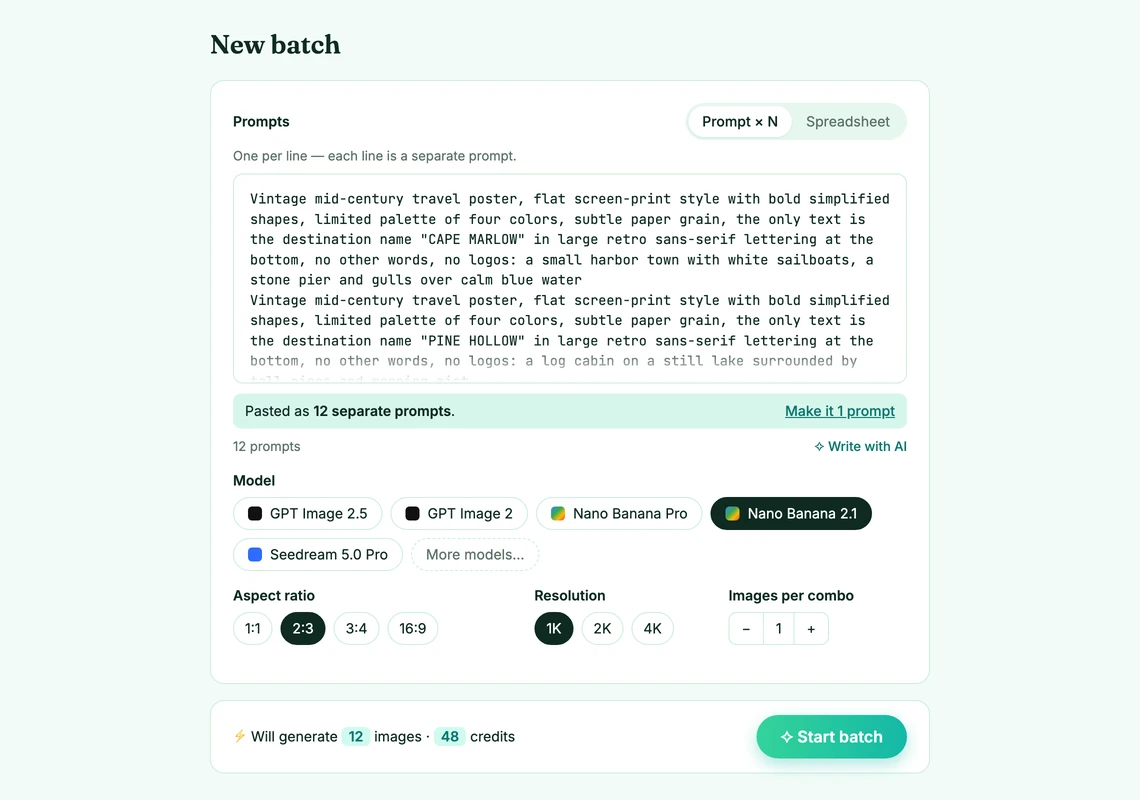
We ran a real batch for this article: twelve vintage travel posters for made-up places, one prompt per line, on Nano Banana 2.1 at 1K in 2:3. Every line starts with the same style sentence and ends with a different scene, and every poster carries exactly one word of text, its destination name, because legible text is the thing the Nano Banana family is known for. Here are the first four lines, which a new account can run on its free credits:
Vintage mid-century travel poster, flat screen-print style with bold simplified shapes, limited palette of four colors, subtle paper grain, the only text is the destination name "CAPE MARLOW" in large retro sans-serif lettering at the bottom, no other words, no logos: a small harbor town with white sailboats, a stone pier and gulls over calm blue water
Vintage mid-century travel poster, flat screen-print style with bold simplified shapes, limited palette of four colors, subtle paper grain, the only text is the destination name "PINE HOLLOW" in large retro sans-serif lettering at the bottom, no other words, no logos: a log cabin on a still lake surrounded by tall pines and morning mist
Vintage mid-century travel poster, flat screen-print style with bold simplified shapes, limited palette of four colors, subtle paper grain, the only text is the destination name "SILVER MESA" in large retro sans-serif lettering at the bottom, no other words, no logos: red desert mesas at sunset with a long empty road and saguaro cacti
Vintage mid-century travel poster, flat screen-print style with bold simplified shapes, limited palette of four colors, subtle paper grain, the only text is the destination name "FROSTWICK" in large retro sans-serif lettering at the bottom, no other words, no logos: a snowy mountain village with a steam train crossing a viaduct under peaks
And the other eight scenes, each with its own name, so you can rebuild the full dozen:
… "AMBER DUNES" …: golden sand dunes with a camel caravan silhouetted against a huge low sun
… "REEDMERE" …: a wetland at dawn with reeds, two herons and a wooden rowboat
… "HIGHCREST" …: an alpine meadow trail leading to a mountain hut below jagged snow peaks
… "CORAL KEY" …: a tropical island with palm trees, a turquoise lagoon and a small seaplane
… "VINEHAVEN" …: rolling vineyard hills with a stone farmhouse and cypress trees in late afternoon light
… "STONEBRIDGE" …: an old arched stone bridge over a river in a valley town with slate roofs
… "MOONSHORE" …: a night beach with a full moon, a long wooden pier and gentle silver waves
… "ORCHARD VALE" …: an apple orchard in autumn with a red barn and baskets of apples
The form read the pasted block as twelve prompts and showed the total before anything was charged: twelve images on Nano Banana 2.1 at 1K is 48 credits.
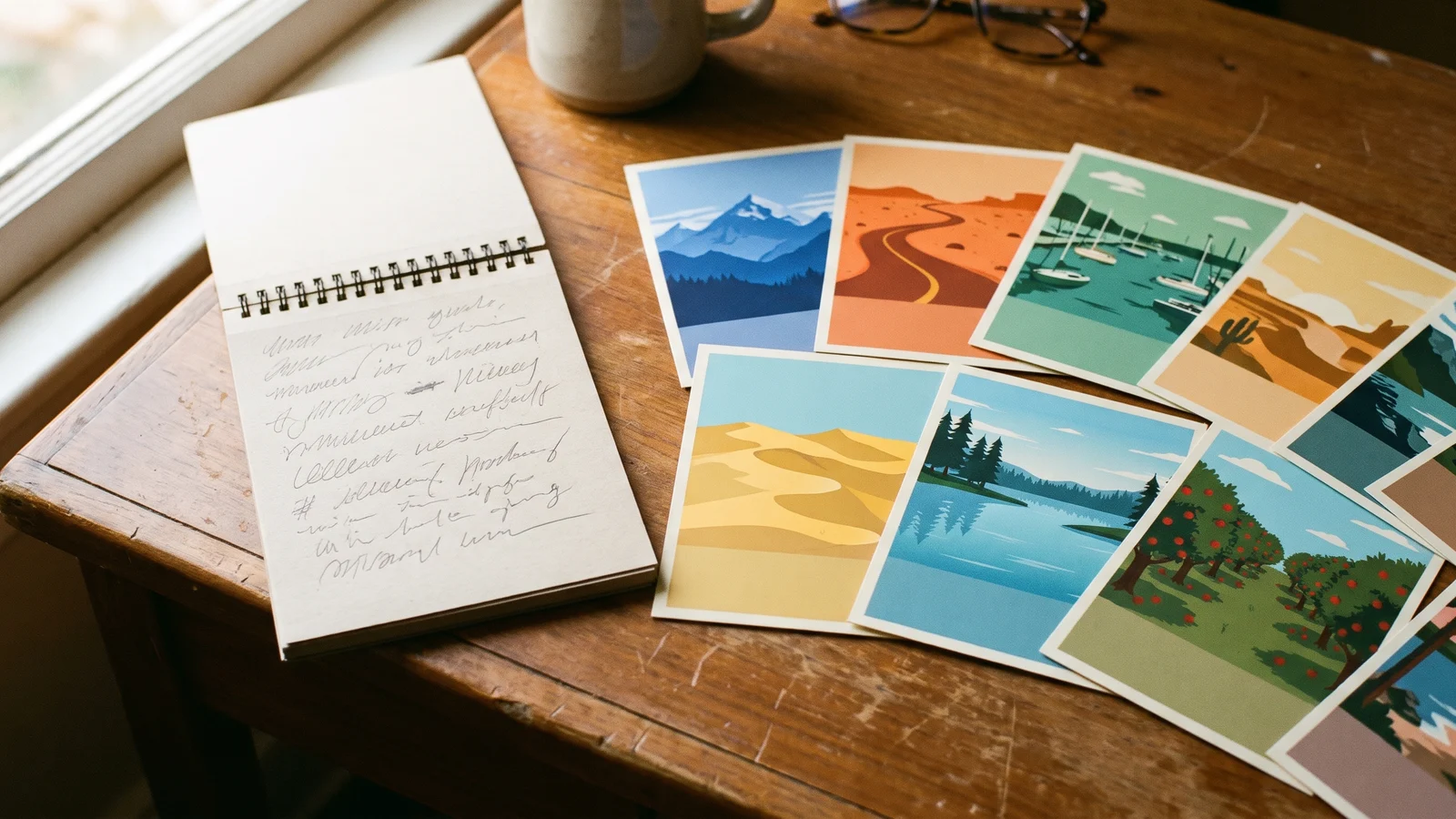
All twelve rendered in about a minute and came back as one ZIP. Unedited, no re-rolls:
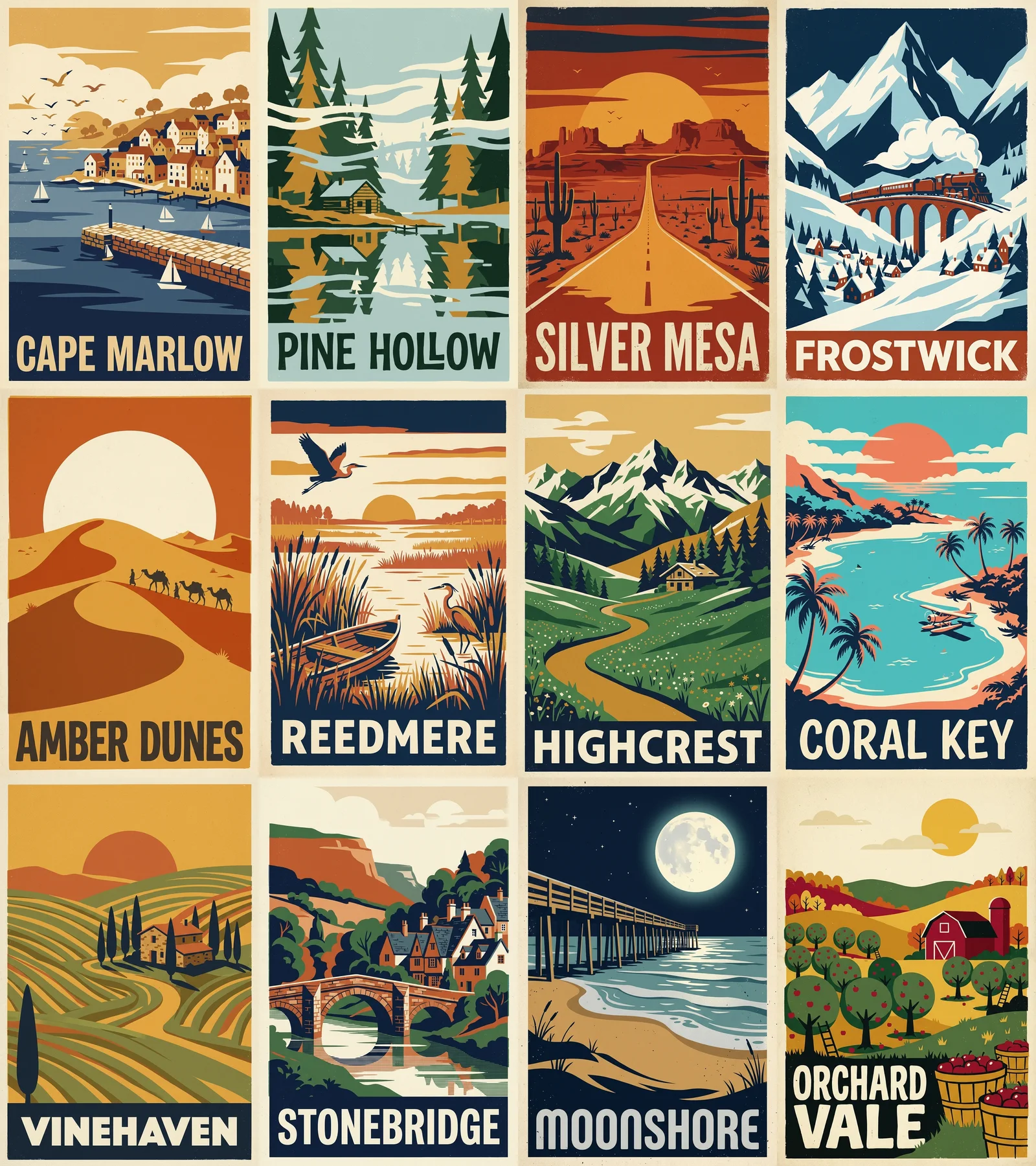
What held up: all twelve names are spelled correctly, the palette and the screen-print texture stayed consistent from the first poster to the last, and no poster picked up stray words or a logo. What did not: "ORCHARD VALE" wrapped onto two lines because the name is longer than the rest, and "AMBER DUNES" lost the solid colour band at the bottom that the other eleven have, so its title sits straight on the sand.
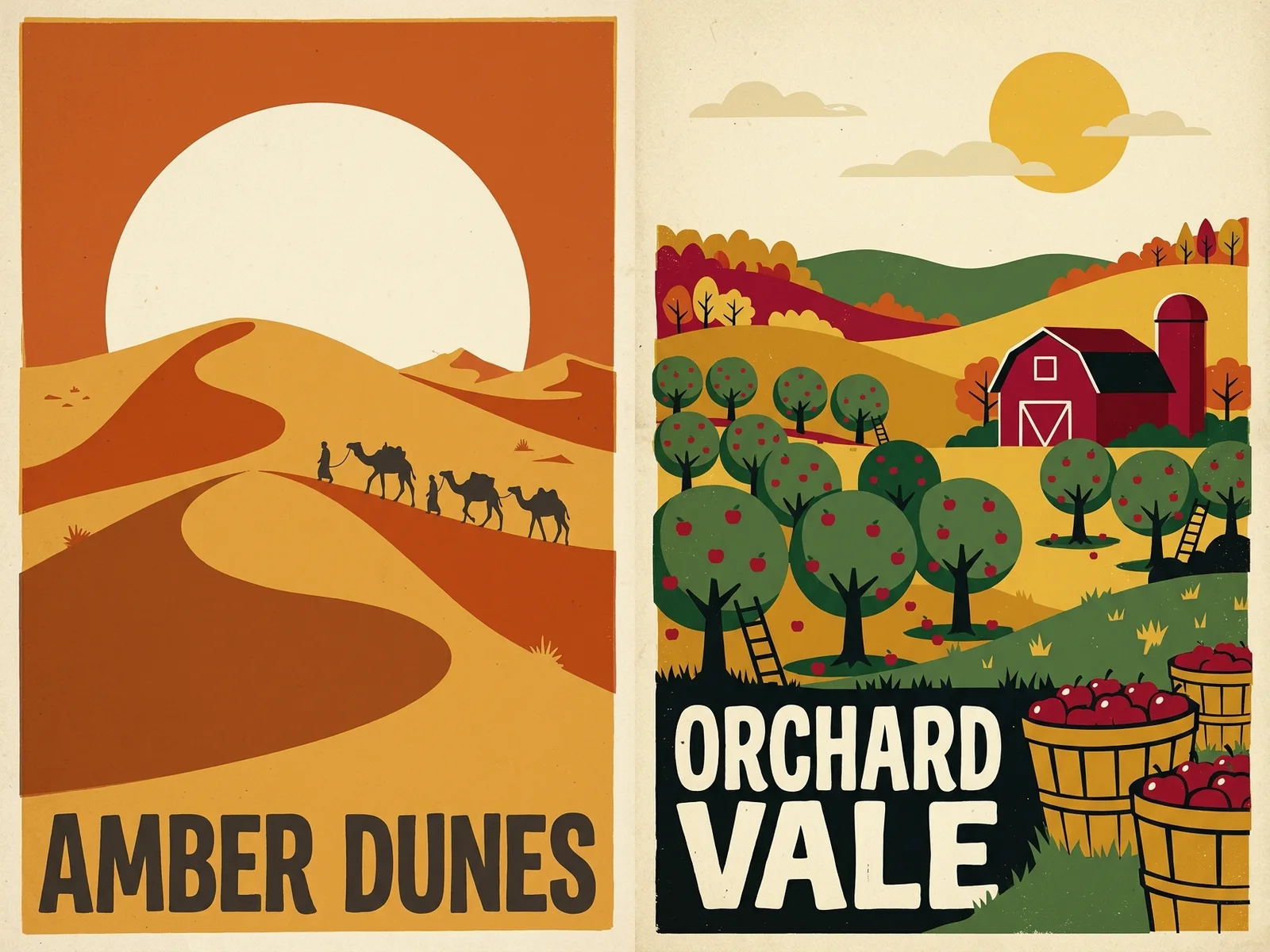
Neither is a disaster, and both are the kind of thing a grid view surfaces in a minute. Re-running those two is two lines pasted back into the form, not two more conversations.
What the batch form gives you that the chat window does not:
- A list in. Paste one prompt per line, or switch to Spreadsheet and upload a .csv, .xls or .xlsx. BulkImagen reads the column named
promptand ignores the rest, so IDs and notes can stay in your file. - Pasting is handled. If you paste a block of text, the form tells you whether it read it as one prompt or many, with a one-click switch either way.
- The price before the button. The line above Start batch reads Will generate N images · X credits. Nothing is charged until you press it.
- The same models, plus the rest. Nano Banana 2, 2.1, 2 Lite and Pro from Google sit next to OpenAI's GPT Image 2 and 2.5, Seedream, Flux, Qwen, Grok and Z-Image. Switch per batch; the models page compares them with current per-image prices.
- Reference images. Upload up to four references for the Nano Banana models and choose Per image to pair each reference with every prompt, or Combine images to put several references into each image.
- One ZIP out. Download the batch, or just the images you select, with optional WebP conversion and a CSV manifest that maps every file to the prompt that made it.
- Failures don't cost you. Images that fail are retried automatically and refunded if they still fail.
From a Gemini chat to a hundred images, step by step#
The best bulk workflow still starts in Gemini, because Gemini is very good at writing lists. Here is the whole loop.
Get the list written. Ask Gemini for the prompts, not the pictures. This instruction works well:
PromptWrite [N] image prompts for [what the set is for]. One prompt per line, no numbering, no blank lines. Start every line with this exact style sentence: "[your style sentence]". Then describe one specific subject per line. Vary the subject, never the style. Do not mention text, words or logos unless I ask for them.Or skip the chat and use Write with AI in the BulkImagen form: describe what you want in your own words and it writes one prompt per image, which costs no credits (the free plan allows a few requests a day).
Paste the list. The form reads one line as one prompt and tells you how many it found. A long multi-line description that should stay one prompt can be merged back with one click.
Set the batch once. Pick the model (Nano Banana 2.1 if you want what Gemini uses, Nano Banana Pro for the hardest text and detail), the aspect ratio and the resolution. These apply to every line, which is exactly what keeps a set consistent.
Read the total. Will generate 100 images · 400 credits on Nano Banana 2.1 at 1K, at the per-image prices on the models page. Every plan caps how many images one batch can hold, so a very long list may need to run as a few batches; the form says so before you start, and the pricing page lists the caps.
Start the batch and come back. The images render on BulkImagen's servers, so the tab can close. When they are done, download the ZIP with its CSV manifest.
Tip
Writing lines that come back as a set, and splitting a pasted list the way you meant it, is covered screen by screen in how to generate images from a list of prompts. If what you actually have is one idea and want many different images from it, read generate multiple images from one prompt first. And if you are choosing between the Nano Banana tiers, the Nano Banana model page lays out what each one costs and supports.
Side by side#
| Gemini app | Google Flow | Gemini API (Batch) | BulkImagen | |
|---|---|---|---|---|
| Images per request | One prompt at a time; no published count | Variations of one prompt via "number of outputs" | A JSONL file of requests, returned within a 24-hour target | A whole list per batch, within your plan's per-batch cap |
| Takes a pasted list or spreadsheet | No | No | Via your own code | Yes (.csv, .xls, .xlsx) |
| Bulk download | No, one "Download full size" per image | No bulk export in the docs | Files wherever your script puts them | One ZIP with a CSV manifest |
| Models | Nano Banana 2; 2.1 and Pro with a Google AI plan | Nano Banana Pro by default | All Nano Banana models | Nano Banana 2, 2.1, 2 Lite and Pro, plus OpenAI, ByteDance, Flux, Qwen, Grok and Z-Image |
| Usage | Compute budget every 5 hours, weekly cap, no image counts | 50 credits a day plus plan top-ups; per-image cost not published | Pay per image; 50% off in Batch; no free tier | Pay-per-image credits, no subscription |
| Code required | No | No | Yes | No |
What Gemini still does better#
This article is about bulk, so it is worth being clear about what you give up by leaving the chat. Gemini's conversational editing is excellent: "make the sky darker" on the image you are looking at just works. Through the API, Nano Banana 2.1 accepts far more reference images per request than a batch form exposes, which matters for complex composites. And Nano Banana Pro's reasoning is at its best when you are iterating on one hard image, not when you are running a hundred easy ones.
Use Gemini to find the look. Once you know what the hundred images should be, paste the list into a bulk image generator and let it run.
FAQ#
Can Gemini generate 100 images at once? No. As of October 2026 the Gemini app takes one prompt per message, and Google's own documentation says the model "won't always follow the exact number of image outputs" you ask for. There is no list input and no bulk download, so a hundred images means a hundred messages and a hundred downloads, inside a usage budget Google does not publish as a number.
How many images can Gemini generate per day? Google does not say. Limits are compute-based, refresh every five hours up to a weekly cap, and paid plans multiply them (2x on AI Plus, 4x on AI Pro, 5x or 20x more than Pro on AI Ultra). The help center confirms a "daily quota of Nano Banana 2 images" exists but gives no figure.
Is there a bulk image generator in Gemini or Google AI Studio? Not in Google's documentation. The Gemini app has no batch mode; AI Studio is a single-request playground; Google Flow can produce several variations of one prompt but has no list or CSV input. The Gemini Batch API is the official bulk route, and it requires code and a billing account.
Does Google AI Pro give unlimited image generation? No. AI Pro is described as "4x higher than standard limits," and even AI Ultra is a multiplier, not unlimited. You can buy extra AI credits to extend a limit you have hit.
Can I use Nano Banana without a Google AI plan? Yes: Nano Banana 2 is the free model in the Gemini app, with 1K downloads. Nano Banana 2.1 and "Redo with Pro" need a Google AI plan there. On BulkImagen every Nano Banana tier is available on pay-per-image credits with no subscription.
Does BulkImagen use the same model as Gemini? It runs Google's Nano Banana 2, 2.1, 2 Lite and Pro, the same family the Gemini app uses, alongside models from OpenAI, ByteDance and others. What differs is the workflow around the model: a list in, a ZIP out.
What does a hundred images cost? On Nano Banana 2.1 at 1K, four credits per image, so 400 credits; the twelve-poster batch above cost 48. Current per-image prices for every model and resolution are on the models page; credit packs are on the pricing page. A new account starts with enough free credits for a first small batch.
Can I use my own images? Yes. Upload reference images and choose Per image to pair each reference with every prompt, or Combine images to put several references into each image. The Nano Banana models accept up to four references per image on BulkImagen.