AI Food Photography: Shoot a Whole Recipe Set in One Batch
AI food photography for recipe blogs and menus: one style line, one dish per line, a matching set in one batch. Two models tested side by side, prompts inside.
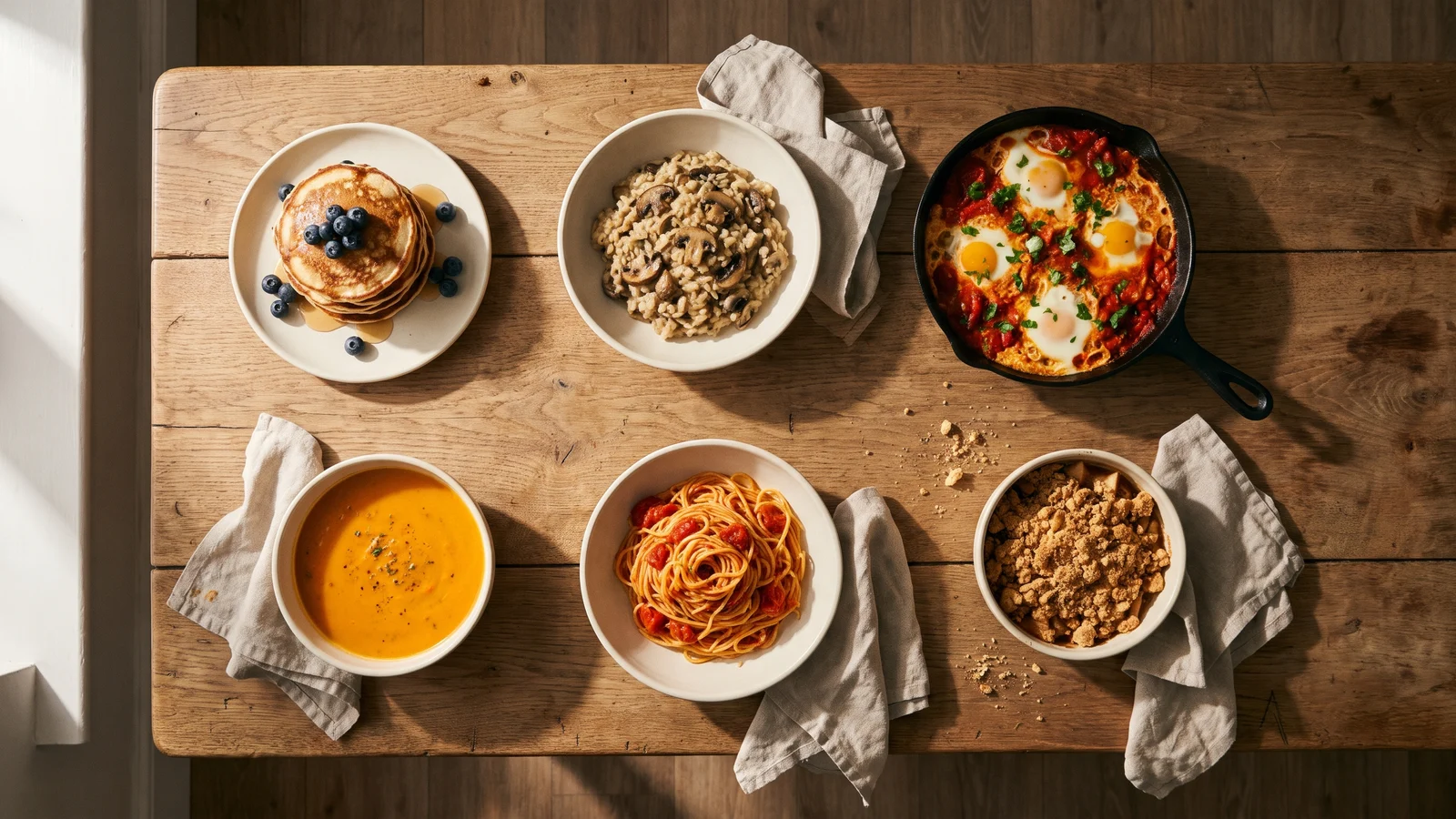
One good food photo is easy to get from an AI model. A set of them is the hard part. A recipe blog needs every post to look like it came out of the same kitchen. A menu needs thirty dishes that sit together on one page. Generate them one at a time and you get thirty different tables, thirty different light sources and a mix of plates. Each picture is fine on its own, and the set is a mess.
The fix is not a better prompt for each dish. It is one shared description of the shoot, written once and attached to every dish, then run as a single batch. That is how AI food photography stops looking like a pile of stock images and starts looking like a series.
We tested it on six home-cooked dishes, two models, one style line. Below are the results, the one thing to check before you publish, and prompts you can run as they are.
Generate in bulk
One prompt per line, hundreds of images, one ZIP to download.
Why single prompts give you a mismatched set#
Every food photo has a dozen decisions in it: where the light comes from, how hard it is, what the plate is made of, what the table is, how close the camera sits, how much is in focus, how warm the colors are. When you write one prompt per dish, the model fills every decision you did not make, and it fills them differently each time.
So the job is to make those decisions once. Everything that should stay the same across the set goes into a style line. Only the dish changes from line to line.
Write the style line#
This is the line we used for every image in this post:
Editorial food photography for a home-cooking recipe blog. Soft window light from the left, gentle shadows, matte handmade stoneware on a worn oak table with a rumpled oatmeal linen napkin, 45-degree angle, shallow depth of field, natural colors, real-world imperfections (crumbs, a drip of sauce, uneven edges), no text, no logos. Dish:What each part does:
- The use ("editorial food photography for a home-cooking recipe blog"). It sets the overall look: styled but lived-in, not a glossy restaurant ad.
- Light, with a direction ("soft window light from the left"). A fixed direction is what makes shadows fall the same way in every picture. Leave it out and the light moves from shot to shot.
- Props, named precisely ("matte handmade stoneware", "worn oak table", "oatmeal linen napkin"). Vague props ("a nice plate") change every time. Named materials and colors do not.
- Camera ("45-degree angle, shallow depth of field"). The angle is the single biggest thing that makes a set feel consistent. 45 degrees suits most plated food; overhead suits flat dishes like pizza or bowls.
- Imperfections ("crumbs, a drip of sauce, uneven edges"). This is the line that removes the plastic look. Perfect, symmetrical, spotless food is what reads as fake. A few crumbs read as real.
- "No text, no logos." It keeps the model from inventing a label on a jar or a brand on a napkin.
One dish per line#
Each line is the style line plus a short description of the dish. One line becomes one image. Describe the dish the way it should look on the plate, not the recipe: toppings, garnish, the vessel, one detail that makes it appetizing.
Here is the full test batch, ready to run:
Editorial food photography for a home-cooking recipe blog. Soft window light from the left, gentle shadows, matte handmade stoneware on a worn oak table with a rumpled oatmeal linen napkin, 45-degree angle, shallow depth of field, natural colors, real-world imperfections (crumbs, a drip of sauce, uneven edges), no text, no logos. Dish: a short stack of lemon ricotta pancakes with melting butter, maple syrup dripping down the side and a few fresh blueberries
Editorial food photography for a home-cooking recipe blog. Soft window light from the left, gentle shadows, matte handmade stoneware on a worn oak table with a rumpled oatmeal linen napkin, 45-degree angle, shallow depth of field, natural colors, real-world imperfections (crumbs, a drip of sauce, uneven edges), no text, no logos. Dish: creamy mushroom risotto in a shallow bowl, topped with sautéed cremini mushrooms, shaved parmesan and thyme leaves
Editorial food photography for a home-cooking recipe blog. Soft window light from the left, gentle shadows, matte handmade stoneware on a worn oak table with a rumpled oatmeal linen napkin, 45-degree angle, shallow depth of field, natural colors, real-world imperfections (crumbs, a drip of sauce, uneven edges), no text, no logos. Dish: shakshuka in a black cast-iron skillet, three runny-yolk eggs in spiced tomato sauce, crumbled feta, chopped parsley, torn crusty bread beside it
Editorial food photography for a home-cooking recipe blog. Soft window light from the left, gentle shadows, matte handmade stoneware on a worn oak table with a rumpled oatmeal linen napkin, 45-degree angle, shallow depth of field, natural colors, real-world imperfections (crumbs, a drip of sauce, uneven edges), no text, no logos. Dish: velvety roasted carrot and ginger soup in a bowl, swirl of coconut cream, toasted pumpkin seeds and a few cilantro leaves
Editorial food photography for a home-cooking recipe blog. Soft window light from the left, gentle shadows, matte handmade stoneware on a worn oak table with a rumpled oatmeal linen napkin, 45-degree angle, shallow depth of field, natural colors, real-world imperfections (crumbs, a drip of sauce, uneven edges), no text, no logos. Dish: spaghetti with fresh cherry tomato and basil sauce twirled in a bowl, a grating of parmesan, a basil sprig on top
Editorial food photography for a home-cooking recipe blog. Soft window light from the left, gentle shadows, matte handmade stoneware on a worn oak table with a rumpled oatmeal linen napkin, 45-degree angle, shallow depth of field, natural colors, real-world imperfections (crumbs, a drip of sauce, uneven edges), no text, no logos. Dish: warm apple crumble in a small oval baking dish, golden oat topping, a scoop of vanilla ice cream starting to melt
To use it for your own recipes, keep the style line and replace everything after "Dish:". If you have more dishes than fit in one batch, run the rest with the same style line; the look carries over because the words are the same.
How we tested#
- Batch: the six prompts above, one image each, 4:5 portrait. 4:5 is a common shape for recipe cards and social feeds and crops cleanly to a square.
- Models: the same six prompts on GPT Image 2 and on Nano Banana Pro, both at 2K. GPT Image 2 is 10 credits per image at 2K and returned 2048 × 2560 px; Nano Banana Pro is 6 credits and returned 1856 × 2304 px.
- No cherry-picking: each model ran once. Every image from both runs is in this post. All 12 came back on the first try.
Two models, two kinds of set#
Both models produced a set that looks like one shoot. They read the same style line in different ways, and the difference decides which one fits your page.
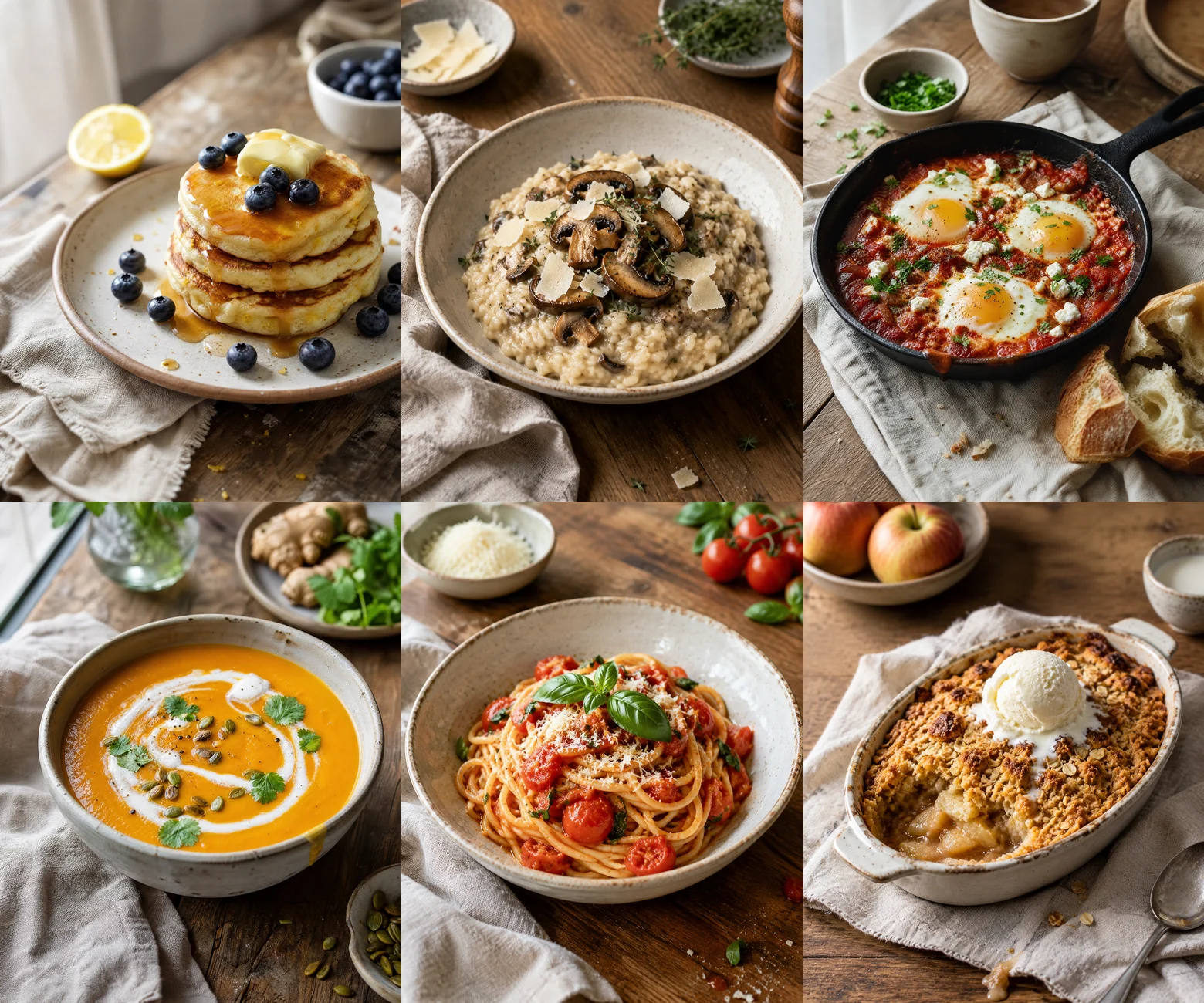
GPT Image 2 shoots close. The dish fills most of the frame (top image). Up close the detail holds: syrup catching the light, browned edges on the pancakes, the bloom on the blueberries, the grain in the bread. This is the hero shot at the top of a recipe post, where the reader should see the texture of the food. The trade-off is that the six frames are similar in layout: dish in the middle, a small prop bowl behind it.
Nano Banana Pro shoots the room. It pulled the camera back, and all six pictures share the same table, the same window and the same linen. Side by side they are the most convincing "one photographer, one afternoon" set of the two. The dish is smaller in the frame, which suits a recipe index, a category page or a menu grid more than a hero image. It is also 40% cheaper at 2K.
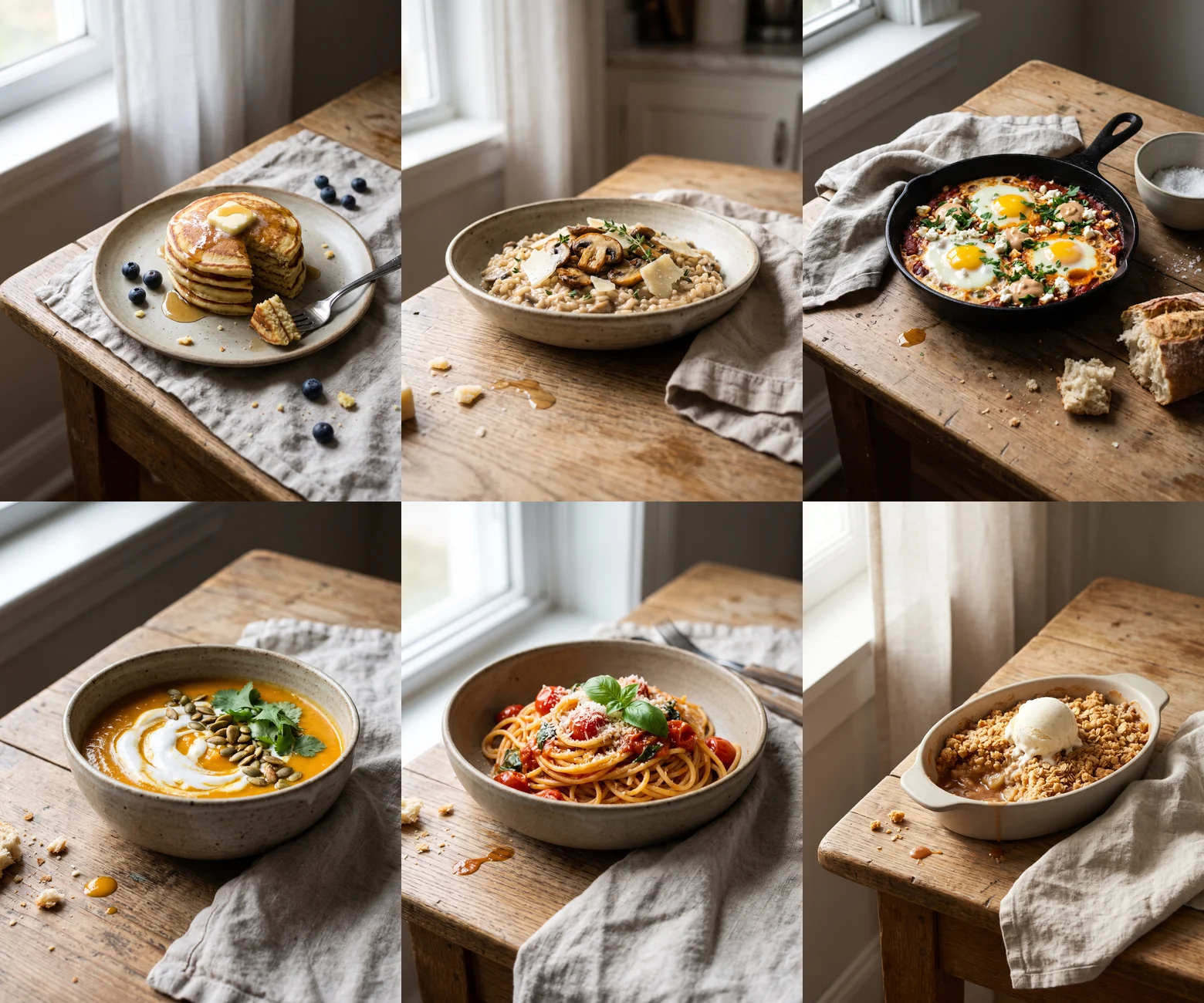
Both models added small props on their own: a cut lemon next to the lemon pancakes, a knob of ginger next to the ginger soup. Those fit the recipe and are harmless. The next one is not.
Check the food against the recipe#
The prompt asked for three eggs in the shakshuka. GPT Image 2 drew three. Nano Banana Pro drew four, and added dollops of a beige sauce (it looks like tahini) that was not in the prompt.
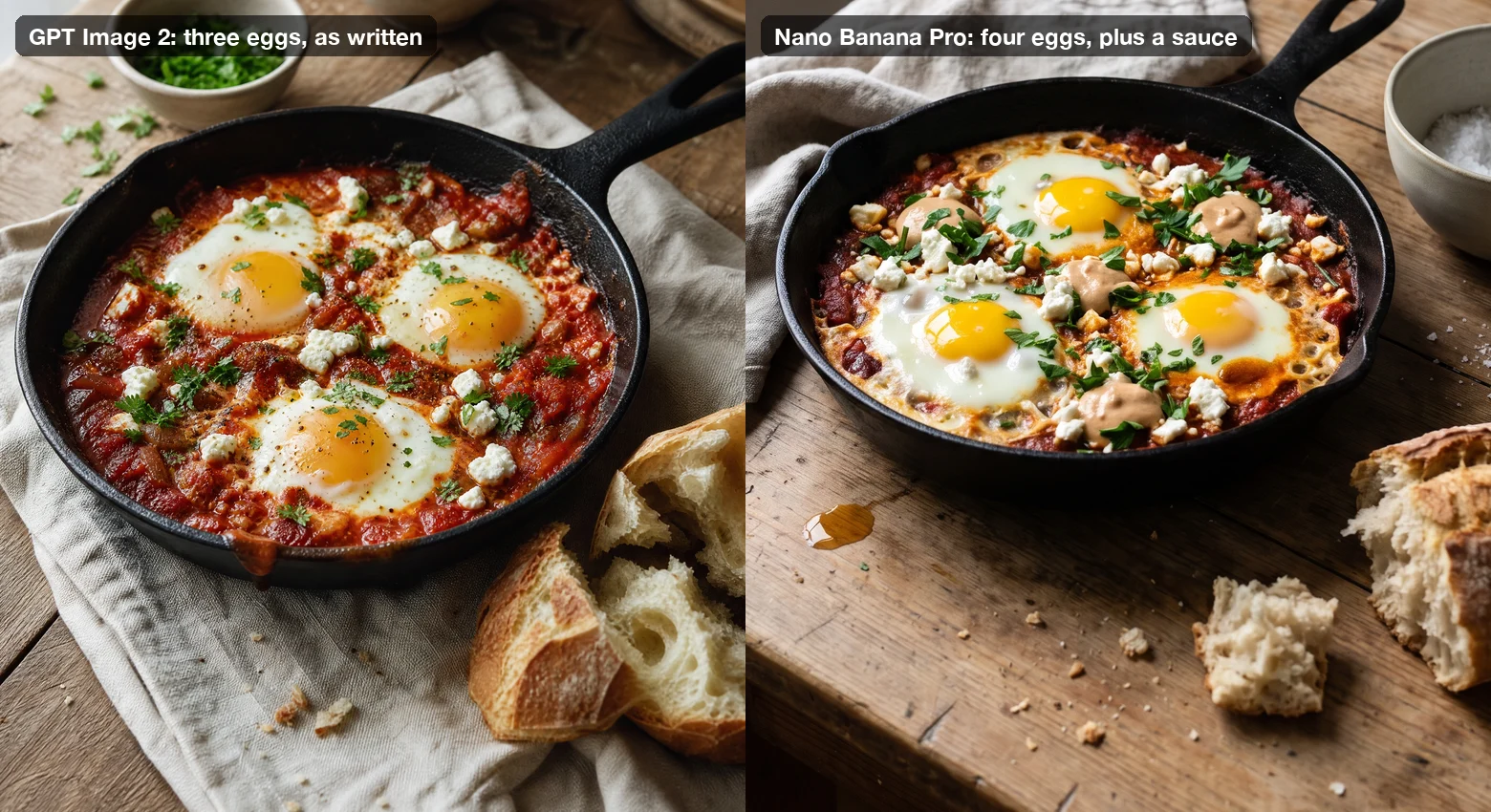
It looks good. It is also a different dish. If the picture sits above a recipe that says three eggs and no tahini, a careful reader notices, and a reader who cooks it gets something that does not look like the photo.
So before you publish, read every image against its recipe: counts, garnish, the vessel, anything that would make the cooked result look different. In our six-dish test this happened once, on one model, so treat it as something to check for, not a rate. If a picture is wrong, rerun just that line, and add what it should not have ("no other sauces") if the extra keeps coming back.
Warning
If the photo sells a specific dish (a menu, a delivery listing, an ad), it has to look like what the customer receives. Generated photos are a good fit for recipe posts, mood shots and placeholders while you wait for a real shoot. For dishes you sell, starting from a photo of the real plate is safer. See below.
Variations for menus and listings#
Swap the style line and keep the list of dishes. These have not been tested like the set above, so run one image before the whole menu:
A clean menu or delivery-app look, every dish on the same plain background from directly above:
Clean menu food photography, shot from directly above, each dish on a plain round white plate centered on a light warm-grey background, soft even daylight, no props, no hands, no text, no logos. Dish: [dish name and what is on top]A darker, moodier restaurant look:
Moody restaurant food photography, dark slate surface, single soft light from behind and to the right, deep shadows, rich warm tones, close 30-degree angle, shallow depth of field, no text, no logos. Dish: [dish name and what is on top]If you already have phone photos of your real dishes, you can keep the food and change only the setting: add the photos as reference images in Per image mode and describe the new background. It is a redraw, not a cutout, so details can move; our guide to batch editing photos with AI shows what holds and what does not.
Tip
Downloaded files are named from the start of each prompt. With the style line first, every file begins the same way. If you want files named by dish, put the dish first and the style line after it.
Checklist#
- One style line: use, light with a direction, named props, camera angle, imperfections, "no text, no logos"
- One dish per line, described as it looks on the plate
- One aspect ratio for the whole set (4:5 or 1:1 for recipe cards and feeds)
- Close hero shots: GPT Image 2. A wider, matching set at lower cost: Nano Banana Pro
- Read every image against its recipe before it goes live
- Rerun single lines, not the whole batch
FAQ#
Can AI food photography look real? It can, and the imperfections line does most of the work. In our test both models produced photos with crumbs, drips, uneven edges and natural light that pass at normal viewing size. Food that is too perfect is what gives AI images away.
Which model is best for food photos? In this test GPT Image 2 gave the strongest close-ups and followed the recipe exactly. Nano Banana Pro gave the most consistent set and costs less, but improvised once. The models page compares prices and features for every model in the form.
How many recipe photos can I make at once? One line per dish, as many lines as your plan's batch size allows. Batch limits are on the pricing page. A larger menu can go in several batches with the same style line.
What did this test cost? Six images on GPT Image 2 at 2K were 60 credits; the same six on Nano Banana Pro at 2K were 36. At 1K both models cost 5 credits per image.
Should I use AI photos on a menu? For dishes you sell, the photo should match what arrives at the table. Use generated photos for recipes, mood and placeholders, and base menu photos on your real dishes.
When you have a list of recipes, a bulk image generator turns it into one batch: one style line, one dish per line, and a set that looks like it was shot on the same afternoon. For more on writing lists that run in one go, see how to generate images from a list of prompts.