Black Friday Ad Creatives with AI: Every Banner Size for Your Sale in One Run
A black friday ad creatives AI workflow: one key visual with a discount badge, then every size for Meta ads, Stories, site banners and email headers in one run.
On this page
- What a Black Friday creative set actually needs
- Step 1: Start from one clean product photo
- Step 2: Batch four key visual concepts with the badge built in
- Step 3: Recompose the winner for every placement
- Step 4: Download at the exact pixel sizes
- Step 5: Put live text on the web banners
- Keep the discount honest
- Why build the whole set in bulk
- Black Friday creative checklist
- FAQ
Black Friday is not one ad. It is the same offer in five or six shapes: a 4:5 for the Facebook feed, a square for Instagram, a full-screen 9:16 for Stories and Reels, a wide hero for the sale page, a header for the email that goes out on Thursday night — and then all of it again for Cyber Monday. Most of the work is not the idea, it is resizing the idea without breaking it.
This guide is a black friday ad creatives AI workflow built around that problem. You make one key visual with the discount badge baked in, pick the winner, and then let the AI recompose that exact picture for every placement, with empty space left where a live headline will go. Every image in this article came out of one run with BulkImagen for an invented, unbranded serum, and the full set cost 60 credits including the cover.
Black Friday 2026 falls on Friday, November 27, and Cyber Monday on November 30. If your ads need review time and a round of testing, the creatives should be finished in the first half of November.
Generate in bulk
One prompt per line, hundreds of images, one ZIP to download.
What a Black Friday creative set actually needs#
Before generating anything, write down the placements. These are the sizes the platforms themselves recommend, checked against Meta's Ads Guide and Business Help Center, Google Ads Help and Mailchimp's help pages in October 2026:
| Placement | Ratio | Recommended size | Note |
|---|---|---|---|
| Facebook feed | 4:5 (or 1:1) | 1440 × 1800 | Meta recommends 4:5 for single-image ads in the Facebook feed |
| Instagram feed | 1:1 (or 4:5) | 1440 × 1440 | Meta recommends 1:1 for the Instagram feed |
| Stories and Reels | 9:16 | 1080 × 1920 | Keep the top, bottom and side edges free of text and logos |
| Google responsive display | 1.91:1 and 1:1 (9:16 optional) | 1200 × 628, 1200 × 1200 | Google advises against text overlaid on the image |
| Website hero banner | Wide, e.g. 21:9 | Depends on your theme | The headline is usually live text on top of the image |
| Email header | About 2:1 | 1200 × 600 | Mailchimp's new builder is 660 px wide; images of 660–1320 px are recommended |
Two things stand out. First, the social placements want the offer in the image — a Story is gone in a few seconds, and the badge is what stops the thumb. Second, the web placements want the opposite: Google recommends against overlaid text because it becomes unreadable in small ad sizes, and a website or email hero looks better and stays accessible when the headline is real text set by your theme. So a good Black Friday set is really two families: badge versions for social, clean "copy space" versions for the web.
Step 1: Start from one clean product photo#
Everything downstream is built from your product, so start with a clean, well-lit photo of it. If you already have a packshot, use it. We generated one for an invented brand:
Studio product photo of a single unbranded skincare serum bottle: frosted glass dropper bottle, 30 ml size, soft rounded shoulders, matte black rubber bulb and black collar, pale blush-pink tinted serum visible through the frosted glass, a small blank white label with only a thin simple line drawing of a leaf. Standing upright on a seamless light gray background, soft even studio light, gentle shadow, sharp focus, catalog packshot. No text, no letters, no logos, no brand names.If you sell many products, our guide to bulk product photos with AI shows how to turn one reference photo per product into a full set of catalog shots first. The sale ads then reuse those.
Step 2: Batch four key visual concepts with the badge built in#
Upload the product photo as a reference image, set the reference mode to Per image, and put one concept per line in the prompt box. Per image pairs the reference with every line, so four lines give four different ads of the same product. We used 4:5, the Facebook feed shape, at 2K.
Each line has three parts: the scene, a product protection sentence, and a badge sentence. The protection sentence stops the model from redesigning your bottle:
Keep the product from the reference image exactly as it is: same frosted glass bottle shape and proportions, same black dropper bulb and collar, same blush-pink serum, same small white label with the leaf line drawing; do not redesign it and do not add logos or text to the bottle.The badge sentence asks for the discount and nothing else — the more text you ask an image model for, the more chances it has to misspell something:
Add one round sale badge in the top-right corner with exactly two lines of text: 'BLACK FRIDAY' and '-30%'. That badge is the only text in the image: no other words, letters, numbers or logos anywhere. Leave the upper-left third calm and uncluttered for a headline. Professional ecommerce sale ad photograph.Here are the four scene lines with both sentences included. Upload your own product photo, swap the product details and the discount, and run them as one batch:
Black Friday ad: the serum bottle standing on black satin fabric with soft folds, warm gold rim light, a few small gold confetti flecks, deep black background. Keep the product from the reference image exactly as it is: same frosted glass bottle shape and proportions, same black dropper bulb and collar, same blush-pink serum, same small white label with the leaf line drawing; do not redesign it and do not add logos or text to the bottle. Add one round sale badge in the top-right corner with exactly two lines of text: 'BLACK FRIDAY' and '-30%'. That badge is the only text in the image: no other words, letters, numbers or logos anywhere. Leave the upper-left third calm and uncluttered for a headline. Professional ecommerce sale ad photograph. Badge: matte gold circle with black text.
Black Friday ad: the serum bottle in front of a stack of matte black gift boxes tied with thin blush-pink satin ribbon, dark charcoal background, soft spotlight from above. Keep the product from the reference image exactly as it is: same frosted glass bottle shape and proportions, same black dropper bulb and collar, same blush-pink serum, same small white label with the leaf line drawing; do not redesign it and do not add logos or text to the bottle. Add one round sale badge in the top-right corner with exactly two lines of text: 'BLACK FRIDAY' and '-30%'. That badge is the only text in the image: no other words, letters, numbers or logos anywhere. Leave the upper-left third calm and uncluttered for a headline. Professional ecommerce sale ad photograph. Badge: blush-pink circle with black text.
Black Friday ad: bold graphic color-block set, the serum bottle standing on a deep red cylinder plinth against a solid black wall, hard directional light with one crisp shadow. Keep the product from the reference image exactly as it is: same frosted glass bottle shape and proportions, same black dropper bulb and collar, same blush-pink serum, same small white label with the leaf line drawing; do not redesign it and do not add logos or text to the bottle. Add one round sale badge in the top-right corner with exactly two lines of text: 'BLACK FRIDAY' and '-30%'. That badge is the only text in the image: no other words, letters, numbers or logos anywhere. Leave the upper-left third calm and uncluttered for a headline. Professional ecommerce sale ad photograph. Badge: white circle with red text.
Black Friday ad: the serum bottle on a dark slate surface with scattered blush rose petals and a single beam of light, moody low-key lighting, black background. Keep the product from the reference image exactly as it is: same frosted glass bottle shape and proportions, same black dropper bulb and collar, same blush-pink serum, same small white label with the leaf line drawing; do not redesign it and do not add logos or text to the bottle. Add one round sale badge in the top-right corner with exactly two lines of text: 'BLACK FRIDAY' and '-30%'. That badge is the only text in the image: no other words, letters, numbers or logos anywhere. Leave the upper-left third calm and uncluttered for a headline. Professional ecommerce sale ad photograph. Badge: black circle with a thin gold ring and white text.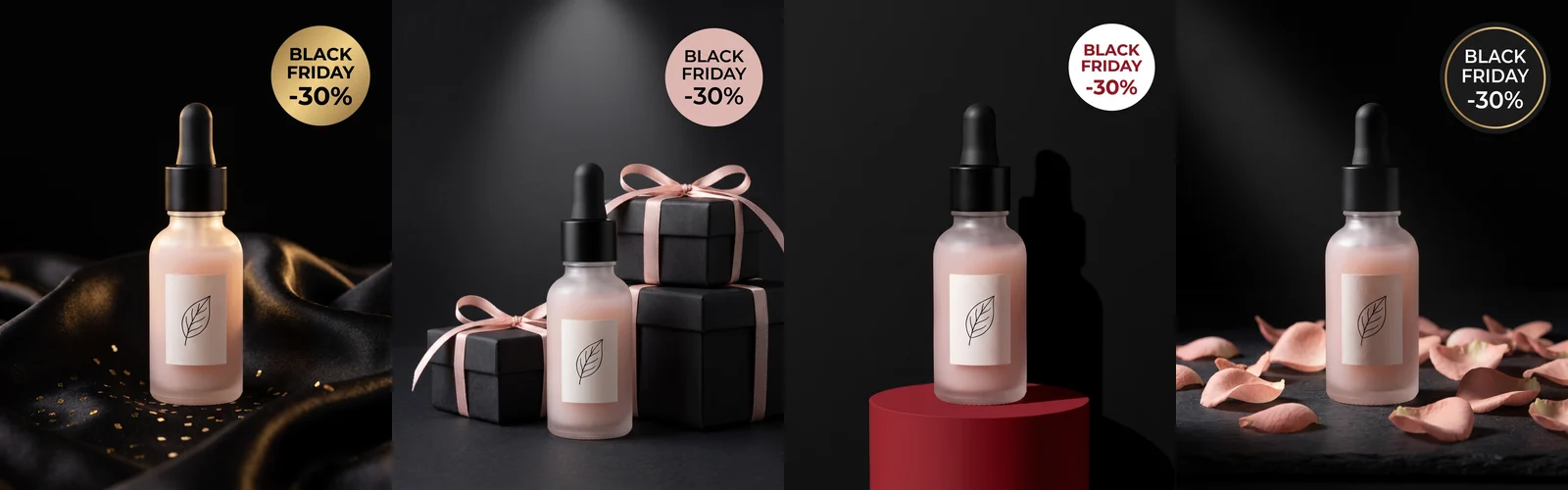
All four badges came back spelled correctly, the bottle and its leaf label survived in every scene, and nothing else in the frames picked up stray lettering. We used Nano Banana Pro, which handles short on-image text well; see all models and prices if you want to compare others. The batch cost 24 credits.
Tip
Treat the four concepts as an A/B test, not a beauty contest. Black-and-gold, gift boxes, bold color and moody petals speak to different buyers. If you have the budget, run two of them for the first days and keep the one with the lower cost per purchase.
Step 3: Recompose the winner for every placement#
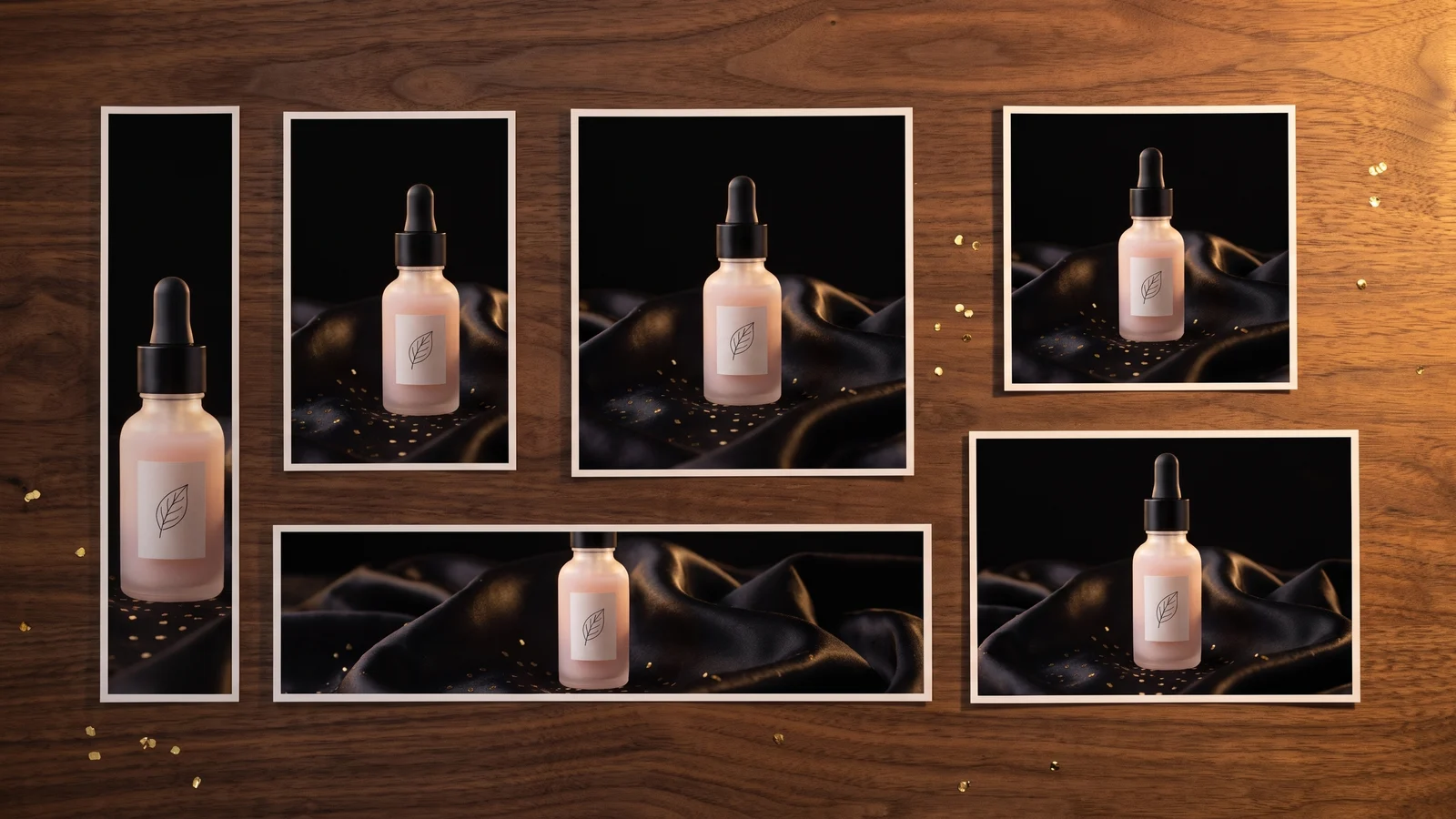
We picked the black satin and gold concept. Now the job is to get the same picture in every other shape without it turning into a different ad.
The aspect ratio is a setting for the whole batch, so this step is one short batch per ratio: upload the winning ad as the reference, choose the ratio, and run a "recompose" prompt. Each one takes a minute. For the social sizes we kept the badge:
Recompose this Black Friday ad as a full-screen vertical 9:16 story. Keep everything from the reference ad exactly as it is: the same frosted serum bottle with black dropper, blush-pink serum and white leaf label, the same black satin, gold rim light, gold confetti and deep black background, the same photographic style. Do not redesign the product and do not add logos. Place the bottle slightly below center, with more black satin below it. Keep the same matte gold round badge with exactly the text 'BLACK FRIDAY' and '-30%', placed in the upper third but well inside the frame, away from the top and side edges. No other text anywhere.For the web sizes we removed the badge and asked for empty space on the left instead, because the headline will be live text:
Recompose this Black Friday ad as an ultra-wide 21:9 website hero banner background. Keep everything from the reference ad exactly as it is: the same frosted serum bottle with black dropper, blush-pink serum and white leaf label, the same black satin, gold rim light, gold confetti and deep black background, the same photographic style. Do not redesign the product and do not add logos. Place the bottle and satin in the right quarter of the frame. Leave the left two thirds as calm, empty, softly lit black space for a headline that will be added later. No badge, no text, no letters, no numbers anywhere.The square and 16:9 versions use the same prompts with the ratio and placement words swapped. Here is the full set: the original 4:5 concept and four recomposed versions.
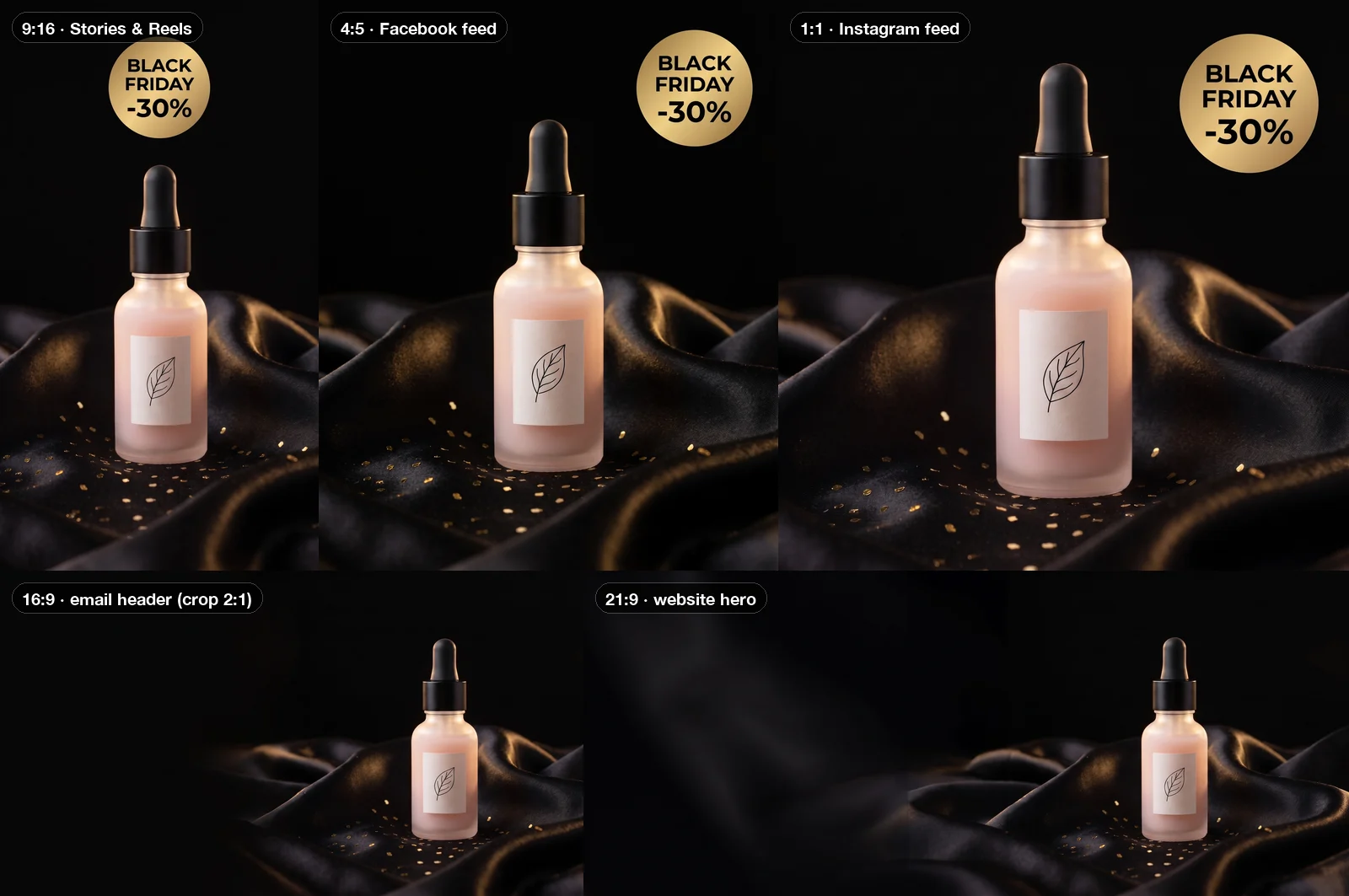
Notice what stayed fixed: the bottle, the leaf label, the satin, the gold light and the badge design. The model didn't stretch or crop the 4:5 — it rebuilt the scene for each frame, which is why the 21:9 has real satin running across the width instead of a blurred extension.
Note
Check the Story before you upload it. Meta asks you to keep the edges of 9:16 ads free of key text, and our badge landed fairly high in the frame. Ads Manager's safe-zone preview shows whether the profile bar would cover it; if it would, regenerate that one image and ask for the badge lower in the frame.
If you run several products, this step scales without extra work. Upload the winning ad of every product at once in Per image mode and run the 9:16 prompt: one batch gives every product its Story. Do the same for each ratio, and ten products in five shapes is still five short batches. Our guide to on-brand product photos for new SKUs shows how to keep that kind of template stable across launches.
Step 4: Download at the exact pixel sizes#
Image models work in ratios and resolution tiers, not exact pixels, so the last step happens in the download. On the batch page, the Size control has presets for exactly these jobs — Instagram post (1080 × 1080), Instagram portrait (1080 × 1350), Instagram story (1080 × 1920) and Email hero (1200 × 600) — plus a custom size for anything else, such as Google's 1200 × 628. Pick one, drag the crop box on the thumbnail if you want a different framing, and the download comes out at exactly those pixels. You can switch the format to WebP or JPEG in the same place to keep files small, which matters for Google's 5120 KB image limit and for email.
For the email header we downloaded the 16:9 version with the Email hero preset; cropping 16:9 down to 2:1 only trims a little sky and satin. (If you'd rather render 2:1 directly, GPT Image 2 offers 2:1 and 3:1 as native ratios.)
Step 5: Put live text on the web banners#
The copy-space versions are backgrounds. The headline, dates and button go on top in your site builder or email editor as real text — it stays sharp on every screen, it's readable by screen readers and search engines, and you can change "30%" to "40%" on Cyber Monday without generating anything. Here is the 21:9 version as a sale-page hero:
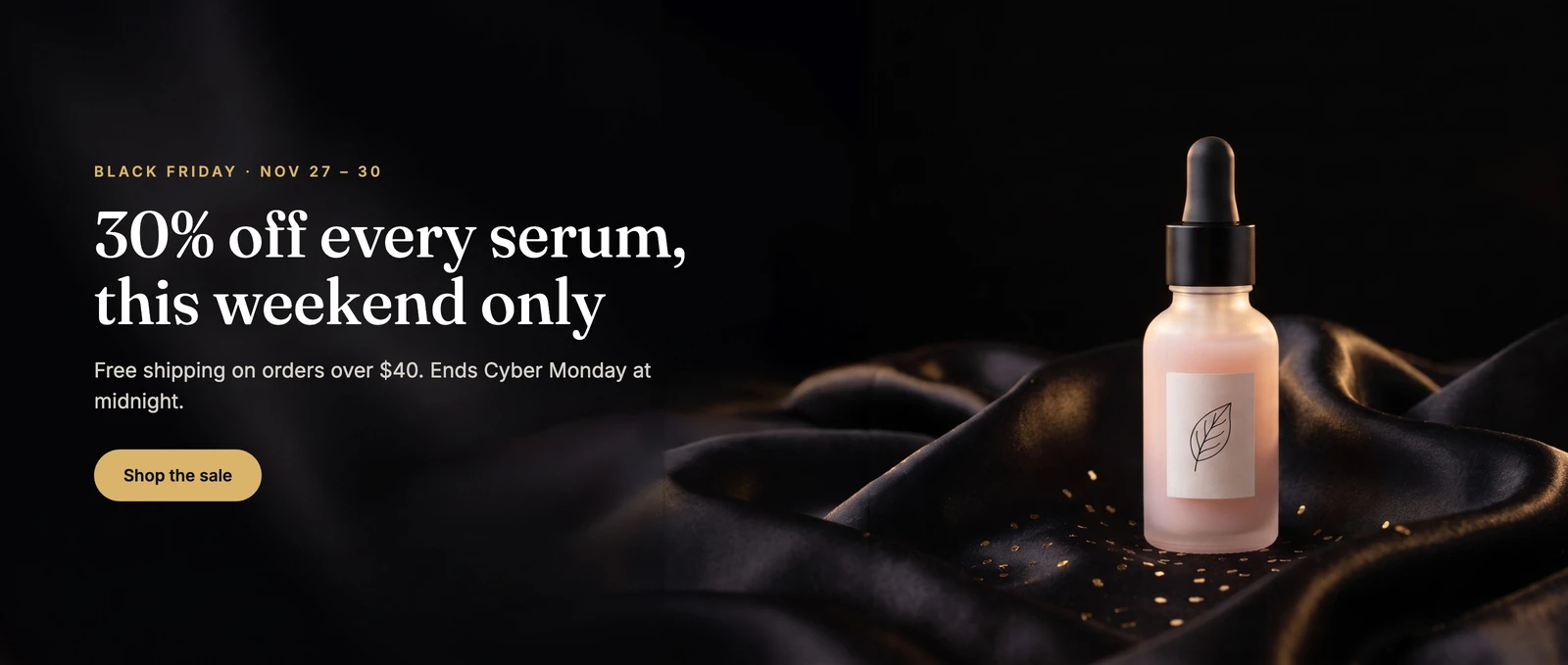
The left two thirds of the image were generated empty, so the text sits on clean black instead of fighting the product. That empty space is the reason to ask for it in the prompt instead of hoping the composition leaves room.
Keep the discount honest#
AI makes it trivial to put "-70%" on a badge, which is exactly why the number deserves a second look before the ads go live:
- United States. The FTC's Guides Against Deceptive Pricing (16 CFR 233.1) say a former-price comparison is legitimate only if the former price is "the actual, bona fide price at which the article was offered to the public on a regular basis for a reasonably substantial period of time". Raising the price in October to advertise a bigger cut in November is the textbook example of a false bargain.
- European Union. Under Article 6a of the Price Indication Directive (as amended by the Omnibus Directive), any announced price reduction must show the prior price, defined as the lowest price the trader applied in the 30 days before the reduction.
Warning
This is not legal advice, and rules vary by country. The safe habit: the percentage on the badge should match a real, recent regular price, and in the EU the "was" price should be the lowest one of the last 30 days.
Why build the whole set in bulk#
Cyber Week is the busiest stretch of the US online shopping year: Adobe Analytics reported $11.8 billion in US online spending on Black Friday 2025, up 9.1% from the year before, $14.25 billion on Cyber Monday, and $44.2 billion over the five days from Thanksgiving to Cyber Monday. Every brand is in the feed at the same time, ads tire quickly, and the winning concept usually needs a fresh variant halfway through the week.
That is where a bulk image generator earns its place. The concept round is one batch, every placement is a short batch from the winner, and a mid-week refresh — new background, new discount, Cyber Monday badge — is the same prompts with one sentence changed. If you want a ready-made starting point for ad images in general, try the AI ad creative generator; if your catalog photos still need a consistent look before the sale, read product photos with consistent backgrounds.
What it cost us, at Nano Banana Pro 2K pricing (6 credits per image): 6 for the product photo, 24 for four concepts, 24 for four recomposed sizes and 6 for this article's cover — 60 credits in total.
Black Friday creative checklist#
- List every placement and its ratio before you generate anything.
- Start from a clean product photo and use Per image mode so every line keeps your real product.
- Put a product protection sentence in every prompt.
- Ask for the badge as exact text, and make it the only text in the image.
- Batch three or four concepts, test two, keep the winner.
- Recompose the winner per ratio: badge versions for social, copy-space versions for web and email.
- Download with the Size presets and check the 9:16 safe zone.
- Make sure the discount on the badge is one you can back up.
- Prepare the Cyber Monday variant now — one changed sentence, one more run.
FAQ#
Can AI write the discount text on the ad correctly? Short text, yes. In our run all four "BLACK FRIDAY -30%" badges and both recomposed badges (square and Story) were spelled correctly. Keep it to a few words, quote the exact text in the prompt, and say it is the only text in the image. Put longer copy — headlines, terms, dates — in the ad platform's text fields or as live text on the page.
Can one batch output several aspect ratios? No, the ratio is set per batch. The workflow above uses one batch for the concepts and then one short batch per ratio, each using the winning ad as its reference. With several products, each of those batches covers every product at once.
What sizes do I need for Facebook and Instagram ads? Meta recommends 4:5 at 1440 × 1800 for the Facebook feed, 1:1 at 1440 × 1440 for the Instagram feed, and 9:16 at 1080 × 1920 for Stories and Reels. Keep text away from the edges of 9:16 images.
Should a Google display ad have text in the image? Google advises against overlaid text in responsive display ad images, because it becomes unreadable in small sizes. Use the copy-space versions there and let Google add your headline.
Will the product change between sizes? Not if you protect it. With the reference image and the protection sentence, the bottle, dropper and label stayed the same in all eight ad images. Check fine details like labels before you publish anyway.
Can I reuse this for Cyber Monday? Yes. Change the badge sentence to "CYBER MONDAY" and your new discount, and run the recompose prompts again with the same reference.