AI Ad Creative Variations: 12 Test Ads from Two Product Photos
Make AI ad creative variations to test: one photo per product, six ad concepts each, one batch for every SKU, then run a fair test on Meta or Google Ads.
On this page
- Why test more than one creative
- Variations that are worth testing
- Step 1: One clean photo per product
- Step 2: Write one line per concept
- Step 3: Run every product against every concept
- Step 4: Check every image before it costs you ad money
- Step 5: Run a fair test
- Step 6: Refresh before fatigue sets in
- What not to make
- A checklist for your first round
- FAQ
Most ad accounts don't fail because the targeting is wrong. They fail because there is only one picture to show, and when it stops working there is nothing to replace it with. A studio day per concept is out of reach for a small brand, so the usual answer is to keep running the same photo until it burns out.
AI ad creative variations change that arithmetic. From one clean photo of each product, you can render half a dozen genuinely different ad concepts — different scenes, different reasons to buy — in a single batch, put them in front of real audiences, and keep the one that wins. This guide walks through the whole loop with a real example: two flavors of a small-batch hot sauce, six concepts each, twelve ads from one batch.
The short answer: upload one clean photo per product, write each ad concept as one line with a sentence that keeps the product unchanged, run every product against every concept in one batch, check each image, then test them on your ad platform one variable at a time.
Generate in bulk
One prompt per line, hundreds of images, one ZIP to download.
Why test more than one creative#
The ad platforms are built to choose between creatives, and they ask for several:
- Meta lets you upload up to 10 images or videos for a single ad, according to its Business Help Center, and its A/B test tool can compare ads that differ only in the image.
- Google Demand Gen accepts up to 20 image assets per ad, and Google's own guidance is to "upload 3 of each aspect orientation for maximum placement coverage." Performance Max also allows up to 20 images per asset group.
- Creatives wear out. Meta's Ads Manager shows a Creative fatigue status when an ad's cost per result reaches twice what similar ads cost in the past, and a Creative limited status before that. Its help page says fatigue happens "when an audience has seen the same creative too many times."
None of that works with one photo. The point of bulk generation here is not volume for its own sake; it is having real alternatives ready before the first ad tires.
Variations that are worth testing#
A useful test changes why someone should care, not the shade of the background. Each concept below is a different reason to stop scrolling:
| Concept | What it tests |
|---|---|
| Bold backdrop | Does a clean, high-contrast product shot stop the scroll on its own? |
| Ingredients | Do people buy the story of what is inside? |
| On the food | Does showing the moment of use beat showing the product? |
| Gift | Is this a gift purchase rather than a pantry purchase? |
| Picnic | Does a social, lifestyle setting pull more than a studio shot? |
| Headline | Does a short line of copy on the image help or hurt? |
Six concepts is a reasonable first round: enough spread to learn something, few enough that each one gets budget. Write your own list from what your customers actually say about the product.
Step 1: One clean photo per product#
Start from the photo you already have of each product: straight-on, plain background, label facing the camera, nothing cropped. For this example we rendered a reference photo of an unbranded hot sauce bottle with a kraft label and a simple chili drawing.
The second flavor taught us something. Rendered separately from a text description, the green version came back as a different flask-shaped bottle, shot from above, with "150 ml" printed on the label because we had mentioned the size in the prompt. Two products from the same brand should not look like they come from two brands. So we made the green one from the red photo instead: same reference, one instruction to change only the sauce color.
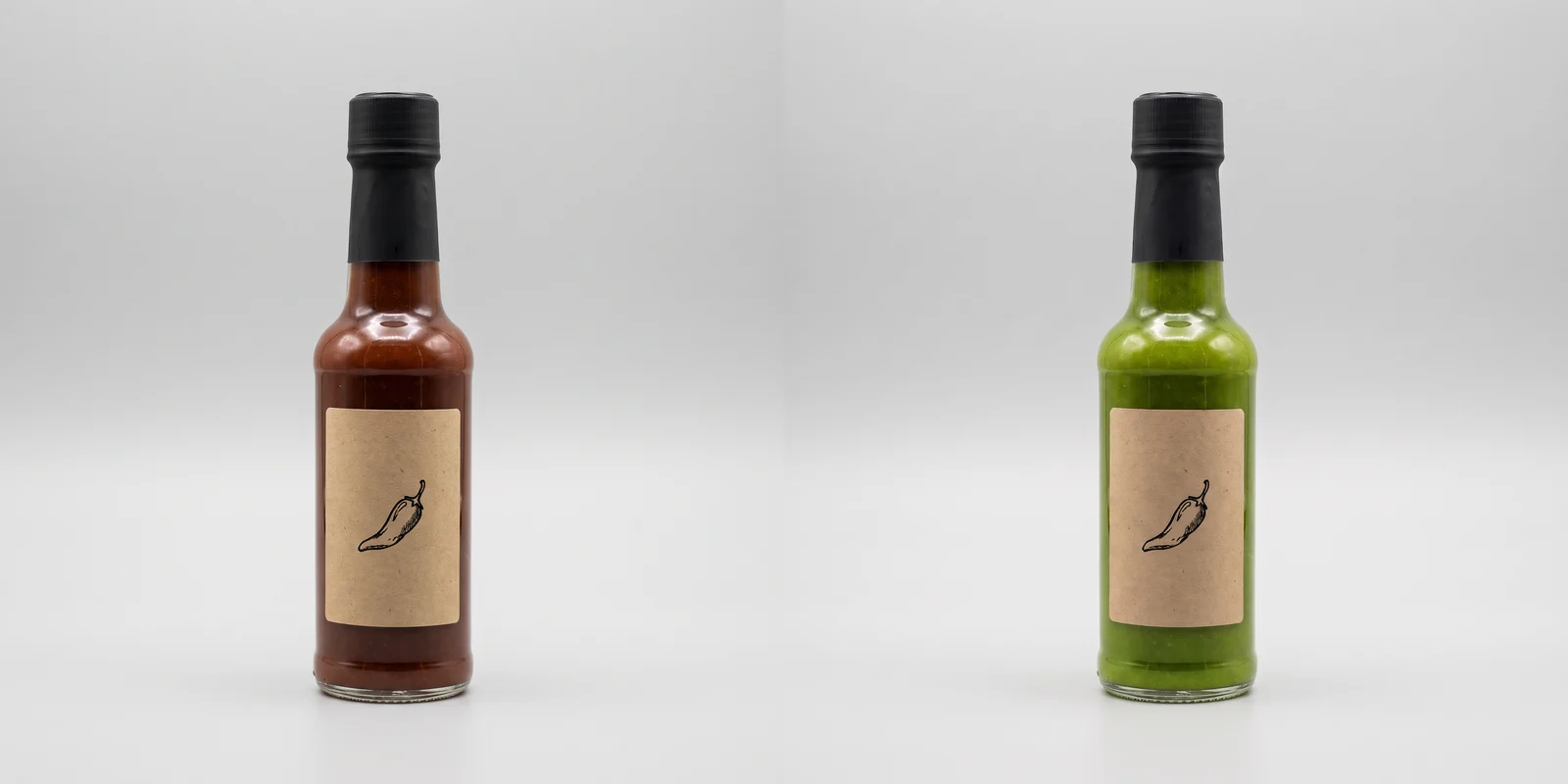
If your product line lives in real photos, shoot every SKU the same way. If you are mocking up a line before it exists, derive each new SKU from the first one.
Step 2: Write one line per concept#
Each line describes one ad and ends with the same protection sentence, so the product stays your product in every scene:
keep the bottle from the reference image exactly as it is: same bottle shape and proportions, same matte black cap, same sauce color, same kraft label with the same chili line drawing; do not redesign it, do not add any words, letters or logos to the bottle or the labelName the details a customer would notice first. For a sauce it is the cap, the label and the color of what is inside; for a shoe it would be the sole and the laces.
Here are the six concept lines we used. Upload a product photo as a reference, and they run as they are:
Bold thumb-stopping product ad photo: the bottle standing alone on a saturated tomato-red seamless backdrop, hard direct light casting one crisp shadow, centered, lots of empty space around it, no other objects, no text; keep the bottle from the reference image exactly as it is: same bottle shape and proportions, same matte black cap, same sauce color, same kraft label with the same chili line drawing; do not redesign it, do not add any words, letters or logos to the bottle or the label
Ingredient story ad photo: the bottle on a rustic wooden board surrounded by fresh whole chili peppers, garlic cloves, a halved lime and coarse sea salt, top light, rich natural colors, no text; keep the bottle from the reference image exactly as it is: same bottle shape and proportions, same matte black cap, same sauce color, same kraft label with the same chili line drawing; do not redesign it, do not add any words, letters or logos to the bottle or the label
Food close-up ad photo: sauce being drizzled from above onto three street tacos on a plate, the bottle standing in sharp focus beside the plate, shallow depth of field, warm restaurant light, no people, no text; keep the bottle from the reference image exactly as it is: same bottle shape and proportions, same matte black cap, same sauce color, same kraft label with the same chili line drawing; do not redesign it, do not add any words, letters or logos to the bottle or the label
Gift ad photo: the bottle nestled in an open kraft gift box with crinkle paper filling, tied with natural twine, on a linen tablecloth, soft window light, cozy and generous mood, no text; keep the bottle from the reference image exactly as it is: same bottle shape and proportions, same matte black cap, same sauce color, same kraft label with the same chili line drawing; do not redesign it, do not add any words, letters or logos to the bottle or the label
Lifestyle ad photo: outdoor picnic table in late afternoon sun with grilled corn, a bowl of chips and the bottle in the foreground, two hands reaching in from the edge of the frame, faces not shown, relaxed summer mood, no text; keep the bottle from the reference image exactly as it is: same bottle shape and proportions, same matte black cap, same sauce color, same kraft label with the same chili line drawing; do not redesign it, do not add any words, letters or logos to the bottle or the label
Graphic ad layout: the bottle on the right third of a flat warm-orange background, with the short headline "Small batch. Big heat." set in large clean bold sans-serif type on the left side, nothing else written anywhere; keep the bottle from the reference image exactly as it is: same bottle shape and proportions, same matte black cap, same sauce color, same kraft label with the same chili line drawing; do not redesign it, do not add any words, letters or logos to the bottle or the label
Notice that the protection sentence forbids text on the bottle, while the last line asks for a headline on the background. Keeping those two apart is what lets one line add copy without the model rewriting your label.
Step 3: Run every product against every concept#
In the batch form, upload both product photos under Reference images and set How to use the references to Per image. Per image pairs every reference with every prompt: 2 products × 6 concepts = 12 ads. With ten products it would be 60, from the same six lines.
Set the batch once: we used Nano Banana Pro at 2K and 4:5, which is the ratio Meta recommends for single-image ads in the Facebook Feed. Leave Images per combo at 1 — a second render of the same concept is not a new test. The line above Start batch read Will generate 12 images · 72 credits, and nothing was charged until we pressed it.
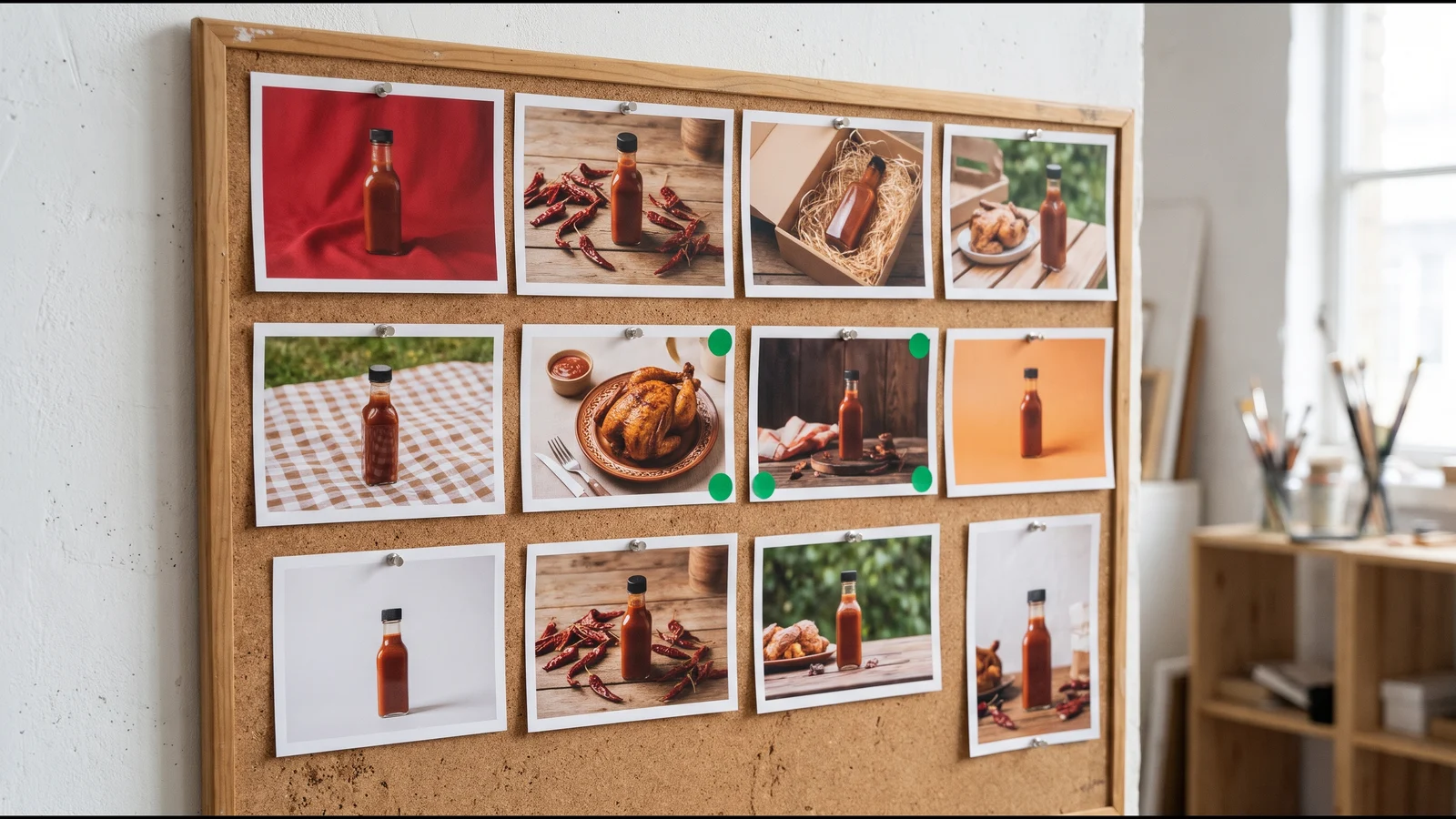
All twelve came back from one batch:
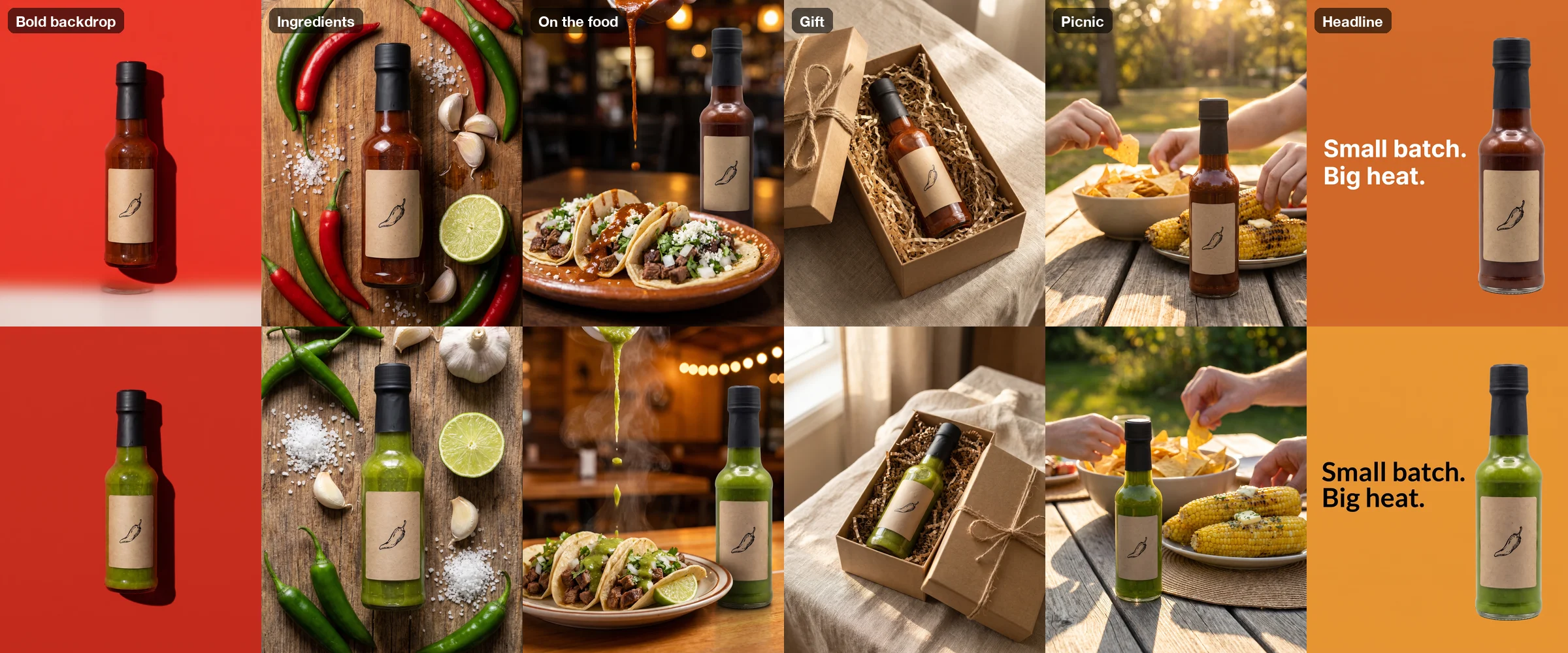
A few things held across all twelve: the bottle shape, the black cap, the kraft label and the chili drawing, with no stray words on the label. The headline came out spelled correctly on both versions. And the model adapted the props to each product without being told: the green bottle's ingredient board has only green chilies, and the sauce on the tacos matches the bottle it came from.
Step 4: Check every image before it costs you ad money#
One of the twelve had a defect you only see at full size. In the red bold-backdrop ad, the bottle floats above the floor and a faint second bottle base sits underneath it. The green version of the same line is fine.
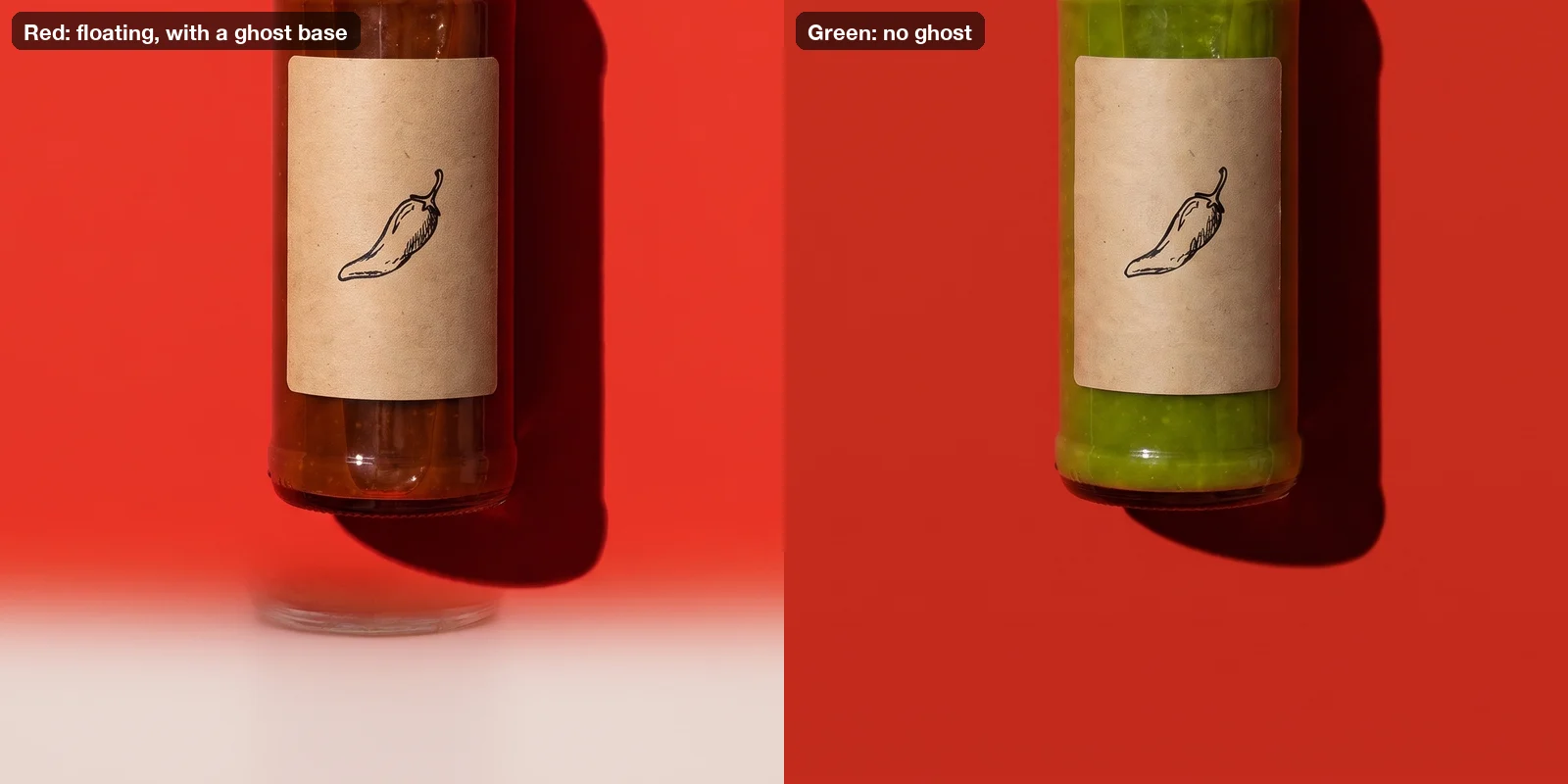
Review every image at full size, label first, before it goes into an ad:
- Product details: cap, label artwork, color of the contents.
- Physics: floating objects, doubled edges, shadows that point the wrong way.
- Text: any word on the image, spelled exactly as you wrote it.
- Hands: finger counts and objects fused into hands.
A bad image is cheap to fix. Re-run that one line, or open the batch and use Remix to copy the settings and prompts into a new batch, edit the line, and submit.
Step 5: Run a fair test#
Twelve images is not twelve tests. Decide what you are comparing first.
- On Meta, to compare concepts head to head, use the A/B test tool and change only the image. Meta's help center says to "test only one variable," recommends a minimum of 7 days, allows a maximum of 30, and advises the same budget for both versions.
- On Meta, to let delivery choose, put several concepts in one ad (up to 10 images) and read which one gets the spend.
- On Google Demand Gen, experiments can test creatives. Google asks for at least 50 conversions per arm with conversion-based bidding before results are conclusive.
- On Performance Max, a beta A/B test compares two sets of assets in the same asset group; Google suggests running it for 4 to 6 weeks.
When a concept wins, make it in every shape you need. Meta recommends 1:1 for the Instagram Feed and 9:16 for Stories and Reels; Performance Max requires 1.91:1 landscape and 1:1 square images. Upload the winning ad as a reference and recompose it, one ratio per short batch — our Black Friday ad creatives guide shows that step and the exact-pixel download presets in detail.
Step 6: Refresh before fatigue sets in#
When Ads Manager flags Creative limited or Creative fatigue, you don't need a new shoot. Open the original batch, press Remix, swap out the concepts that lost for new ones, and run it against the same product photos. Your references and protection sentence carry over, so round two looks like the same brand as round one.
What not to make#
Being able to render any scene doesn't mean every scene belongs in an ad:
- No invented customers. Don't render "real customer" selfies or testimonials. Your product photos are yours; a fake person vouching for them is not.
- Before-and-after images for cosmetic products are restricted in Meta's ad standards, and weight-loss ads face stricter rules still.
- The product must match what ships. Meta's commercial policies cover products that "materially differ from what was advertised." Restage your real product; don't improve it.
- AI labels. Meta says it labels ad images created or edited with third-party AI tools with "AI info," shown in the About this ad screen and sometimes next to Sponsored. Meta requires advertisers to disclose photorealistic AI images in social issue, election and political ads; Google requires the same for election ads, and since July 2026 has allowed any advertiser to add their own AI label inside an image ad.
A checklist for your first round#
- One clean photo per product; make extra SKUs from the first one.
- Six concepts, each a different reason to buy.
- One protection sentence on every line; no text on the product.
- Per image mode, so every product gets every concept.
- 4:5 for Facebook Feed tests; recompose the winners for other placements.
- Every image checked at full size before upload.
- One variable per test, at least a week per test on Meta.
Platform rules above were checked against Meta's and Google's help pages in October 2026. When you're ready, open the bulk image generator, upload your product photos and run your first six concepts — then use the models page to compare per-image prices before you scale up.
FAQ#
How many ad creative variations should I test? Neither Meta nor Google publishes a magic number. Meta allows up to 10 images in one ad, and Google's Demand Gen guidance suggests three images per aspect orientation. Five or six distinct concepts is a practical first round for a small budget.
Can AI make variations from one product photo? Yes. Upload the photo as a reference image and describe each new scene in its own line, with a sentence that keeps the product unchanged. In Per image mode, every product photo is paired with every scene.
Do AI-generated ads need to be labeled? For ordinary product ads, Meta says it applies its own "AI info" label to ad images created or edited with third-party AI tools, and minor edits like resizing don't get one; advertisers must disclose AI use themselves only in social issue, election and political ads. Google requires election ads to declare synthetic content and lets other advertisers add labels voluntarily.
Can the AI put text on the ad? Short lines work: our two-line headline came out spelled correctly on both versions. Keep it short, quote the exact words, and check every image. For long copy and prices, add live text in your ad tool instead.
What does a round like this cost? The form shows the exact total before you start. Our 12 ads on Nano Banana Pro at 2K cost 72 credits; per-image prices for every model are on the models page, and credit packs on the pricing page.