AI YouTube Thumbnails: Can 3 Models Spell Your Title? 30 Tests
We made 30 AI YouTube thumbnails with GPT Image 2, Nano Banana Pro and Nano Banana 2.1 to see which spells the title right, and what still goes wrong.
On this page
- How we tested
- Results at a glance
- Short titles: all three get it right
- Long titles: where the misses showed up
- The problems that are not spelling
- The video length covers the bottom-right corner
- The creator changes in every variant
- The files are too big to upload
- Which model should you use?
- The prompt we used
- Make all your variants in one batch
- FAQ
- Can AI put text on YouTube thumbnails correctly now?
- What size should an AI YouTube thumbnail be?
- How do I keep my face the same across thumbnail variants?
- Should I add the text in the AI model or in an editor?
The old rule for AI YouTube thumbnails was simple: let the AI make the picture, then add the title yourself in Canva, because the model will misspell it. "TINY HOSUE", melted letters, a dollar sign that turns into an S. Is that still true?
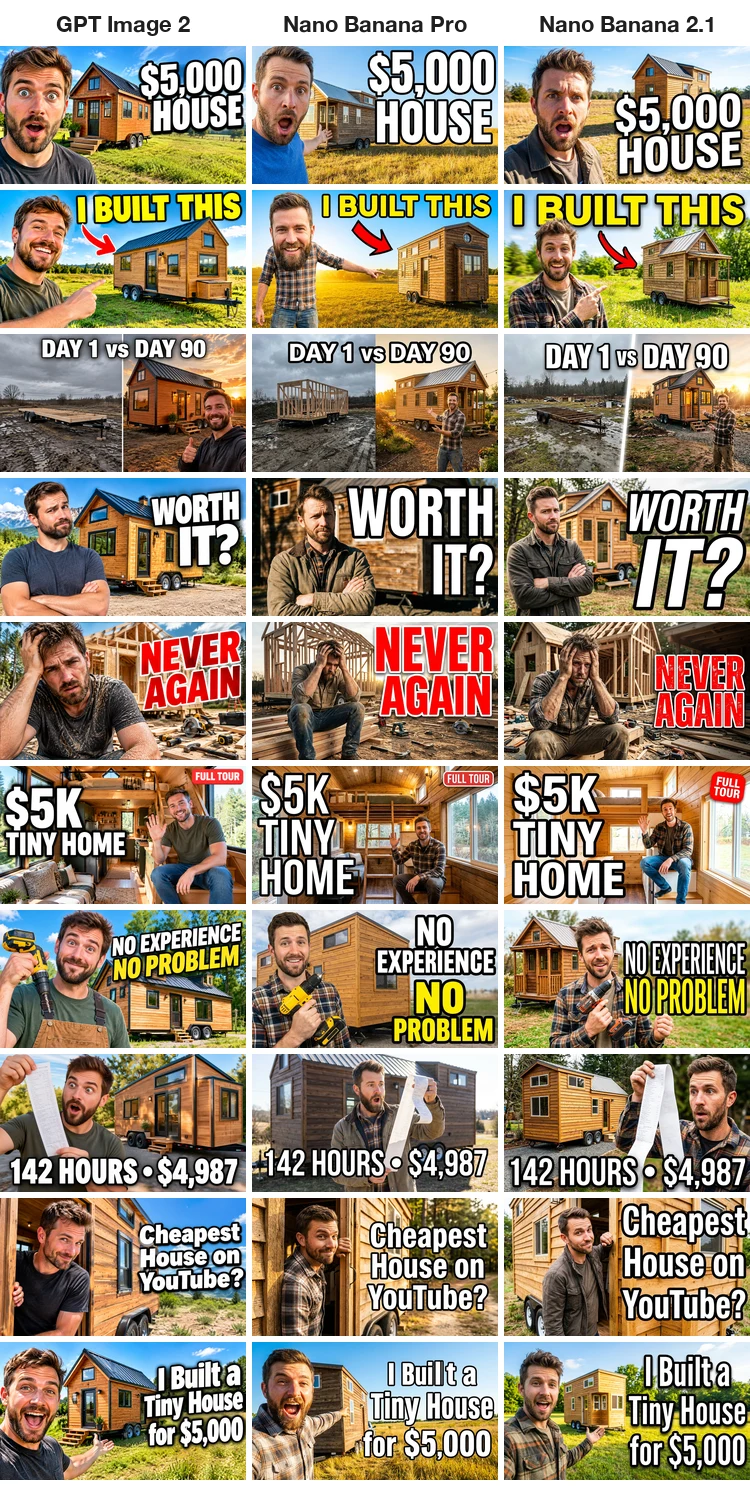
We tested it. We took one video, wrote ten thumbnail variants for it with titles from two words up to a full seven-word headline, and ran all ten on three image models: GPT Image 2, Nano Banana Pro and Nano Banana 2.1. That is 30 thumbnails, one attempt each, no cherry-picking.
The short version: spelling is mostly solved. 29 of the 30 titles came back letter-perfect. What still goes wrong is everything around the text: a creator who looks different in every variant, a title sitting where YouTube puts the video length, and files too big to upload.
Generate in bulk
One prompt per line, hundreds of images, one ZIP to download.
How we tested#
- One video, ten A/B variants. The video is made up: I Built a Tiny House for $5,000. Real channels test several thumbnails per video, so we wrote ten, each with a different title and scene.
- Titles get harder as you go down. Two words ("WORTH IT?"), a split-screen label ("DAY 1 vs DAY 90"), a main title plus a small badge ("$5K TINY HOME" + "FULL TOUR"), a two-line title, numbers and symbols ("142 HOURS • $4,987"), mixed case ("Cheapest House on YouTube?") and the full title in three lines.
- Same prompt shape every time. Each prompt describes the creator (a man around 30 with short brown hair and a beard), his expression, the tiny house, the text color and outline, where the text goes, and ends with "The text must be spelled exactly as written. No other text, no logos."
- Same settings on all three models: 16:9, 1K resolution, text prompt only, one attempt per prompt. All 30 rendered on the first try.
Ten prompts per model is a small sample. Treat the results as what happened in this run, not as a ranking that will hold for every title.
Results at a glance#
| Model | Titles spelled exactly | Layout misses | Output file | 1K credits per thumbnail |
|---|---|---|---|---|
| GPT Image 2 | 10 / 10 | none | 1672×941 PNG, 2.2 to 2.8 MB | 5 |
| Nano Banana Pro | 9 / 10 | one (two lines became four) | 1376×768 JPEG, 0.7 to 1.0 MB | 5 |
| Nano Banana 2.1 | 10 / 10 | none | 1376×768 PNG, 2.2 to 3.0 MB | 4 |
"Spelled exactly" means every letter, space, number and symbol matches the prompt, including the dollar sign, the comma in $4,987, the bullet dot and the capital T in YouTube.
Short titles: all three get it right#
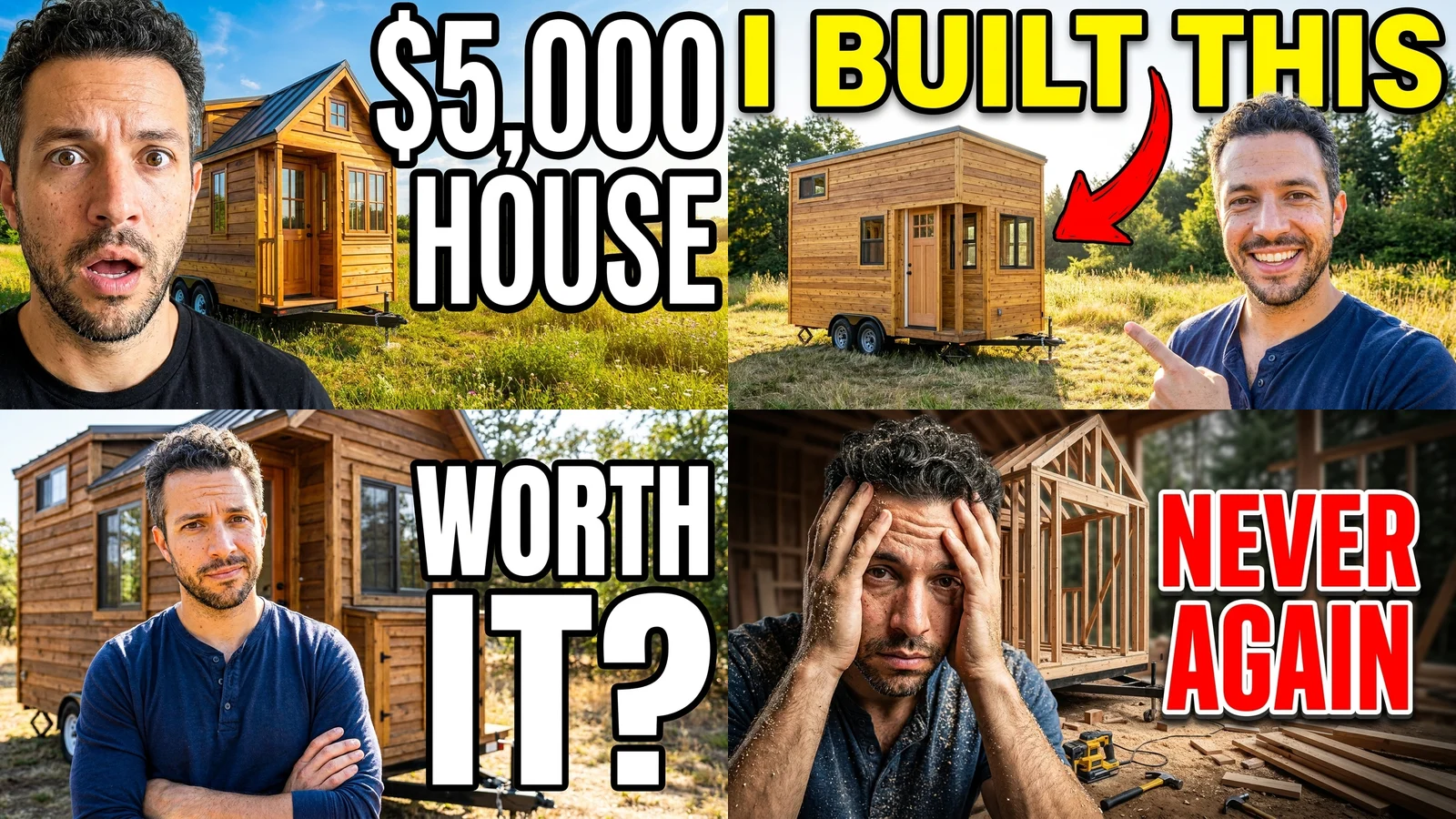
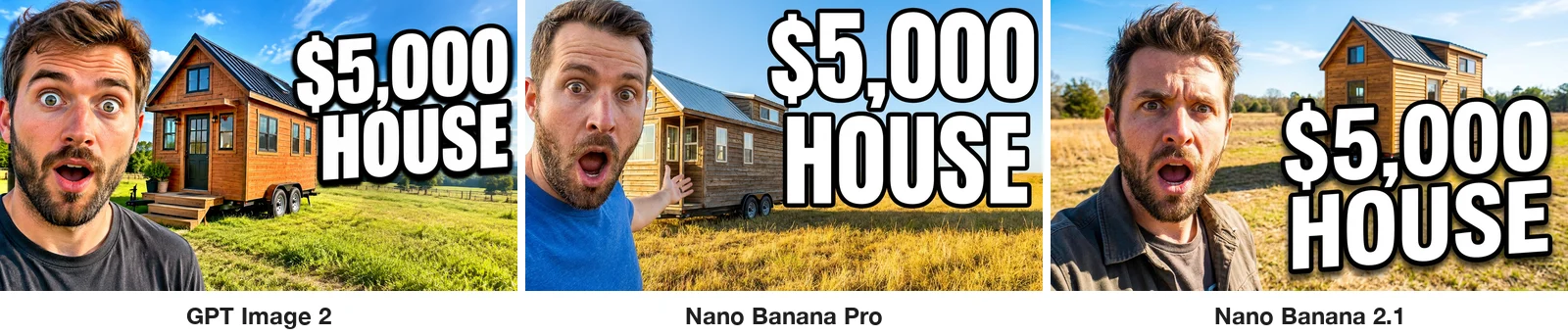
For two- and three-word titles there was nothing to choose between the models. "$5,000 HOUSE", "I BUILT THIS", "WORTH IT?" and "NEVER AGAIN" were correct on all three, in the colors we asked for, with clean outlines. All three also drew the red arrow from "I BUILT THIS" toward the house when asked.
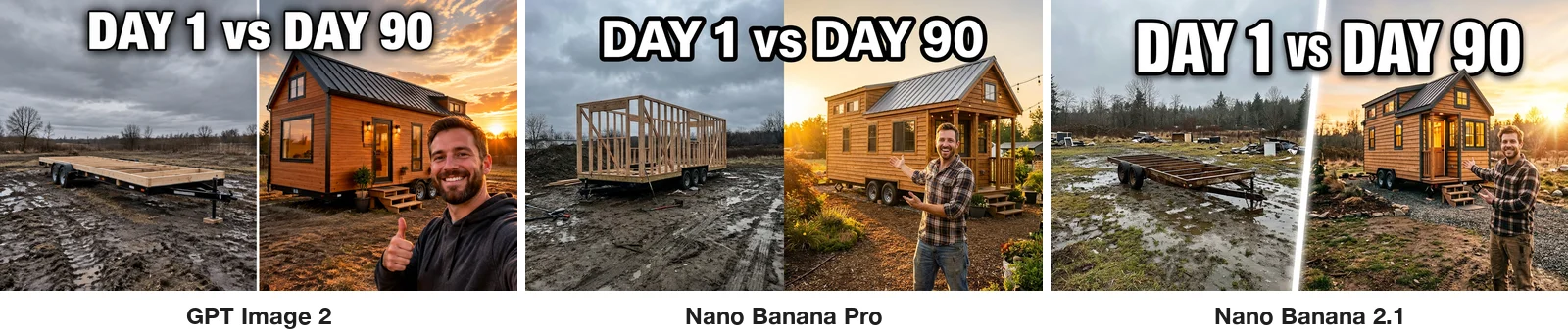
The split-screen variant worked too. Each model put a muddy empty lot on the left, the finished house at sunset on the right, and "DAY 1 vs DAY 90" across the top. Nano Banana Pro drew wall framing on the left instead of the bare trailer frame we described, so its "day 1" shows more progress than the prompt asked for.
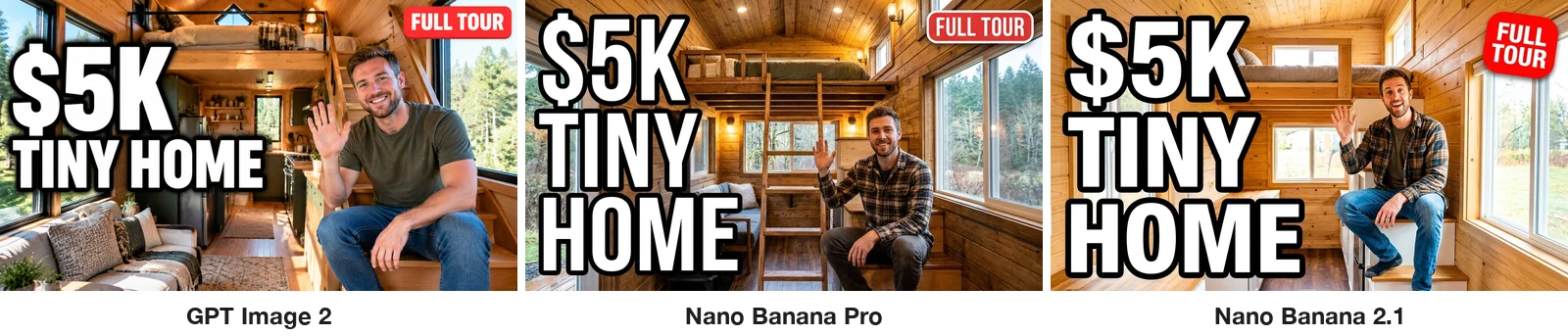
A small badge is a classic thumbnail element and a good test of small text. "FULL TOUR" in a red rounded badge came out correct on all three. Nano Banana 2.1 wrapped it onto two lines, which still reads fine.
Long titles: where the misses showed up#
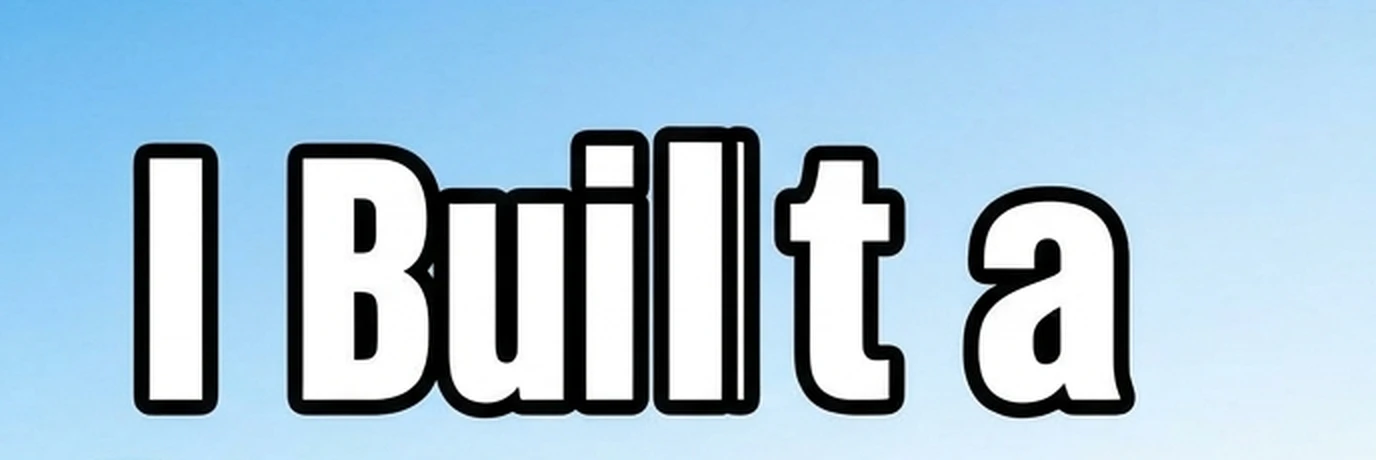
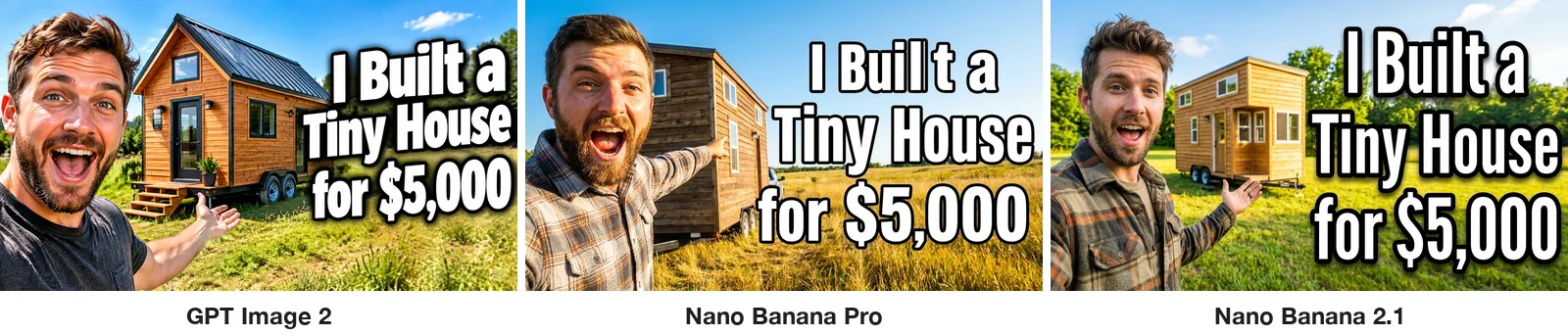
The only spelling error in the whole test came on the longest title. Nano Banana Pro rendered "I Built a Tiny House for $5,000" with a broken letter in "Built": a doubled stroke on the l and a gap before the t. At full size you notice it. At thumbnail size it is easy to miss, which is exactly how it would get published.
The only layout miss was also Nano Banana Pro. We asked for "NO EXPERIENCE" on one line and "NO PROBLEM" on a second. It split them into four lines (NO / EXPERIENCE / NO / PROBLEM). The words are right, but a four-line stack is harder to read at a glance. GPT Image 2 and Nano Banana 2.1 kept two lines.
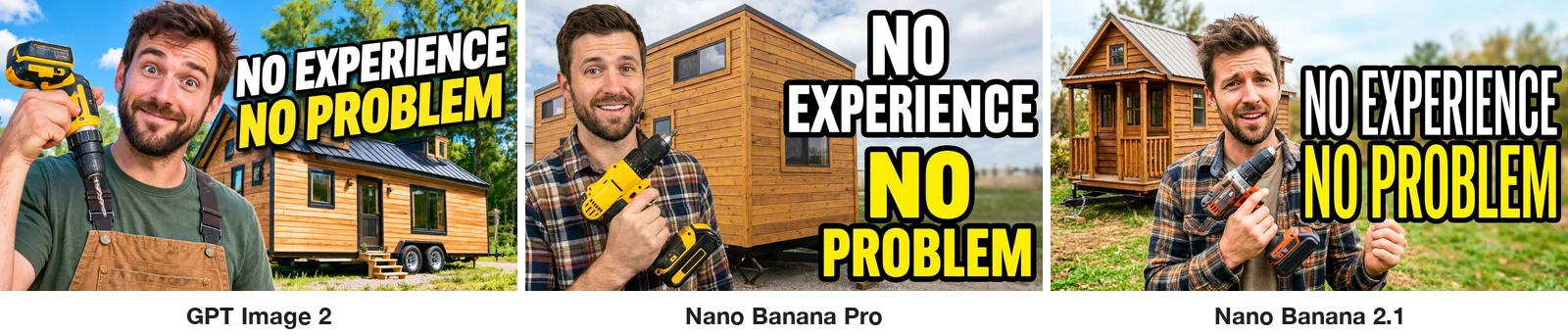
That prompt also asked for him to hold the drill "the wrong way round" as a joke. None of the three models did it: all three drew a normal grip. Text instructions were followed far more reliably than small visual gags.
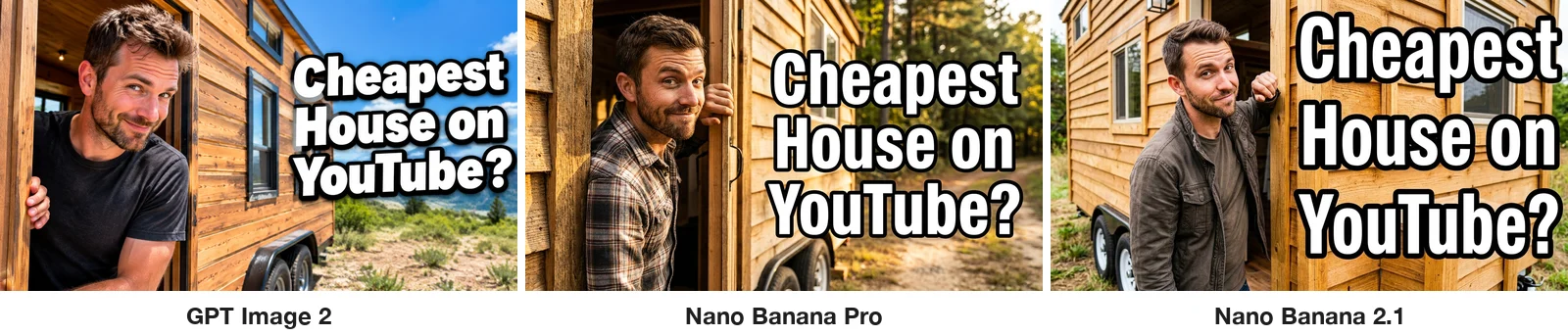
Mixed case held up. "Cheapest House on YouTube?" kept its capitals on every model, including the T in the middle of YouTube. One thing to watch in the overview at the top: on the longer titles, GPT Image 2 tended to set the text smaller than the other two, so it is harder to read in a small preview.
The problems that are not spelling#
The video length covers the bottom-right corner#
YouTube puts the video's duration in a small black box in the bottom-right corner of the thumbnail. For "142 HOURS • $4,987" we asked for the text "across the bottom", and all three models ran it right into that corner. We added a mock duration badge to show the result: on every version it sits on top of the price, the number the thumbnail is selling.
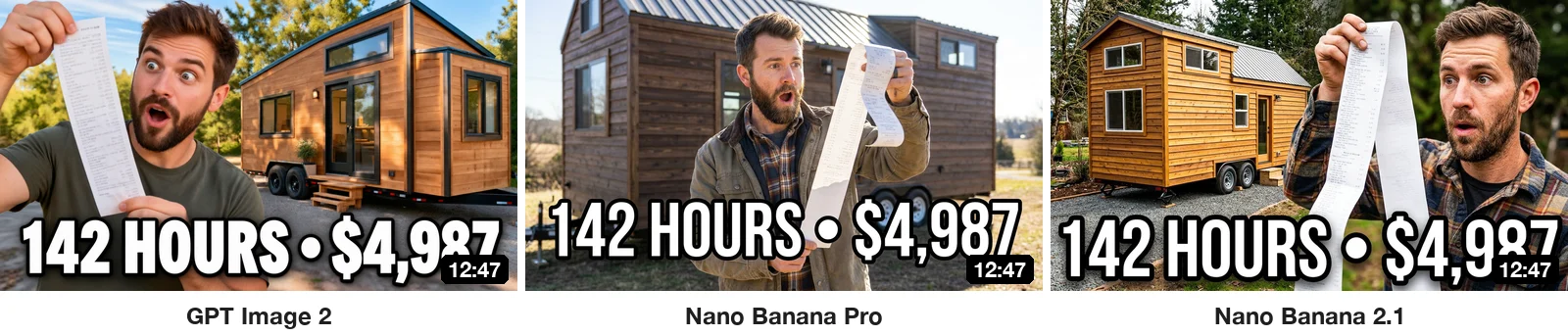
The fix is in the prompt: say where the text should go and where it should not, for example "text in the top half, keep the bottom-right corner empty." We did not rerun this variant with that line, so check the result before you rely on it.
The creator changes in every variant#
Look down any column of the overview. "A man around 30 with short brown hair and a beard" became ten different men on every model. For an A/B test that breaks the test: you want the title and scene to change, not the face. Channels also want viewers to recognize the creator.
So we ran a fifth set: four of the variants on Nano Banana Pro (the model that kept faces closest in our Halloween photo test), this time with a selfie as the reference image and the line "the man from the reference photo (keep his exact face, hair and beard)". The man in the selfie is fictional; we generated it for testing.
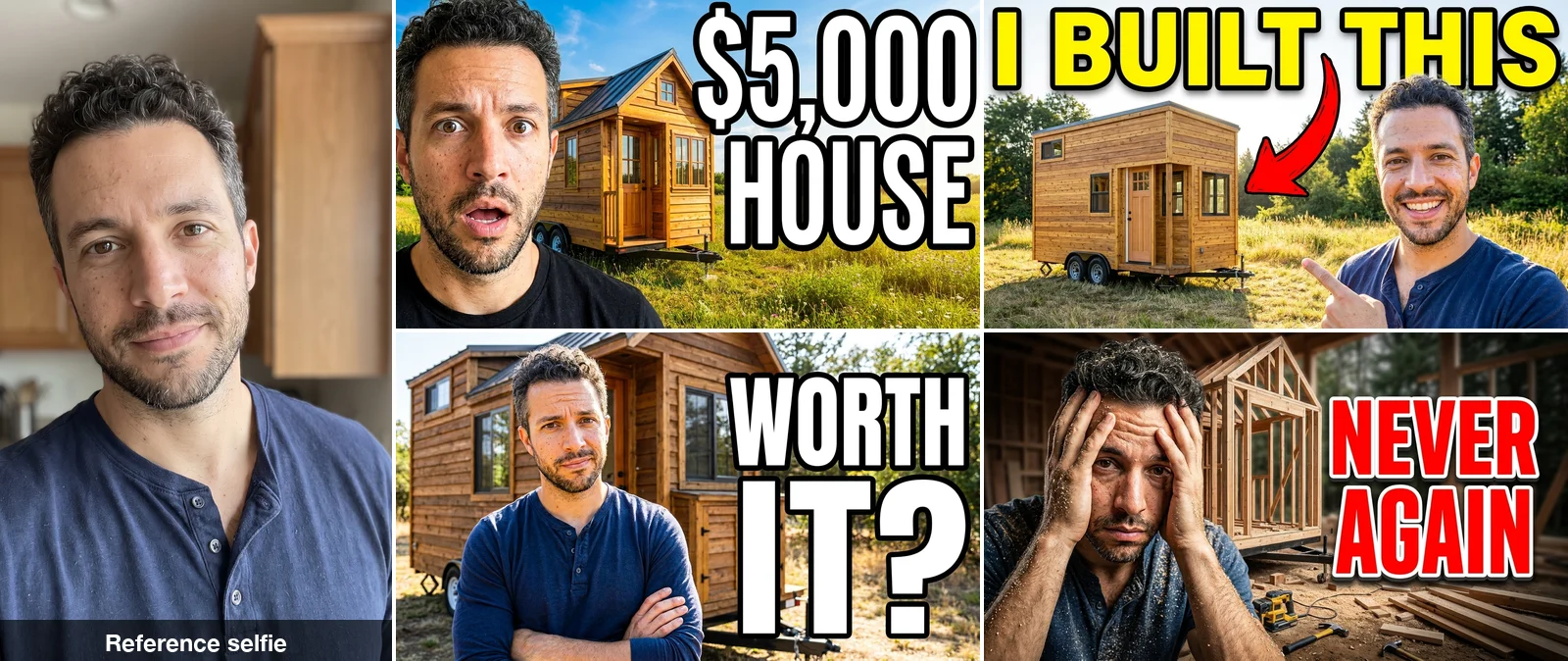
All four kept the same face, and all four titles were spelled correctly. Three of the four also kept the navy henley shirt from the selfie. Nano Banana Pro did the same with clothes in the Halloween test. If you want a different outfit, describe it in the prompt. For more on keeping one person consistent across a set of images, see how to make consistent character images.
The files are too big to upload#
YouTube's help page recommends 1280×720 for custom thumbnails and asks for files under 2 MB. GPT Image 2 and Nano Banana 2.1 returned PNGs of 2.2 to 3.0 MB, every one of them over the limit. Nano Banana Pro returned JPEGs under 1 MB, but at 1376×768 rather than 1280×720.
When we resized the PNGs to 1280×720 and saved them as JPEG, each one came out at around 0.3 MB. In BulkImagen you can do this for the whole batch at once: open the batch, click Select & edit, select the thumbnails, set Size to YouTube thumbnail and Format to JPG, then download the ZIP.
Which model should you use?#
- Nano Banana 2.1 if you want the cheapest clean result. It spelled all ten titles correctly, kept every layout and costs 4 credits at 1K, the least of the three. Its files need converting before upload.
- GPT Image 2 if you like its look. It also spelled all ten correctly, but set long titles smaller. It returns the largest images (1672×941) and the largest files.
- Nano Banana Pro if the creator's face is in the thumbnail. It was the model we tested with a reference photo, and it kept the face across every variant. Watch long titles: both of its misses came on long titles.
Whichever you pick, zoom in on every title before you upload. One broken letter in 30 is a low rate, but it is not zero. You can compare the models' prices and limits on the GPT Image page and the Nano Banana 2.1 page.
The prompt we used#
Swap in your own creator, scene and title. Keep the last two sentences. They are what tells the model the text matters.
YouTube thumbnail, 16:9, high contrast, bold and clean. [Who: the man from the reference photo, keep his exact face, hair and beard] [expression and pose], [scene]. Huge bold [color] text with a thick black outline on the [right / top / left]: "[YOUR TITLE]". The text must be spelled exactly as written. No other text, no logos.The ten titles we tested, from easiest to hardest:
- $5,000 HOUSE
- I BUILT THIS (with a red arrow to the house)
- DAY 1 vs DAY 90 (split screen)
- WORTH IT?
- NEVER AGAIN (red text)
- $5K TINY HOME, plus a FULL TOUR badge
- NO EXPERIENCE / NO PROBLEM (two lines)
- 142 HOURS • $4,987
- Cheapest House on YouTube?
- I Built a Tiny House for $5,000
Make all your variants in one batch#
Ten variants means ten prompts, and pasting them one at a time into a chat window gets old by the third. With a bulk image generator you paste all ten prompts, one per line, attach your selfie once, and get every variant back in a single batch. That is how each set of ten in this test was made. The guide to generating images from a list of prompts covers the format, and if you also need pictures for the video itself, see AI images for YouTube videos.
A set of ten thumbnails at 1K costs 40 credits on Nano Banana 2.1 and 50 on GPT Image 2 or Nano Banana Pro.
FAQ#
Can AI put text on YouTube thumbnails correctly now?#
In our test, mostly yes. 29 of 30 thumbnails had the title spelled exactly, including numbers, a dollar sign, a comma and a bullet dot. The one error came on the longest title. Short, punchy titles are both the safest for the model and the most readable for viewers.
What size should an AI YouTube thumbnail be?#
YouTube recommends 1280×720 (16:9) and a file under 2 MB. Generate at 16:9, then resize and convert to JPEG before uploading. The PNG files from two of the three models we tested were over 2 MB.
How do I keep my face the same across thumbnail variants?#
Use a photo of yourself as a reference image and say in the prompt to keep your exact face. Without a reference, a description like "a man around 30 with a beard" produced a different person in every image.
Should I add the text in the AI model or in an editor?#
For short titles, the model now does it well enough that you can skip the editor, as long as you check every letter. If you need an exact brand font or the same text placement across every variant, an editor still gives you more control.