AI Game Assets: 12 Item Icons and a 4-Pose Character in One Batch
How to make AI game assets that match: one style line, a list of items, real transparent PNGs. 12 inventory icons and a 4-pose knight tested, with engine notes.
A game never needs one picture. It needs a set: every item in the inventory, every enemy in the zone, every state of the hero, all drawn so they look like they belong to the same game. That is the part most AI image tools get wrong. Ask for a potion, then a sword, then a shield in three separate chats and you get three pretty pictures in three different styles, each on a painted background you have to cut out by hand.
AI game assets only become useful when you can make the whole set in one go, in one style, as files that drop straight into an engine. So we ran the job the way an indie developer would: one style line, a list of twelve inventory items, the transparent background setting on, one batch. Then a second batch for a character: one reference image and four poses. Below is what came back, what went wrong, the prompts, and what to check before the files go into Unity, Godot or Unreal.
AI 이미지 대량 생성
한 줄에 프롬프트 하나, 이미지 수백 장, ZIP 하나로 다운로드.
What a game asset batch has to get right#
Three things, in this order:
- Style consistency. Twelve icons have to read as one game. Same lighting direction, same level of detail, same palette temperature. This is what breaks when you generate one at a time.
- Real transparency. An inventory icon sits on a UI panel, a sprite sits on a level. The file needs an alpha channel, not a painted-in checkerboard. We check every file on a dark background and read the alpha channel directly, because a fake checkerboard looks identical on a white page.
- Predictable files. Same size, same format, named so you can find them. An engine import is a chore when every file is a different shape.
Everything below is measured against those three.
How we tested#
- Model: GPT Image 2, the default model in the form, at 1K (5 credits per image). It is the model that can output an alpha channel at every resolution; see the model list for what each one supports.
- Setting: Background set to Transparent. The form marks it "Beta — may not apply to every image".
- Batch 1, icons: 12 prompts, one image each, 1:1. Every line was the item plus the same style line.
- Batch 2, character: one text-to-image prompt for a small knight, then 4 prompts in Per image mode with that knight as the reference, each describing a pose. Same style line, same setting.
- Samples: 12 icons and 1 + 4 character images, one run each, no cherry-picking. That is enough to show the method, not enough to quote failure rates.
Results: the 12 inventory icons#
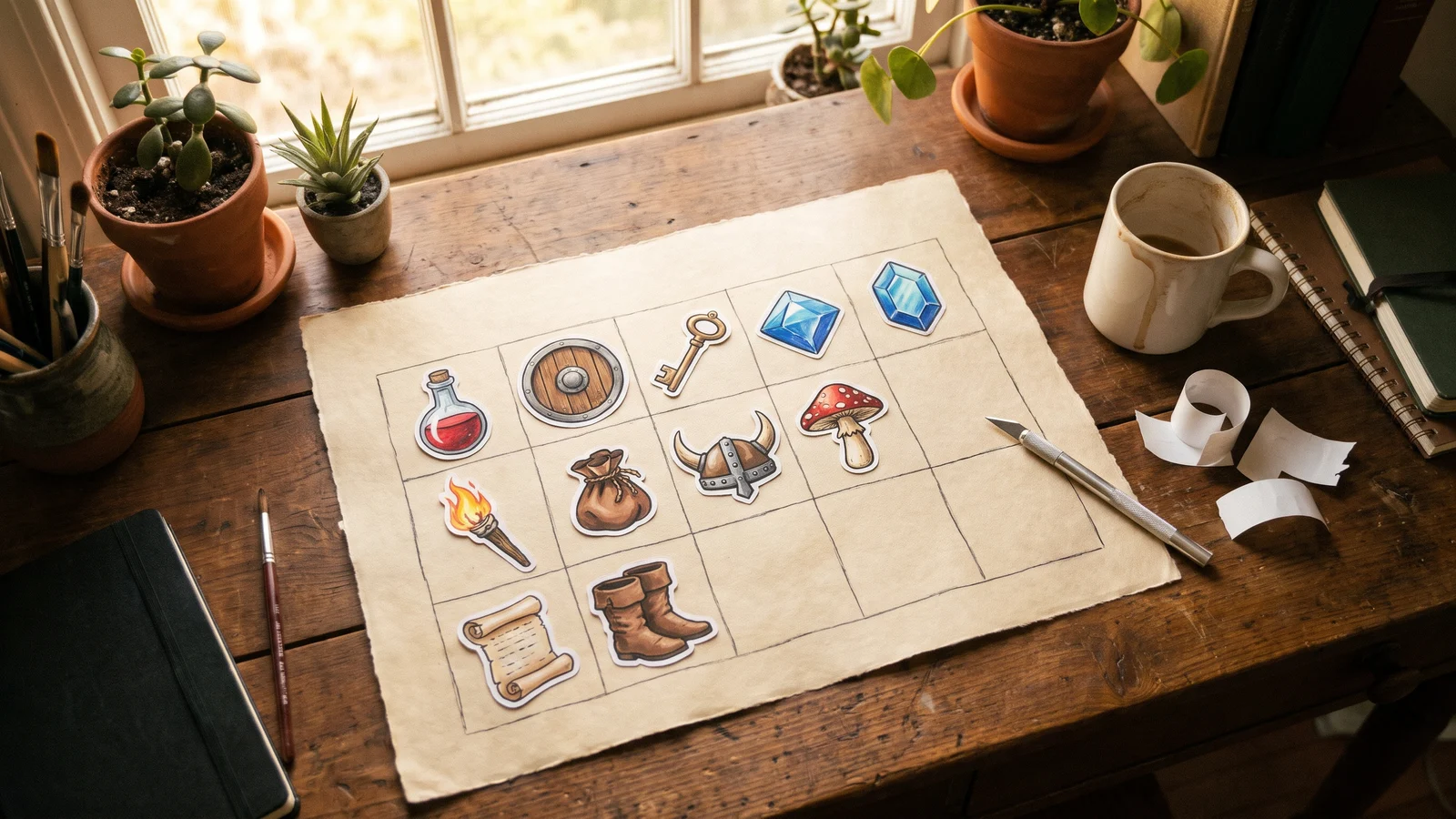
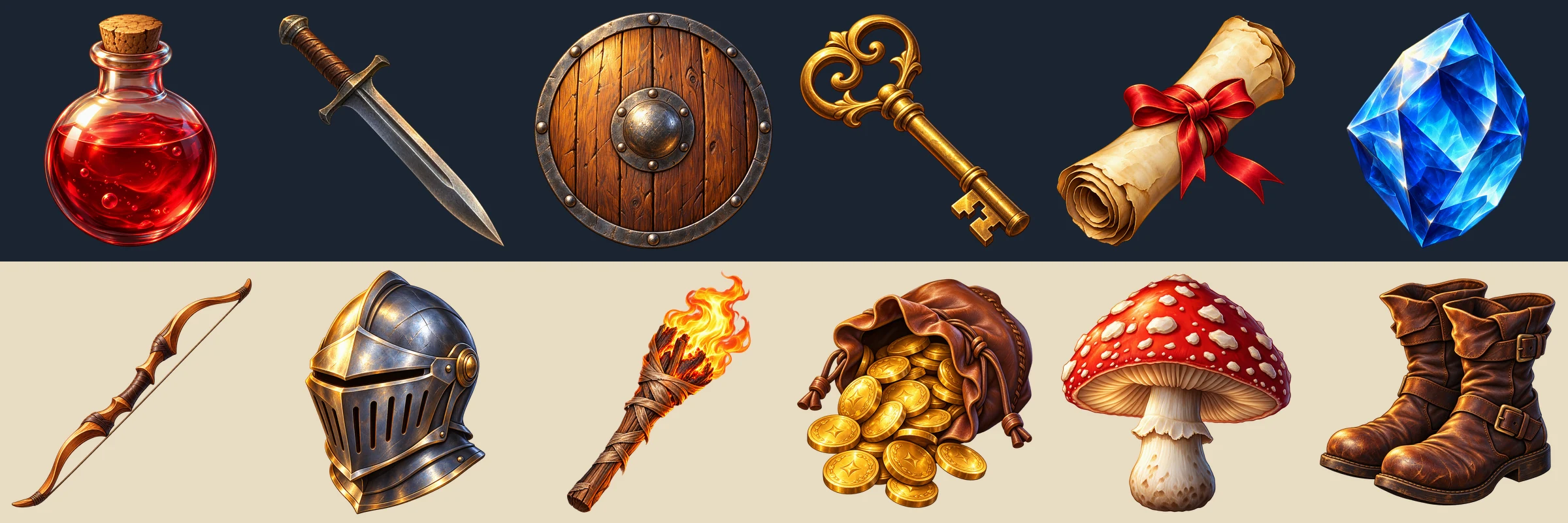
12 of 12 came back as real transparent PNGs. Every file was RGBA, with between 26% and 90% of the canvas fully transparent depending on the shape (the shield fills the frame, the bow barely does). On a near-black panel the edges are clean: no white fringe on the flame of the torch, the glass of the potion or the fur-lined boots.
The style line held. All twelve have the same top-left light, the same warm highlight and dark rim shading, the same slightly glossy painted finish. Dropped on a dark UI color and on a parchment color, as in the image above, they read as one inventory.
What to know before you run your own:
- Thin objects do not fill the frame. The prompt said "filling most of the frame". The potion, shield and helmet did; the sword and bow came back long and thin with a lot of empty canvas. Expect to scale icons so their visual weight matches, or write the thin ones as "diagonal, filling the frame corner to corner".
- One file came back at a different size. Eleven icons were 1254 × 1254 px; the sword was 1024 × 1024, from the same model and the same batch. For icons that is harmless, but check dimensions before you set up a grid import.
- Angles vary a little. Most items are drawn at a slight three-quarter angle; the shield is straight-on. If the angle matters to you, put it in the style line ("viewed from a three-quarter angle, slightly above").
- Nothing extra was added. "No added decorations" in the style line worked here: no sparkles, no pedestals, no extra props, which is a change from our earlier transparent clipart test, where the model kept adding sprigs and bows.
Results: one character, four poses#
For the character we started with a text-to-image prompt for a small chibi knight: silver armor, blue tabard, red plume, round shield, short sword. That image became the reference. Four more prompts, each in Per image mode, asked for idle, running, jumping and attacking, with a protection sentence that lists what must not change.
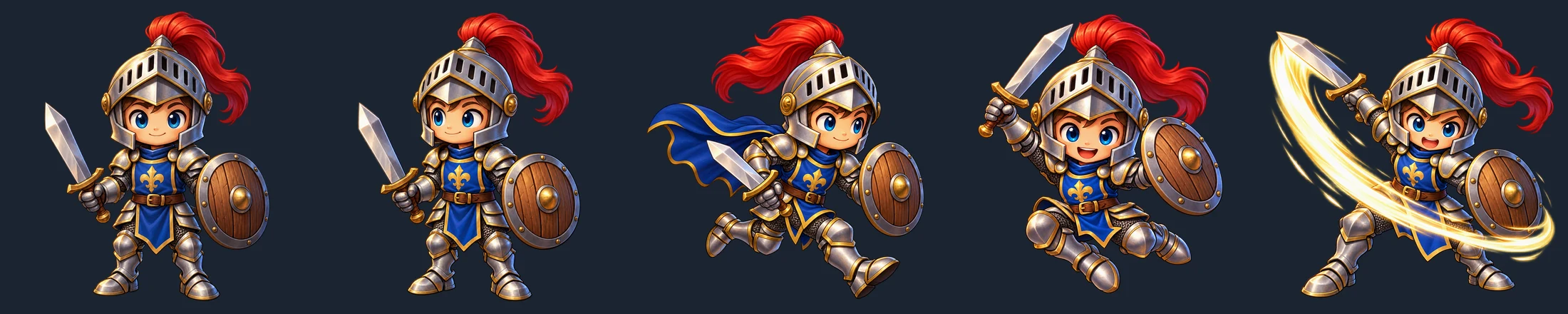
4 of 4 came back transparent, and 4 of 4 are clearly the same knight. Helmet shape, plume, the fleur-de-lis on the tabard, the shield's iron boss, the proportions and the face all survived. That is the result that makes a character set usable: you can put these five on one screen and nobody asks why the hero changed armor between frames.
Two things to be honest about:
- The model follows the words, including the wrong ones. The run prompt said "cape and plume trailing". The reference has no cape, so the model added one. That is our mistake, not the model's, and it is the point of the protection sentence: only describe what should change. The idle, jump and attack poses, whose prompts did not mention a cape, have none.
- The attack came with a golden slash effect that nobody asked for. "Wide attack arc" was read as a visual effect. It looks good, but if you want a clean sprite add "no motion effects, no glow" to the line.
One more thing this is not: an animation cycle. These are four consistent key poses, not frames spaced for a run loop. They work as a character sheet, as portraits for dialogue, as poses for a visual novel, or as the starting point for an animator. If you need a 12-frame walk cycle, generate the key poses this way and build the in-betweens in your animation tool.
Getting the files into your engine#
All three major engines take a PNG with an alpha channel as-is. What differs is a few import settings, and the docs for each (checked October 2026) say roughly the same things.
| Engine | What to do with a transparent PNG |
|---|---|
| Unity | Set Texture Type to Sprite (2D and UI) (automatic in a 2D project). For crisp icons choose Filter Mode Point and Compression None; for painted art like ours Bilinear is fine. Keep Sprite Mode on Single for one object per file. Turn on Alpha Is Transparency to avoid edge artifacts. |
| Godot 4 | Drop the PNG in the project. The default texture filter is Linear; for pixel art switch Rendering → Textures → Canvas Textures → Default Texture Filter to Nearest, or set it per node. The import dock has a Fix Alpha Border option for edge fringes. |
| Unreal 5 | The PNG imports as a Texture asset. Right-click it → Sprite Actions → Apply Paper 2D Texture Settings (removes mipmaps, sets filter to Nearest) and create a sprite. Non-power-of-two textures are set to no mipmaps on import; power-of-two sizes are required for texture streaming. |
The last row matters for the sizes you get. 1254 × 1254 is not a power of two. For UI icons and 2D sprites that is normal and fine; if your pipeline needs power-of-two textures, resize to 1024 or 512 when you download, which the download panel can do for you, or let Unreal's Power of Two Mode pad them.
Tip
One file per asset is the easiest import. All three engines can also slice a sprite sheet (Unity's Sprite Editor has an Automatic slice that uses the transparency, Unreal's Extract Sprites has the same idea), but you only need a sheet if your tooling asks for one.
The rules you have to follow when you ship#
AI game assets come with disclosure duties on most storefronts, and they are stricter than most people assume. As of October 2026:
- Steam. The Steamworks content survey asks you to disclose AI content in two categories: pre-generated (made with AI tools and shipped with the game, reviewed like any other content) and live-generated (created while the game runs, which also requires describing the guardrails you have in place). A set of icons made this way is pre-generated.
- itch.io. The quality guidelines ask you to tag any project that contains generative AI material, and say disclosure is strictly enforced for game asset pages; untagged asset pages can be delisted. For asset creators the AI disclosure field is required.
- Unity Asset Store. The submission guidelines require that content generated with the aid of AI, in whole or in part, be disclosed in the listing, including which tools were used, and allow Unity to reject mass-produced AI content.
- Fab (Epic). Listings must use the "Created with AI" setting; according to Epic's May 2025 announcement, content that is not identified properly violates Fab's terms, and buyers can hide AI-created assets.
On ownership: the US Copyright Office's January 2025 report on copyrightability says AI output can be protected only where a human author determined sufficient expressive elements, and that prompts alone do not qualify. For assets you use inside your own game that rarely matters day to day. For assets you intend to sell as a pack, read your storefront's rules before you list.
Warning
Do not prompt for "in the style of" a named game or studio, and do not use another game's sprites as reference images. A consistent set is easy to get from a plain style description, as the icons above show, and it keeps the pack yours.
Step by step#
- Write one style line. Medium, finish, lighting direction, framing, and what to exclude. Name the light ("soft top-left light") and the finish ("hand-painted, slightly glossy"); that is what makes twelve files match.
- List the items, one per line. Object first, style line second. One line becomes one file, and downloaded files are named from the start of the prompt, so "a-brass-skeleton-key…" is a name you can find later.
- Pick GPT Image 2, 1:1, 1K, and set Background to Transparent. 1K is 5 credits per icon and gives a file over 1000 px, more than any inventory slot needs.
- For a character, make the reference first. One text-to-image prompt. Check it, and only then run the poses in Per image mode with a protection sentence.
- Check on dark, check the size, then download. Leave Format on Keep as is to get the PNG files. Do not pick JPG, which has no transparency.
If one line comes back wrong, rerun that line, not the batch.
The prompts we used#
The style line, if you want to build your own item list:
Hand-painted fantasy RPG inventory icon, stylized semi-realistic game art, rich saturated colors, soft top-left light with warm highlights and dark rim shading, single isolated object centered and filling most of the frame, no added decorations, no text, no letters, no border, no ground, no shadow underneath, transparent backgroundThe twelve icons, ready to run (switch Background to Transparent first):
a round glass flask of red health potion with a cork stopper. Hand-painted fantasy RPG inventory icon, stylized semi-realistic game art, rich saturated colors, soft top-left light with warm highlights and dark rim shading, single isolated object centered and filling most of the frame, no added decorations, no text, no letters, no border, no ground, no shadow underneath, transparent background
an iron short sword with a leather-wrapped grip. Hand-painted fantasy RPG inventory icon, stylized semi-realistic game art, rich saturated colors, soft top-left light with warm highlights and dark rim shading, single isolated object centered and filling most of the frame, no added decorations, no text, no letters, no border, no ground, no shadow underneath, transparent background
a round wooden shield with an iron boss and rim. Hand-painted fantasy RPG inventory icon, stylized semi-realistic game art, rich saturated colors, soft top-left light with warm highlights and dark rim shading, single isolated object centered and filling most of the frame, no added decorations, no text, no letters, no border, no ground, no shadow underneath, transparent background
a brass skeleton key. Hand-painted fantasy RPG inventory icon, stylized semi-realistic game art, rich saturated colors, soft top-left light with warm highlights and dark rim shading, single isolated object centered and filling most of the frame, no added decorations, no text, no letters, no border, no ground, no shadow underneath, transparent background
a rolled parchment scroll tied with a red ribbon. Hand-painted fantasy RPG inventory icon, stylized semi-realistic game art, rich saturated colors, soft top-left light with warm highlights and dark rim shading, single isolated object centered and filling most of the frame, no added decorations, no text, no letters, no border, no ground, no shadow underneath, transparent background
a faceted blue crystal gem. Hand-painted fantasy RPG inventory icon, stylized semi-realistic game art, rich saturated colors, soft top-left light with warm highlights and dark rim shading, single isolated object centered and filling most of the frame, no added decorations, no text, no letters, no border, no ground, no shadow underneath, transparent background
a wooden recurve bow with a taut string. Hand-painted fantasy RPG inventory icon, stylized semi-realistic game art, rich saturated colors, soft top-left light with warm highlights and dark rim shading, single isolated object centered and filling most of the frame, no added decorations, no text, no letters, no border, no ground, no shadow underneath, transparent background
a steel knight helmet with a closed visor. Hand-painted fantasy RPG inventory icon, stylized semi-realistic game art, rich saturated colors, soft top-left light with warm highlights and dark rim shading, single isolated object centered and filling most of the frame, no added decorations, no text, no letters, no border, no ground, no shadow underneath, transparent background
a burning wooden torch. Hand-painted fantasy RPG inventory icon, stylized semi-realistic game art, rich saturated colors, soft top-left light with warm highlights and dark rim shading, single isolated object centered and filling most of the frame, no added decorations, no text, no letters, no border, no ground, no shadow underneath, transparent background
a leather coin pouch with gold coins spilling out. Hand-painted fantasy RPG inventory icon, stylized semi-realistic game art, rich saturated colors, soft top-left light with warm highlights and dark rim shading, single isolated object centered and filling most of the frame, no added decorations, no text, no letters, no border, no ground, no shadow underneath, transparent background
a red-capped mushroom with white spots. Hand-painted fantasy RPG inventory icon, stylized semi-realistic game art, rich saturated colors, soft top-left light with warm highlights and dark rim shading, single isolated object centered and filling most of the frame, no added decorations, no text, no letters, no border, no ground, no shadow underneath, transparent background
a pair of worn brown leather boots. Hand-painted fantasy RPG inventory icon, stylized semi-realistic game art, rich saturated colors, soft top-left light with warm highlights and dark rim shading, single isolated object centered and filling most of the frame, no added decorations, no text, no letters, no border, no ground, no shadow underneath, transparent background
The character reference (one image, text to image):
a small chibi knight character for a 2D game, full body, front view, standing idle, silver armor with a blue tabard and a red plume on the helmet, round wooden shield on the left arm, short sword in the right hand, big friendly eyes. Hand-painted stylized game art, rich saturated colors, soft top-left light with warm highlights and dark rim shading, clean outline, single isolated character centered, no text, no letters, no border, no ground, no shadow underneath, transparent backgroundThe protection sentence that goes after every pose line (adapt the list to your own character):
Keep the character from the reference image exactly as it is: same armor, same blue tabard, same red plume, same round shield, same sword, same proportions and face; do not redesign it. Same hand-painted stylized game art, same colors and lighting, single isolated character centered, no text, no letters, no border, no ground, no shadow underneath, transparent backgroundAnd the four poses, with the cape mistake removed and a "no effects" clause added to the attack, which we did not retest, so run one before all four:
the same knight standing idle, relaxed, facing slightly left. Keep the character from the reference image exactly as it is: same armor, same blue tabard, same red plume, same round shield, same sword, same proportions and face; do not redesign it. Same hand-painted stylized game art, same colors and lighting, single isolated character centered, no text, no letters, no border, no ground, no shadow underneath, transparent background
the same knight running to the right, mid-stride, plume trailing. Keep the character from the reference image exactly as it is: same armor, same blue tabard, same red plume, same round shield, same sword, same proportions and face; do not redesign it. Same hand-painted stylized game art, same colors and lighting, single isolated character centered, no text, no letters, no border, no ground, no shadow underneath, transparent background
the same knight jumping, knees tucked, arms up. Keep the character from the reference image exactly as it is: same armor, same blue tabard, same red plume, same round shield, same sword, same proportions and face; do not redesign it. Same hand-painted stylized game art, same colors and lighting, single isolated character centered, no text, no letters, no border, no ground, no shadow underneath, transparent background
the same knight swinging the sword in a wide attack arc, no motion effects, no glow. Keep the character from the reference image exactly as it is: same armor, same blue tabard, same red plume, same round shield, same sword, same proportions and face; do not redesign it. Same hand-painted stylized game art, same colors and lighting, single isolated character centered, no text, no letters, no border, no ground, no shadow underneath, transparent background
Upload the reference image first; the form asks for it before these run.
Other asset types, same method#
The list changes, the method does not. These are untested starting points, so run one line before the set:
Pixel art game item, 32-bit style with visible pixels, limited 16-color palette, black outline, single isolated object centered, no text, no border, transparent backgroundFlat vector UI icon for a mobile game, bold rounded shapes, two-tone [color] and [color], thick white outline, single isolated object centered, no text, no border, transparent backgroundLow-poly stylized 3D render of a game prop, soft studio lighting, pastel palette, single isolated object centered on nothing, no ground plane, no text, transparent backgroundNote
"Pixel art" from an image model is a painting of pixel art, not a true low-resolution bitmap: the pixels will not be on an exact grid. Downscale with nearest-neighbor to your target size (32 or 64 px) and the look snaps into place for most pieces.
Checklist#
- One style line with lighting direction, finish and exclusions, pasted onto every item line
- GPT Image 2, 1:1, 1K, Background set to Transparent
- Character: reference image first, then poses in Per image mode with a protection sentence
- Dark-background check and a dimension check on every file
- Format on Keep as is (PNG), never JPG
- Storefront AI disclosure filled in before you list or publish
FAQ#
Can AI make game assets with a transparent background? Yes, when the model can output an alpha channel. In this test GPT Image 2 returned real transparent PNGs for 12 of 12 icons and 5 of 5 character images at 1K. Many models only paint a background; the Background setting in our form is limited to the models that can actually do it.
Will the icons all look like the same game? If they share one style line, yes. All twelve here share the same light, finish and palette temperature. The main variations we saw were how much of the frame thin objects fill and the viewing angle, both of which you can pin down in the style line.
Can I make a sprite sheet or an animation? You can make consistent key poses from one reference image, as the knight shows. You cannot expect frame-accurate animation cycles from an image model; build those from the key poses in your animation tool. Engines can slice a sheet, but a file per asset is the simpler import.
What does it cost? GPT Image 2 is 5 credits per image at 1K. The 12 icons were 60 credits, the character reference plus 4 poses were 25. Prices for each model are on the pricing page and in the model list.
Do I have to disclose AI assets? On Steam, itch.io, the Unity Asset Store and Fab, yes, each in its own way; see the rules section above and read the storefront's current page before you publish.
When the asset list is long, a bulk image generator is the difference between a pile of mismatched pictures and a set: one style line, one setting, every file a cutout ready for the engine. For the mechanics of running a list in one go, see how to generate images from a list of prompts, and for a character that has to hold across a whole story, consistent character AI images.