Seedream Image Editing: 8 Edits in a Row on One Photo, Tested
We tested Seedream image editing on one photo, eight edits in a row, with pixel diffs and Nano Banana Pro and GPT Image 2.6 on the same chain. What held up.
En esta página
- What ByteDance claims about Seedream 5.5 editing
- How we tested
- The chain: eight edits on Seedream 5.5
- Did it really leave the rest alone? The pixel diffs
- The same eight edits on Nano Banana Pro and GPT Image 2.6
- Text edits: four rewrites on one poster
- One prompt with all eight edits, or eight steps?
- How to run a chain of edits in BulkImagen
- Verdict
- FAQ
- Is Seedream 5.5 good at image editing?
- Can Seedream 5.5 really edit an image 100 times?
- Does Seedream 5.5 keep the rest of the image exactly the same?
- Should I put all my edits in one prompt?
- How big was this test?
Most AI image editors are fine for one edit. The trouble starts on the third or fourth: the face slowly turns into someone else, the colors creep warmer, and a sign you never touched now says something new. That slow drift is the real test of Seedream image editing, because ByteDance's pitch for Seedream 5.5 is that it doesn't happen.
So we tested it. One photo, eight edits in a row, each edit fed the previous result. We measured how many pixels each edit changed, ran the exact same chain on Nano Banana Pro and GPT Image 2.6, and checked whether writing all eight changes in one prompt works just as well. Below are all the images, unedited apart from resizing and labels, including the places where it went wrong.
Genera imágenes por lotes
Un prompt por línea, cientos de imágenes, un ZIP para descargar.
What ByteDance claims about Seedream 5.5 editing#
ByteDance's Seed team announced Seedream 5.5 on November 9, 2026. Editing is the headline. As of November 2026, the announcement and the Seedream 5.5 product page say:
- Up to 100 rounds of continuous editing on the same image.
- Regions you didn't ask to change stay intact "at the pixel level", and the color drift that builds up over repeated edits is gone.
- Better dense small text and complex characters, with severe text errors in 0.4% of cases and mild ones in 1.7%.
- Native transparent (RGBA) output.
The evidence for the 100 rounds is a single demo on one character. ByteDance doesn't publish a degradation rate or an editing benchmark with numbers, and its comparisons with GPT Image 2.5 and Nano Banana 2.1 say only that Seedream is "leading". A claim that strong deserves an independent check, even a small one.
How we tested#
- One starting photo, made with Seedream 5.5 from a text prompt: a fictional woman at a café window, with details planted on purpose so drift would be easy to spot. She has freckles and a single silver stud earring, the mug has a blue fish pattern, and a chalkboard behind her reads OPEN.
- Eight edits, one change each. Each step used the previous step's output as its reference image. Every edit prompt ended with the same "keep everything else" sentence.
- Same chain on three models: Seedream 5.5, Nano Banana Pro and GPT Image 2.6, all starting from the same photo, at 1K and 3:4. One run per step, no cherry-picking. One GPT Image 2.6 step failed upstream and was simply resubmitted.
- A drift number for every step: the share of pixels whose brightness changed by more than 30 of 255 levels compared with the step before. A small number means the edit stayed where it was asked to.
Here is the sentence that ended every edit:
Keep everything else exactly the same: same woman, same face, freckles, single silver stud earring, same pose, same framing, same mug with the blue fish pattern, same colors and details.One chain on one photo is a small sample. Read what follows as strong tendencies from one run, not laws.
The chain: eight edits on Seedream 5.5#
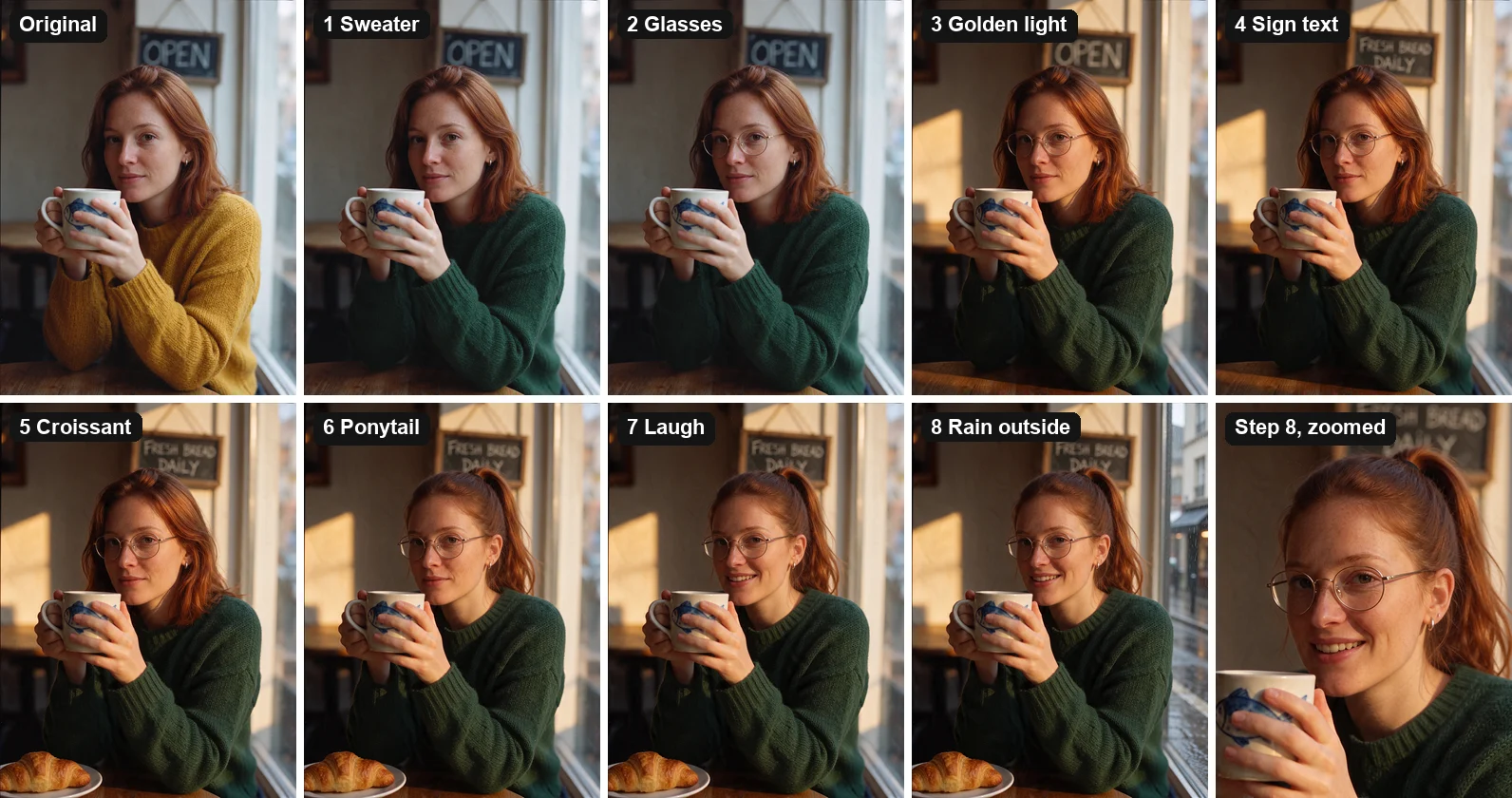
All eight edits landed as written:
- Change her sweater color from mustard yellow to deep forest green.
- Add thin round gold-rimmed glasses.
- Change the light to warm golden-hour sunlight from the left.
- Change the chalkboard text from OPEN to FRESH BREAD DAILY.
- Put a croissant on a small white plate next to the mug.
- Change her hairstyle to a high ponytail.
- Change her expression to a warm laugh.
- Replace the view through the window with a rainy city street.
By step 8 she is still clearly the same woman. The freckles, the earring and the fish on the mug survived all eight rounds. We saw no creeping blur, no oversharpening and no color cast beyond the golden light we asked for in step 3. The chalkboard text was right the first time and stayed right. Each step came back in well under a minute.
Did it really leave the rest alone? The pixel diffs#
This is where the "pixel level" claim gets tested. Each panel below shows only what changed between one step and the one before it: bright means changed, black means untouched.
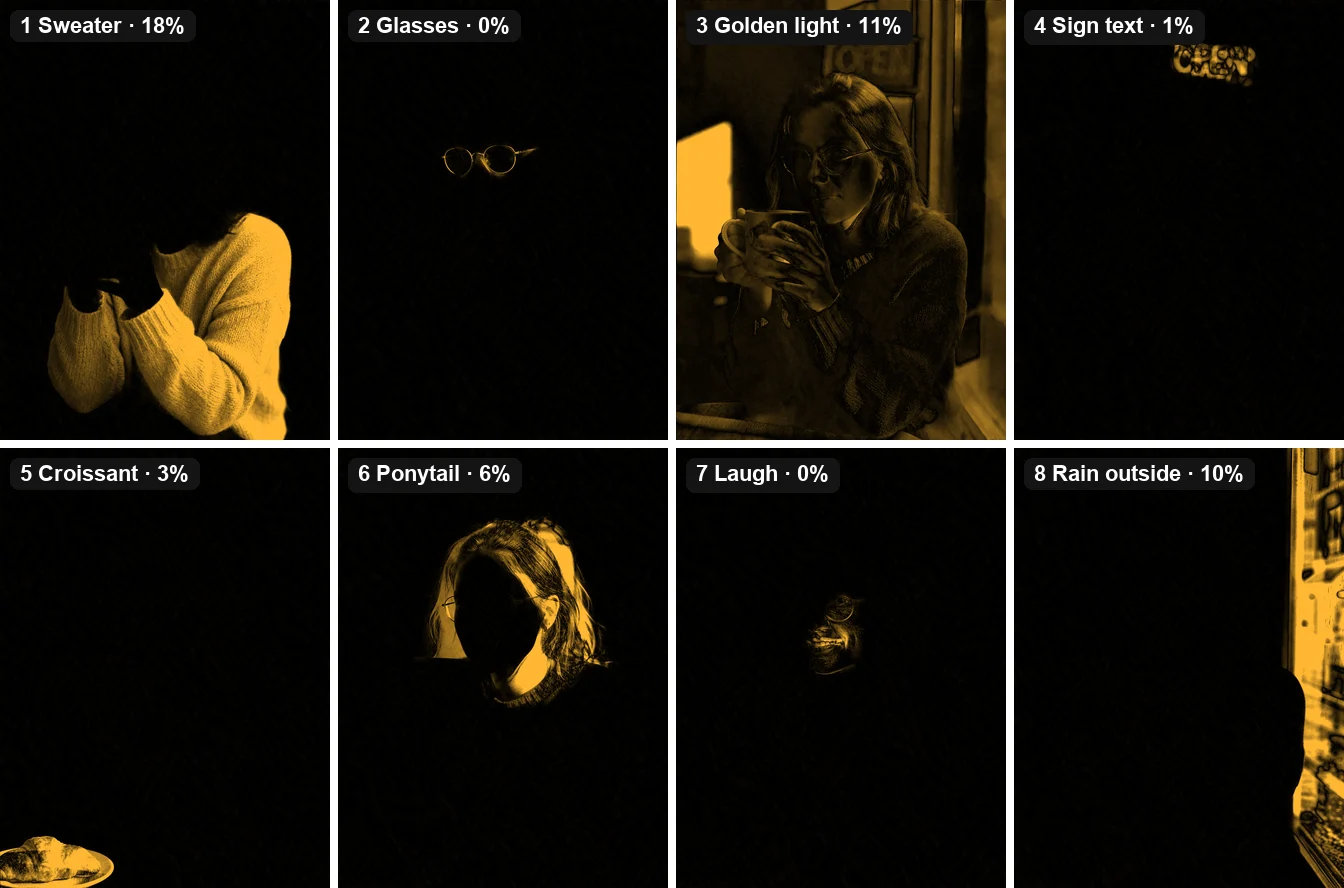
Five of the eight edits moved 6% of the pixels or fewer, and almost all of that was inside the thing we asked to change. Adding glasses touched the glasses and nothing else. The laugh changed the mouth and cheeks. Rewriting the sign changed 1% of the frame, all of it on the chalkboard. The two large numbers are expected: golden light (11%) changes every lit surface by definition, and the rainy street (10%) replaces the whole window.
The one real miss is step 1. We asked for a new sweater color, and the heat map shows the arms and hands moved too. The hands now grip the mug differently, and the fish pattern turned slightly. That's not pixel-level preservation. As you'll see below, the other two models did exactly the same thing on that step, so it looks like a weakness of "change the clothing" edits in general rather than something specific to Seedream.
Note
The pixel numbers are a rough tool. They count a soft shadow that shifted as a change, and they can't tell an intended change from a mistake. Use them to see where an edit reached, then judge with your eyes.
The same eight edits on Nano Banana Pro and GPT Image 2.6#
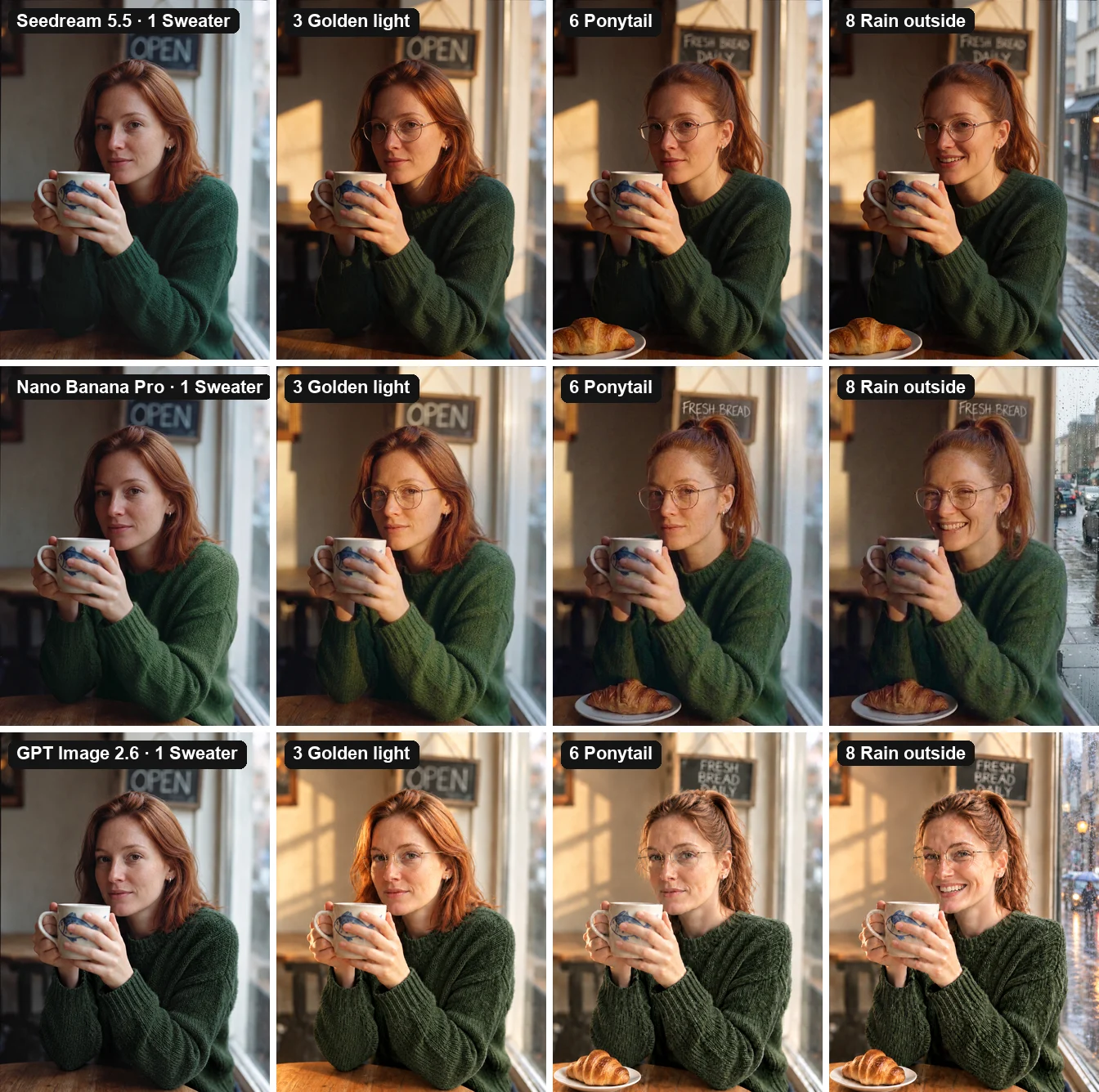
We gave the other two models the same starting photo and the same eight prompts.
| Seedream 5.5 | Nano Banana Pro | GPT Image 2.6 | |
|---|---|---|---|
| Edits that landed | 8 of 8 | 8 of 8 | 8 of 8 |
| Pixels changed by the sweater edit | 18% | 18% | 19% |
| Pixels changed by the golden light edit | 11% | 20% | 34% |
| Pixels changed by the glasses, sign and laugh edits | 0–1% | 0–1% | 1–3% |
| Framing over eight edits | Held | Held | Camera pulled back from step 3 |
| Output size at 1K, 3:4 | 864×1152 | 896×1200 | 768×1024 |
| Price on BulkImagen, 1K | 8 credits | 5 credits | 5 credits |
Seedream 5.5 and Nano Banana Pro are close. Both kept the woman, the framing and the small details through all eight rounds. The clearest difference was the lighting edit: Seedream changed the light and little else, while Nano Banana Pro reworked more of the frame to get there. One small difference you might miss: on Nano Banana Pro the new ponytail rose high enough to cover the word DAILY on the sign, while Seedream kept it below the sign. Neither one is a mistake, but if text on the wall matters, it's something to check.
GPT Image 2.6 drifted the most. The light edit at step 3 changed a third of the frame: the camera moved back so more of the table shows, the window got new panes, the hair turned curlier and lighter, and the whole image got brighter. Those changes carried through every later step. Zoom in on the last step and the difference is plain:
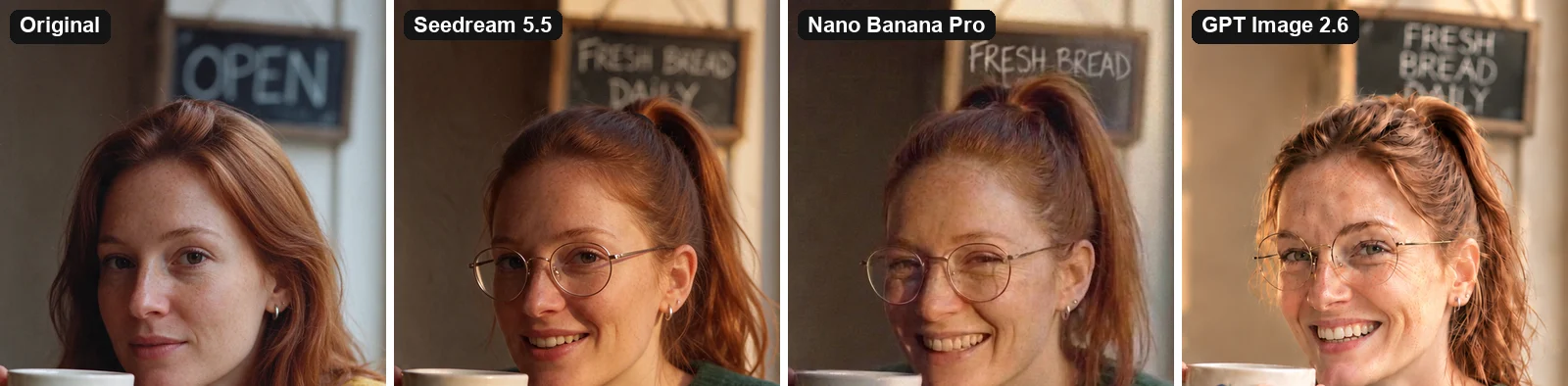
All three are recognizably the same person. GPT Image 2.6 sharpened her skin hard enough to make her look older, and its hair has a different texture. Seedream's version is the closest to the original apart from the edits we asked for.
Text edits: four rewrites on one poster#
Seedream has always been good at text, so we gave it a harder job: start with a bakery poster in English and Chinese, then change one line at a time and see whether the rest of the poster survives.
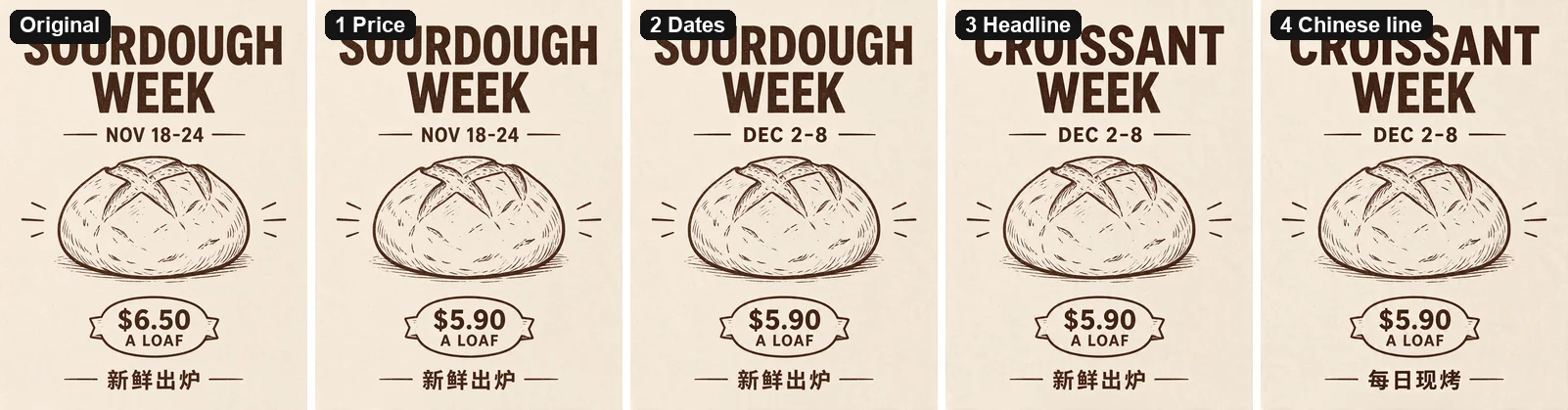
All four rewrites came out right on the first try: $6.50 to $5.90, NOV 18-24 to DEC 2-8, SOURDOUGH WEEK to CROISSANT WEEK, and 新鲜出炉 to 每日现烤. Fonts, layout and the bread illustration didn't move. The steps changed 0%, 1%, 5% and 1% of the pixels; the headline was the biggest because CROISSANT is a different shape from SOURDOUGH.
This is the closest the test came to "pixel level". If you produce price cards, event posters or menus that change every week, this is the most useful thing Seedream 5.5 does.
The prompt for each step is the same short pattern, with your own old and new text:
Change the price from [old text] to [new text]. Keep everything else exactly the same: same layout, same fonts, same illustration, same colors, all other text unchanged.One prompt with all eight edits, or eight steps?#
If the edits are planned in advance, why not ask for all of them at once? We tried that too: one prompt listing all eight changes, run once on each model, starting from the same photo.
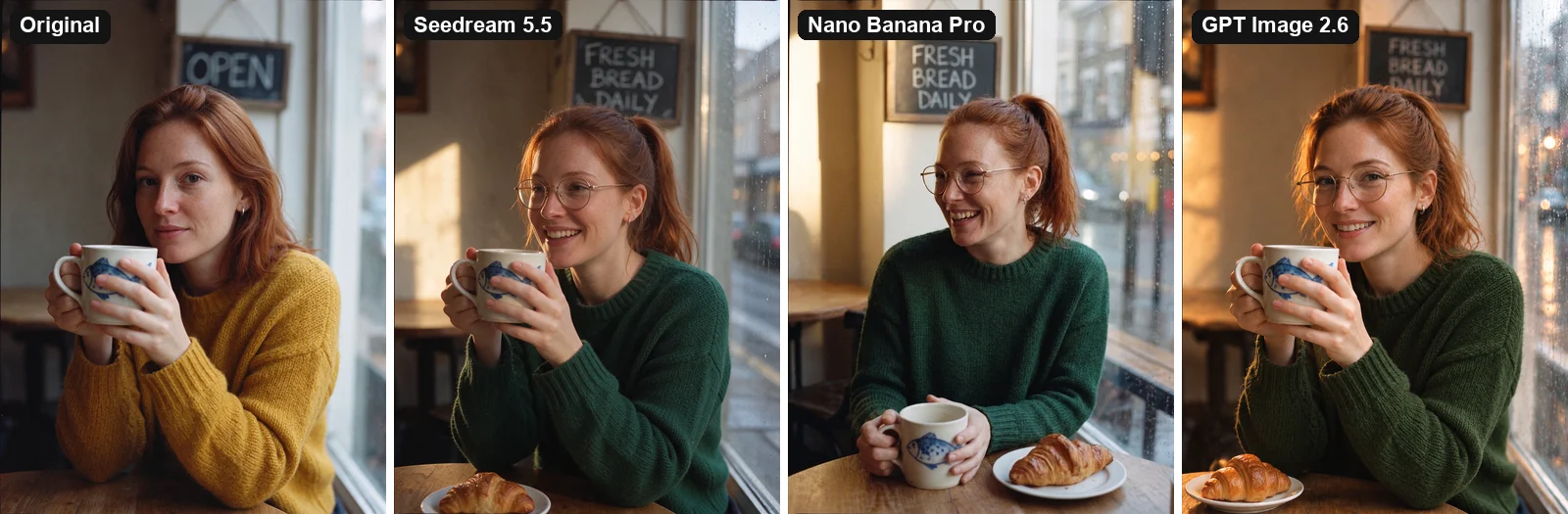
All three models made all eight changes. But Seedream 5.5 and Nano Banana Pro treated the long prompt as a new photo: Seedream changed her pose and how she holds the mug, and Nano Banana Pro turned her to the side and moved the mug onto the table. The woman is still recognizable; the photo isn't the same photo.
GPT Image 2.6 went the other way. Its single-prompt result kept the original pose and framing better than its own eight-step chain did.
The practical rule from this run:
- On Seedream 5.5, edit in steps when the original composition matters. One change per prompt is what the model is built for, and it showed.
- On GPT Image 2.6, try one combined prompt first. Every extra round gave it another chance to redraw the scene.
How to run a chain of edits in BulkImagen#
BulkImagen is a bulk image generator, not a chat editor, so each edit is a small batch. That turns out to be useful, because each step can run on many images at once.
- Generate or upload your starting image. In the batch form, choose Seedream 5.5 and set the same aspect ratio as your image. Seedream 5.5 doesn't offer an automatic ratio, and a different ratio means a recomposed picture.
- Write one edit per line and end it with your "keep everything else" sentence. Name the details you care about most, the way we named the earring and the mug.
- Pick the result and continue. Every image you generate is in your Library. Select it and click Use as reference, which opens a new batch with that image attached, then write the next edit.
- Apply each step to a set. With several reference images and the Per image mode, one edit line runs on every image. Changing the sweater color across ten product shots is one batch, not ten.
- Explore before you commit. Put three versions of the next edit on three lines (three shades of green, say) against the same reference, then continue from the one you like.
At 1K, Seedream 5.5 costs 8 credits per image, so our whole eight-step chain cost 72 credits including the starting image. Failed images are refunded automatically. The Seedream 5.5 model page has the full spec sheet and a ready-made form, and our guides to batch editing photos with AI and consistent characters cover the other two common edit jobs.
Tip
Zoom in on every step before you build on it. A small slip, like the hands moving in our sweater edit, gets passed to every later step, because each round treats the previous output as the truth.
Verdict#
Seedream 5.5's editing claim mostly held up in our test. Over eight rounds it kept the face, the framing and the small details, it wrote every piece of text correctly, and most edits changed only what we asked for. It isn't literally pixel-perfect: a clothing color change moved the arms, and global edits like lighting change everything they touch. Nano Banana Pro was nearly as steady for less money per image. GPT Image 2.6 drifted the most step by step, but did better when we gave it everything in one prompt.
If your work is a chain of small changes to the same picture, such as product variants, weekly posters or a character in new outfits, Seedream 5.5 is the model to try first.
FAQ#
Is Seedream 5.5 good at image editing?#
In our test, yes. All eight edits in a row landed, the woman stayed recognizable, and five of the eight edits changed 6% of the image or less. Text edits were the strongest: four rewrites on a poster, all correct, with the rest of the poster unchanged.
Can Seedream 5.5 really edit an image 100 times?#
ByteDance says it supports up to 100 rounds and shows one demo. We tested 8 rounds and saw no buildup of blur or color drift. We haven't verified 100.
Does Seedream 5.5 keep the rest of the image exactly the same?#
Mostly. Small edits like glasses, a sign or an expression changed 0–1% of the pixels. A clothing color change also moved the arms and hands, on all three models we tested, so check the regions next to whatever you edit.
Should I put all my edits in one prompt?#
Not on Seedream 5.5 if you want to keep the original composition. In our test, one long prompt with eight changes produced a recomposed photo, while eight single edits kept the original. GPT Image 2.6 behaved the other way around.
How big was this test?#
One starting photo, three models, eight chained edits each, plus one single-prompt run per model and a four-step text chain on Seedream 5.5. All at 1K, run once, unedited apart from resizing and labels. The woman, the café and the bakery are fictional and AI-generated.