How to Make AI Images Look Realistic: 36 Test Photos
How to make AI images look realistic: 6 scenes, a plain prompt vs a phone-photo line vs a film line, on two models. What worked, and what backfired.
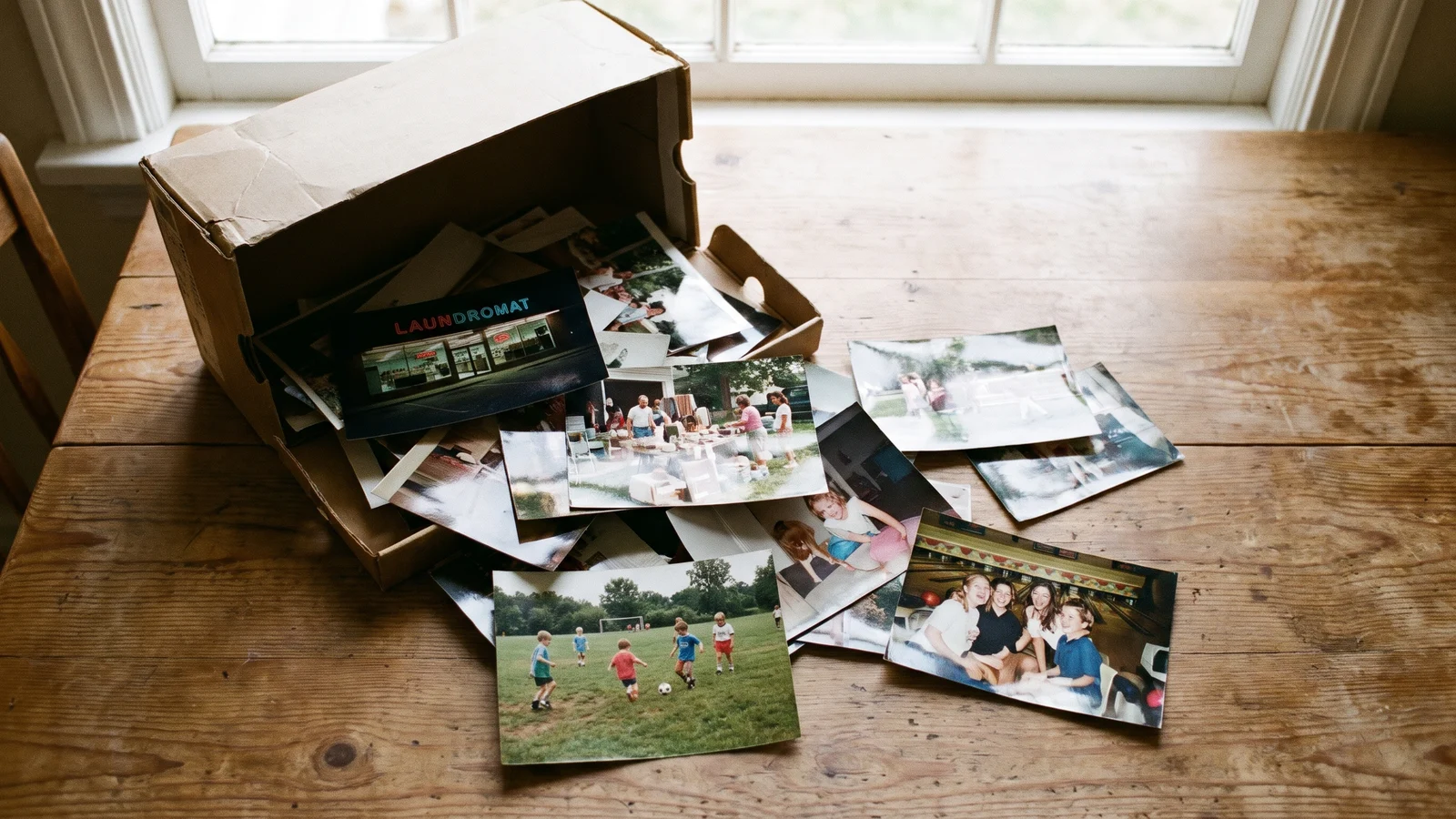
You can usually spot an AI photo before you can say why. Everyone is laughing at the same moment, the subject sits dead center, the sky is a perfect pink sunset, and nothing in the frame is out of place. The fix is less about the model and more about what you ask for: if you want to make AI images look realistic, describe how a real person would have taken the photo, not just what is in it.
We tested that on 36 images. Six ordinary scenes, three ways of writing each prompt, two image models, one attempt per image. Below are the results, the two lines that did most of the work, and one surprising way the realism lines backfired.
Genera imágenes por lotes
Un prompt por línea, cientos de imágenes, un ZIP para descargar.
How we tested#
- Six everyday scenes, the kind of photo people really take: a laundromat late at night, a driveway yard sale, a skate park at dusk, a self-serve car wash at night, friends at a bowling alley, and parents on the sideline of a kids' soccer game. All people are fictional.
- Three versions of each prompt:
- Plain: one sentence, "A photo of…", the way most people start.
- Phone line: the same sentence plus a short description of a casual phone snapshot.
- Film line: the same sentence plus a short description of a 35mm point-and-shoot snapshot.
- Every prompt ended with No readable text, no logos.
- Two models, as available in November 2026: GPT Image 2 at 1K and Nano Banana Pro at 2K, both 4:3. One attempt per prompt, no cherry-picking. All 36 rendered on the first try.
We also tried to put a number on "looks AI": saturation, contrast, and the share of blown-out or pure-black pixels. None of them moved consistently between the three versions, and on Nano Banana Pro the phone versions were often more saturated than the plain ones. So the judgments below are by eye, from full-size images.
The results#
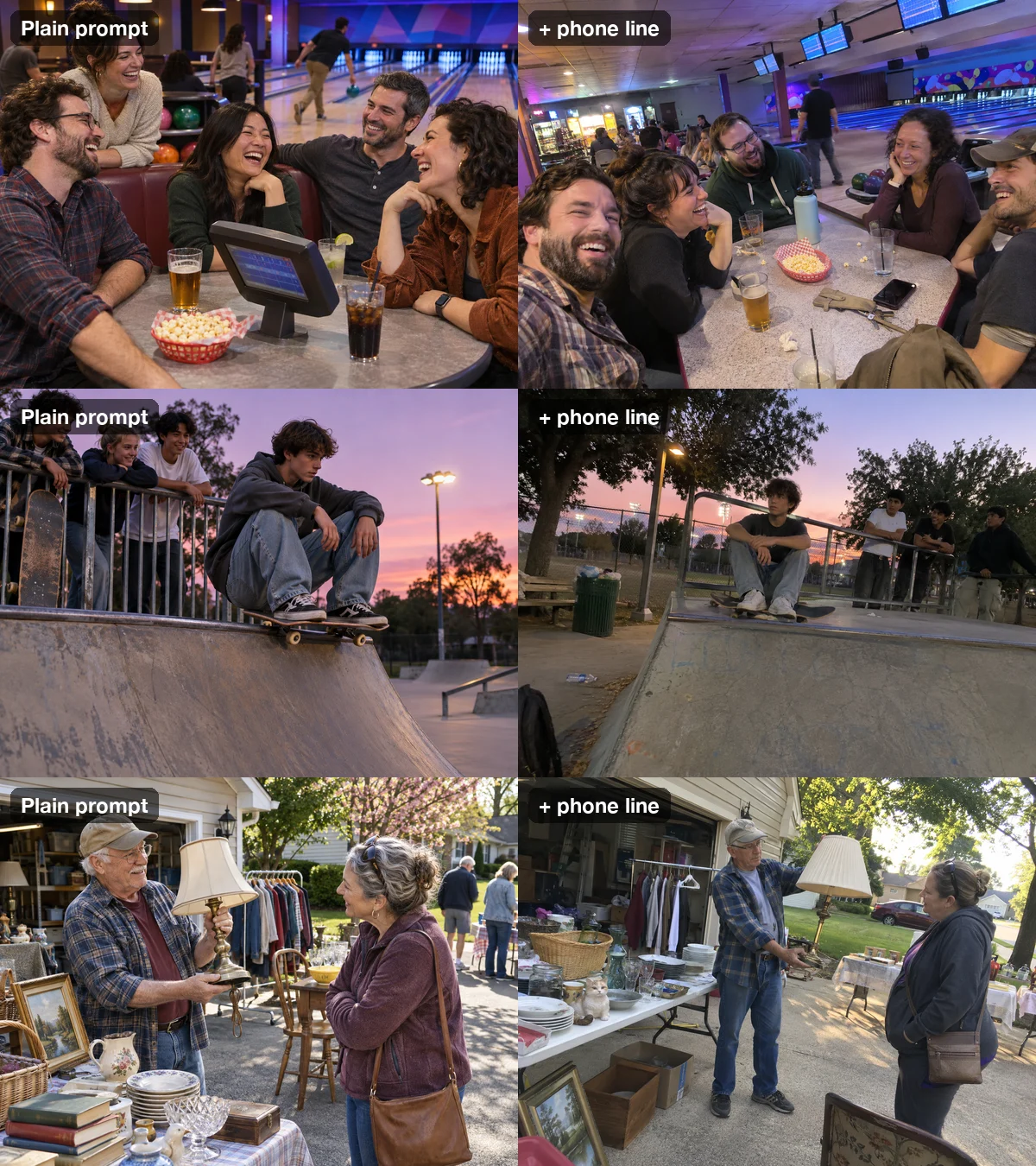
GPT Image 2 changed the most. The plain prompts gave textbook stock photos: four friends at a bowling alley all laughing toward the camera, a skater framed against a glowing sunset, an older man holding up a lamp in golden light with everything around him neatly arranged. Add the phone line and the same scenes turn into snapshots: the horizon tilts, the subject drifts off center, there is a trash can and a stray water bottle in frame, the light is flat and a bit green, and faces look like faces instead of ads.
The film line pushed further in a different direction: flash-lit or dim, muted color, grain, and the slightly washed-out look of a print from a drugstore lab.
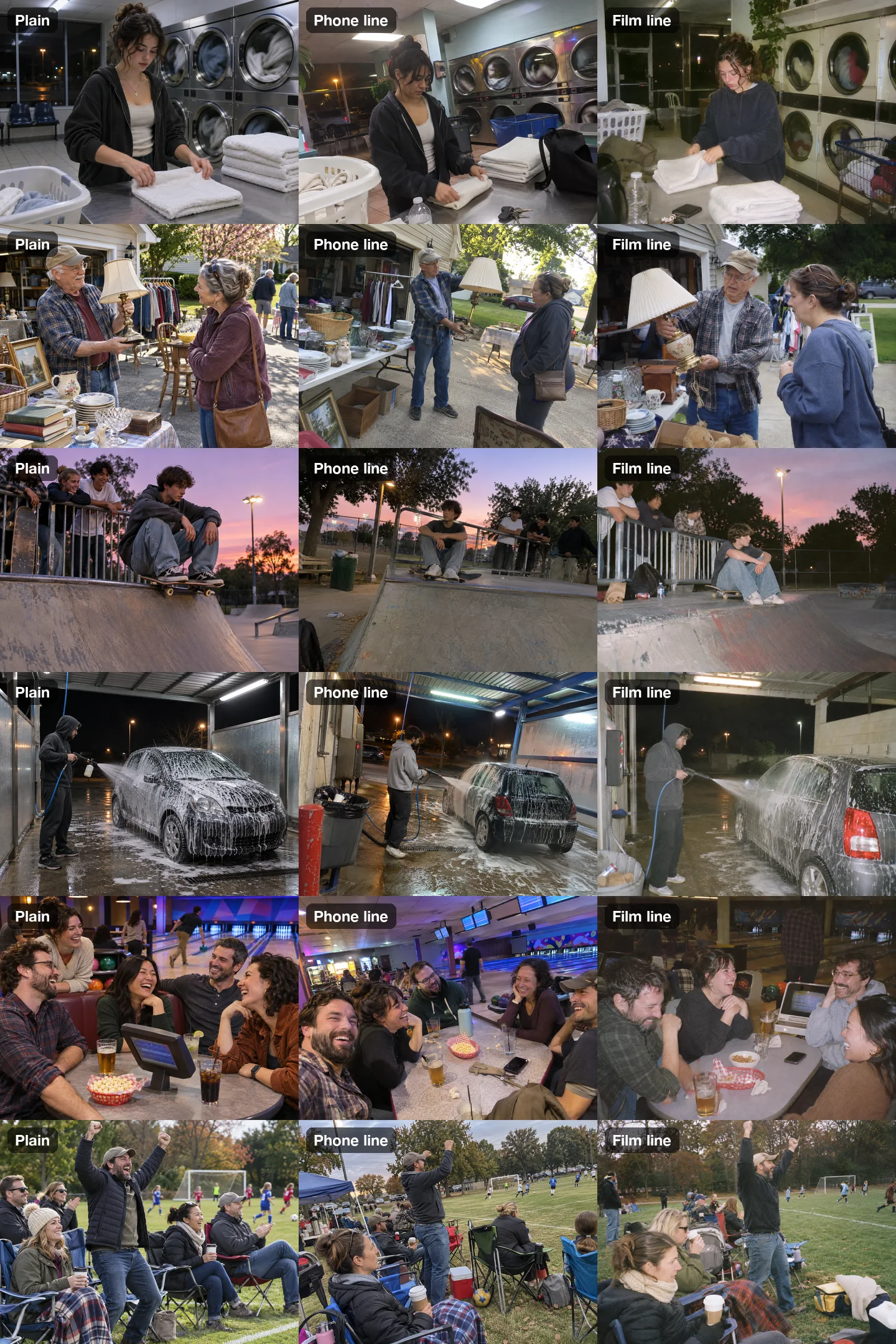
Nano Banana Pro starts more realistic. Its plain versions already looked like photographs most of the time: a rainy street through the laundromat window, real clutter on the yard sale tables. The lines still helped, but the gap was smaller. On this model, the phone line tended to go wide-angle and strongly tilted, sometimes more than a real photo would.
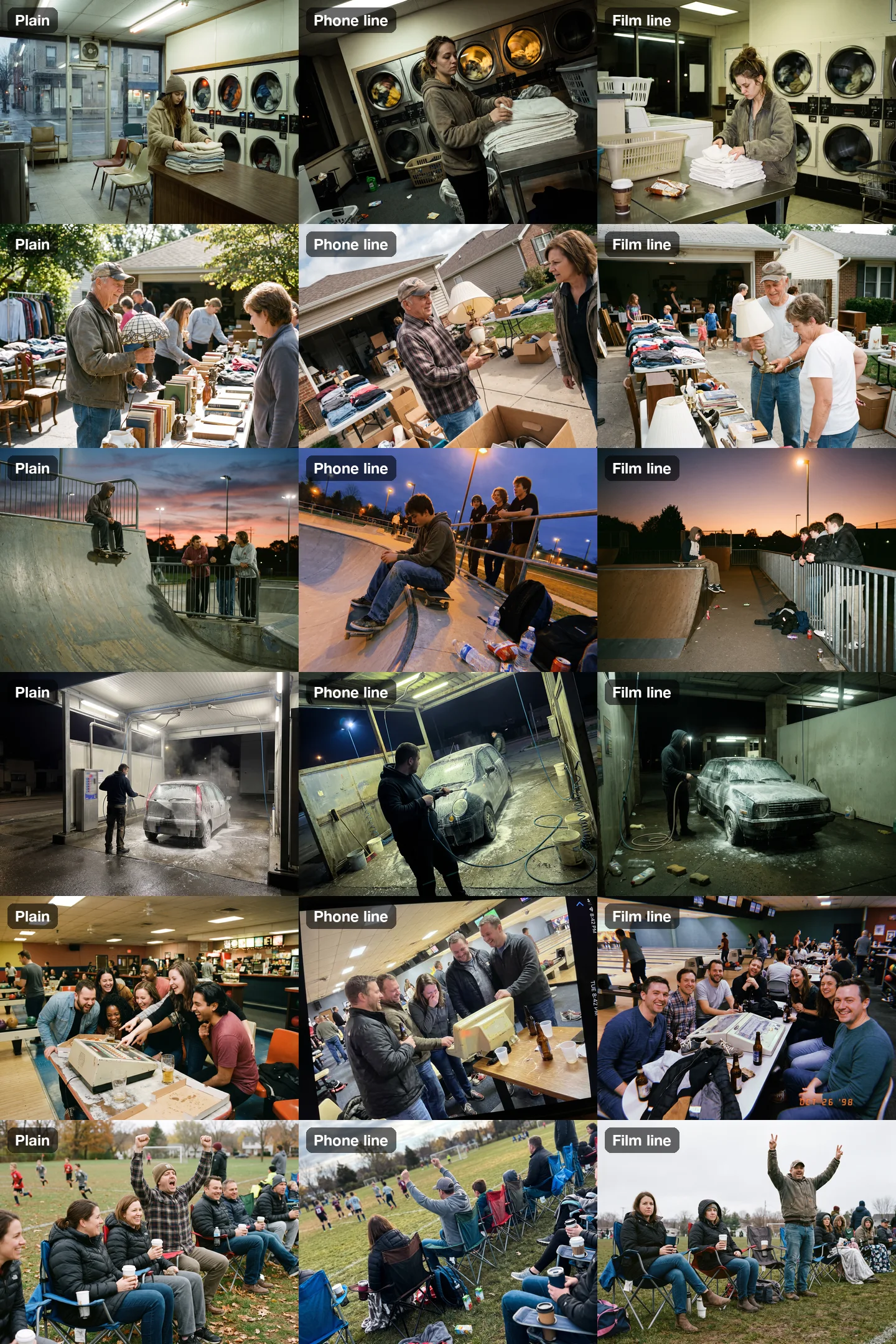
Short version: if your images look like stock photos, the description of how the photo was taken matters more than which model you pick.
The lines that worked#
Here is the phone line we used. Add it after your scene description:
Shot on a phone by someone who was there, not a photographer: slightly tilted framing, subject a little off-center, mixed real-world lighting with the color cast it gives, ordinary clutter left in the frame, a little noise in the shadows, no retouching, no dramatic lighting, no shallow depth of field, people with normal skin texture and unposed expressions.And the film line:
Casual 35mm film snapshot from a point-and-shoot camera, built-in flash or available light: visible film grain, slightly muted colors, imperfect exposure, ordinary framing, everyday clutter left in, no retouching, people with normal skin texture and unposed expressions.Each part of the line removes one thing that makes an AI image look AI:
- Say who took it. "Someone who was there, not a photographer" is the biggest single change. Models default to the look of professional photography because that is what most captioned photos online are.
- Ask for imperfect framing. A tilted horizon and an off-center subject read as a real moment. Perfect symmetry reads as staged.
- Name the light you would really get. Fluorescent tubes, a sodium street lamp, a built-in flash. Real light has a color cast; AI light is flattering by default. "No dramatic lighting" stops the automatic golden hour.
- Leave the clutter in. Trash cans, coats on chairs, a phone on the table. Real places are not art-directed.
- Ban the portrait look. "No shallow depth of field" stops the creamy blurred background that phones rarely produce in a busy scene, and "unposed expressions" stops everyone smiling at once.
Tip
Keep the scene sentence plain and put all the camera and light words in the style line. Then you can reuse one style line across a whole list and every image matches.
When the realism line backfires: the model draws the camera#
Two of Nano Banana Pro's 18 images showed a failure we had not expected. The model did not just take the photo in a phone style. It drew the phone.
- Phone line, bowling alley: the image came back as a picture of a phone screen, with a status bar, a Wi-Fi icon and "TUE 8:42 PM" down the side.
- Film line, bowling alley: the model added an orange date stamp, "OCT 26 '98", in the corner, plus a light leak.
Both prompts ended with No readable text. The model ignored it, because to the model the date stamp and the status bar are part of what "phone photo" and "film snapshot" look like.
One extra sentence fixed each one. We re-ran both images once with the additions below and both came back clean:
This is the photo itself, not a picture of a phone screen: no camera interface, no status bar, no timestamps.No date stamp, no light leaks.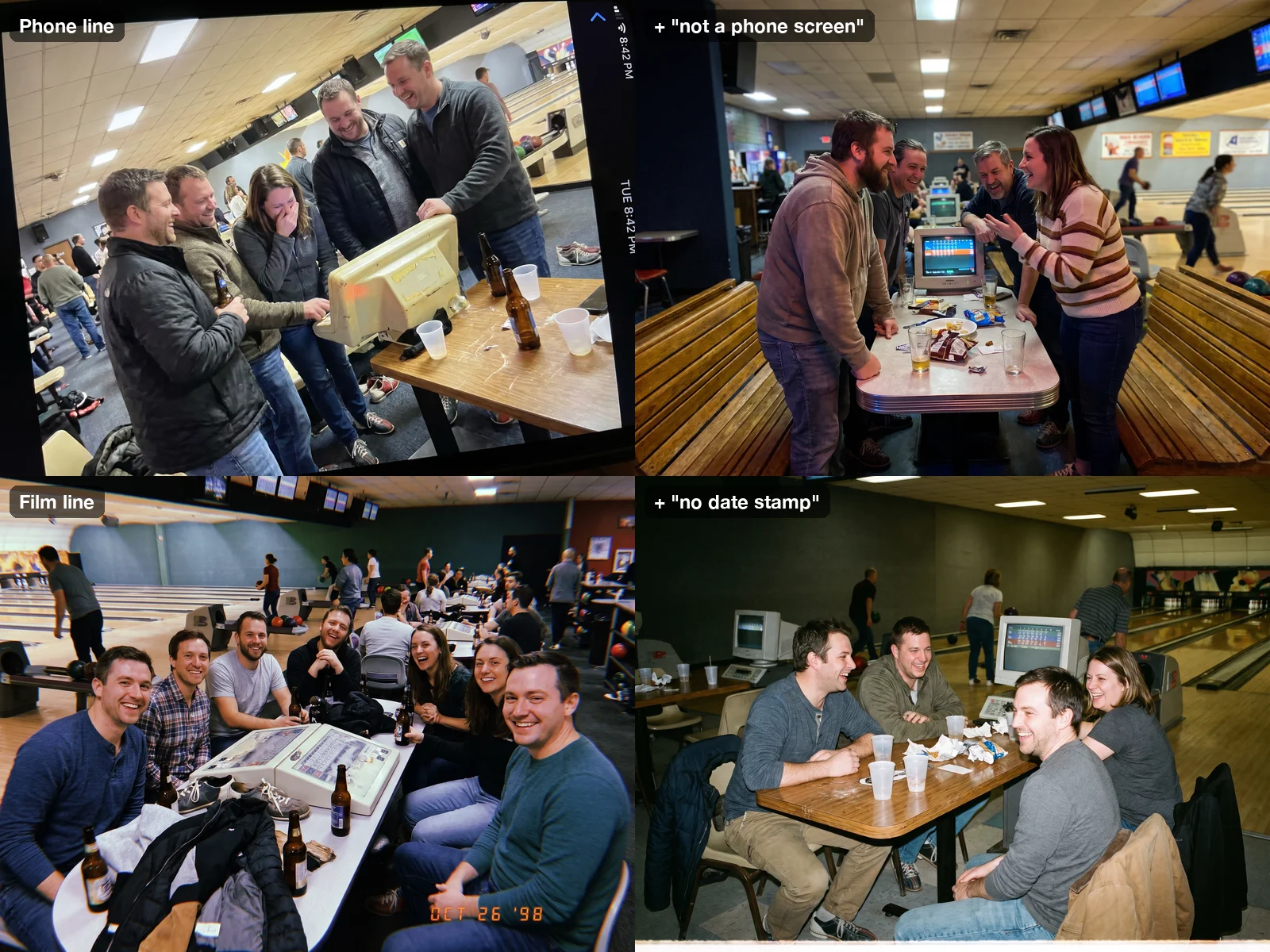
GPT Image 2 did not do this in any of its 18 images, but that is a small sample. If you write "shot on an iPhone" or "Polaroid", expect the same risk, along with a real camera brand's look or lettering. Describe the result you want, not the device.
A prompt list you can run#
Here are all six scenes with the phone line and the fix sentence built in, one image per line. We tested the fix sentence on one scene, so treat this as a strong starting point, and check each image before you use it.
A photo of a laundromat late at night, a young woman folding towels on a counter while the dryers spin behind her. Shot on a phone by someone who was there, not a photographer: slightly tilted framing, subject a little off-center, mixed real-world lighting with the color cast it gives, ordinary clutter left in the frame, a little noise in the shadows, no retouching, no dramatic lighting, no shallow depth of field, people with normal skin texture and unposed expressions. This is the photo itself, not a picture of a phone screen: no camera interface, no status bar, no timestamps. No readable text, no logos.
A photo of a driveway yard sale on a Saturday morning, an older man in a cap holding up a lamp for a neighbor to look at. Shot on a phone by someone who was there, not a photographer: slightly tilted framing, subject a little off-center, mixed real-world lighting with the color cast it gives, ordinary clutter left in the frame, a little noise in the shadows, no retouching, no dramatic lighting, no shallow depth of field, people with normal skin texture and unposed expressions. This is the photo itself, not a picture of a phone screen: no camera interface, no status bar, no timestamps. No readable text, no logos.
A photo of a skate park at dusk, a teenage boy sitting on his board at the top of a ramp while friends watch from the rail. Shot on a phone by someone who was there, not a photographer: slightly tilted framing, subject a little off-center, mixed real-world lighting with the color cast it gives, ordinary clutter left in the frame, a little noise in the shadows, no retouching, no dramatic lighting, no shallow depth of field, people with normal skin texture and unposed expressions. This is the photo itself, not a picture of a phone screen: no camera interface, no status bar, no timestamps. No readable text, no logos.
A photo of a self-serve car wash bay at night, a man in a hoodie spraying soap on a small hatchback. Shot on a phone by someone who was there, not a photographer: slightly tilted framing, subject a little off-center, mixed real-world lighting with the color cast it gives, ordinary clutter left in the frame, a little noise in the shadows, no retouching, no dramatic lighting, no shallow depth of field, people with normal skin texture and unposed expressions. This is the photo itself, not a picture of a phone screen: no camera interface, no status bar, no timestamps. No readable text, no logos.
A photo of a bowling alley on a weeknight, a group of friends in their thirties laughing at the scoring table between turns. Shot on a phone by someone who was there, not a photographer: slightly tilted framing, subject a little off-center, mixed real-world lighting with the color cast it gives, ordinary clutter left in the frame, a little noise in the shadows, no retouching, no dramatic lighting, no shallow depth of field, people with normal skin texture and unposed expressions. This is the photo itself, not a picture of a phone screen: no camera interface, no status bar, no timestamps. No readable text, no logos.
A photo of the sideline of a kids' soccer game, parents in folding chairs with coffee cups, a dad cheering with his arms up. Shot on a phone by someone who was there, not a photographer: slightly tilted framing, subject a little off-center, mixed real-world lighting with the color cast it gives, ordinary clutter left in the frame, a little noise in the shadows, no retouching, no dramatic lighting, no shallow depth of field, people with normal skin texture and unposed expressions. This is the photo itself, not a picture of a phone screen: no camera interface, no status bar, no timestamps. No readable text, no logos.
To use your own scenes, keep the style line and swap the first sentence. If you need dozens of photos in the same look, for a blog, an ad test or a website, a bulk image generator runs the whole list in one batch with the style line repeated on every row, so the set matches. More on that in how to generate images from a list of prompts.
Which model to use#
| GPT Image 2 | Nano Banana Pro | |
|---|---|---|
| Plain prompt | Glossy, posed, stock-photo look | Already fairly photographic |
| With the phone or film line | Biggest improvement; convincing snapshots in all 6 scenes | Smaller improvement; phone line can over-tilt |
| Drew the camera into the picture | 0 of 12 styled images | 2 of 12 (fixed with one sentence) |
| Credits per image in this test | 5 (1K) | 6 (2K) |
Both are good choices once the style line is in. GPT Image 2 is the default model in the form, so the list above runs on it as it is. Prices and features for every model are on the models page.
Checklist#
- Describe the scene in one plain sentence
- Add one style line: who took it, imperfect framing, the real light, clutter, no portrait blur, unposed faces
- Describe the result, not the device: avoid camera brand names
- Add "not a picture of a phone screen" to phone lines and "no date stamp" to film lines
- Check every image at full size for status bars, date stamps and stray lettering
- Reuse the same style line for a whole set so it matches
FAQ#
What is the fastest way to make AI images look realistic? Add one line describing how a real person would have taken the photo: a casual phone snapshot or a film point-and-shoot, with imperfect framing, real light and clutter left in. In our test that one line turned stock-photo results into believable snapshots on GPT Image 2.
Why do AI images look fake? Mostly because models default to professional photography: centered subjects, flattering golden light, blurred backgrounds, tidy scenes and everyone smiling at once. Real photos are messier. Asking for the mess is what makes the difference.
Should I write "shot on an iPhone" in my prompt? We would avoid device and brand names. In our test even a generic "shot on a phone" made Nano Banana Pro draw a phone screen with a status bar. Describe the look you want instead, and add "not a picture of a phone screen".
Does "no text" stop date stamps and screen overlays? Not reliably. Both failures in our test happened with "No readable text" in the prompt. Name the specific thing you don't want: "no date stamp", "no status bar".
Can I measure how realistic an AI image looks? We tried saturation, contrast and clipped pixels, and none of them tracked what we saw. Judge at full size, and look for the giveaways in this article: posing, perfect light, empty scenes and overlays.
How many images did this test use? 36 images (6 scenes × 3 prompt versions × 2 models), one attempt each, plus 2 re-runs to test the fix sentences. It is a small sample, so read the results as strong tendencies, not rules.
For one specific era, see our 80s AI photo prompts test, which runs the same idea with yearbook portraits and mall glamour shots.