GPT Image 2.6 vs 2.5 vs GPT Image 2: Is the New Model Better?
GPT Image 2.6 vs 2.5 vs GPT Image 2: seven identical tests on menus, posters, products and reference edits. What changed, what didn't, and which to use.
En esta página
- What OpenAI changed in GPT Image 2.6
- How we tested
- The five text-to-image prompts
- 1. A menu with eight items and prices
- 2. An infographic with small labels
- 3. A poster layout
- 4. Glass and reflections
- 5. Counting and colors
- The two reference-image tests
- 6. Put the mug in a new scene
- 7. Keep a face in a new scene
- Results at a glance
- So, should you switch to GPT Image 2.6?
- Run the same test on your own prompts
- FAQ
OpenAI released GPT Image 2.6 on November 4, 2026, and the first question anyone with a working setup asks is whether to switch. So we ran a gpt image 2.6 vs 2.5 test, and added GPT Image 2 as well, since it is still the model most people use for batch work. Same prompts, same settings, one attempt each.
The short answer surprised us: at the 1K setting, GPT Image 2.6 was not better than either older model. All three spelled every word correctly and kept every reference image intact. Where 2.6 differed, it was by adding things we never asked for. Below are the prompts, all the results side by side, and what OpenAI actually changed in 2.6, which is mostly not about image quality.
Genera imágenes por lotes
Un prompt por línea, cientos de imágenes, un ZIP para descargar.
What OpenAI changed in GPT Image 2.6#
Before the tests, it helps to know what OpenAI says is new. According to OpenAI's API changelog and image-generation guide (checked November 6, 2026):
- Two builds again. GPT Image 2.6 comes as Sunburst, "for detailed visual work", and Flare, "for fast iteration". GPT Image 2.5 had the same split.
- SVG output. Through OpenAI's Image API, 2.6 can return a static, editable vector file instead of a picture. This works for new images only, not edits.
- Animated GIF output. 2.6 can return a looping GIF of 2 to 16 frames, with a frame duration you choose.
- A complexity setting (low, medium or high) that controls how much the model plans before it draws. OpenAI says higher complexity helps with dense text and complex layouts, can add time, and "can introduce unwanted changes". It costs nothing extra.
- Same token prices as 2.5. OpenAI notes that the cost per image can still differ, because models use different numbers of tokens for the same picture.
What OpenAI does not claim is that 2.6 draws better pictures than 2.5. The developer pages for both 2.6 builds list performance and speed as "not specified". So the question for anyone making ordinary images is open, which is why we tested it.
Note
On BulkImagen, GPT Image 2.6 can return a looping GIF through the Output option. SVG and the complexity setting are API features of OpenAI's own service and are not part of our form. This comparison is about still pictures.
How we tested#
- Three models, as available in November 2026: GPT Image 2, GPT Image 2.5 and GPT Image 2.6, all generated through the BulkImagen API.
- Seven tests: five text-to-image prompts aimed at things image models tend to get wrong (dense text, small labels, layout, glass, counting), plus two reference-image tests.
- Same settings for all three: 1K resolution, quality left on Auto, the same aspect ratio per test. On BulkImagen, Auto runs the Flare build of 2.5 and 2.6 and High runs Sunburst, so we also ran four of the tests on GPT Image 2.6 with High quality to see whether Sunburst behaves differently.
- One attempt per model, no cherry-picking. Every image below is the first and only one we generated.
- The reference photos are not real. The mug and the woman were generated by AI; the woman is fictional.
One thing we noticed before looking at a single picture: the same "1K" setting gave different sizes. On the 3:4 tests, GPT Image 2 and 2.5 returned 1086 × 1448 pixels, while GPT Image 2.6 returned 768 × 1024. On the square test it was 1254 × 1254 against 1024 × 1024. On the 3:2 tests all three returned 1536 × 1024. If you need pixels at 1K, the older models give you more for the same price.
The five text-to-image prompts#
Every model got these exact words, one prompt per line:
A chalkboard cafe menu titled "THE CORNER CUP", listing exactly eight items with prices in neat hand-lettering: Espresso $3.00, Cappuccino $4.25, Flat White $4.50, Oat Latte $5.00, Chai Latte $4.75, Hot Chocolate $3.75, Almond Croissant $4.00, Banana Bread $3.50; small chalk drawings of a coffee cup and a croissant in the corners, photographed straight on
A clean flat infographic titled "HOW TO REPOT A PLANT" with four numbered steps, each with a simple illustration and a short caption: 1 "Water the day before", 2 "Loosen the roots", 3 "Add fresh soil", 4 "Water and wait"; white background, muted green and terracotta colors, small sans-serif labels
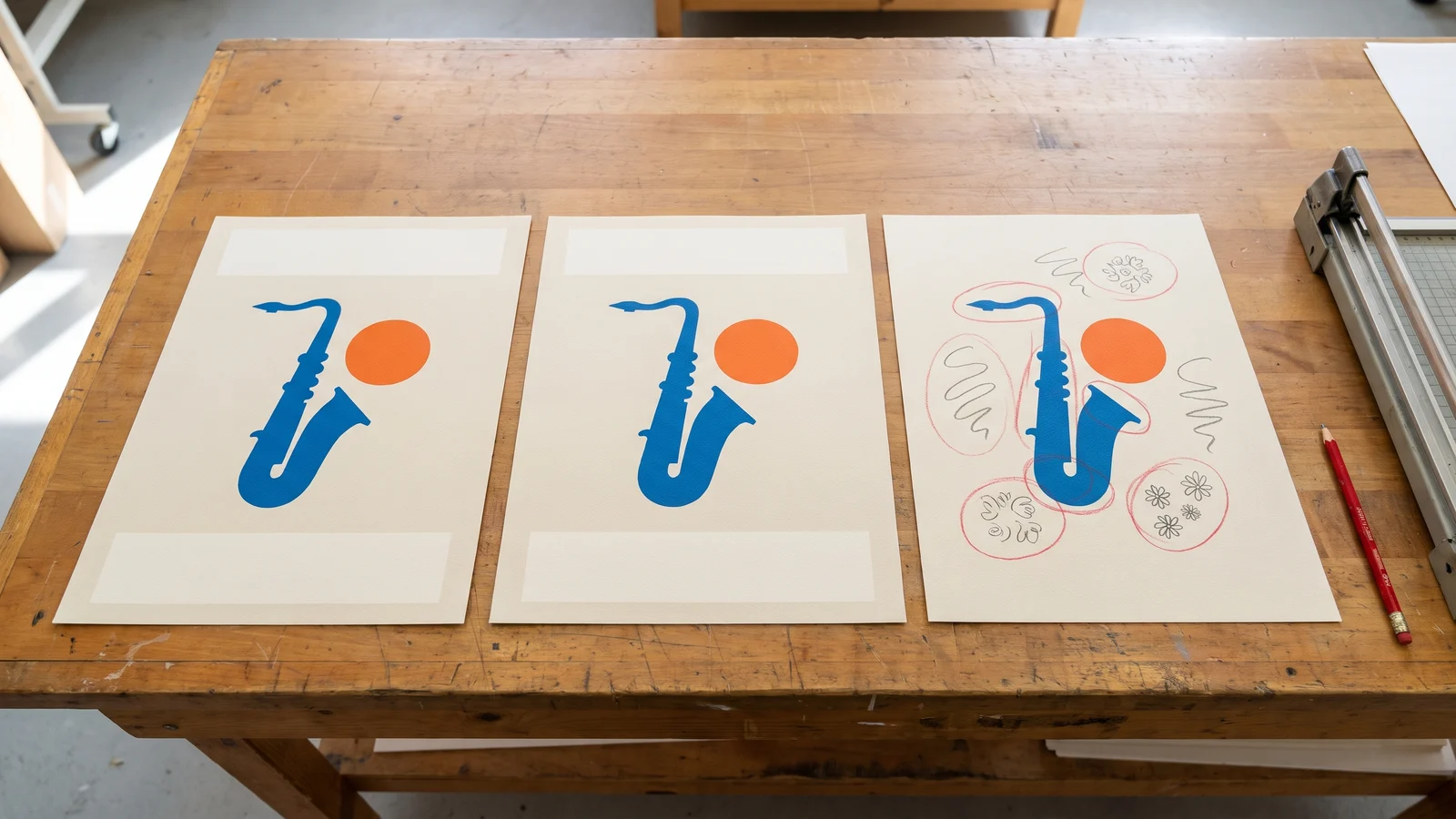
A minimalist concert poster for a fictional jazz night, large title "BLUE HOUR SESSIONS", subtitle "Live at the Harbor Hall", date line "Friday, March 14 · 8 PM", a single saxophone silhouette in deep blue and orange, lots of negative space, Swiss grid layout
A clear glass perfume bottle with a faceted crystal stopper on a wet black stone, single water droplets on the glass, dramatic side light creating caustic reflections, dark background, no label, no text, product photograph
Five ceramic teacups in a row on a linen tablecloth, each a different color from left to right: yellow, teal, coral, navy and white; a single sugar cube sits on the saucer of the navy cup only; soft overhead daylight, photograph
In every image below, the models appear in the same order, left to right: GPT Image 2, GPT Image 2.5, GPT Image 2.6, and where shown, GPT Image 2.6 on High.
1. A menu with eight items and prices#
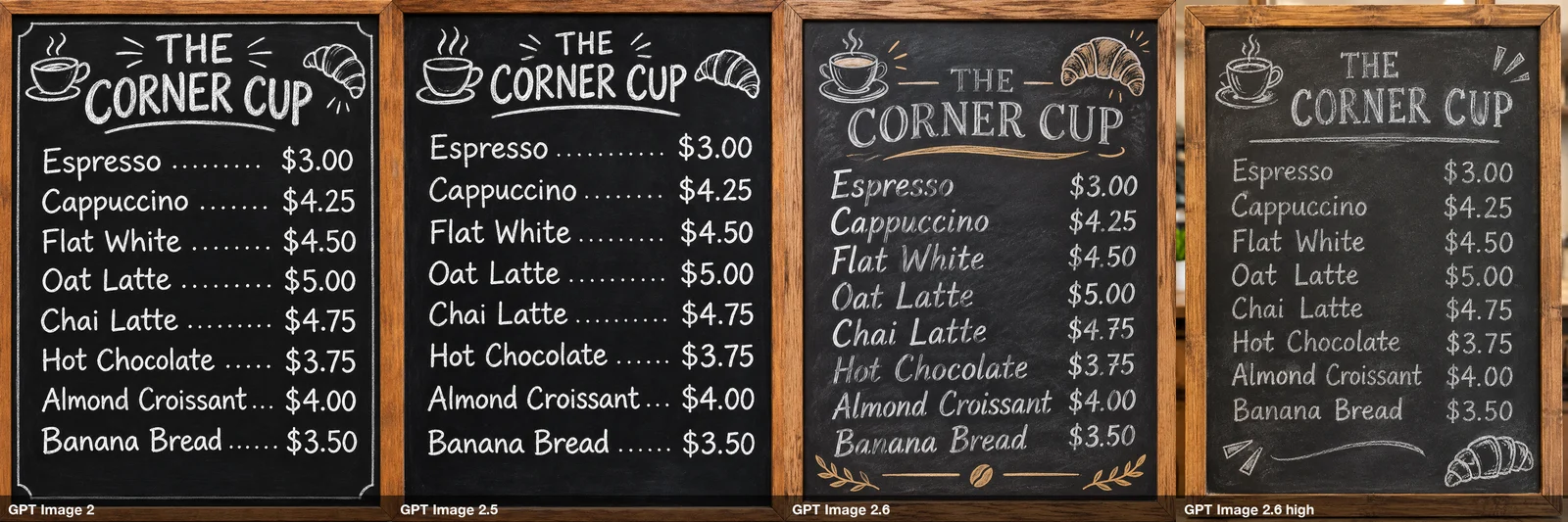
This is the test we expected to separate the models, and it did not. All four images have all eight items and all eight prices, spelled and matched correctly. A year ago that alone would have been a headline.
The differences are style. GPT Image 2 and 2.5 drew clean menus with dotted leader lines. GPT Image 2.6 looks most like real chalk, and it also added wheat sprigs and a coffee bean along the bottom that the prompt never mentioned. On High it was plainer and closer to the brief.
2. An infographic with small labels#
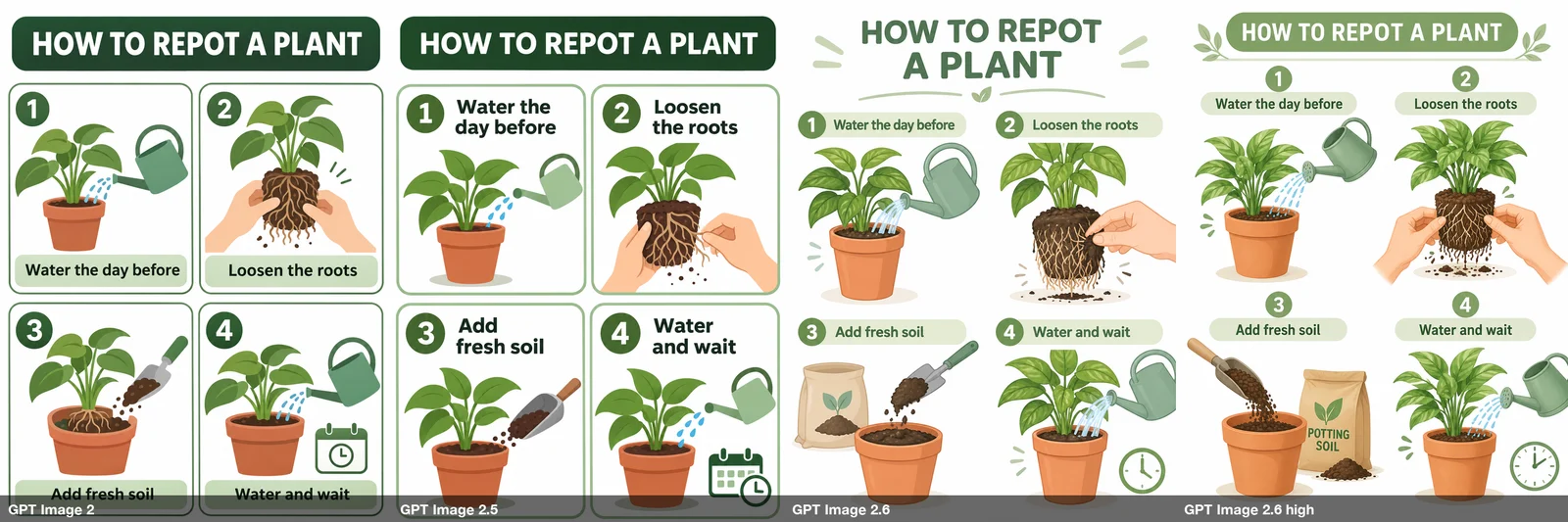
Again, every title and every caption is correct in all four. GPT Image 2.5 gave the captions the most room and is the easiest to read at small sizes. GPT Image 2.6 on High wrote "POTTING SOIL" on the bag of soil in step 3. It is spelled right and it makes sense, but it is text we did not ask for, and on a brand graphic that matters.
3. A poster layout#
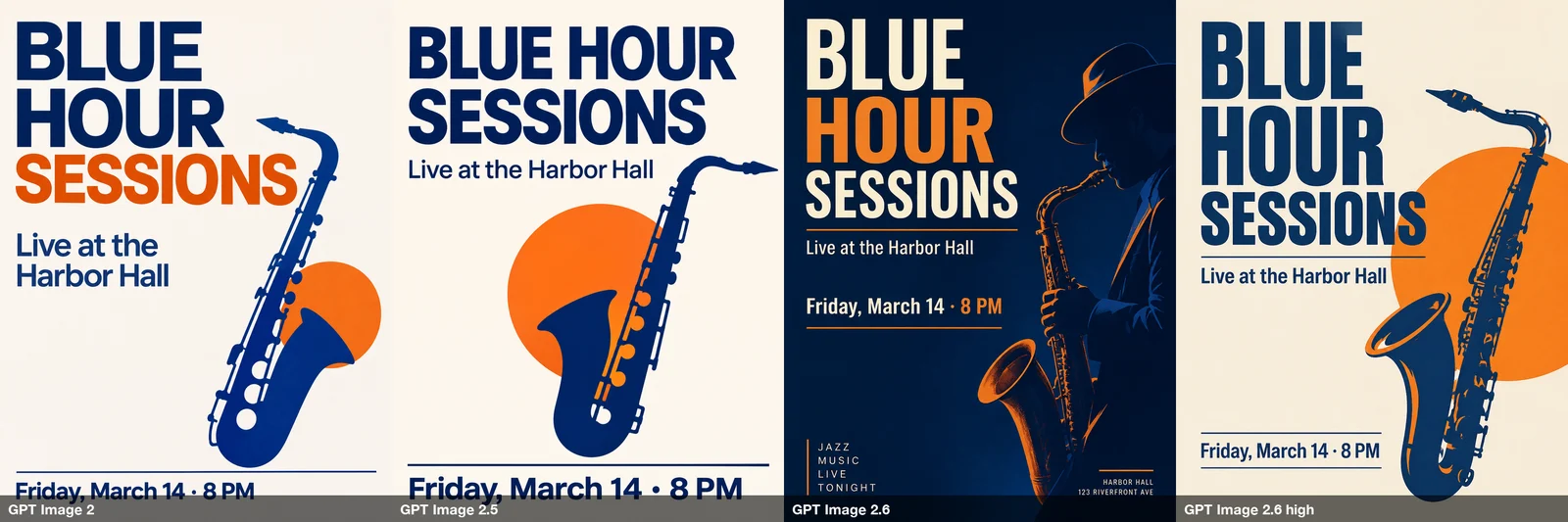
All four spelled the title, subtitle and date correctly. GPT Image 2 and 2.5 followed the brief closely: light background, a single saxophone silhouette, lots of empty space.
GPT Image 2.6 on Auto went its own way. It switched to a dark background, replaced the silhouette with a man in a hat playing the saxophone, and added two blocks of text we never wrote: "JAZZ MUSIC LIVE TONIGHT" and a made-up street address, "123 RIVERFRONT AVE". It is a handsome poster, but it is not the one we asked for, and an invented address is exactly the kind of thing that slips through a batch unnoticed. On High, 2.6 came back to the brief.
4. Glass and reflections#
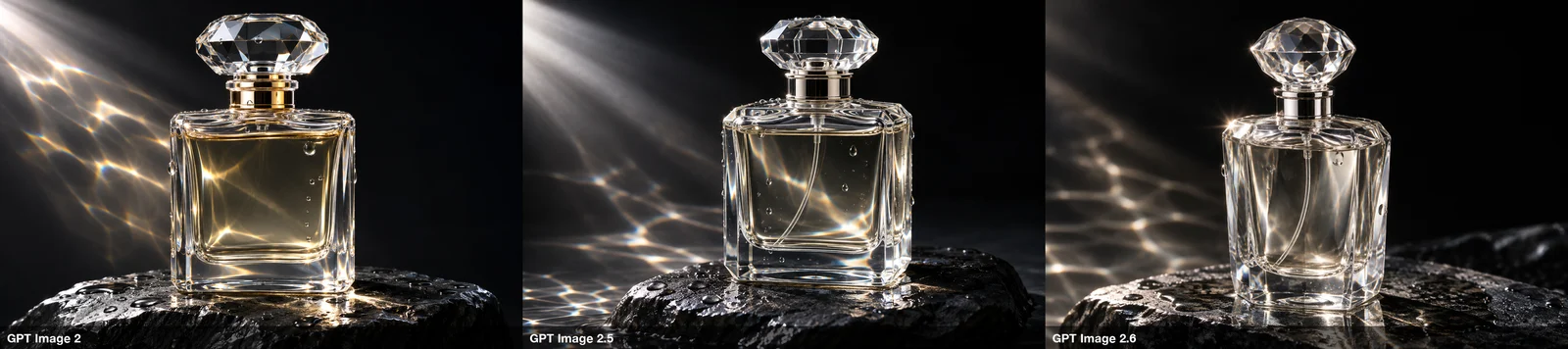
A tie. All three rendered convincing glass, droplets and light patterns, and all three respected "no label, no text". GPT Image 2 tinted the liquid gold; the other two kept it nearly clear. Pick by taste.
5. Counting and colors#
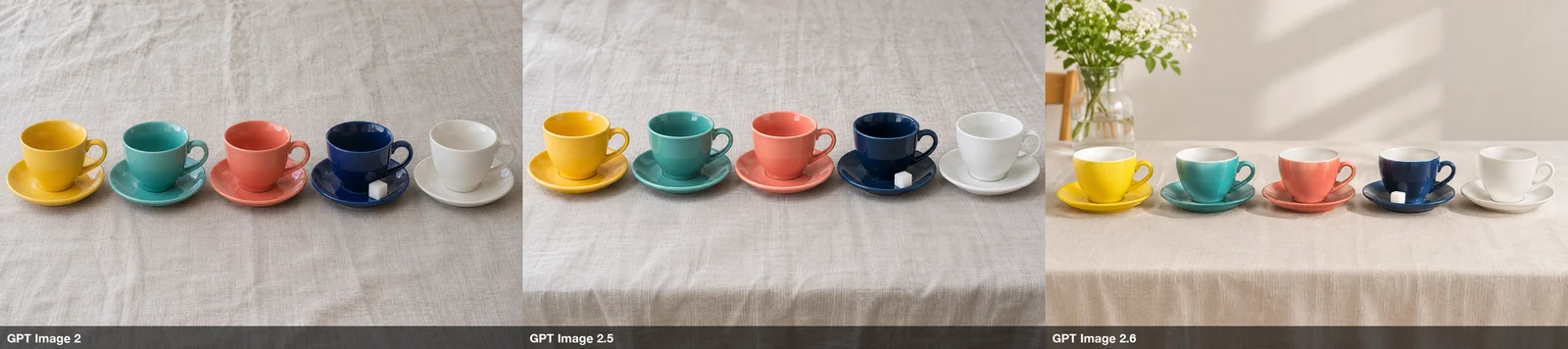
All three got five cups, the five colors in the right order, and the sugar cube on the navy saucer only. GPT Image 2.6 pulled the camera back and added a vase of flowers and a chair, another small addition nobody asked for.
The two reference-image tests#
For batch work, keeping a product or a person the same across many images is often the whole point, so we reused the two AI-generated references from our Muse Image comparison: a sage-green mug with a white leaf drawing, and a fictional woman in a mustard sweater.
6. Put the mug in a new scene#
Place the mug from the reference image on a desk beside an open notebook, a pencil and a small potted succulent, cool afternoon light from a window. Keep the mug exactly as in the reference image: same shape, same handle, same matte sage-green color and the same white leaf drawing; do not add any text or logos.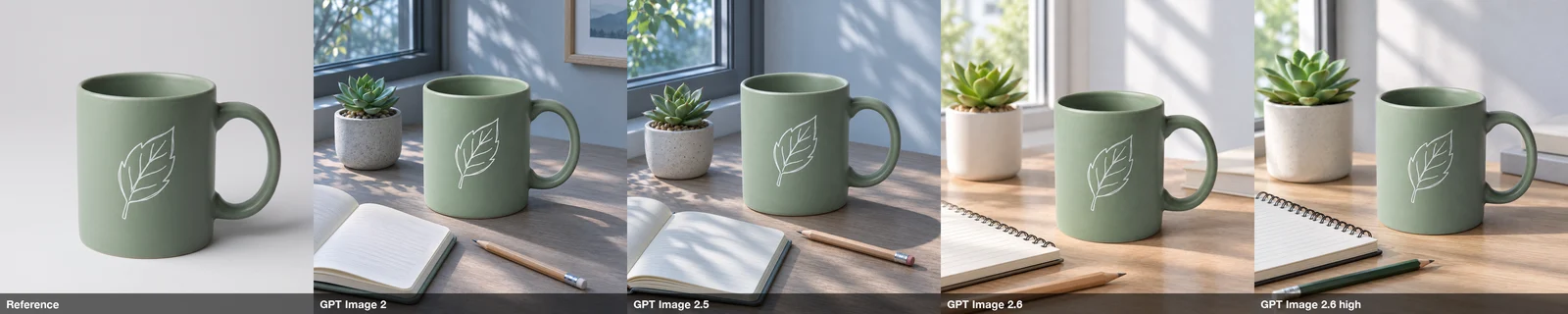
Every version kept the mug's shape, handle, color and leaf drawing, with no extra text or logos. GPT Image 2 and 2.5 produced almost the same picture as each other. GPT Image 2.6 swapped the notebook for a spiral-bound one and moved the camera, which is fine. There was no winner here; all four are usable.
7. Keep a face in a new scene#
The woman from the reference image walks through a farmers market on an autumn morning carrying a paper bag of apples, looking slightly to the side. Keep her face, freckles, wavy auburn hair and mustard knit sweater exactly as in the reference image. Candid street photograph, natural light.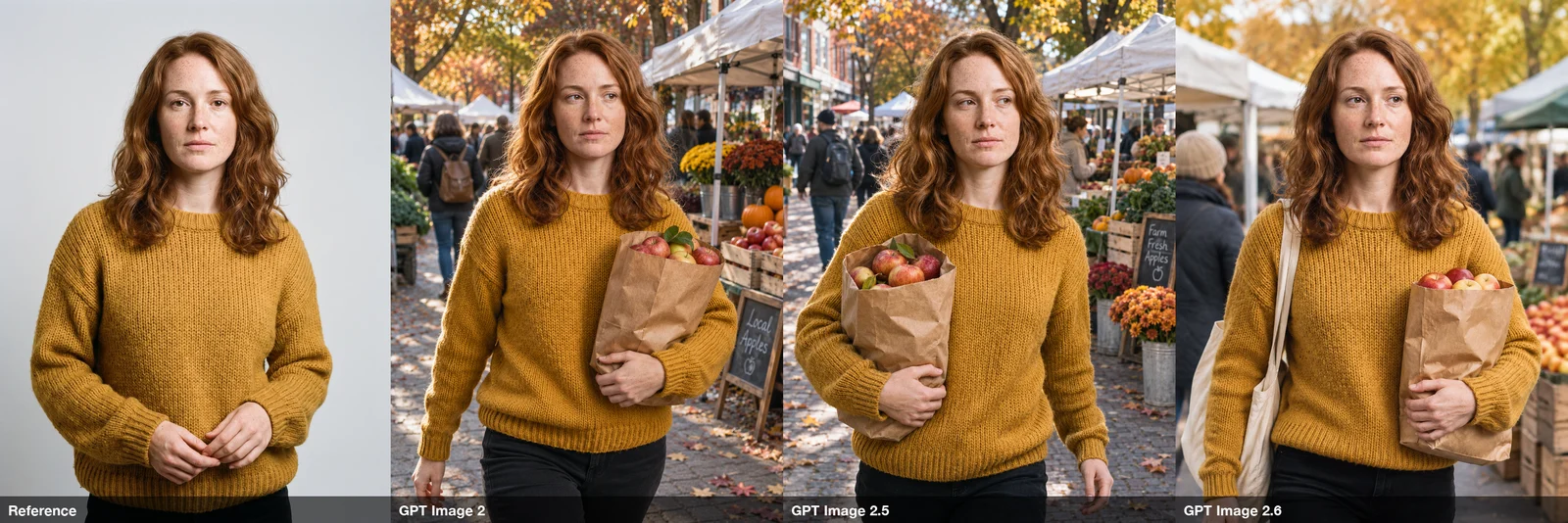
All three kept her face, freckles, hair and sweater. GPT Image 2 and 2.5 each added a chalkboard sign ("Local Apples", "Farm Fresh Apples"), both spelled correctly; GPT Image 2.6 gave her a tote bag. We could not pick a winner on likeness.
Results at a glance#
| GPT Image 2 | GPT Image 2.5 | GPT Image 2.6 | |
|---|---|---|---|
| Menu: 8 items and prices | All correct | All correct | All correct, added decorations |
| Infographic captions | All correct | All correct, easiest to read | All correct (High added a label) |
| Poster: follows the brief | Yes | Yes | Auto: no, invented text and an address. High: yes |
| Glass and reflections | Good | Good | Good |
| Counting and colors | Correct | Correct | Correct, added props |
| Keeps a product unchanged | Yes | Yes | Yes |
| Keeps a face | Yes | Yes | Yes |
| Pixels at 1K, 3:4 | 1086 × 1448 | 1086 × 1448 | 768 × 1024 |
| Credits per image (1K / 2K / 4K) | 5 / 10 / 20 | 5 / 10 / 16 | 5 / 10 / 16 |
| Max reference images | 4 | 8 | 4 |
| Transparent background | 1K, 2K, 4K | 1K only | No |
Credits are what BulkImagen charged at the time of writing; check the models page for current prices and options.
So, should you switch to GPT Image 2.6?#
For ordinary images at 1K, not yet, based on our seven tests:
- GPT Image 2.5 was the most literal and the easiest to read, and it takes up to eight reference images. If you are on it, there is no reason in these results to move. See the GPT Image 2.5 page.
- GPT Image 2 matched 2.5 on everything we tested, is the only one of the three with a transparent background at every resolution, and gives the same large 1K images. It remains a sensible default. See the GPT Image page.
- GPT Image 2.6 did nothing wrong on text or references, but on Auto it was the most likely to add things to your brief: decorations, props, and once, an invented address. On High it behaved much more like the older models. If you want a bit more creative interpretation, try it on High. See the GPT Image 2.6 page.
The real changes in 2.6 are the new output formats and the complexity setting. For a looping GIF, see our GPT Image 2.6 GIF test. For an editable vector icon, go to OpenAI's own API.
Tip
When you run a batch, the extra things a model adds are easy to miss in a grid of thumbnails. Open a few images full size before you use the whole set, and look for text you did not write.
Seven tests is a small sample, and we only tested 1K. Read the results as a strong hint for prompts like ours, not a ranking.
Run the same test on your own prompts#
Your product, your style and your references may rank these three differently. You can check in one go:
- Open Compare models in the BulkImagen dashboard and paste your prompt (add reference images if you have them).
- Tick GPT Image 2, GPT Image 2.5 and GPT Image 2.6, then press Compare 3 models.
- Look at the three results side by side. When one wins, use Which one wins? Batch with it to carry your prompts into a new batch with that model.
The form shows the credit total before you submit. Once you have a winner, a bulk image generator runs it across your whole list, one prompt per line, and gives you one ZIP at the end. You can also compare models from the compare page.
FAQ#
Is GPT Image 2.6 better than GPT Image 2.5? Not in our seven tests at 1K. Both spelled every word correctly and kept every reference image. 2.6 was more likely to add things we did not ask for, and it returned smaller images at 1K. OpenAI does not claim better image quality for 2.6; its new features are SVG output, GIF output and a complexity setting.
What is the difference between GPT Image 2.6 Flare and Sunburst? OpenAI describes Sunburst as the build for detailed visual work and Flare as the build for fast iteration. On BulkImagen, quality Auto uses Flare and High uses Sunburst, at the same price. In our tests, 2.6 on High followed the brief more closely than Auto.
How much does GPT Image 2.6 cost? On BulkImagen, 5 credits per image at 1K, 10 at 2K and 16 at 4K, the same as GPT Image 2.5, as of November 2026. In OpenAI's own API, 2.6 and 2.5 have the same token prices.
Can I get SVG or GIF output from GPT Image 2.6 on BulkImagen? GIF yes, SVG no. Choose GPT Image 2.6 and switch Output to GIF. SVG output is available through OpenAI's own Image API.
Is GPT Image 2 being retired? Not as of November 6, 2026. OpenAI's deprecations page lists retirements for older models such as gpt-image-1.5, but none for GPT Image 2 or 2.5.
Did you cherry-pick the images? No. Every image is the first and only result each model gave for that prompt.