AI Virtual Staging: Furnish Every Empty Room in a Listing at Once
AI virtual staging for real estate: furnish every empty room in two styles in one batch, keep walls and windows intact, and turn floor plans into 3D renders.
On this page
- What AI virtual staging can and cannot do
- How to stage a whole listing in one batch
- 1. Upload every empty room photo
- 2. Write one prompt per style, not one per room
- 3. Review, pick a style, download
- Check every image against the original
- Floor plan to 3D render
- Disclose virtual staging in your listing
- Why stage in bulk
- A virtual staging checklist
- FAQ
An empty room photographs badly. The floor looks bigger than it is, the walls look bare, and a buyer scrolling a listing on their phone cannot tell whether a sofa and a dining table will fit. That is why staging exists, and why virtual staging — adding furniture to the photo instead of the room — became the default for vacant listings.
AI virtual staging does the same job in seconds instead of days. You upload a photo of an empty room, describe a style, and get back the same room with furniture in it. Where it gets interesting is scale: a listing is not one photo, it is 10 to 25, and an agent with several vacant listings has a lot more. This guide shows how to stage a whole set of room photos in one batch, in more than one style, without the AI quietly redesigning the house. It also covers a second job people ask for constantly: turning a 2D floor plan into a 3D render.
Every image in this article was generated with BulkImagen for an invented house. The "empty" rooms are AI-generated too, so no real property was altered.
Generate in bulk
One prompt per line, hundreds of images, one ZIP to download.
What AI virtual staging can and cannot do#
Here is the result first: one empty living room, and the same photo after a single staging prompt.
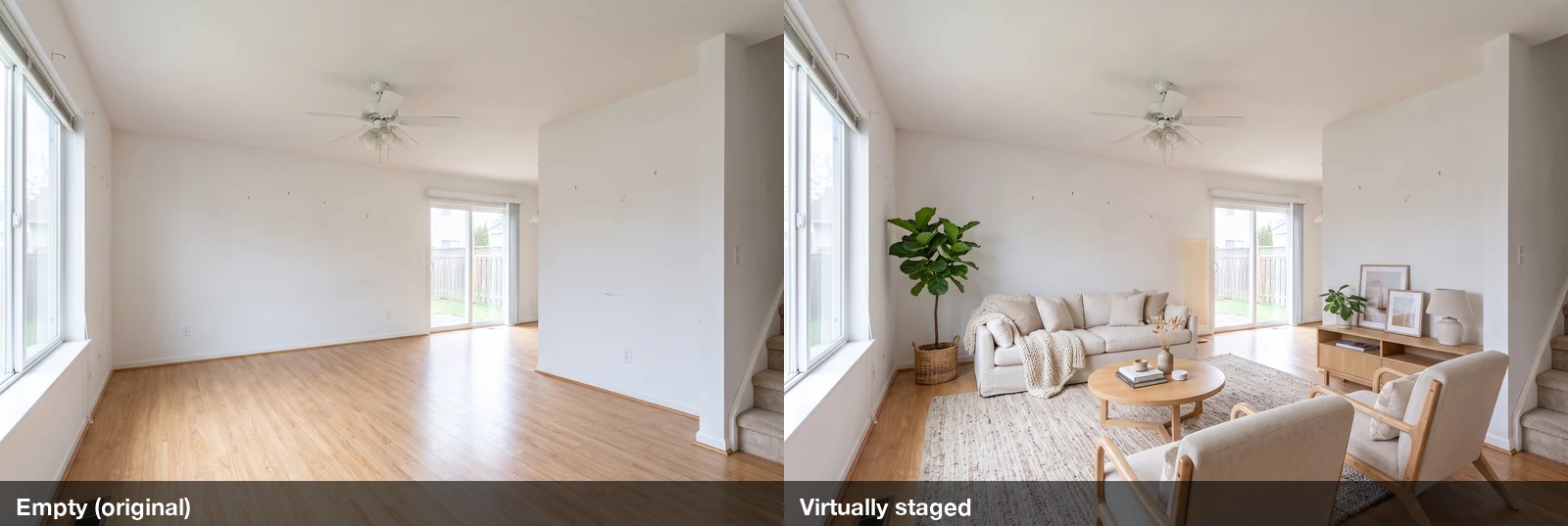
The walls, window, sliding door, ceiling fan, staircase and even the floor vent stayed where they were. That is the whole trick of virtual staging: furniture is added, the building is not touched.
What it does well:
- Furnishes living rooms, bedrooms, dining nooks and kitchens in a coherent style.
- Matches the room's existing light and perspective, so furniture sits on the floor instead of floating.
- Produces several styles of the same room, so you can pick the one that suits the likely buyer.
What it does not do, and should not be asked to do:
- Fix the house. Look closely at the living room above — the small nail holes in the wall are still there. That is correct. Removing defects is no longer staging, it is misrepresenting the property.
- Guarantee every small fixture survives. In our test, one of six images lost a wall thermostat (more on that below). You still have to check every image against the original.
How to stage a whole listing in one batch#
The workflow is three steps, and the same three steps work whether you have three rooms or thirty.
1. Upload every empty room photo#
In the generation form, add all the room photos as reference images and set the reference mode to Per image. Per image pairs every reference with every prompt: each photo gets its own copy of each prompt, and the room in that photo is what gets staged.
Pick the aspect ratio that matches your photos (most listing photos are 3:2) so nothing gets cropped, and use 2K or 4K so the result holds up on a listing site. We used Nano Banana Pro at 2K.
2. Write one prompt per style, not one per room#
You don't need a different prompt for the bedroom and the kitchen. Write the prompt so the model furnishes "whatever the room clearly is", and let the photo decide. Then add one line per style you want to offer. Here is the warm Scandinavian prompt we used:
Virtually stage this empty room for a home listing, furnished for whatever the room clearly is (living room, bedroom, or kitchen with dining nook). Style: warm Scandinavian modern — light oak wood, cream and oat linen upholstery, soft wool rug, a few green plants, simple paper pendant or floor lamp. Keep the room exactly as it is in the reference photo: same walls, wall color, flooring, windows, doors, closet, cabinets, appliances, ceiling fixtures, outlets and vents, same camera position, lens and perspective, same daylight. Do not move, remove, resize or repaint anything that is part of the building. Only add movable furniture, rugs, lamps, plants and decor, scaled realistically to the room. Realistic real estate listing photograph, no people, no text, no logos.And a second style, classic transitional, with the same protection sentence:
Virtually stage this empty room for a home listing, furnished for whatever the room clearly is (living room, bedroom, or kitchen with dining nook). Style: classic transitional — navy and warm gray upholstery, dark walnut wood, brass accents, patterned wool rug, framed landscape art in neutral tones. Keep the room exactly as it is in the reference photo: same walls, wall color, flooring, windows, doors, closet, cabinets, appliances, ceiling fixtures, outlets and vents, same camera position, lens and perspective, same daylight. Do not move, remove, resize or repaint anything that is part of the building. Only add movable furniture, rugs, lamps, plants and decor, scaled realistically to the room. Realistic real estate listing photograph, no people, no text, no logos.The long second half is the important part. We call it the protection sentence: it names the things a buyer will check on a viewing — walls, floors, windows, doors, cabinets, fixtures — and tells the model it may only add movable things. Without it, models like to "improve" a room by widening a window or swapping a laminate floor for hardwood, which is exactly what you can't do in a listing.
Tip
Put each style on its own line in the prompt box (one prompt per line). Three room photos with two style lines gives you 3 × 2 = 6 staged images in one batch. Twenty photos with three styles is 60 images — still one batch, as long as it fits your plan's per-batch limit on the pricing page.
3. Review, pick a style, download#
Here is the full batch: three empty rooms, each staged in both styles.
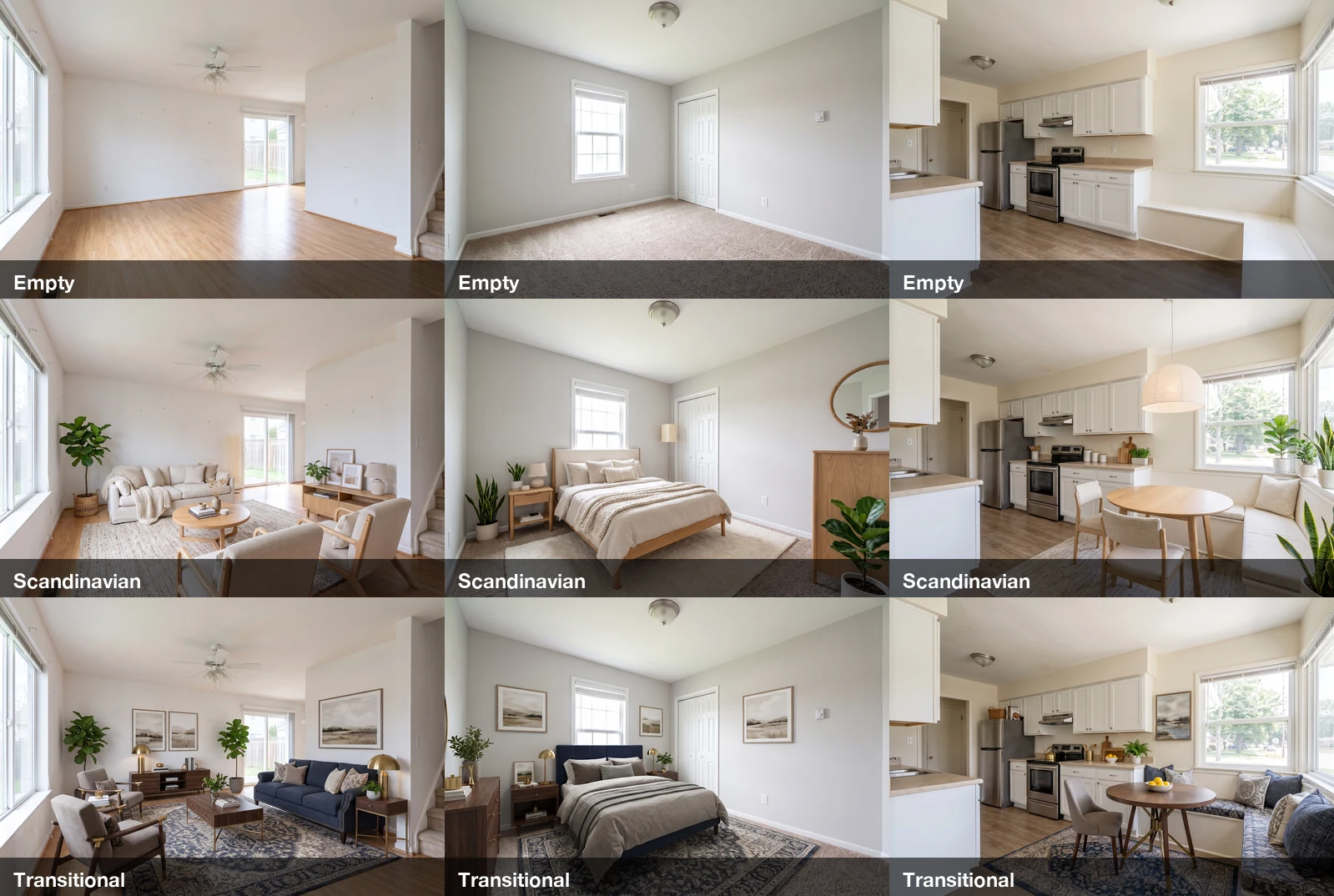
The whole batch took one submission and cost 36 credits (six images at 6 credits each for Nano Banana Pro at 2K; see models and prices for other options). Notice what changed and what didn't: the kitchen's cabinets, range, fridge and built-in window bench are identical in all three versions — the model put a cushion on the bench rather than replacing it. The bedroom keeps its bifold closet and window. The living room keeps its stairs and ceiling fan.
Picking a style is a marketing decision, not a technical one. Light Scandinavian reads as fresh and roomy and suits starter homes and rentals; darker transitional reads as settled and comfortable. Because both come from the same batch, you can show both to the seller and let them choose.
Check every image against the original#
Now the honest part. In the Scandinavian bedroom, the model hung a round mirror near the thermostat — and the thermostat disappeared.
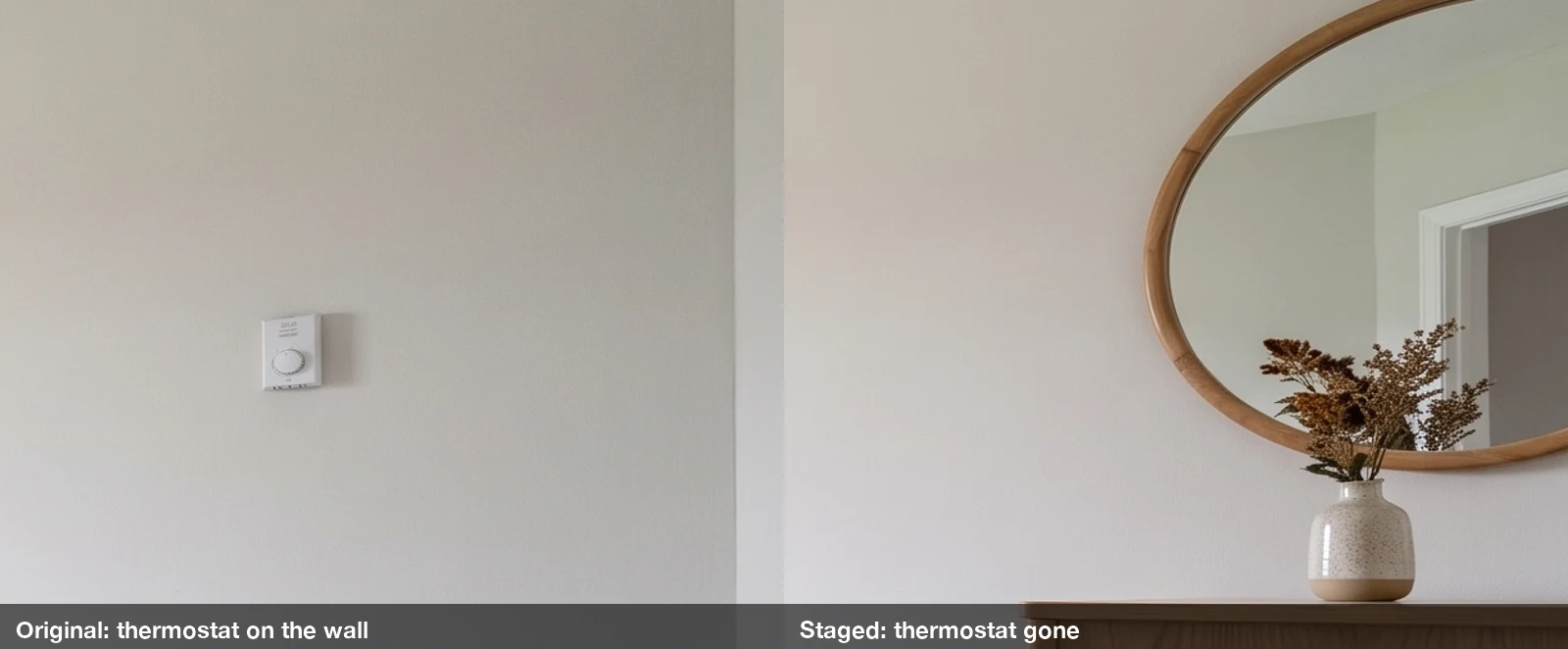
One small fixture in one of six images is not much, but it is the kind of change you are responsible for once the photo is in a listing. Our review routine:
- Open the original and the staged image side by side.
- Check the things the protection sentence names: windows (count and size), doors, floor material, cabinets and appliances, light fixtures, vents, outlets, switches, thermostats.
- If anything permanent moved or vanished, regenerate that one image. Retrying a single image costs one image, not the whole batch.
In our test the other five images passed this check.
Floor plan to 3D render#
The second request we see over and over is not staging a photo at all: it is "here is my floor plan, show me what it looks like furnished". Buyers of new builds and off-plan apartments only have a drawing, and a drawing doesn't sell a feeling.
The same Per image workflow handles it. Upload the floor plan as the reference and ask for a 3D cutaway. The key sentence is the one that forbids changing the layout — without it, models tend to square off odd shapes and invent rooms:
Turn this 2D floor plan into a photorealistic 3D cutaway render of the same apartment, furnished, seen from above at a 45-degree angle, walls cut at mid height so every room is visible. Follow the plan exactly: the same outline, the same number of rooms in the same places, every wall, door and window where the plan puts it. Do not square off the outline and do not add or merge rooms. Warm Scandinavian modern furniture, light oak floors, soft daylight, white background around the model, no text, no labels, no dimensions.We tested it on an L-shaped plan with a balcony:
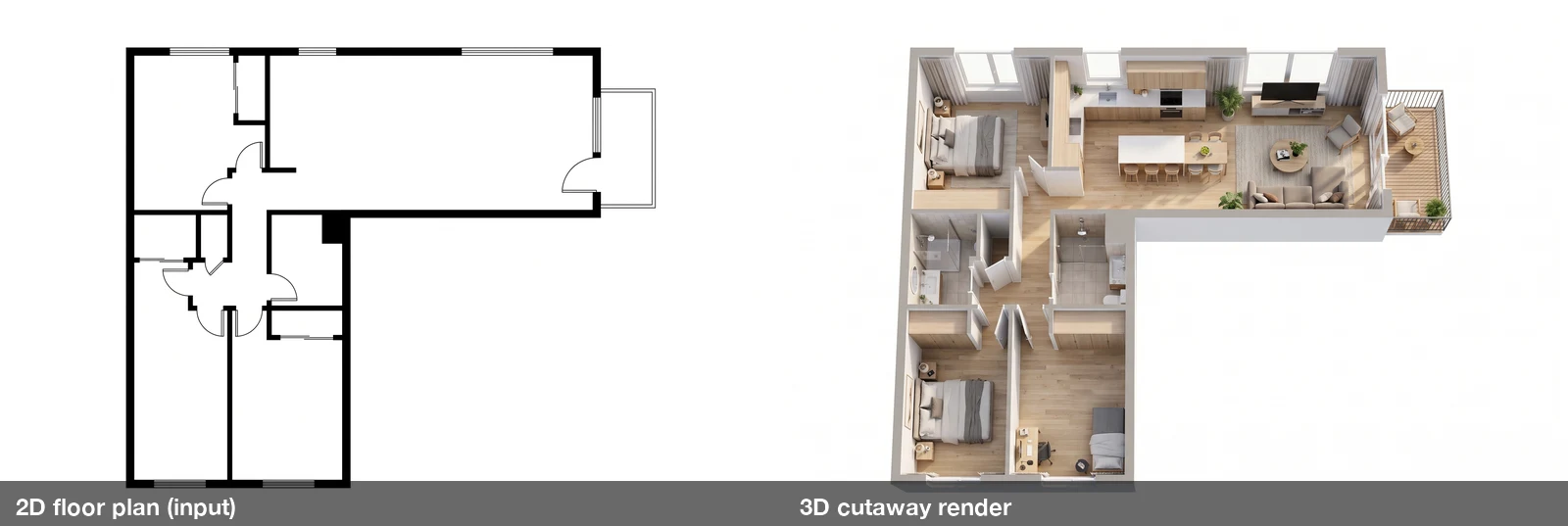
The L shape survived, the balcony is on the correct side, and the rooms are where the plan puts them. Our prompt originally described "two bedrooms and one bathroom", but the plan actually has three closed rooms in those positions — and the render followed the drawing, not our text. That is the behaviour you want: the plan is the source of truth, so keep the prompt about style, not about the layout.
You can also ask for an eye-level view of one room from the plan:
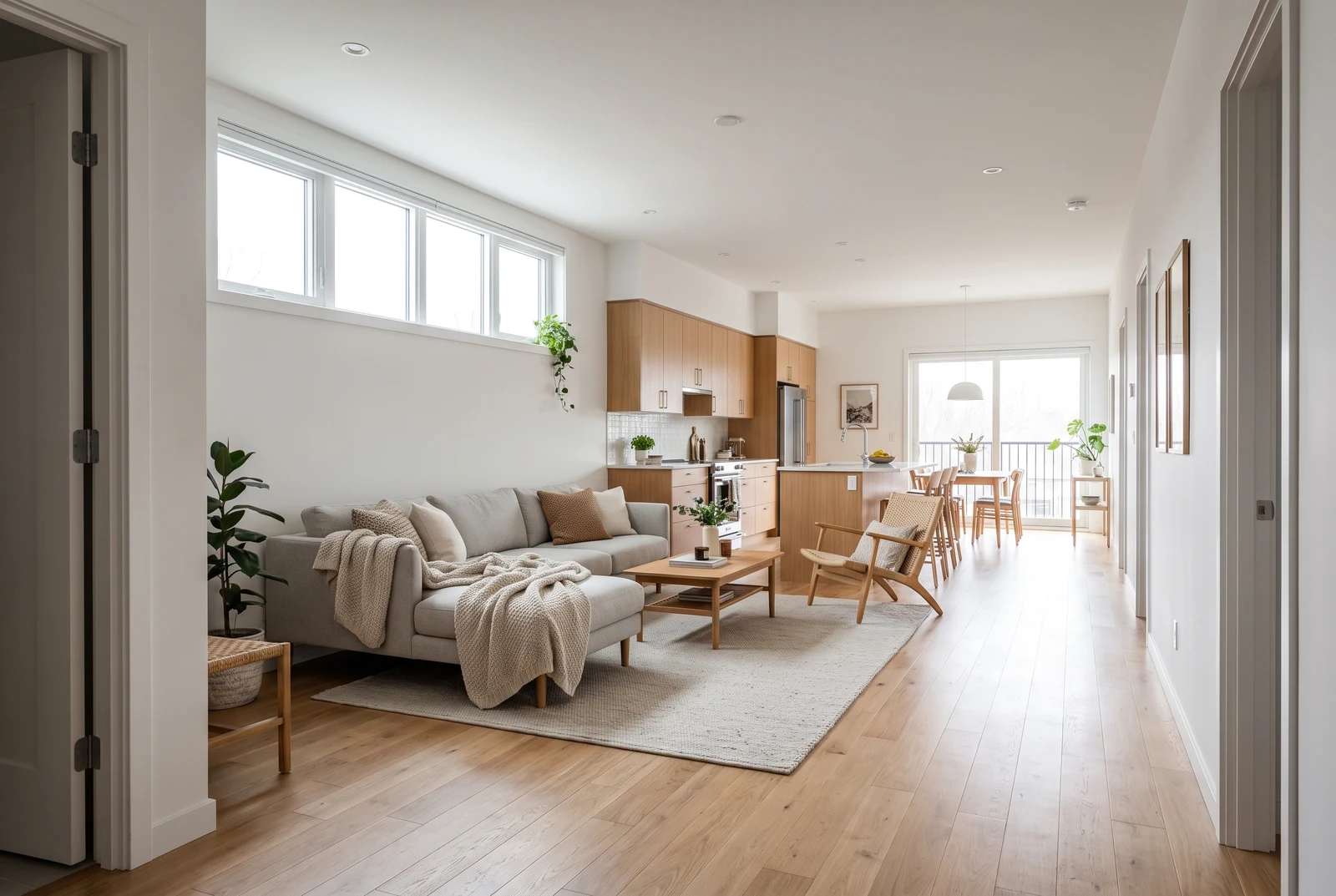
It looks convincing, but treat it as an impression, not a measured render. The windows and the balcony door are where the plan puts them; the doors along the right-hand wall are the model's invention. A floor plan has no ceiling heights, finishes or kitchen layout, so the model fills those in. Use eye-level renders to sell a mood, and the 3D cutaway to explain the layout — and label both as artist's renderings when they go into a listing.
Disclose virtual staging in your listing#
Virtual staging is legal and widely used, but in a growing number of places it has to be labeled. Three examples, checked against the official texts in October 2026:
- California law. Assembly Bill 723 (2025) added section 10140.8 to the Business and Professions Code, in force since January 1, 2026. When an agent uses a "digitally altered image" in an ad for the sale of real property, the ad must say the image was altered and link to the original, unaltered photo. The definition explicitly includes images altered "through the use of photo editing software or artificial intelligence" to add furniture — so AI virtual staging counts. Ordinary edits such as exposure, white balance, straightening and cropping do not.
- MLS rules. California Regional MLS (CRMLS) Rule 11.5.2 requires the original photo to appear right before or after the altered one, and the altered photo to be labeled "Virtually Staged", "Digitally Altered", "AI Altered" or similar. The same rule forbids altering real property elements such as flooring, walls, windows, cabinetry or the view, unless the property will actually be improved to match by closing. Other MLSs have their own versions, so check yours.
- The REALTOR® Code of Ethics. Article 12 requires REALTORS® to "present a true picture in their advertising", and Standard of Practice 12-10 names "misleading images" explicitly.
Warning
This is not legal advice, and rules differ by state and MLS. The safe default everywhere: label every staged photo as virtually staged, keep the original next to it, and never use AI to change, hide or repair anything that is part of the property.
That is one more reason the protection sentence matters. A staged photo that also "upgraded" the countertops is no longer a virtually staged photo under rules like CRMLS's — it is an altered one, and many MLSs won't accept it.
It also helps to know what staging is worth. In the National Association of REALTORS® 2025 Profile of Home Staging, 83% of buyers' agents said staging made it easier for a buyer to visualize the property as a future home. The same report put the median spend on a professional staging service at $1,500. Virtual staging doesn't replace walking through a furnished home, but it gets the "visualize it" part of that value into the photos for a fraction of the cost.
Why stage in bulk#
Virtual staging tools usually charge per photo and are built around one room at a time. That is fine for one listing. It gets slow when you have a vacant 12-room house in two styles, or a property manager with forty units to refresh before the summer rental season.
A bulk image generator changes the unit of work from the room to the listing: all photos in, every style out, one download. If you already write prompts in a spreadsheet, the same approach is covered in our guide to generating images from a list of prompts.
A virtual staging checklist#
- Shoot the empty rooms straight and bright: level camera, vertical lines straight, all lights on, blinds open. The AI keeps your light and angle, good or bad.
- Upload all rooms at once with Per image mode, and match the aspect ratio of your photos.
- Write one prompt per style, each ending with the protection sentence.
- Use 2K or 4K for listing photos.
- Compare every staged image with its original before using it; regenerate any image where a permanent feature changed.
- Label staged photos as virtually staged and keep the originals available.
- For floor plans, keep the prompt about style and let the drawing decide the layout.
FAQ#
Will AI virtual staging change my walls, floors or windows? It can, which is why the prompt has to forbid it explicitly. With the protection sentence above, all six of our staged images kept their walls, floors and windows; one lost a small wall thermostat. Always compare against the original.
Can I stage several rooms with one prompt? Yes. Write the prompt as "furnished for whatever the room clearly is", upload every room photo in Per image mode, and each photo is staged according to what it shows.
Can I get several styles of the same room? Yes — add one prompt line per style. Every photo gets every style in the same batch.
Can AI turn a floor plan into a 3D render? Yes, as a 3D cutaway or an eye-level impression. Tell the model to follow the plan exactly and not to add or merge rooms, and check the result against the drawing. Eye-level views fill in details the plan doesn't contain.
Do I have to disclose virtual staging? Often, yes. California has required it in real estate ads since January 1, 2026, with a link to the unaltered photo, and many MLSs require a "Virtually Staged" label. Labeling every staged photo and keeping the original next to it is the safe default anywhere.
Can I use AI to remove a crack or a stain from a listing photo? You shouldn't. Hiding a defect misrepresents the property. Virtual staging adds furniture and decor; it doesn't repair the house.