Muse Image vs GPT Image 2.5 vs Nano Banana 2.1: We Tested All Three
Muse Image vs GPT Image 2.5 vs Nano Banana 2.1: eight identical tests, from poster text to reference edits. See what each model does best and what it costs.
On this page
- How we tested
- The six text-to-image prompts
- 1. Text on a poster
- 2. A portrait with hands
- 3. A product shot with glass
- 4. Counting and colors
- 5. A watercolor style
- 6. An interior scene
- The two reference-image tests
- 7. Put the mug in a new scene
- 8. Combine two references
- Results at a glance
- Which one should you use?
- Run the same test on your own prompts
- FAQ
Meta's Muse Image is a new image model, and the obvious question is how it stacks up against the two models most people already know. So we ran a muse image vs gpt image comparison of our own: Muse Image, OpenAI's GPT Image 2.5 and Google's Nano Banana 2.1, the same prompts, the same settings, one attempt each.
The short version: Muse Image did not win the test, and it did not lose it either. It is a strong model at a low price. GPT Image 2.5 was the most polished, especially when we asked it to keep a product or a face unchanged. Nano Banana 2.1 had one clear weak spot. Below are the prompts, all the results side by side, and a plain verdict on which model to use for what.
Generate in bulk
One prompt per line, hundreds of images, one ZIP to download.
How we tested#
- Three models, as available in November 2026: Muse Image (Meta), GPT Image 2.5 (OpenAI) and Nano Banana 2.1 (Google).
- Eight tests: six text-to-image prompts, each aimed at one thing models tend to get wrong, plus two reference-image tests. Everything was generated with the BulkImagen API.
- Same settings for all three: the 1K resolution, because Muse Image only has that one. Each model got the same aspect ratio per prompt: 3:4 for the first three prompts, 3:2 for the next three, 1:1 and 3:4 for the reference tests.
- One attempt per model, no cherry-picking. Every image you see is the first and only one we generated.
- The reference photos are not real. The mug and the woman in the reference tests were generated by AI, so no one's real photo is involved. The woman is fictional.
Two honest caveats. Eight tests is a small sample, so read the results as a strong hint, not a ranking. And "1K" does not mean the same pixel count on every model: on the 3:4 prompts Muse Image returned 1344 × 1792 pixels, Nano Banana 2.1 returned 896 × 1200, and GPT Image 2.5 returned between 768 × 1024 and 1086 × 1448. Muse Image gives you the most pixels at the same setting, which is part of why its pictures look crisp.
The six text-to-image prompts#
Here are the six prompts, one per line. Every model got these exact words:
A retro travel poster for a fictional seaside town, headline in large clean lettering reading "VISIT MARROW BAY" and a smaller line below reading "Fresh Air Since 1923", illustrated harbor with striped beach umbrellas and sailboats, flat vintage colors
Candid close-up portrait of an elderly fisherman with weathered skin, holding a steaming mug of coffee with both hands, soft morning window light, natural skin texture, shallow depth of field, 85mm photo
A glass bottle of amber olive oil on a marble countertop beside a halved lemon and a sprig of rosemary, soft window light, realistic reflections and highlights on the glass, shallow depth of field, product photograph
Five children in yellow raincoats and one brown dog at a bus stop in the rain; each child holds a different colored umbrella: red, blue, green, purple and orange; the dog sits under the bench; wet pavement, overcast light, photograph
Loose watercolor illustration of a rooftop garden at golden hour with tomato plants, potted herbs and string lights, soft paper texture, visible brush strokes and color bleeds
A bright Scandinavian living room with a green velvet sofa, a round oak coffee table, a floor-to-ceiling bookshelf and a large window looking out on snowy pine trees, photorealistic wide-angle interior photograph
In every image below, the models appear in the same order, left to right: Muse Image, Nano Banana 2.1, GPT Image 2.5.
1. Text on a poster#
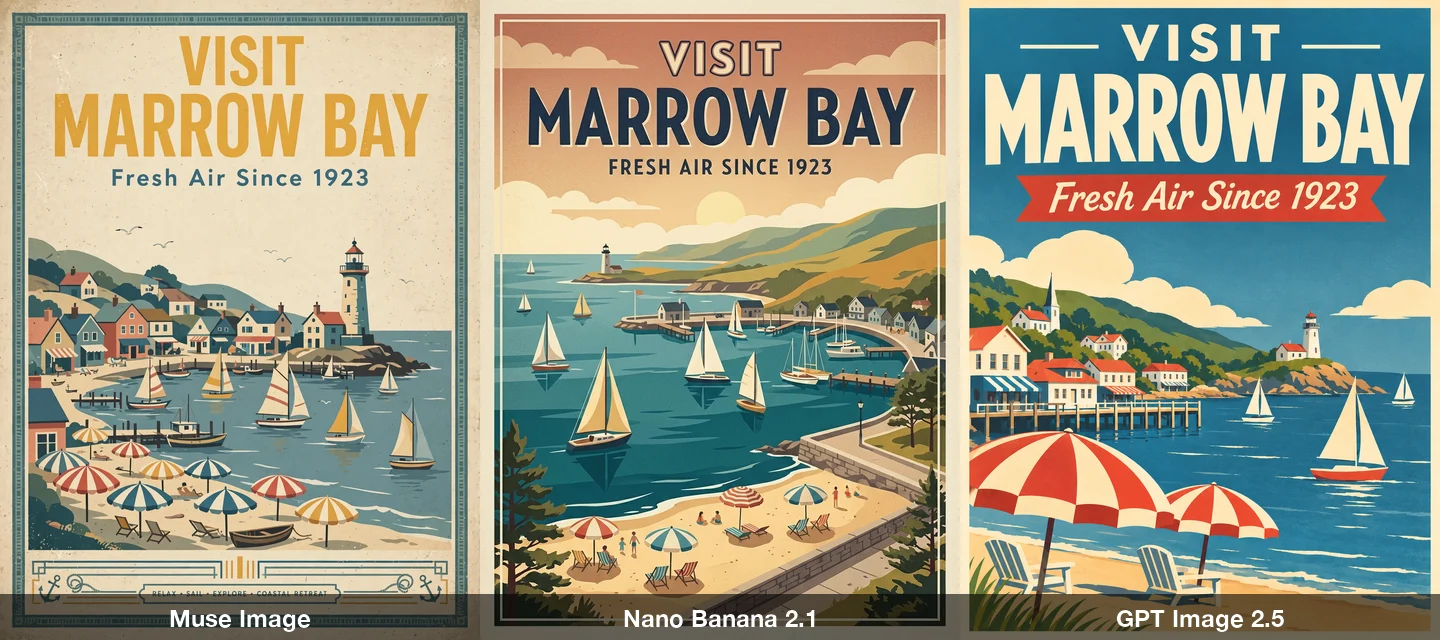
All three spelled "VISIT MARROW BAY" and "Fresh Air Since 1923" correctly, which would have been a stumble for most models not long ago. The differences are in design. GPT Image 2.5 made the boldest layout, with a red ribbon behind the tagline. Muse Image added a line we never asked for at the bottom ("RELAX · SAIL · EXPLORE · COASTAL RETREAT"), also spelled correctly. Nano Banana 2.1 followed the prompt most literally.
All three also drew a lighthouse we did not request. That is the kind of detail to watch for if your brand needs a specific scene.
2. A portrait with hands#
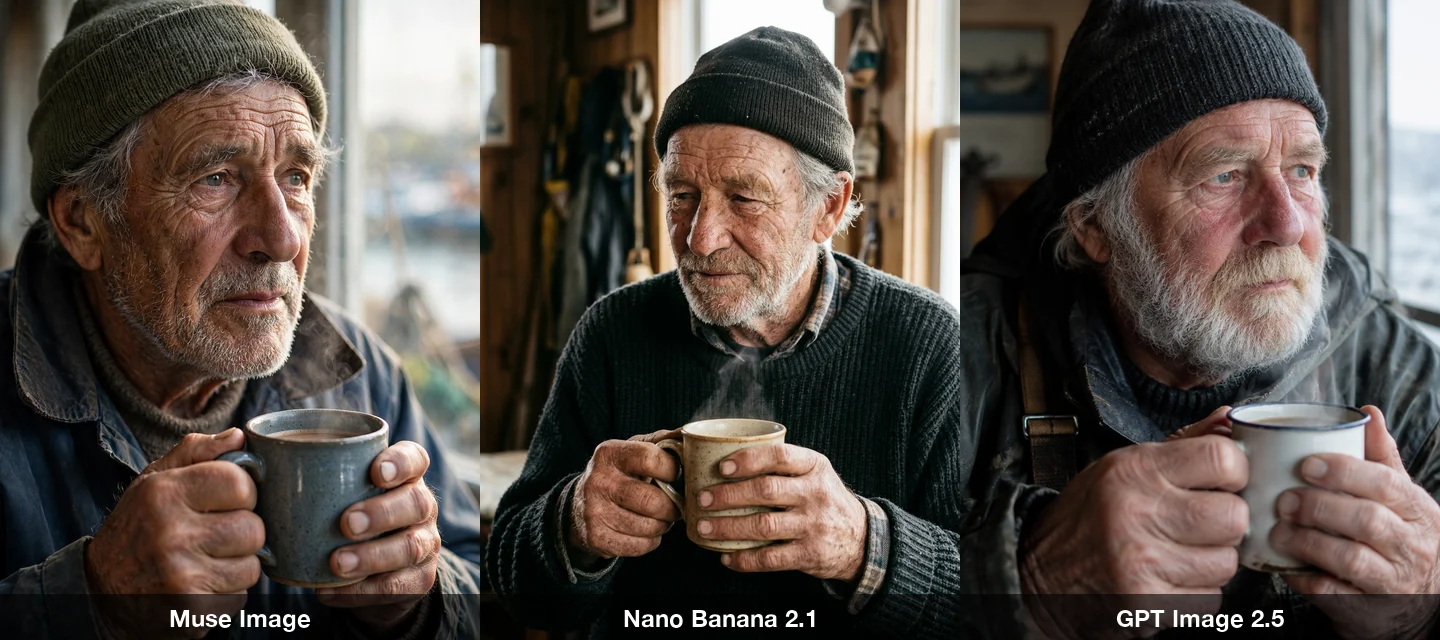
Hands are where image models used to give themselves away, and we zoomed in on all three. None had extra or missing fingers. Muse Image and Nano Banana 2.1 rendered the weathered hands sharply. GPT Image 2.5's hands came out larger and softer, though still correct. This round is close to a tie, with a slight edge to Muse Image on skin detail.
3. A product shot with glass#
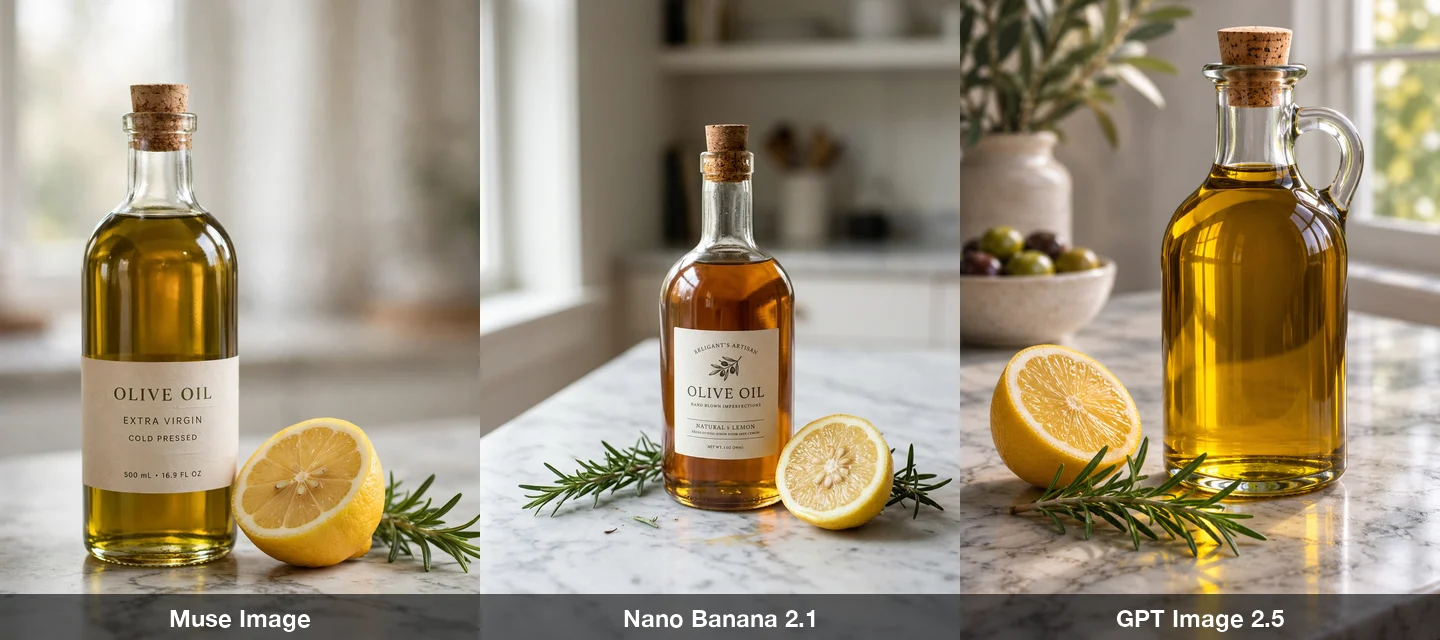
All three handled the glass reflections well. The interesting part is the label, which our prompt never mentioned. Muse Image and Nano Banana 2.1 each invented one; GPT Image 2.5 left the bottle plain.
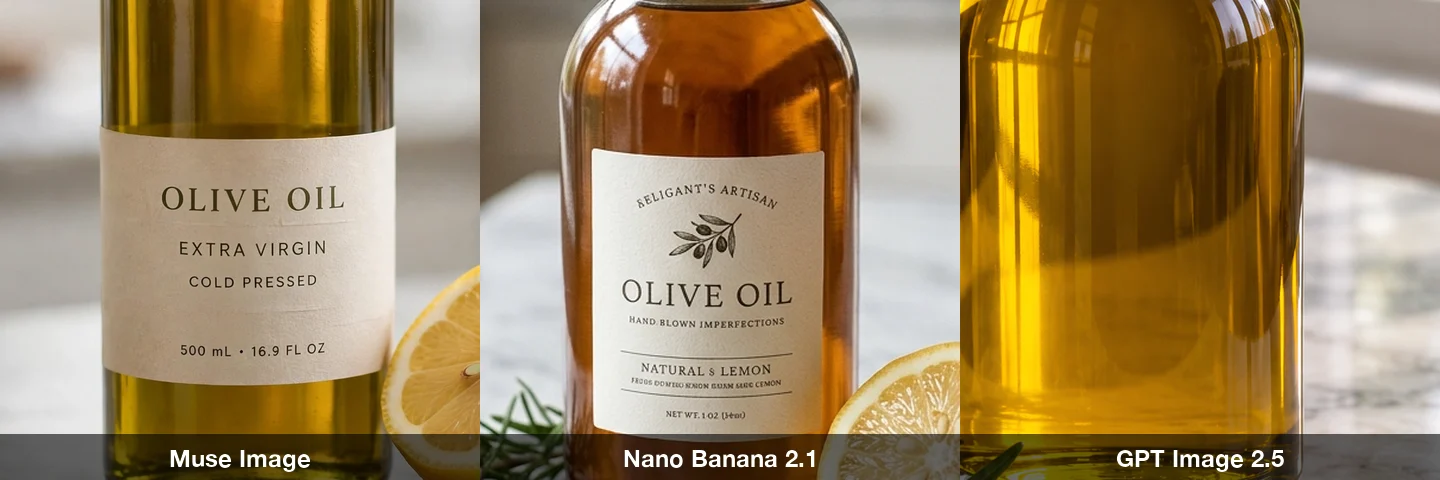
Zoomed in, Muse Image's label is clean: "OLIVE OIL / EXTRA VIRGIN / COLD PRESSED / 500 mL · 16.9 FL OZ". Nano Banana 2.1's label starts well, but the top line reads "RELIGANT'S ARTISAN" and one line near the bottom is gibberish. This was the clearest weakness we found in the whole test, and it only shows up when a model adds text on its own. If you ask for specific words, as in the poster test, all three get them right.
4. Counting and colors#
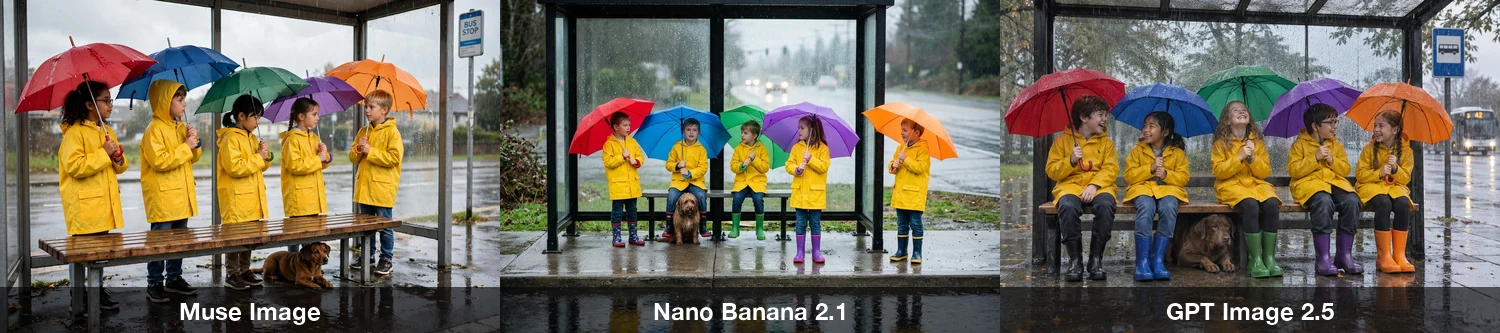
This prompt packs in a lot of specifics: five children, five named umbrella colors, one dog, and where the dog sits. All three models got the count, the five colors and the dog's position right. Models used to fumble this kind of instruction, so it is a good sign, and a reason not to choose between these three on counting alone.
5. A watercolor style#
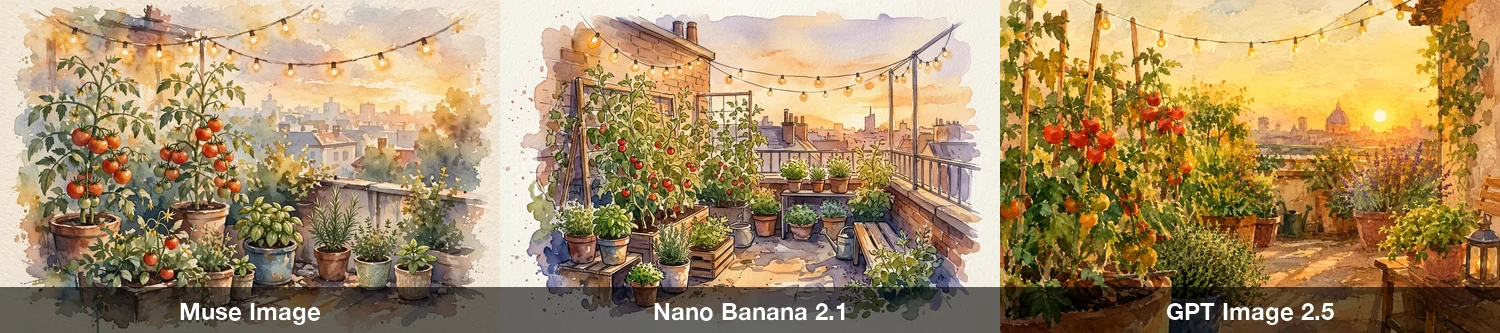
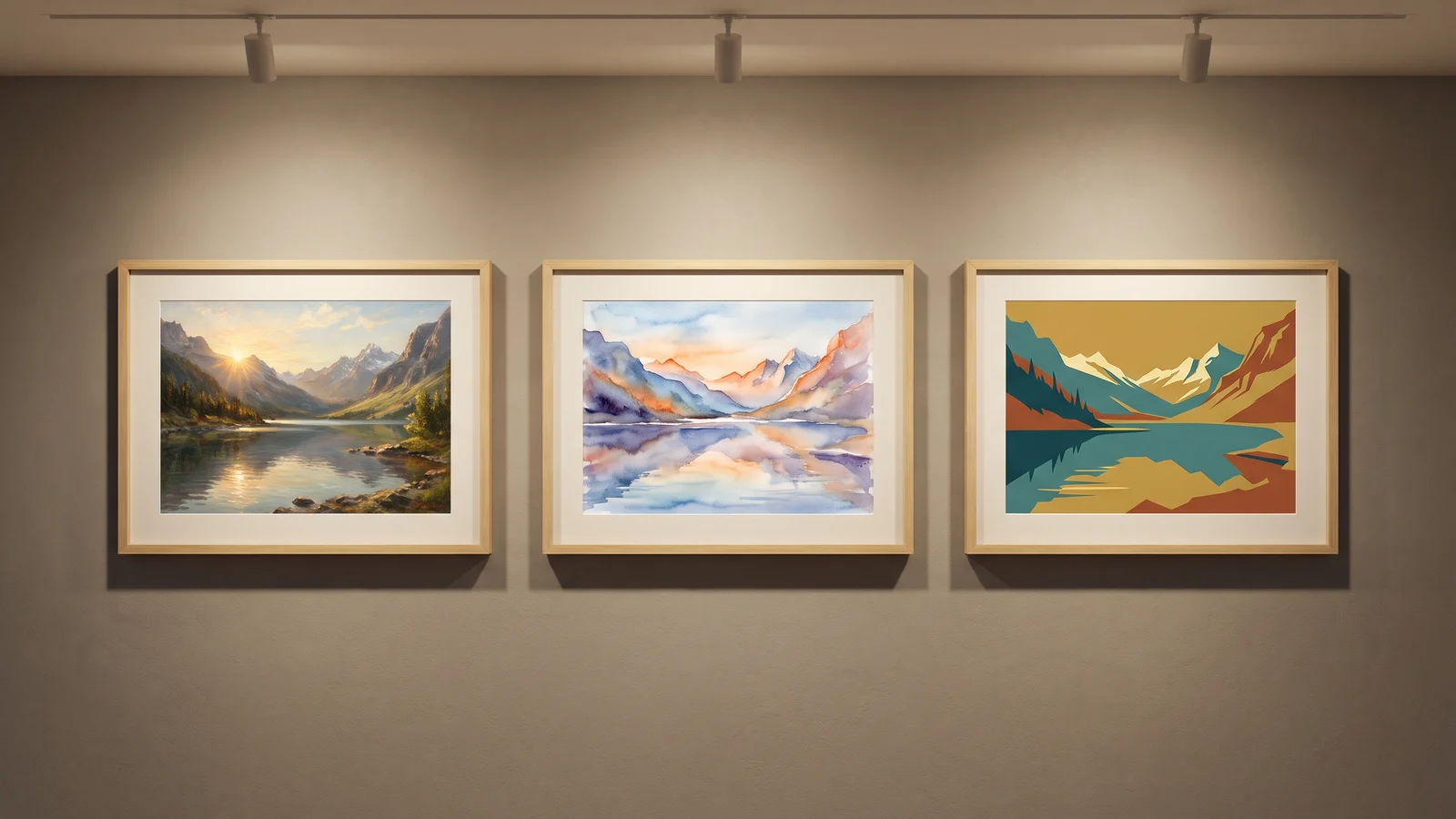
Muse Image gave the most convincing watercolor, with soft bleeds and a visible paper edge. Nano Banana 2.1 leaned toward pen-and-ink with a light wash. GPT Image 2.5 produced a lovely image, but it reads more like a digital painting than a watercolor.
6. An interior scene#
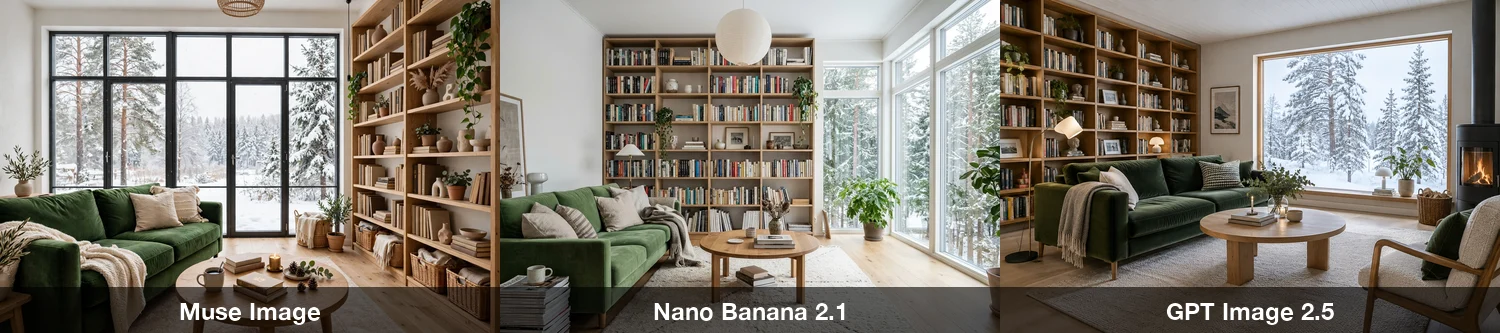
All three delivered every item on the list: green velvet sofa, round oak table, floor-to-ceiling bookshelf, snowy pines through the window. The differences are taste, not mistakes. GPT Image 2.5 added a wood stove and an armchair on its own.
The two reference-image tests#
Muse Image's pitch is editing and combining reference images, so we tested that too. We generated two AI reference images first, a sage-green ceramic mug with a white leaf drawing and a studio portrait of a fictional woman, then asked each model to reuse them.
7. Put the mug in a new scene#
This is the prompt, sent with the mug as the reference image:
Place the mug from the reference image on a rustic wooden breakfast table next to a croissant and a small jar of jam, warm morning sunlight coming through a window. Keep the mug exactly as in the reference image: same shape, same handle, same matte sage-green color and the same white leaf drawing; do not add any text or logos.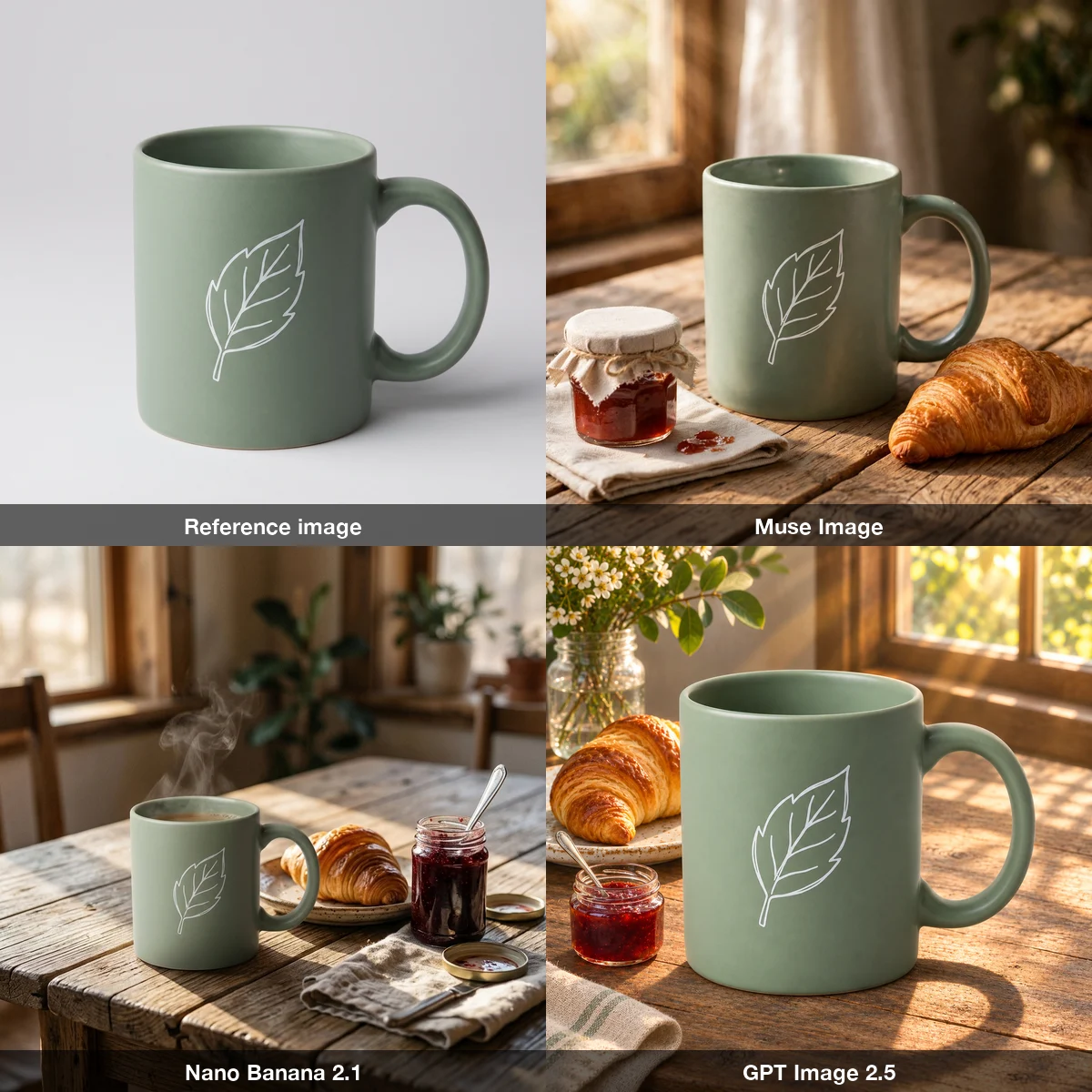
All three kept the mug's shape, handle and color, and all three kept the leaf. GPT Image 2.5 was the most faithful and the best-looking. Nano Banana 2.1 added steam and coffee we did not ask for.
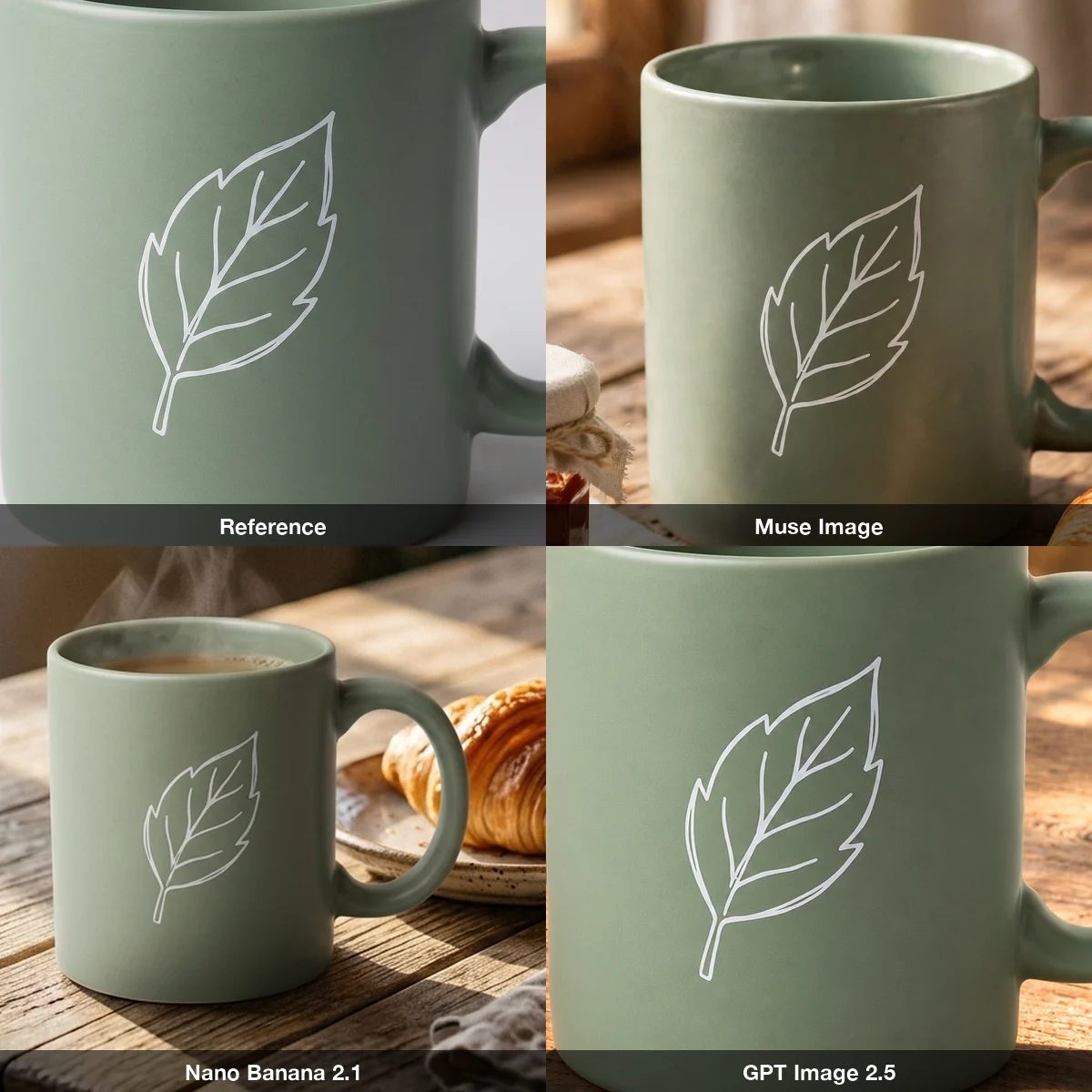
Up close, GPT Image 2.5 copied the leaf almost line for line. Muse Image kept the shape with a slightly simpler vein pattern. Nano Banana 2.1 redrew it smaller and smoother. For a real product with a logo or pattern, that difference matters.
8. Combine two references#
For the last test, each model got both references, the woman first and the mug second:
The woman from the first reference image sits in a sunny cafe holding the mug from the second reference image in both hands, smiling slightly. Keep her face, freckles, wavy auburn hair and mustard knit sweater exactly as in the first reference image, and keep the mug exactly as in the second reference image: matte sage green with the white leaf drawing. Candid lifestyle photograph, shallow depth of field.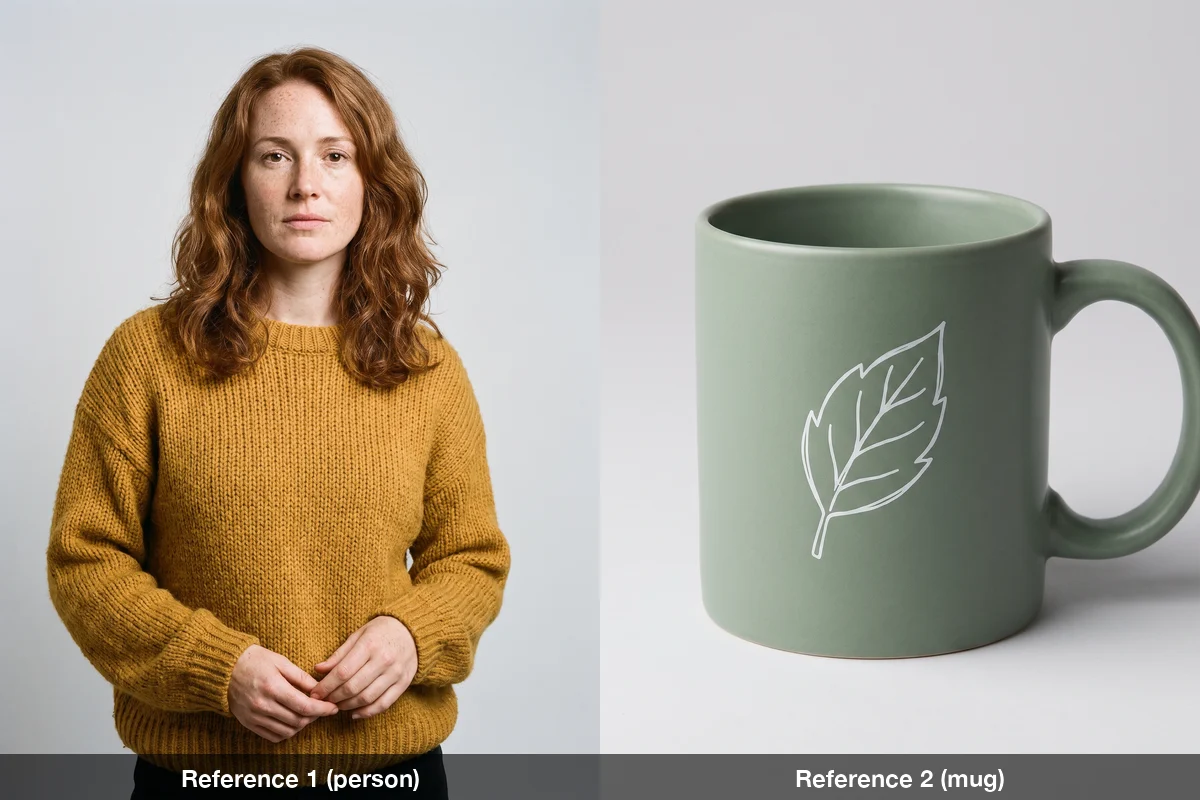
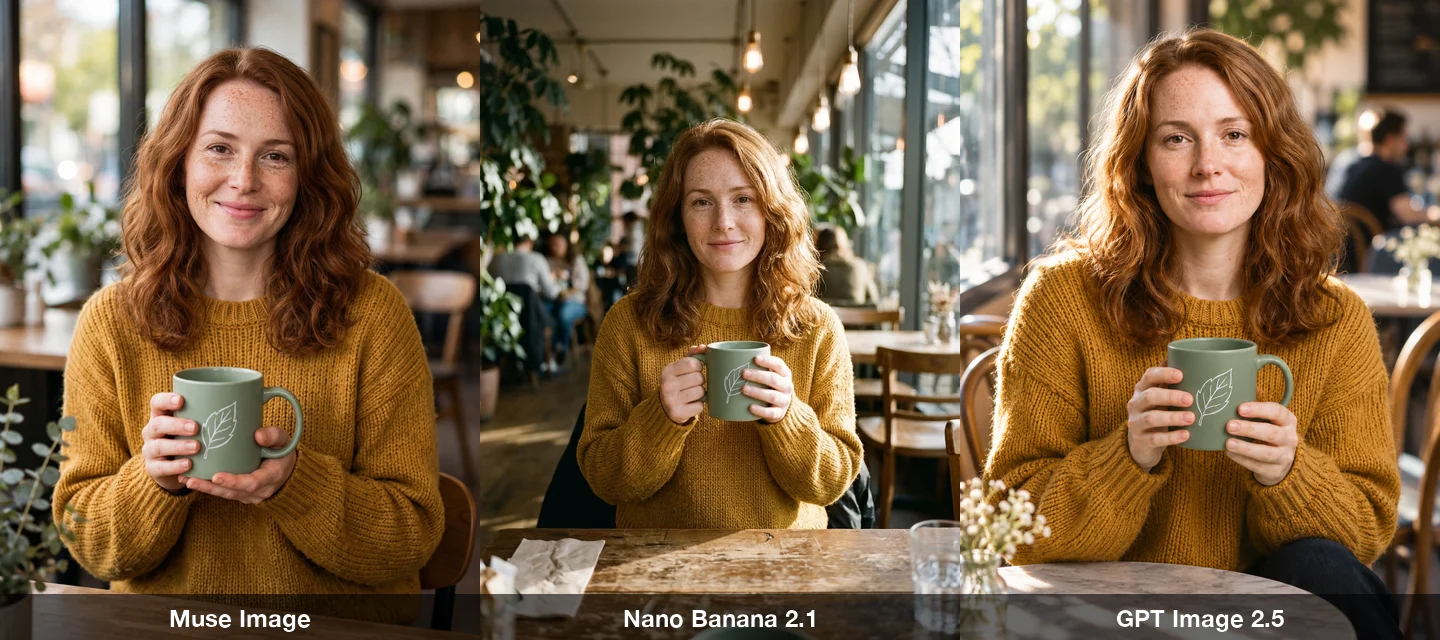
All three kept her face, freckles, hair and sweater, and all three put a leaf mug in her hands. No model swapped her face or dropped the leaf. Muse Image gave the widest smile, wider than "slightly". GPT Image 2.5 kept her calm expression and drew the largest, clearest mug. Nano Banana 2.1's mug is small.
Results at a glance#
| Muse Image | Nano Banana 2.1 | GPT Image 2.5 | |
|---|---|---|---|
| Poster text | Correct, added extra text | Correct | Correct, boldest layout |
| Portrait and hands | Sharp, best skin detail | Sharp | Correct, softer hands |
| Text it adds on its own | Clean | Garbled lines on the label | Added none |
| Counting and colors | Correct | Correct | Correct |
| Watercolor | Most convincing | Pen and wash | Reads as digital painting |
| Keeps a product unchanged | Close | Simplified the pattern | Closest |
| Combines two references | Good, widest smile | Good, small mug | Good, most faithful |
| Credits per image at 1K | 4 | 4 | 5 |
| Resolutions | 1K only | 1K, 2K, 4K | 1K, 2K, 4K |
Credits are what BulkImagen charged at the time of writing; check the models page for current prices.
Which one should you use?#
- Muse Image is the value pick. At 4 credits you get the most pixels per image, the best watercolor and clean text on anything it adds itself. It is a good default for illustrations, social images and people. Limits: it is 1K only, it has seven aspect ratios (9:16, 2:3, 3:4, 1:1, 4:3, 3:2, 16:9), and it takes up to four reference images. See the Muse Image page for the full specs.
- GPT Image 2.5 is the polish pick. It was the most faithful when we asked it to keep a mug unchanged and the best at layout and design. It costs a little more per image and goes up to 4K. Details on the GPT Image page.
- Nano Banana 2.1 is solid on prompts you write precisely, and it supports 1K to 4K. Its one weakness in our test was gibberish on text it invented, so give it the exact words and it behaves. More on the Nano Banana page.
No single model won everything, so for important work, test on your own prompt before you spend credits on a whole batch.
Run the same test on your own prompts#
Eight tests tell you how these models behave on our prompts. Your product, your style and your references may rank them differently. You can check without running three separate sessions:
- Open Compare models in the BulkImagen dashboard and paste your prompt (add reference images if you have them).
- Tick Muse Image, Nano Banana 2.1 and GPT Image 2.5, then press Compare 3 models.
- Look at the three results side by side. When one wins, use Which one wins? Batch with it to carry your prompts into a new batch with that model.
The form shows the credit total before you submit. When you are ready to run the winner across a whole list, a bulk image generator handles one prompt per line and gives you one ZIP at the end. You can also try the three models side by side from the compare page.
FAQ#
Is Muse Image better than GPT Image 2.5? Not across the board. In our eight tests GPT Image 2.5 was better at keeping a product exact and at layout, while Muse Image was cheaper per image and better at watercolor. Eight tests is a small sample.
How much does Muse Image cost? On BulkImagen it is 4 credits per image at its one resolution, 1K, as of November 2026. GPT Image 2.5 is 5 credits at 1K, and Nano Banana 2.1 is 4.
Does Muse Image support reference images? Yes, up to four. In our two reference tests it kept a product's shape and color and kept a person's face, though it simplified a small line drawing a little.
Why does the same "1K" give different sizes? Each model chooses its own output dimensions. Muse Image returned the largest images in our test, which gives it an edge in apparent sharpness.
Did you cherry-pick the images? No. Every image here is the first and only result each model gave for that prompt.