Nano Banana 2.1 vs Nano Banana Pro: 6 Prompts, Side by Side
Nano Banana 2.1 vs Nano Banana Pro on the same six prompts: text, infographics, menus, product shots and tricky scenes, with Nano Banana 2 and GPT Image 2.5.
On this page
- What changed in Nano Banana 2.1
- How we tested
- Test 1: a poster with an exact headline
- Test 2: an infographic with four labeled steps
- Test 3: a chalkboard menu with prices
- Test 4: a studio product shot
- Test 5: a scene with countable details
- Test 6: a busy night street
- Results at a glance
- So which should you use?
- Compare the models on your own prompts
- FAQ
- Is Nano Banana 2.1 better than Nano Banana Pro?
- Is Nano Banana 2.1 cheaper than Pro?
- Does Nano Banana 2.1 replace Nano Banana 2?
- Can either model render readable text?
- How big was this test?
Google shipped Nano Banana 2.1 on October 6, 2026, and its own model card scores it above Nano Banana Pro on every preference rating it publishes. Pro costs Google's API customers more than two and a half times as much per 2K image. So the obvious question in Nano Banana 2.1 vs Nano Banana Pro is whether there is still a reason to pay for Pro.
We ran both on the same six prompts, with Nano Banana 2 (the model 2.1 replaces) and OpenAI's GPT Image 2.5 alongside for reference. The short answer: 2.1 is the better scene-builder and was the fastest by far, but it likes to add words you didn't ask for. Pro still writes exactly what you typed and nothing else. Below are all 24 images, unedited, and what we saw when we zoomed in.
Generate in bulk
One prompt per line, hundreds of images, one ZIP to download.
What changed in Nano Banana 2.1#
Nano Banana 2.1 (API id gemini-nano-banana-2.1) is built on Gemini 3.6 Flash. Google positions it as the efficient counterpart to Pro, and it replaces Nano Banana 2 (Gemini 3.1 Flash Image), which Google deprecated the same day. According to Google's model page and changelog, as of October 2026:
- Better prompt adherence, realism, text rendering and infographic layout than Nano Banana 2, and better character consistency across multi-turn edits.
- A thinking level control with minimal, medium (the default) and high. Nano Banana 2 offered only minimal and high.
- A fix for tiling artifacts on the extreme 1:4, 4:1, 1:8 and 8:1 ratios at 2K and 4K.
- The 512px tier is gone. 2.1 renders at 1K, 2K and 4K only.
- Known limits, in Google's words: small text is often blurry at 1K, long paragraphs are hard, and left/right can get mixed up.
Nano Banana Pro (Gemini 3 Pro Image) is unchanged. Google still pitches it as the premium choice for complex graphic design, product mockups and data visualizations, with thinking always on.
| Nano Banana 2.1 | Nano Banana Pro | |
|---|---|---|
| Built on | Gemini 3.6 Flash | Gemini 3 Pro |
| Released | Oct 6, 2026 | Nov 20, 2025 (GA May 2026) |
| Resolutions | 1K, 2K, 4K | 1K, 2K, 4K |
| Aspect ratios | 14, including 1:8 to 8:1 | 10, from 9:16 to 21:9 |
| Reference images (Google API) | 10 objects + 4 characters | 6 objects + 5 characters + 3 style references |
| Thinking | Minimal / medium / high | Always on |
| Search grounding | Web and image search | Web search |
| Google API price, 2K | $0.0504 | $0.134 |
Those are Google's numbers for its own API. On BulkImagen the two models cost the same at 2K and 4K, so the decision here comes down to how they behave, not what they cost. You can see the full spec table for every model on the model comparison page.
How we tested#
- Six prompts, each aimed at a known weak spot for image models: a poster with an exact headline, a labeled infographic, a chalkboard menu with prices, a studio product shot, a scene with countable details, and a busy night street.
- Same settings for every model: 2K, 1:1, one image per prompt, run once, no retries and no cherry-picking. All four batches were submitted at the same moment.
- Four models: Nano Banana Pro, Nano Banana 2.1, Nano Banana 2 and GPT Image 2.5, as offered on BulkImagen on October 7, 2026.
- The prompts are fictional. The jazz night, the café and the market stall don't exist.
Six prompts is a small sample. Read what follows as strong tendencies from one run, not laws.
In each grid, Pro is top left and 2.1 top right. Nano Banana 2 is bottom left and GPT Image 2.5 bottom right.
Test 1: a poster with an exact headline#
A vintage-style concert poster for a fictional jazz night. Headline in large bold letters: "MIDNIGHT BRASS". Below it, smaller: "Saturday, November 14 · Harbor Hall · Doors 8 PM". A stylized trumpet silhouette, deep navy and mustard yellow palette, subtle paper grain.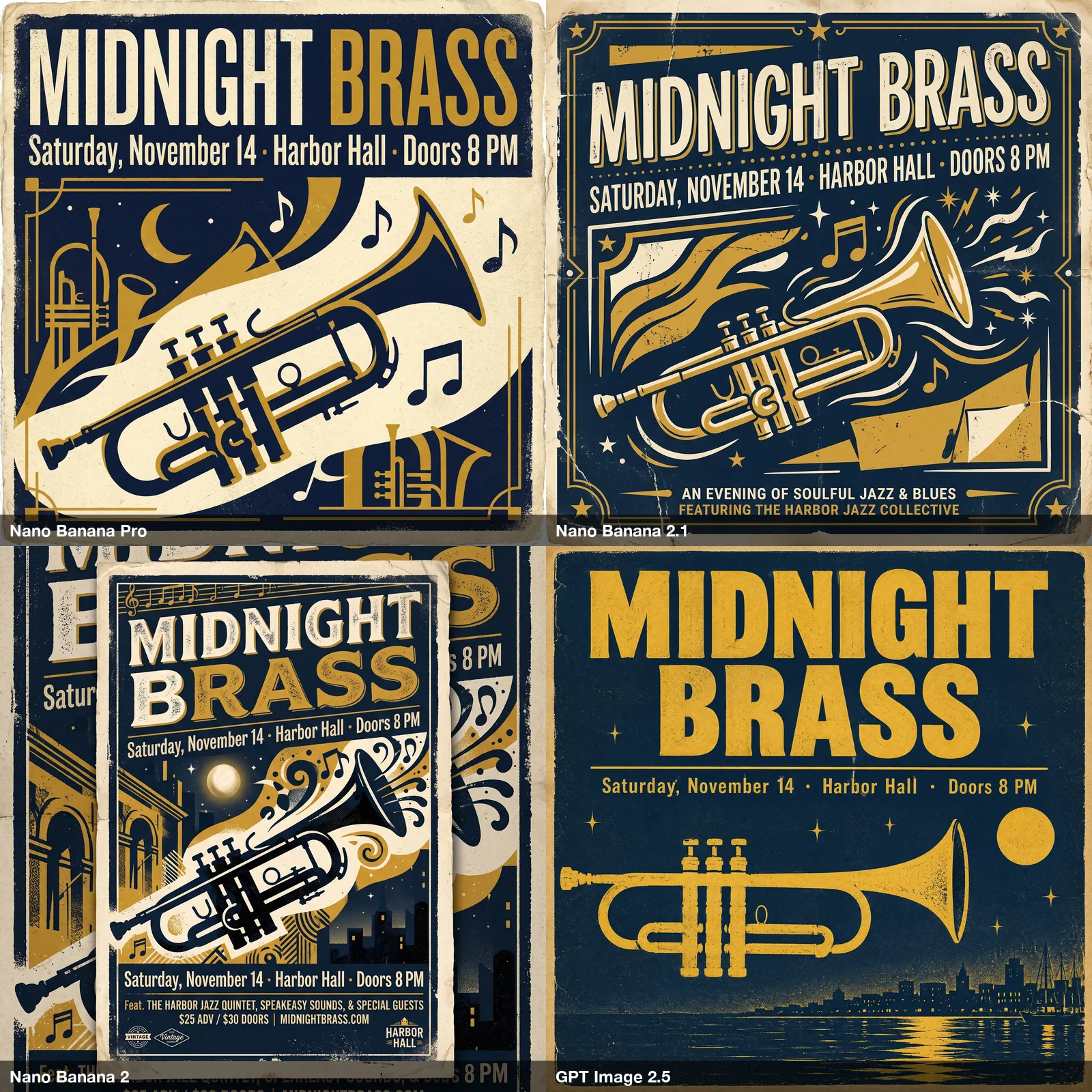
Every model spelled both lines correctly, so legible text alone no longer separates these models. What separates them is discipline:
- Pro set exactly the two lines it was given, in the original capitalization, and nothing else.
- 2.1 set the headline correctly, but rewrote the date line in capitals and added two lines of its own at the bottom: "An evening of soulful jazz & blues" and a made-up band name.
- Nano Banana 2 turned the brief into a mockup of a poster pinned over a larger poster, and invented a lineup, ticket prices and a website.
- GPT Image 2.5 produced the plainest layout, with exactly the requested text.
If the poster is going to print, an invented line is a problem. You'd have to catch it and regenerate.
Test 2: an infographic with four labeled steps#
A clean flat infographic titled "How to Brew Pour-Over Coffee" showing four numbered steps in a 2x2 grid, each with a simple icon and a short label: "1. Rinse the filter", "2. Add 20 g coffee", "3. Bloom for 30 seconds", "4. Pour slowly to 320 g". White background, teal accents.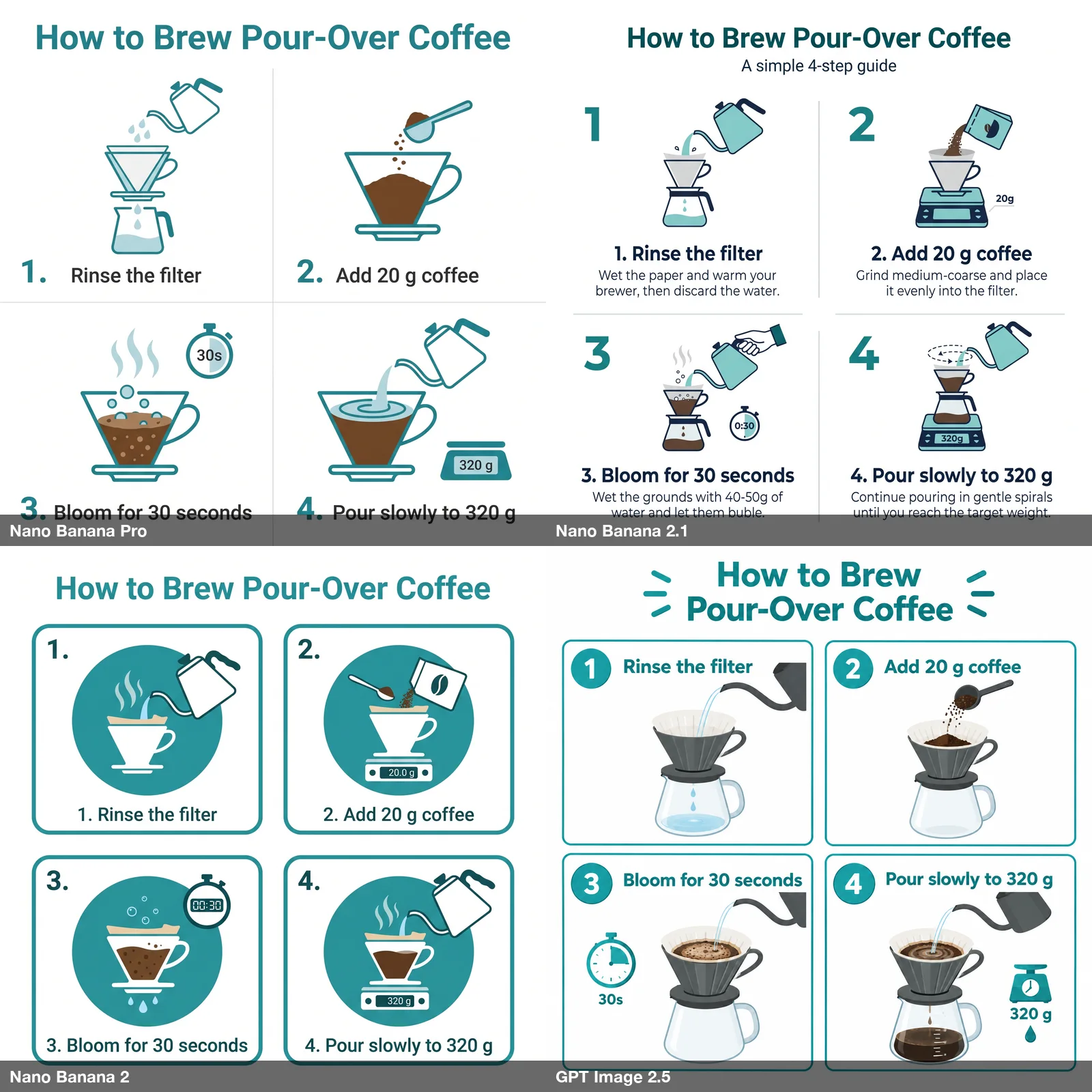
All four got the title and the four labels right. Again, 2.1 went further than the brief. It added a subtitle and a sentence of instructions under every step, and one of those sentences contains a misspelling and a number nobody supplied:

Google's model card rates 2.1 well above Pro on infographic layout, and the layout here is the most polished of the four. But "factuality" in a benchmark is not the same as "only what I asked for". Pro's version is plainer and needs no proofreading.
Tip
If you use 2.1 for anything with text, add a line like Use only the text given above. Do not add any other words. It is a cheap guard against invented copy. We didn't add it here because we wanted to see each model's default behavior.
Test 3: a chalkboard menu with prices#
A cafe chalkboard menu hung on a brick wall, hand-lettered in white chalk. Title "TODAY'S BAKES". Four items with prices on separate lines: "Cardamom Bun 4.50", "Pear Galette 5.00", "Rye Sourdough 7.00", "Pistachio Croissant 4.75". Warm morning light.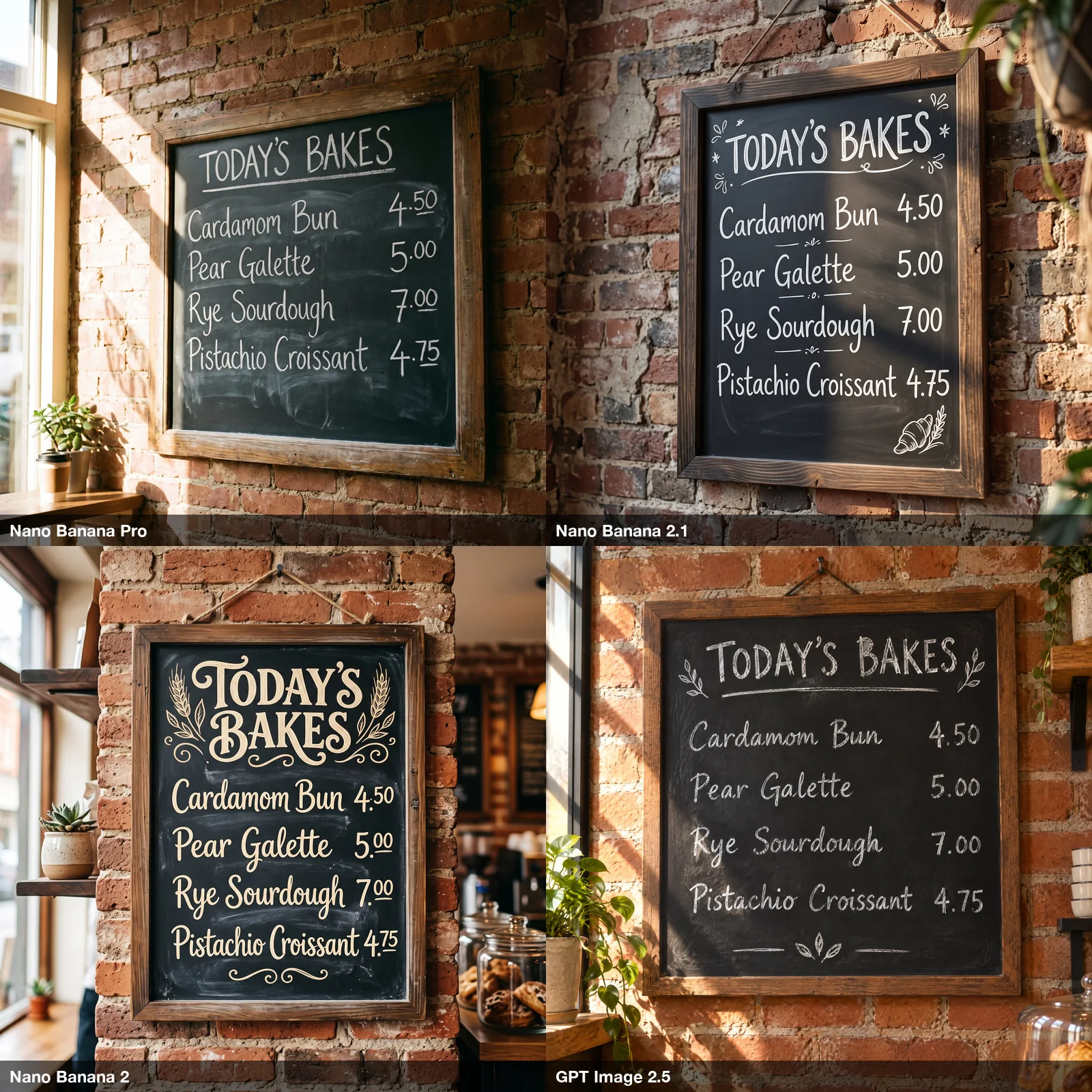
A clean sweep: all four rendered the title, all four items and all four prices correctly, with nothing added. The differences are stylistic. Pro, 2.1 and GPT Image 2.5 look like real chalk. Nano Banana 2's cream lettering looks printed rather than hand-drawn, which the prompt didn't ask for. For short, fully specified text, any of these models will do.
Test 4: a studio product shot#
Studio product photo of a hand-thrown ceramic matcha bowl with a bamboo whisk resting beside it on a dark slate surface, a small mound of bright green matcha powder, soft key light from the left, shallow depth of field, crisp texture on the glaze, no text, no logos.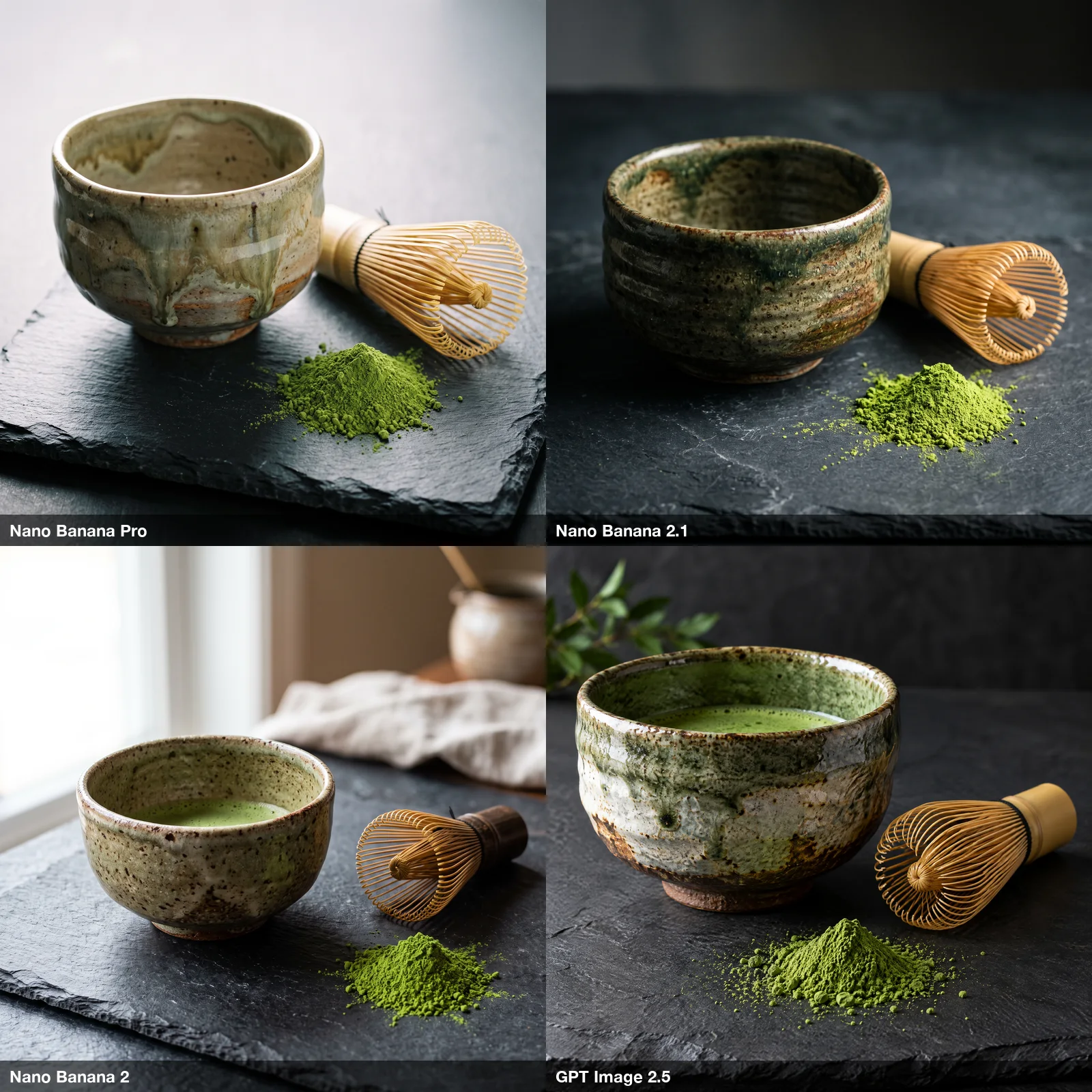
All four are usable product photos with convincing glaze and whisk detail. Pro and 2.1 stayed closest to the brief: a dark studio, slate, the three objects. Nano Banana 2 moved the scene next to a window with a linen cloth. GPT Image 2.5 filled the bowl with tea and added a sprig of leaves. Neither is wrong, but if you're shooting a catalog where every image has to match, the models that add props are the ones that drift.
Test 5: a scene with countable details#
A cozy reading nook: on the wooden shelf there are exactly three books, from left to right red, green and blue. A sleeping orange cat curls on a gray armchair. Through the window, snow is falling. A round wall clock shows 3:15. Warm lamp light.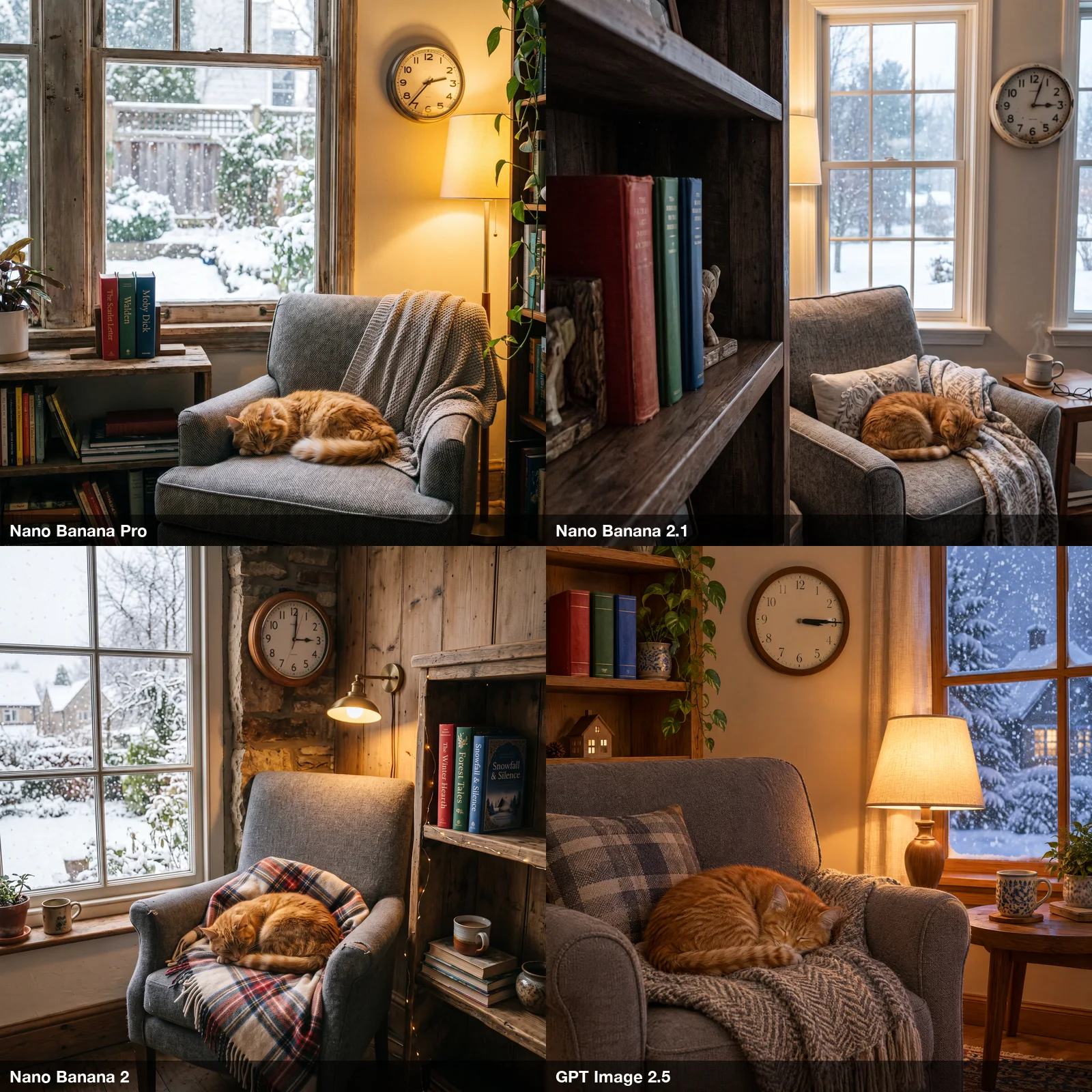
This prompt has five checkable instructions, and this is where 2.1 pulled ahead of Pro:
- Three books, red, green, blue: all four models got the order right. But Pro and Nano Banana 2 then filled the other shelves with dozens more books, which breaks "exactly three". 2.1 and GPT Image 2.5 showed only the three.
- Cat, armchair, snow, lamp: all four got these.
- The clock at 3:15: only one model got it.
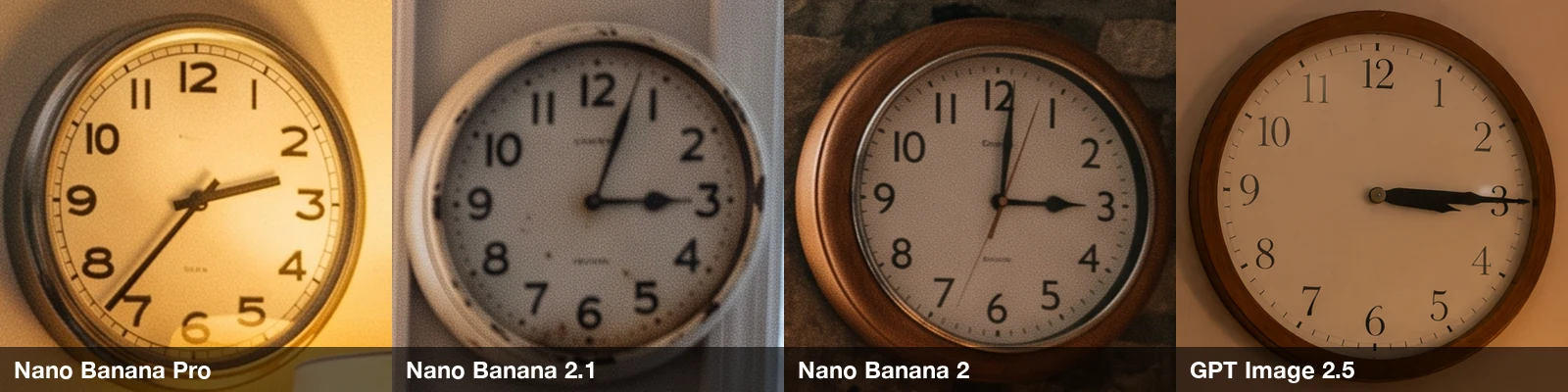
Pro's clock reads about 2:35. 2.1's reads about 3:05, Nano Banana 2's reads 3:00, and GPT Image 2.5's reads 3:15. Clock faces are a well-known blind spot for image models, so treat any specific time as a coin flip unless you check it.
Test 6: a busy night street#
A night street food stall in a busy Asian market, a cook tossing noodles in a flaming wok, steam rising, neon signs reflected on wet pavement, candid 35mm photo look, natural grain, motion in the crowd behind.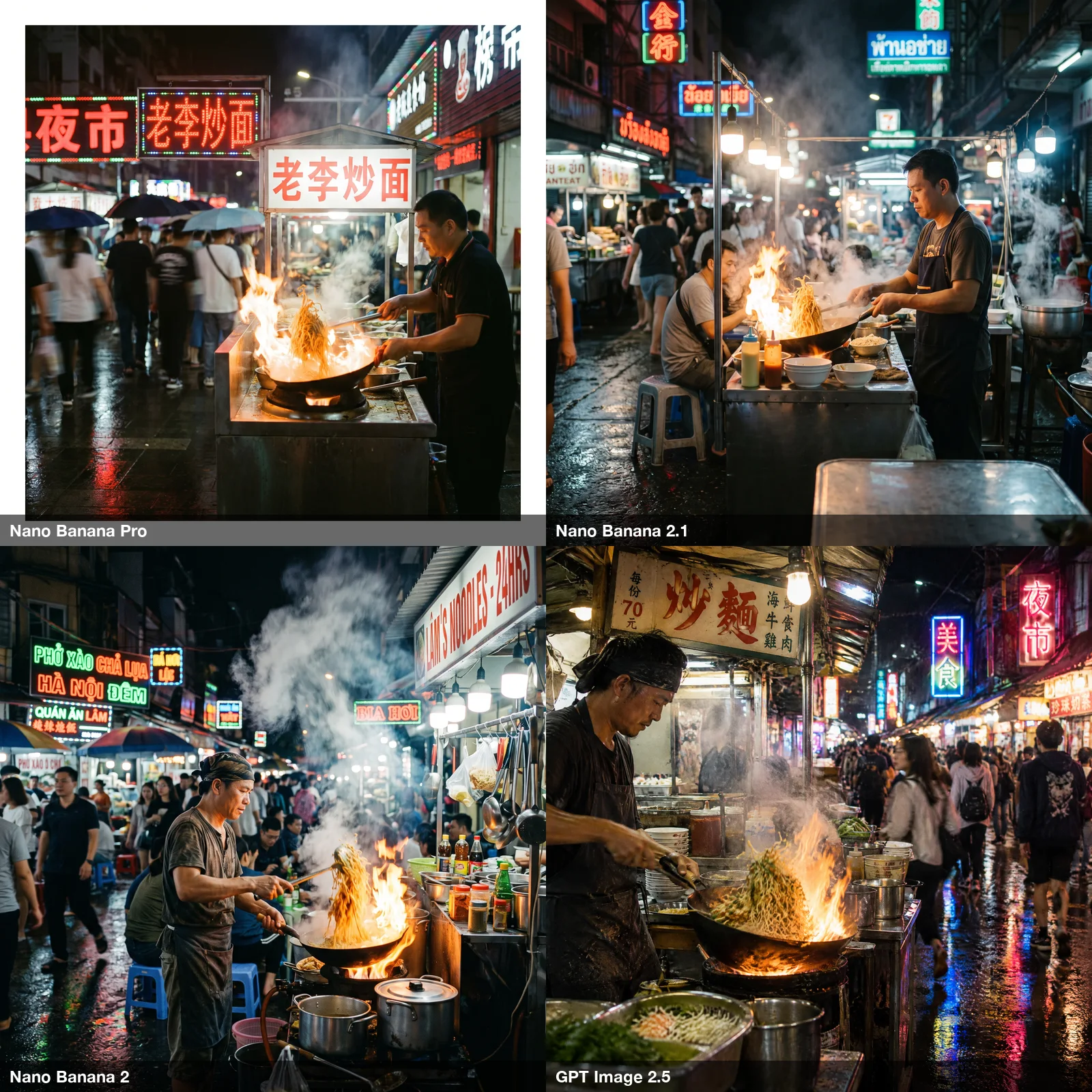
All four nailed the core of the scene: flame, steam, wet neon reflections and a moving crowd. Two details stood out on closer inspection:
- Pro put a white border around its photo, as if it were a scanned print. You'd have to crop it before use.
- 2.1's signs are pseudo-script. They look like Thai at a glance but don't read as anything. Pro, Nano Banana 2 and GPT Image 2.5 wrote real, legible words on their signs, even though the prompt never asked for any.
Results at a glance#
| Nano Banana Pro | Nano Banana 2.1 | Nano Banana 2 | GPT Image 2.5 | |
|---|---|---|---|---|
| Exact text, nothing added | Yes, all three text tests | Added lines on poster and infographic, one typo | Added a lineup, prices and a URL | Yes, all three text tests |
| Counting and constraints | Extra books, wrong clock | Three books, clock close but wrong | Extra books, wrong clock | Three books, clock right |
| Sticking to the brief | High | High in scenes, loose with text | Adds props and framing | Adds props |
| Visible defects | White border on one photo | Pseudo-script signs | Poster-in-poster mockup | None in this run |
| Time for the batch of 6 | about 70 s | about 25 s | about 65 s | about 80 s |
| BulkImagen credits (1K / 2K / 4K) | 5 / 6 / 10 | 4 / 6 / 10 | 4 / 6 / 10 | 5 / 10 / 16 |
Batch times are rough: one run each, measured by our polling interval of 5 seconds. Credit prices are as of October 7, 2026; the pricing page always has the current numbers.
So which should you use?#
Pick Nano Banana 2.1 when the image is a scene. It followed the countable instructions better than Pro, kept product shots on brief, and finished its batch in about a third of the time. Against Nano Banana 2, at the same price, the picture is mixed: 2.1 was faster, stayed closer to the brief and respected "exactly three books", but Nano Banana 2 kept the infographic to the requested text and wrote legible signs. Google has deprecated Nano Banana 2, so 2.1 is the one that will keep improving.
Pick Nano Banana Pro when the image carries copy you wrote. Posters, labels, infographics and menus where every word matters. In this test Pro never added a word, while 2.1 added lines on two of the three text images.
Pick GPT Image 2.5 when you need both exact text and exact details, and the higher price at 2K and 4K is worth it. It was the only model to get the clock right and the only one with no visible defect in this run.
Note
With six prompts, one run each, these are tendencies, not verdicts. The cheapest way to settle it for your own work is to run your real prompts through both models and compare. That's the next section.
Compare the models on your own prompts#
Model comparisons on someone else's prompts only go so far. What matters is how each model handles your product, your layouts and your text. A bulk image generator makes that comparison cheap: put your prompts in a list, one per line, and generate the whole list in one batch.
- Paste 5–10 of your real prompts, one per line, into the prompt box.
- Choose Nano Banana 2.1, set the size and aspect ratio you actually use, and generate.
- Open the finished batch and click Remix. That copies its settings and prompts into a new batch without charging anything. Switch the model to Nano Banana Pro and submit.
- Compare the two batches side by side and zoom in on text and small details.
At 2K that costs 6 credits per image on either model, so a ten-prompt comparison is 120 credits for both batches. The Nano Banana 2.1 model page has the full spec sheet and a ready-made form.
FAQ#
Is Nano Banana 2.1 better than Nano Banana Pro?#
For scenes with several specific details, it was in our test: it respected "exactly three books" where Pro didn't, and it ran about three times faster. For text you've written yourself, Pro was more reliable, because 2.1 added unrequested lines on two of three text tests. Google's own ratings favor 2.1 overall.
Is Nano Banana 2.1 cheaper than Pro?#
On Google's API, yes: $0.0504 versus $0.134 per 2K image, as of October 2026. On BulkImagen, 2.1 is cheaper at 1K (4 vs 5 credits) and the same price at 2K and 4K (6 and 10 credits).
Does Nano Banana 2.1 replace Nano Banana 2?#
On Google's side, yes: Google deprecated Nano Banana 2 (gemini-3.1-flash-image) on the day 2.1 launched. In our six prompts the result was mixed. 2.1 was faster and followed scene details better, while Nano Banana 2 added less text to the infographic. Both cost the same on BulkImagen.
Can either model render readable text?#
Both rendered every requested word correctly in our three text tests. The difference is that 2.1 sometimes adds its own text, and Google itself notes that small text can be blurry at 1K. For text-heavy images, use 2K or higher and proofread.
How big was this test?#
Six prompts, four models, one image each at 2K, 24 images total, no retries. All images shown are unedited apart from resizing and the labels we added.