ChatGPT Bulk Image Generator: How Many Images Can ChatGPT Make at Once?
Looking for a ChatGPT bulk image generator? ChatGPT makes one image per turn, eight at most. Here is how to get 100 from the same GPT Image models with no code.
If you are searching for a ChatGPT bulk image generator, here is the short version: there isn't one inside ChatGPT. ChatGPT makes one image per message, or a connected set of up to eight if you are on a paid plan and switch on thinking. There is no list input, no spreadsheet upload and no "download all" button. That is not a bug. ChatGPT is a conversation, and conversations happen one message at a time.
The good news is that the model behind ChatGPT's images, OpenAI's GPT Image family, is available outside the chat window, and there are three realistic ways to run a hundred prompts through it: OpenAI's API, OpenAI's Codex, or a bulk image generator that takes a pasted list and returns a ZIP. This guide covers what ChatGPT itself can do, verified against OpenAI's own help pages and documentation in October 2026, and then walks through each of the three routes with real numbers.
Genera por lotes
Un prompt por línea, cientos de imágenes, un ZIP para descargar.
How many images can ChatGPT generate at once?#
One per request is the default. Ask for a picture and you get a picture. Since the April 2026 release of ChatGPT Images 2.0, there is one exception: with images with thinking switched on, OpenAI says you can "ask for a coherent set of up to eight outputs in one go with character and object continuity, that sequentially build on one another." Think of a manga page sequence or a family of poster concepts, not eight unrelated product shots.
Here is how that breaks down by plan, using the wording on OpenAI's pricing page and help center as of October 2026:
| Plan | Image creation | Images with thinking (up to 8 per request) |
|---|---|---|
| Free | "Limited" | No |
| Go | "More image creation" | No |
| Plus | "More complex and accurate image creation" | Yes |
| Pro | "Unlimited and faster image creation", subject to abuse guardrails | Yes |
A few more facts from the same sources that matter for anyone trying to produce images in volume:
- OpenAI publishes no image counts. The help center says image generation has "separate usage limits" from chat and that ChatGPT "will notify you when you reach an applicable limit." When the September 2026 Images 2.5 update shipped, the release notes said simply that "existing image-generation limits are unchanged."
- Each image takes a while. OpenAI's help page says generation "may take a few minutes, depending on the complexity of your request." You can keep chatting while it works, but you cannot queue the next fifty.
- Downloads are one at a time. Every image is saved under Images in the sidebar, and each has a Save button that "downloads the image to your device." There is no bulk download or export in the official documentation.
- No list, no spreadsheet. Images 2.5 added templates (poster, merch, product photos), a Sketch tool and an aspect-ratio picker. None of them accept a list of prompts.
- DALL·E is gone. The official DALL·E GPT was retired from ChatGPT on 30 August 2026, and the DALL·E 2 and 3 API models were retired on 12 May 2026. "DALL·E bulk image generator" results you may still find are describing a tool that no longer exists.
So the arithmetic for a hundred images inside ChatGPT is: at least thirteen requests on a paid plan if every request can be a coherent eight-image set, or a hundred requests if your images are unrelated, each one typed by hand, each one waiting a few minutes, and each one saved by hand afterwards.
Note
Google's Gemini app works the same way for bulk purposes. Its help page describes generating with Nano Banana 2 one prompt at a time, downloading each image with "Download full size," and a daily quota it does not publish as a number. We compare the two in ChatGPT vs Gemini image generation.
Route 1: OpenAI's Images API#
If you can write code, the GPT Image models that power ChatGPT are available directly. As of October 2026 the current API models are gpt-image-2.5-flare (the default for most work) and gpt-image-2.5-sunburst (slower, more precise editing). The facts that matter for bulk, from OpenAI's API docs:
- The
nparameter sets how many images one request returns, and "must be between 1 and 10." - The Batch API accepts image generation and edit requests at a "50% cost discount compared to synchronous APIs," with a completion window that "can only be set to
24h." A single batch "may include up to 50,000 requests." - "Complex prompts may take up to 2 minutes to process," and you "may need to complete" organization verification before using GPT Image models.
- Rate limits are per organization and shown in your account settings, not in the public docs.
This is the cheapest way to make images at scale, and it is entirely your job: a script to read the prompts, handle errors and rate limits, download and store the files, and build whatever review step the rest of your team needs. For a one-off batch of a hundred product shots, the engineering costs more than the images.
Route 2: Codex#
OpenAI's coding agent can generate images too. Its documentation says built-in image generation "uses gpt-image-2 and counts toward your general Codex usage limits," and that image turns "use included limits 3–5x faster on average than similar turns without image generation." Then it is candid about volume: "For larger batches, set OPENAI_API_KEY in your environment and ask ChatGPT to generate images through the API so API pricing applies."
In other words, Codex's answer to bulk is Route 1 with Codex writing the script for you. It works, but you still end up with files in a folder and a usage bill on an API key.
Route 3: a bulk image generator that runs GPT Image for you#
The third route is a tool built for exactly this gap: you bring a list, it runs the same model family, and you get one download at the end. This is what BulkImagen does, so this section is the one we can show rather than describe.
To keep it honest, we ran a real batch while writing this article. Twelve prompts, one per line, on GPT Image 2.5 at 1K, submitted together in a single batch. Here are the first four, which a new account can run on its free credits:
Isometric miniature room diorama in soft matte clay render style, pastel palette, warm studio lighting, plain white background, no text, no letters, no logos: a tiny pottery studio with a wheel and shelves of unglazed bowls
Isometric miniature room diorama in soft matte clay render style, pastel palette, warm studio lighting, plain white background, no text, no letters, no logos: a tiny home bakery with a wooden counter and trays of bread
Isometric miniature room diorama in soft matte clay render style, pastel palette, warm studio lighting, plain white background, no text, no letters, no logos: a tiny vinyl listening corner with a turntable and record crates
Isometric miniature room diorama in soft matte clay render style, pastel palette, warm studio lighting, plain white background, no text, no letters, no logos: a tiny indoor garden room full of potted plants and a watering can
And the other eight lines, so you can rebuild the full dozen:
… a tiny chess nook with two armchairs and a board mid-game
… a tiny sewing room with a sewing machine and rolls of fabric
… a tiny aquarium corner with a glowing fish tank and a stool
… a tiny home gym with a yoga mat, dumbbells and a mirror
… a tiny painter's studio with an easel, canvases and paint jars
… a tiny reading nook with a window seat and stacked books
… a tiny woodworking bench with hand tools and wood shavings
… a tiny tea room with a low table, cushions and a steaming teapot
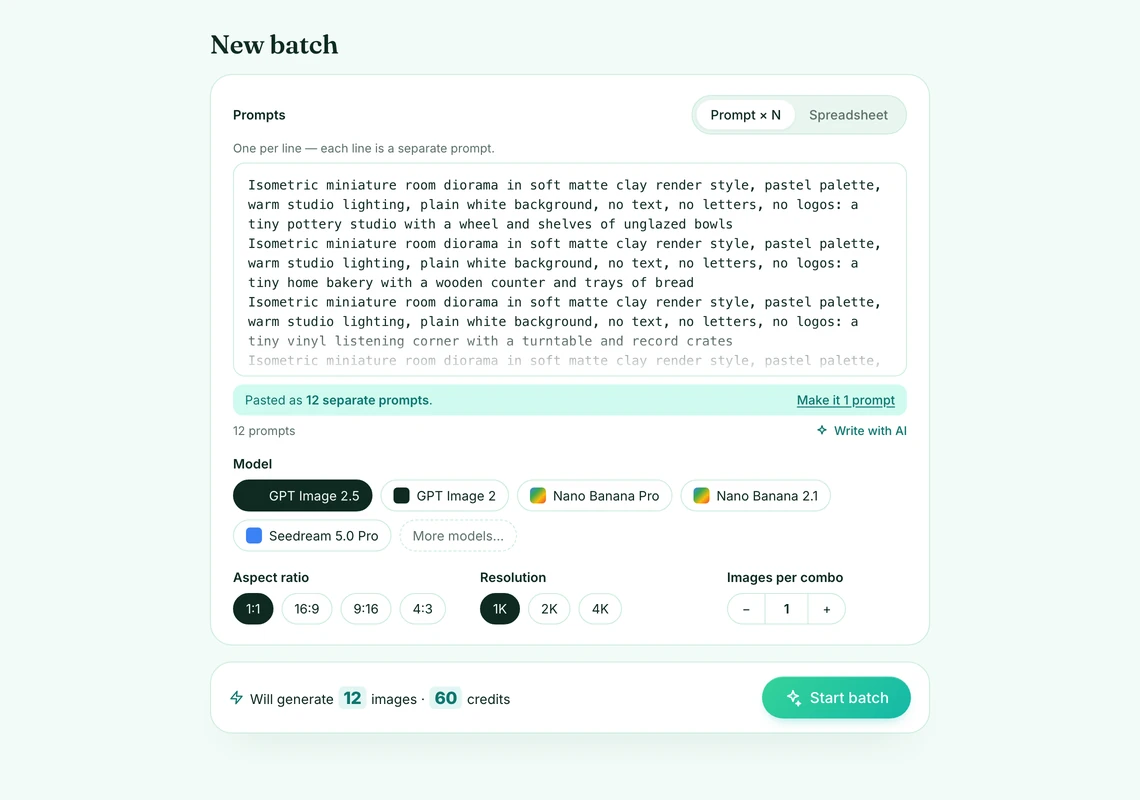
Every line starts with the same style sentence, which is what keeps image twelve looking like image one. The form read the pasted text as twelve separate prompts and showed the total before anything was charged:
All twelve rendered together and came back as one ZIP. Unedited, no re-rolls:
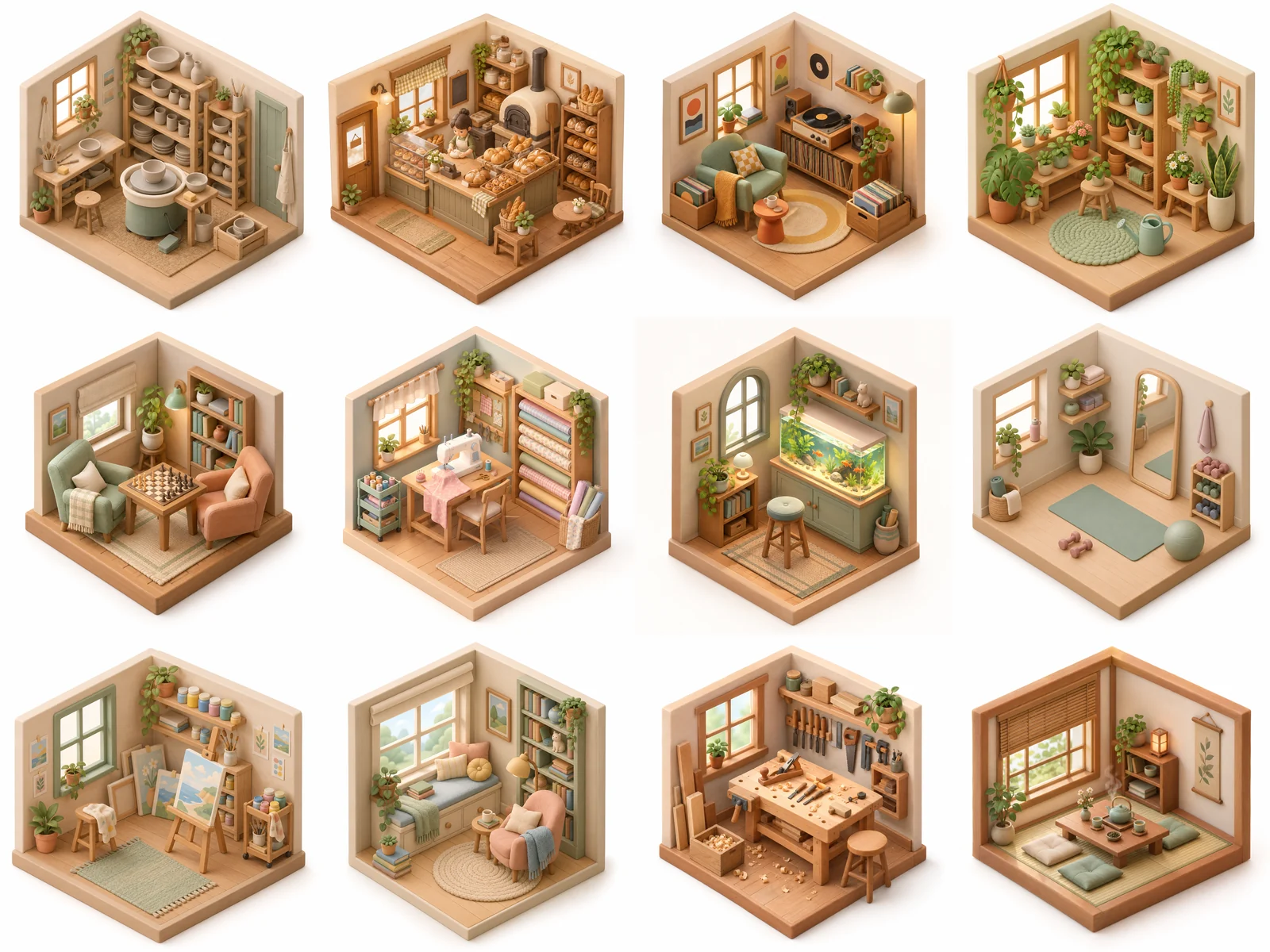
Not every line is perfect. The bakery gained a baker nobody asked for, and the tea room swapped the wooden floor for tatami. That is normal for any image model, including the one in ChatGPT; the difference is that reviewing twelve images in a grid takes a minute, and re-running the two you dislike is two lines, not two more conversations.
What the batch form gives you that the chat window does not:
- A list in. Paste one prompt per line, or switch to Spreadsheet and upload a .csv, .xls or .xlsx. BulkImagen reads the column named
promptand ignores the rest, so IDs and notes can stay in your file. - Pasting is handled. If you paste a block of text, the form tells you whether it read it as one prompt or many, with a one-click switch either way.
- The price before the button. The line above Start batch reads Will generate N images · X credits. Nothing is charged until you press it.
- The same models. GPT Image 2 and GPT Image 2.5 from OpenAI, alongside Google's Nano Banana family, Seedream, Flux, Qwen, Grok and Z-Image. Switch per batch; the models page compares them with current per-image prices.
- One ZIP out. Download the batch, or just the images you select, with optional WebP conversion and a CSV manifest that maps every file to the prompt that made it.
- Failures don't cost you. Images that fail are retried automatically and refunded if they still fail.
From a ChatGPT idea to a hundred images, step by step#
The best bulk workflow still starts in ChatGPT, because ChatGPT is very good at writing lists. Here is the whole loop.
Get the list written. Ask ChatGPT for the prompts, not the pictures. This instruction works well:
PromptWrite [N] image prompts for [what the set is for]. One prompt per line, no numbering, no blank lines. Start every line with this exact style sentence: "[your style sentence]". Then describe one specific subject per line. Vary the subject, never the style. Do not mention text, words or logos.Or skip ChatGPT and use Write with AI in the BulkImagen form: describe what you want in your own words and it writes one prompt per image, which costs no credits (the free plan allows a few requests a day).
Paste the list. The form reads one line as one prompt and tells you how many it found. A long multi-line description that should stay one prompt can be merged back with one click.
Set the batch once. Pick the model (GPT Image 2.5 if you want what ChatGPT uses), the aspect ratio and the resolution. These apply to every line, which is exactly what keeps a set consistent.
Read the total. Will generate 100 images · 500 credits on GPT Image 2.5 at 1K, at the per-image prices on the models page. Every plan caps how many images one batch can hold, so a very long list may need to run as a few batches; the form says so before you start, and the pricing page lists the caps.
Start the batch and come back. The images render on BulkImagen's servers, so the tab can close. When they are done, download the ZIP with its CSV manifest.
Tip
Writing lines that come back as a set, and splitting a pasted list the way you meant it, is covered screen by screen in how to generate images from a list of prompts. If what you actually have is one idea and you want many different images from it, read generate multiple images from one prompt first.
Side by side#
| ChatGPT | OpenAI API | Codex | BulkImagen | |
|---|---|---|---|---|
| Images per request | 1, or up to 8 as a connected set with thinking on paid plans | Up to 10 per call; batches of up to 50,000 requests | Per turn, via your plan limits | A whole list per batch, within your plan's per-batch cap |
| Takes a pasted list or spreadsheet | No | Via your own code | Via code it writes | Yes (.csv, .xls, .xlsx) |
| Bulk download | No, Save per image | Files wherever your script puts them | Files on disk | One ZIP with a CSV manifest |
| Models | GPT Image (Images 2.5) | GPT Image 2.5 Flare and Sunburst | gpt-image-2 | GPT Image 2 and 2.5, plus Google, ByteDance, Flux, Qwen, Grok and Z-Image |
| Usage | Plan limits, not published as counts | Pay per image; 50% off via Batch API | Codex plan limits, used 3–5x faster | Pay-per-image credits, no subscription |
| Code required | No | Yes | Some | No |
What ChatGPT still does better#
This article is about bulk, so it is worth being clear about what you give up by leaving the chat window. ChatGPT's multi-turn editing is excellent: "make the background darker" works, and Images 2.5 is specifically better at changing only what you asked for. Its thinking mode produces connected sets where a character carries across eight panels, which a list of independent prompts does not do on its own. And the Sketch tool, templates and comment-on-the-image editing are genuinely nice for a single hero image.
Use ChatGPT to find the look. Once you know what the hundred images should be, paste the list into a bulk image generator and let it run.
FAQ#
Can ChatGPT generate 100 images at once? No. As of October 2026 a single request returns one image, or a connected set of up to eight with images with thinking on Plus, Pro and Business plans. There is no list input and no bulk download, so a hundred images means at least thirteen requests and a hundred Save clicks.
Is there a bulk image generator inside ChatGPT? Not in OpenAI's documentation. Templates, Sketch and the aspect-ratio picker change how one image is made, not how many. Browser extensions that promise to export your whole image library are third-party tools, not an OpenAI feature.
Does ChatGPT Plus have unlimited image generation? Plus is described as "more complex and accurate image creation." Only Pro is described as "unlimited and faster image creation," and that is "subject to abuse guardrails." OpenAI does not publish per-plan image counts.
Does BulkImagen use the same model as ChatGPT? It offers OpenAI's GPT Image 2 and GPT Image 2.5, the same model family ChatGPT Images runs on, alongside models from Google, ByteDance and others. What differs is the workflow around the model: a list in, a ZIP out.
What does a hundred images cost? On GPT Image 2.5 at 1K, five credits per image, so 500 credits. Current per-image prices for every model and resolution are on the models page; credit packs are on the pricing page. A new account starts with enough free credits for a first small batch.
Can I use my own images? Yes. Upload reference images and choose Per image to pair each reference with every prompt, or Combine images to put several references into each image. GPT Image 2.5 accepts up to eight references per image.